GeezerVisonThe World Wide Web, restored to 800 pixels of glory. |
| Home|About|Gaming cabinet|Archives|How it works|Starter sites |
GeezerVison is showing docs.servicestack.net — Plugins PluginsServiceStack Plugin API provides a declarative way to enable modular functionality in ServiceStack: Plugin APICustom Logic before Plugins are loadedIf your plugin also implements Custom Logic after Plugins are loadedIf your plugin implements Custom Logic after AppHost is initializedIf your plugin implements Disabling Plugins via Feature Enum FlagsAll built-in Plugins are Registered and available via base.Plugins before your Configure() script is run so you have a chance to modify the behaviour or remove un-used plugins which is exactly what the short-hand: Which under the covers just does: Which you now also have an opportunity to also do in your AppHost Configure() start-up script yourself - if you want to remove or customize any pre-loaded plugins. Configuring PluginsThe As it's resilient against ordering, it's the recommended way to configure any plugin it doesn't register, here's some usage examples:
Resolving PluginsYou can easily use LINQ to fetch any specific plugin: Which is also what the To resolve a required plugin it's recommended to use List of Plugins added by DefaultA list of all of the plugins available on ServiceStack and how to add them: Auto-registered pluginsThese plugins below are already added by default, you can remove or customize them using the methods described above. Metadata FeatureProvides ServiceStack's auto-generated metadata pages. Predefined RoutesProvides ServiceStack's pre-defined routes used in the built-in C# Service Clients. Native TypesEnables ServiceStack's Add ServiceStack Reference support allowing API Consumers to download API DTOs generated in their preferred programming language. Request InfoProvides ServiceStack's Request Info feature useful for debugging requests. Just add ?debug=requestinfo in your SVGEnabling ServiceStack's SVG Support. CSV FormatRegisters the CSV Serializers to enable ServiceStack's CSV Format. INFO By default the CSV Format tries serialize the Response object directly into CSV which is only ideal if your responses return JSON Lines FormatRegisters the INFO The JSON Lines format follows CSV Format's behavior for serializing Html FormatProviding ServiceStack's Html Format. ValidationEnables the validation feature to enable ServiceStack's Fluent Validation and Declarative validators support. HTTP CachingEnables HTTP Caching support Available PluginsThe rest of ServiceStack's plugins are not enabled by default by can easily be added on adhoc basis, as and when needed. Auto QueryAutoQuery enables instant querying support on RDBMS tables behind clean self-describing APIs by enhancing the ideal API the developer would naturally write and completing their implementation for them! This is essentially the philosophy behind AutoQuery which utilizes conventions to automate creation of intent-based self-descriptive APIs that are able to specify configurable conventions and leverage extensibility options to maximize the utility of AutoQuery services. INFO Requires ServiceStack.Server Server EventsServer Events enables server push notifications to create real-time responsive web apps with its support for Server Sent Events. It offers a number of different API's for sending notifications to select users at different levels of granularity, letting you interact and modify live-running web apps. PostmanThe Postman Rest Client is a very popular and easy to use HTTP Request composer that makes it easy to call web services, similar to Fiddler's Composer. It also provides as an alternative for auto-generating API documentation to ServiceStack's Open API support that makes it easier to call existing services but does require users to install the Postman Rest Client. Open API supportSwagger support an optional add-on available in the ServiceStack.Api.OpenApi NuGet package. After installing the NuGet package enable the Swagger with: Now you can enjoy your shiny new Swagger UI at: Annotating your servicesYou can further document your services in the Swagger UI with the new Razor FormatProvides ServiceStack's primary HTML story with support for the MVC Razor view engine. It's an optional .NET 4.0 plugin that is available in the ServiceStack.Razor NuGet package. AuthenticationThe Authentication Feature enables the Authentication and Authorization support in ServiceStack. It makes available the AuthService at the default route at An example AuthFeature registration (taken from the SocialBootstrapApi project): This registers and provides your ServiceStack host a myriad of different Authentication options as described above. Session supportIf you're not using the AuthFeature above and you still want Session support you need to enable it explicitly with: This will add a Request Filter to instruct any HTTP client calling a ServiceStack web service to create a Temporary (ss-id) and Permanent (ss-pid) cookie if not already done so. RegistrationRelated to Authentication is Registration which enables the Registration Service at the default route See the SocialBootstrapApi project for a working example of Registration and Authentication. MessagePack formatTo add fast binary MessagePack support to ServiceStack install the ServiceStack.MsgPack NuGet package and register the plugin with: ProtoBuf formatTo enable ProtoBuf support install the ServiceStack.ProtoBuf NuGet package and register the plugin with: Proxy FeatureThe Request LoggerAdd an In-Memory The
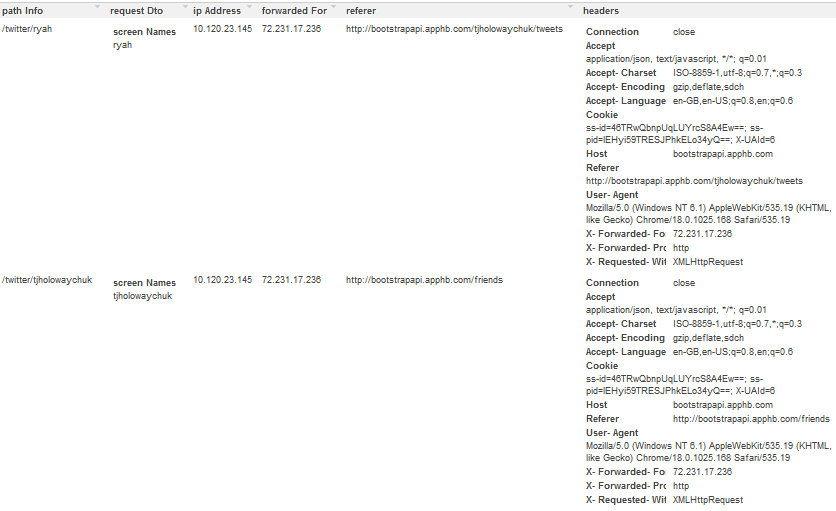
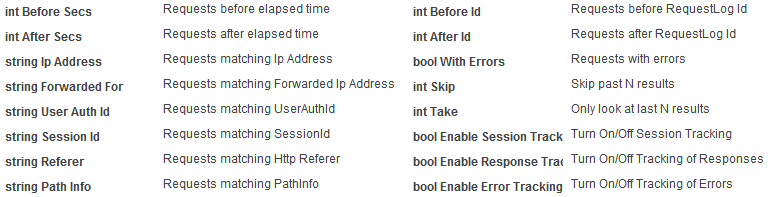
It supports multiple queryString filters and switches so you filter out related requests for better analysis and debuggability:
The RequestLogsService is just a simple C# service under-the-hood but is a good example of how a little bit of code can provide a lot of value in ServiceStack's by leveraging its generic, built-in features. Encrypted MessagingThe Encrypted Messaging feature enables a secure channel for all Services to offer protection to clients who can now easily send and receive encrypted messages over unsecured HTTP by registering the EncryptedMessagesFeature plugin: Where Razor Markdown FormatThis provides ServiceStack's Razor Markdown Format and also enables ServiceStack to serve static .md or .markdown files in either plain text, rendered as HTML (partial), or rendered in HTML inside a static _Layout.shtml HTML template. Cancellable RequestsThe Cancellable Requests Feature makes it easy to design long-running Services that are cancellable with an external Web Service Request. To enable this feature, register the CancellableRequestsFeature plugin: Web SudoA common UX in some websites is to add an extra layer of protection for super protected functionality by getting users to re-confirm their password verifying it's still them using the website, common in places like confirming a financial transaction. WebSudo is a new feature similar in spirit requiring users to re-authenticate when accessing Services annotated with the Your Custom AuthUserSession would need to either inherit Then tell ServiceStack to use your CustomUserSession by registering it with the You can then apply WebSudo behavior to existing services by annotating them with Once enabled this will throw a 402 Web Sudo Required HTTP Error the first time the service is called: Re-authenticating afterwards will allow access to the WebSudo service. Community PluginsServiceStack.WebhooksIf you need to implement a Webhooks solution for your Services check out ServiceStack.Webhooks. ServiceStack.Webhooks is a well documented solution for raising and managing application-level "events" raised by your services:
The ServiceStack.Webhooks plugin is versatile and supports persisting event subscriptions in multiple back-end data stores including: Memory, Cache Clients, Azure Table Storage as well as every major RDBMS that supported by OrmLite. Getting StartedInstall ServiceStack.Webhooks from NuGet:
Register the Then configure the plugin to suit your needs. Community ResourcesOn This Page
|
| You are visitor 01402792 — GeezerVison does not store the pages you look up. Best viewed with Netscape Navigator 4.7 or Internet Explorer 6 at 800×600. No cookies required. |