GeezerVisonThe World Wide Web, restored to 800 pixels of glory. |
| Home|About|Gaming cabinet|Archives|How it works|Starter sites |
GeezerVison is showing newandroidbook.com — imjtool - A tool for unpacking Android boot and system images imjtool (formerly known as imgtool)The By any name, you can get the tool: -f and range extraction, ZowieBoxes, cenydd bug fixed and Ori's bug fixed - thanks to you both!). March 4, 2026Just unpack the tar. There are x86_64/aarch64 images for macOS, Linux, and (ARM64 only, of course) Android images (remember they might need chmod +x to run, and prefix with ./). As usual, you might want to check out the RSS feed, or follow my company's Twitter for more updates. xattr -d com.apple.quarantine /path/to/imjtool to get past annoying GateKeeperWhy should I care?Well, most users wouldn't. But if you need a quick tool to unpack Android images, this is useful. Think of it as the inverse of mkbootimg (from the AOSP), coupled with simg2img (the sparse image extractor). Another bonus feature it provides is unpacking the Linux bzimage kernels. Also, if you're a Darwin user, there's no good LZ4 or XZ built-in to the system. And if you're ever encountered a broken ZIP file and unzip wasn't too helpful... Version 2.0 (6/2024) also allows searching inside an image, and range extraction. What if it doesn't work on _________ (some image or file)?LET ME KNOW. There are myriad image formats and corner cases which I don't normally run into, but you likely will. If I know about them (preferably through a download link to the image) I can easily fix it.So how do I use it?Like So:
morpheus@Zephyr (~)$ imjtool
Usage: imjtool _img_name_ [extract]
Where: _img_name_ is the name of an Android boot or bootloader image (or boot partition)
       [extract]  is an optional parameter to extract the image components
To obtain an Android system image, you can either get it from a zip (e.g. Google's update, Amazon's update.bin, etc), or by morpheus@Zephyr (~/Documents/Android/Book/src/ImgTool) % adb shell shell@htc_m8wl:/ $ su root@htc_m8wl:/ # ls -l /dev/block/platform/msm_sdcc.1/by-name/boot lrwxrwxrwx root root 2014-09-26 04:48 boot -> /dev/block/mmcblk0p43 root@htc_m8wl:/ # dd if=/dev/block/mmcblk0p43 of=/data/local/tmp/boot.img 32768+0 records in 32768+0 records out 16777216 bytes transferred in 0.971 secs (17278286 bytes/sec) root@htc_m8wl:/ # ^D shell@htc_m8wl:/ $ ^D # Back on host morpheus@Zephyr (~/Documents/Android/Book/src/ImgTool) % adb pull /data/local/tmp/boot.img 5781 KB/s (16777216 bytes in 2.834s) # Locating the ANDROID! magic morpheus@Zephyr (~/Documents/Android/Book/src/ImgTool) % od -A d -t c boot.img | grep "A N D" 0000256 A N D R O I D ! Х ** ` \0 \0 200 \0 \0 morpheus@Zephyr (~/Documents/Android/Book/src/ImgTool) % dd if=boot.img of=boot bs=256 skip=1 65535+0 records in 65535+0 records out 16776960 bytes transferred in 0.153107 secs (109576753 bytes/sec) morpheus@Zephyr (~/Documents/Android/Book/src/ImgTool) % imjtool boot extract Boot image detected Part Size Pages Addr Kernel: 6333904 3093 0x8000 Ramdisk: 834688 408 0x2008000 Secondary: 0 0 0xf00000 Tags: 1e00000 Flash Page Size: 2048 bytes Name: CmdLine: console=ttyHSL0,115200,n8 androidboot.hardware=qcom user_debug=31 ehci-hcd.park=3 Extracting contents to directory: extracted Found GZ Magic at offset 16207 gzip: extracted/kernelimage.gz: decompression OK, trailing garbage ignored morpheus@Zephyr (~/Documents/Android/Book/src/ImgTool) % ls -l extracted total 46840 -rw-rw-rw- 1 morpheus staff 6333904 Oct 1 19:28 kernel -rw------- 1 morpheus staff 16809984 Oct 1 19:28 kernelimage -rw-rw-rw- 1 morpheus staff 834688 Oct 1 19:28 ramdisk morpheus@Zephyr (~/Documents/Android/Book/src/ImgTool) % file extracted/* extracted/ramdisk: gzip compressed data, from Unix extracted/kernel: Linux kernel ARM boot executable zImage (little-endian) extracted/kernelimage: data # unrecognized by file(1), but still uncompressed If you're using the Google images, it's easier: morpheus@Zephyr (~) % imjtool Images/hammerhead-lpv81c/bootloader-hammerhead-hhz11k.img extract Boot loader detected 6 images detected, starting at offset 0x200. Size: 2568028 bytes Image: 0 Size: 310836 bytes sbl1 Image: 1 Size: 285848 bytes tz Image: 2 Size: 156040 bytes rpm Image: 3 Size: 261716 bytes aboot Image: 4 Size: 18100 bytes sdi Image: 5 Size: 1535488 bytes imgdata # And the bootloader components are ready in extracted/ You can also use it to extract the filesystem image (basically, do what morpheus@Zephyr (~) % /imjtool Images/Glass/system.img extract Sparse image v1.0 detected 262144 blocks of 4096 bytes compressed into 1304 chunks (39% compressed) Extracted image is in extracted/image.img morpheus@Zephyr (~) % file extracted/image.img extracted/image.img: Linux rev 1.0 ext4 filesystem data (extents) (large files) # Ready to mount -o loop.. Lastly, you can use it for imgdata extraction as well (as the file format there is derived from that of the boot image: morpheus@Zephyr (~) % imjtool Devices/Nexus5/Partitions/imgdata
Image Data detected
12 images detected, 1, 0 0
Image: 0 Name: boot Dimensions: 183x517 Unknowns: 281 868 Offset: 400 Size: 570c
Image: 1 Name: charger Dimensions: 390x250 Unknowns: 415 765 Offset: 5c00 Size: 1374
Image: 2 Name: unlocked Dimensions: 95x71 Unknowns: 504 1750 Offset: 7000 Size: 7ac
Image: 3 Name: start Dimensions: 216x1080 Unknowns: 0 100 Offset: 7800 Size: 6e14
Image: 4 Name: bootloader Dimensions: 216x1080 Unknowns: 0 100 Offset: e800 Size: ce50
Image: 5 Name: recovery Dimensions: 216x1080 Unknowns: 0 100 Offset: 1b800 Size: af28
Image: 6 Name: poweroff Dimensions: 216x1080 Unknowns: 0 100 Offset: 26800 Size: 7eb4
Image: 7 Name: fastboot_op Dimensions: 840x1080 Unknowns: 0 400 Offset: 2e800 Size: d5998
Image: 8 Name: oem_unlock Dimensions: 1300x1080 Unknowns: 0 0 Offset: 104200 Size: 4ec90
Image: 9 Name: unlock_yes Dimensions: 450x1080 Unknowns: 0 1300 Offset: 153000 Size: d7c4
Image: 10 Name: unlock_no Dimensions: 450x1080 Unknowns: 0 1300 Offset: 160800 Size: d7c0
Image: 11 Name: downloadmode Dimensions: 140x480 Unknowns: 300 890 Offset: 16e000 Size: 8dd8
ChangeLog/**
*
* Not-so-rudimentary-anymore Android image and partition unpacking tool
*
* v0.1 - Support unpacking of BootLoader and Boot images, as well as imgdata
* v0.2 - Supports offset= (for HTC and other boot.imgs where ANDROID! is wrapped)
* Supports cmdline= (to override kernel command line)
*
* v0.3 - Integrated mkbootimg functionality, added dt_size and id
*
* v0.4 - cmdline, addrs..
*
* v0.4.1 - Fix for Edvard Holst on Essential PH1 images.. (who uses Essential nowadays, I wonder?)
*
* v0.5 - Update with LZ4 binaries, fix for extract devicetree even if can't uncompress kernel
*
* v0.6 - Samsung images (with DT > 0) - Device Tree now found whereever it may hide
*
* v0.7 - system.transfer.list support
*
* v0.8 - FBPK (SD845 CrossHatch (Pixel 3 XL) bootloader images) AND Huawei Mate
* Also compiles cleanly
*
* v0.85 - system.transfer.list support for v4 (MTK 64 bit)
*
* v1.0 - EFI. Worthy enough a feature that (after three years) I hit version 1 on it, and - JCOLOR
*
* v1.1 - Samsung baseband images ("TOC") - 03/04/2020
*
* v1.2 - DTBO, super.img (03/20/2020) and integrated Brötli
*
* v1.2.1 - Lots of QCOM EFI GUIDs added. Thanks to anonymous contributor!
*
* v1.3 - Can now also pack super.img and boot.img based on existing!
*
* v1.4 - uBoot uimage format
*
* v1.5 - MTK images!
*
* v1.5.1 - Fixes: QCOM FPBK fixed (accidentally removed during refactoring around 1.3.. oops)
* UEFI now unpacks files by UI, if presenr, rather than GUID
*
* 1.6 - Peek into images to detect payload format, recognize AVB (vbmeta)
*
* 1.7 - boot Img header v2,3 and vendor boot images
*
* 1.8 - CrAu (Chrome Auto-updater - the update.bin of Android and CrumOS OTA images)
*
* 1.9 - LZ4/BZ2 integration, selective extraction (extract ..what.. in commandline for some formats)
*
* 1.9.1 - Motorola bootloader images (SnL, thanks to NL), some bugfixes
*
* 1.10 - FBPK/FBPTv2 (Pixel 6)
*
* 2 - Time for version 2 - ZIP support, including partial/broken zips
*
* 2 - (still 2.0, beta) PBZX, AA/YAA, LZFSE (BVX2) - even in IMG4 containers (for IPSW unpacking)
* AR (.a) and RTKIT FTAB and AAPL symbolcaches
*
* 2 - Finally, 2: Extract by ranges (0x..-.../0x...+....), and find in images (-f)
*
* 2.0.1 - AAPL Bundles (exclavecore)
*
* 2.0.2 - ZOWIEBOX? whatever that is, I support it now :-)
*
* 2.0.3 - bug fix for LZ4 decompression and also made much more efficient (Thanks to bug reports by cenydd & Ori)
*
* TODO: Zstandard (lame LZ4 ripoff)
*
* Acknowledgements/Notes:
* -----------------------
*
* platform-innovation-framework-for-uefi-complete-specifications-v0.90-v0.97 from Intel was invaluable
* for figuring out EFI
*
* Uses Google's Brotli extraction code (there's a limit to how much I'm willing to re-implement!)
* Uses libLZMA and LZ4 (because it's everywhere nowadays)
* Uses lzfse from Apple's GitHub
*
*
*
* This tool is part of the free downloads for the book "Android Internals: A Confectioner's Cookbook"
* But (as of v1.0) is also quite useful or MacOS T2 firmwares and (as of 2.0) for IPSWs.
*
* Author: Jonathan Levin, http://NewAndroidBook.com
*
*
* License: Use freely, BUT give credit where due. This way people learn of the website and books.
*
* If you have suggestions for improvement/new image types/etc - let me know and I'll gladly
* add them in.
*
**/
Version 0.2 Changes
Version 0.3-0.4 ChangesZephyr:/tmp morpheus$ ~/Documents/Android/src/ImgTool/imjtool
Usage: /Users/morpheus/Documents/Android/src/ImgTool/imjtool _img_name_ [cmdline='args to kernel'] [extract]
Where: _img_name_ is the name of an Android boot or bootloader image (or boot partition)
[extract] is an optional parameter to extract the image components
[offset=...] offset to find ANDROID! magic (e.g. 256 in HTC boot)
[cmdline='args to kernel'] is an optional parameter specifying the kernel command line
[addr=0x.....] is an optional base address to load the kernel into
or: /Users/morpheus/Documents/Android/src/ImgTool/imjtool make _img_name_ _kernel_ _ramdisk_
Make _img_name by combining kernel and ramdisk and creating header
Version 0.5 ChangesVersion 0.6 ChangesVersion 0.7 Changesmorpheus@Zephyr (/tmp/biscuit) % ls -l total 1077360 drwxr-xr-x@ 6 morpheus wheel 192 Sep 6 13:26 META-INF -rw-r--r--@ 1 morpheus wheel 7733248 Jul 21 2016 boot.img -rw-r--r--@ 1 morpheus wheel 35571 Jul 21 2016 file_contexts drwxr-xr-x@ 5 morpheus wheel 160 Sep 6 13:26 images -rw-r--r--@ 1 morpheus wheel 257 Jul 21 2016 ota.prop drwxr-xr-x@ 3 morpheus wheel 96 Sep 6 13:26 system -rw-r--r--@ 1 morpheus wheel 540708864 Jul 21 2016 system.new.dat -rw-r--r--@ 1 morpheus wheel 0 Jul 21 2016 system.patch.dat -rw-r--r--@ 1 morpheus wheel 198 Jul 21 2016 system.transfer.list morpheus@Zephyr (/tmp/biscuit) % ~/Documents/Android/src/ImgTool/imjtool system.new.dat stl STL - # of blocks 132009, numNew 26 Image written to /tmp/extracted.img morpheus@Zephyr (/tmp/biscuit) % file /tmp/extracted.img /tmp/extracted.img: Linux rev 1.0 ext4 filesystem data, UUID=57f8f4bc-abf4-655f-bf67-946fc0f9f25b (extents) (large files) Version 0.8 Changesmorpheus@Zephyr (~/Documents/Android/Images/Huawei)% imjtool UPDATE.APP
Huawei update image detected
0x5c: Name: SHA256RSA (256 bytes) Date: 2017.12.21 Time: 09.11.46
0x1c0: Name: CRC (255916 bytes) Date: 2017.12.21 Time: 09.11.46
0x3ea4c: Name: CURVER (15 bytes) Date: 2017.12.21 Time: 09.11.46
0x3eac0: Name: VERLIST (29 bytes) Date: 2017.12.21 Time: 09.11.46
0x3eb44: Name: PACKAGE_TYPE (14 bytes) Date: 2017.12.21 Time: 09.11.46
0x3ebb8: Name: HISIUFS_GPT (200704 bytes) Date: 2017.12.21 Time: 09.11.46
0x6fc7c: Name: XLOADER (180224 bytes) Date: 2017.12.21 Time: 09.11.46
0x9bd38: Name: FW_LPM3 (225408 bytes) Date: 2017.12.21 Time: 09.11.46
0xd2e8c: Name: HHEE (71424 bytes) Date: 2017.12.21 Time: 09.11.46
0xe4614: Name: FASTBOOT (2480960 bytes) Date: 2017.12.21 Time: 09.11.46
0x342674: Name: VECTOR (1218880 bytes) Date: 2017.12.21 Time: 09.11.46
0x46c26c: Name: VBMETA (10176 bytes) Date: 2017.12.21 Time: 09.11.47
0x46ea94: Name: MODEMNVM_UPDATE (7718544 bytes) Date: 2017.12.21 Time: 09.11.47
0xbcc040: Name: MODEMNVM_CUST (957242 bytes) Date: 2017.12.21 Time: 09.11.47
0xcb5db0: Name: TEEOS (4278656 bytes) Date: 2017.12.21 Time: 09.11.47
0x10cafbc: Name: TRUSTFIRMWARE (163584 bytes) Date: 2017.12.21 Time: 09.11.47
0x10f2f70: Name: SENSORHUB (1706752 bytes) Date: 2017.12.21 Time: 09.11.47
0x1293e14: Name: FW_HIFI (5832000 bytes) Date: 2017.12.21 Time: 09.11.47
0x18246d8: Name: KERNEL (25165824 bytes) Date: 2017.12.21 Time: 09.11.47
0x302773c: Name: RAMDISK (16777216 bytes) Date: 2017.12.21 Time: 09.11.47
0x40297a0: Name: RECOVERY_RAMDISK (33554432 bytes) Date: 2017.12.21 Time: 09.11.47
0x602d804: Name: RECOVERY_VENDOR (16777216 bytes) Date: 2017.12.21 Time: 09.11.48
0x702f868: Name: RECOVERY_VBMETA (7104 bytes) Date: 2017.12.21 Time: 09.11.48
0x7031490: Name: ERECOVERY_KERNEL (25165824 bytes) Date: 2017.12.21 Time: 09.11.48
0x88344f4: Name: ERECOVERY_RAMDISK (33554432 bytes) Date: 2017.12.21 Time: 09.11.48
0xa838558: Name: ERECOVERY_VENDOR (16777216 bytes) Date: 2017.12.21 Time: 09.11.49
0xb83a5bc: Name: ERECOVERY_VBMETA (7104 bytes) Date: 2017.12.21 Time: 09.11.49
0xb83c1e4: Name: HDCP (220544 bytes) Date: 2017.12.21 Time: 09.11.49
0xb872034: Name: DTS (9033728 bytes) Date: 2017.12.21 Time: 09.11.49
0xc1109d4: Name: DTO (1951488 bytes) Date: 2017.12.21 Time: 09.11.49
0xc2ed4f0: Name: CACHE (6348948 bytes) Date: 2017.12.21 Time: 09.11.49
0xc8fc204: Name: SYSTEM (3042749952 bytes) Date: 2017.12.21 Time: 09.11.49
0xc2031bfc: Name: ISP_FIRMWARE (6486336 bytes) Date: 2017.12.21 Time: 09.12.30
0xc2662200: Name: MODEM_FW (58720256 bytes) Date: 2017.12.21 Time: 09.12.30
0xc5e69264: Name: HISEE_IMG (571376 bytes) Date: 2017.12.21 Time: 09.12.31
0xc5ef4bd0: Name: HISEE_FS (4391084 bytes) Date: 2017.12.21 Time: 09.12.31
0xc6325540: Name: VENDOR (600677176 bytes) Date: 2017.12.21 Time: 09.12.31
0xea046a90: Name: ODM (123703128 bytes) Date: 2017.12.21 Time: 09.12.38
0xf164e63c: Name: PRODUCT (144699356 bytes) Date: 2017.12.21 Time: 09.12.40
morpheus@Chimera (~/Documents/Android/src/ImgTool)% ./imjtool Tests/bootloader-crosshatch-b1c1-0.1-5034669.img extract
QCom SD845 ("FBPK") image detected
Partition Table with 19 entries:
0x23b0: msadp
0x63f0: xbl
0x382430: xbl_config
0x39a470: aop
0x3c74b0: tz
0x5bd4f0: hyp
0x61c530: abl
0x71c570: keymaster
0x7515b0: cmnlib
0x7ad5f0: cmnlib64
0x826630: devcfg
0x830670: qupfw
0x8406b0: storsec
0x8466f0: logfs
morpheus@Chimera (~/Documents/Android/src/ImgTool)% file extracted/*
extracted/abl:        ELF 64-bit LSB executable, ARM, version 1 (SYSV), statically linked, corrupted section header size
extracted/aop:        ELF 32-bit LSB executable, ARM, EABI5 version 1 (GNU/Linux), statically linked, stripped
extracted/cmnlib:     ELF 32-bit LSB shared object ARM, EABI5 version 1 (GNU/Linux), dynamically linked, stripped
extracted/cmnlib64:   ELF 64-bit LSB shared object ARM aarch64, version 1 (GNU/Linux), dynamically linked, stripped
extracted/devcfg:     ELF 64-bit LSB executable, ARM aarch64, version 1 (GNU/Linux), statically linked, stripped
extracted/hyp:        ELF 64-bit LSB executable, ARM aarch64, version 1 (GNU/Linux), statically linked, stripped
extracted/keymaster:  ELF 64-bit LSB shared object ARM aarch64, version 1 (GNU/Linux), dynamically linked, stripped
extracted/logfs:      DOS/MBR boot sector, code offset 0x3c+2, OEM-ID "MSDOS5.0", Bytes/sector 4096, root entries 512, sectors 1280 (volumes <=32 MB), Media descriptor 0xf8, sectors/FAT 1, sectors/track 1, heads 1, hidden sectors 16, serial number 0xd27355ea, unlabeled, FAT (12 bit)
extracted/msadp:      ELF 32-bit LSB no file type, ARM, version 1 (SYSV)
extracted/qupfw:      ELF 32-bit LSB executable, QUALCOMM DSP6, version 1 (SYSV), statically linked, corrupted section header size
extracted/storsec:    ELF 32-bit LSB shared object ARM, EABI5 version 1 (GNU/Linux), dynamically linked, stripped
extracted/tz:         ELF 64-bit LSB executable, ARM aarch64, version 1 (GNU/Linux), statically linked, stripped
extracted/xbl:        ELF 64-bit LSB executable, ARM aarch64, version 1 (SYSV), statically linked, corrupted section header size
extracted/xbl_config: ELF 64-bit LSB executable, ARM, version 1 (SYSV), statically linked, corrupted section header size
Version 0.85 ChangesVersion 1.0 Changes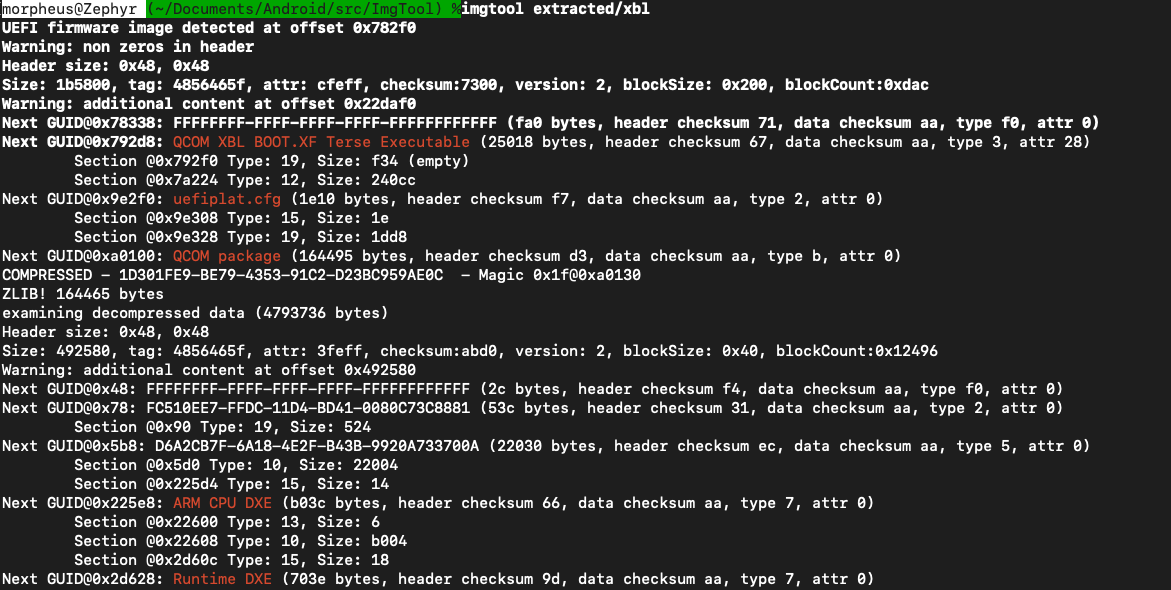
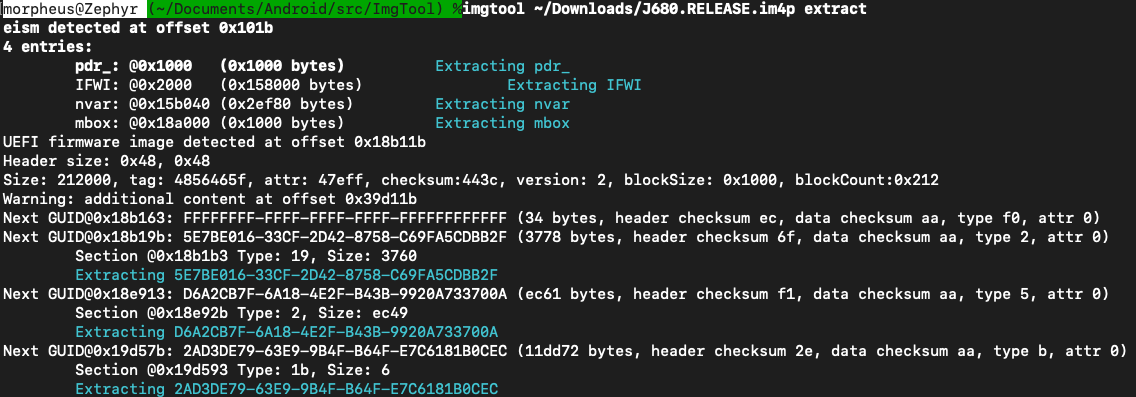
I generally recurse when I can detect layering, but - you might need to run this tool more than once since many images have multiple layers of encapsulation: morpheus@Zephyr (~/Downloads) % imjtool 8WCN25WW/cap/qcfirmware8998v1.0.1075.2507.cap extract UEFI firmware image detected at offset 0xa15 Size: 2ded80, tag: 4856465f, attr: 3feff, checksum:512d, version: 2, blockSize: 0x40, blockCount:0xb7b6 Next GUID@0xa5d: Lenovo container (2de814 bytes, type Raw, attr 40) Extracting Lenovo container Next GUID@0x2df275: C7340E65-0D5D-43D6-ABB7-39751D5EC8E7 (510 bytes, type Raw, attr 40) Extracting C7340E65-0D5D-43D6-ABB7-39751D5EC8E7 # # And again: # morpheus@Zephyr (~/Downloads) % imjtool extracted/Lenovo\ container UEFI firmware image detected at offset 0x7eba0 Warning: non zeros in header Size: 200000, tag: 4856465f, attr: cfeff, checksum:c8a7, version: 2, blockSize: 0x200, blockCount:0x1000 Warning: additional content at offset 0x27eba0 Next GUID@0x7ebe8: FFFFFFFF-FFFF-FFFF-FFFF-FFFFFFFFFFFF (fa0 bytes, type Padding, attr 0) Next GUID@0x7fb88: QCOM XBL BOOT.XF Terse Executable (26018 bytes, type Security Core, attr 28) Section @0x7fba0 Type: Raw, Size: 0xf34 (empty) Section @0x80ad4 Type: Terse Executble, Size: 0x250cc Next GUID@0xa5ba0: uefiplat.cfg (24ab bytes, type Freeform, attr 0) Section @0xa5bb8 Type: UI, Size: 0x1e uefiplat.cfg Section @0xa5bd8 Type: Raw, Size: 0x2473 Next GUID@0xa8050: QCOM package (1adcd0 bytes, type Firmware Volume Image, attr 0) COMPRESSED - EE4E5898-3914-4259-9D6E-DC7BD79403CF - Magic 0x5d@0xa8080 LZMA! 1adca0 bytes examining decompressed data (8542152 bytes) Size: 8257c0, tag: 4856465f, attr: 3feff, checksum:948d, version: 2, blockSize: 0x40, blockCount:0x2095f Warning: additional content at offset 0x8257c0 Next GUID@0x48: FFFFFFFF-FFFF-FFFF-FFFF-FFFFFFFFFFFF (2c bytes, type Padding, attr 0) Next GUID@0x78: FC510EE7-FFDC-11D4-BD41-0080C73C8881 (54c bytes, type Freeform, attr 0) Section @0x90 Type: Raw, Size: 0x534 Next GUID@0x5c8: D6A2CB7F-6A18-4E2F-B43B-9920A733700A (27030 bytes, type Driver eXecution Environment Core, attr 0) Section @0x5e0 Type: PE32, Size: 0x27004 Section @0x275e4 Type: UI, Size: 0x14 DxeCore Next GUID@0x275f8: ARM CPU DXE (c03c bytes, type Driver, attr 0) Section @0x27610 Type: Driver eXecution Env Dependencies, Size: 0x6 Section @0x27618 Type: PE32, Size: 0xc004 Section @0x3361c Type: UI, Size: 0x18 ArmCpuDxe Next GUID@0x33638: Runtime DXE (803e bytes, type Driver, attr 0) Section @0x33650 Type: Driver eXecution Env Dependencies, Size: 0x6 Section @0x33658 Type: PE32, Size: 0x8004 Section @0x3b65c Type: UI, Size: 0x1a RuntimeDxe I don't purport to cover all EFI GUIDs here. Your favorite tool is probably better. I built this for my own use cases (primarily, command line, greppable, scriptable, cross platorm), and I think it's useful enough to provide freely. If your specific image isn't supported, you can always drop me a line. Ranting on twitter denigrating my work and/or me won't help. And btw, you're welcome.
Version 1.2 Changesroot@Qilin (/NewAndroidBook/ddb/S20Ultra/...)# imjtool super.img extract Warning: super.img is likely truncated or still compressed Sparse image v1.0 detected, 2304000 blocks of 4096 bytes 2304000 blocks of 4096 bytes compressed into 56 chunks (20% compressed) Extracted image is in extracted/image.img root@Qilin (/NewAndroidBook/ddb/S20Ultra/...)# imjtool extracted/image.img extract liblp dynamic partition (super.img) - Blocksize 0x1000, 2 slots LP MD Header @0x3000, version 10.0, with 4 logical partitions on block device at partition super, first sector: 0x800 Partitions @0x3080 in 2 groups: Group 0: default Group 1: group_basic Name: system (read-only, spanning 1 extents and 5597 MB) - extracted Name: vendor (read-only, spanning 1 extents and 1091 MB) - extracted Name: product (read-only, spanning 1 extents and 676 MB) - extracted Name: odm (read-only, spanning 1 extents and 4 MB) - extracted root@Qilin (/NewAndroidBook/ddb/S20Ultra/...)# file extracted/* extracted/image.img: data extracted/odm.img: Linux rev 1.0 ext2 filesystem data, UUID=79c8b8f8-84be-5f6f-b675-dd53f53ebb2c, volume name "odm" (extents) (large files) (huge files) extracted/product.img: Linux rev 1.0 ext2 filesystem data, UUID=8bf42db5-b3bc-5890-8b2a-8eeeba73b344, volume name "product" (extents) (large files) (huge files) extracted/system.img: Linux rev 1.0 ext2 filesystem data, UUID=2939f12c-6689-53a4-b94a-1c1ce1c83fbd (extents) (large files) (huge files) extracted/vendor.img: Linux rev 1.0 ext2 filesystem data, UUID=a8b0696d-9320-55bc-b768-8579563bdfdc, volume name "vendor" (extents) (large files) (huge files) root@Qilin (/NewAndroidBook/ddb/RedmiK30) # head -2 vendor.transfer.list 4 345427 root@Qilin (/NewAndroidBook/ddb/RedmiK30) #BLOCKS=345427 imjtool vendor.new.dat.br \ stl=vendor.transfer.list Attempting Brotli decompression. You might need to supply NUMBLOCKS=(2nd line on the list) while J works this feature. Image written to /tmp/extracted.img root@Qilin (/NewAndroidBook/ddb/RedmiK30) # file /tmp/extracted.img /tmp/extracted.img: Linux rev 1.0 ext2 filesystem data, UUID=2b96c597-1e2f-5ee1-9851-c4a9fa9de36e, volume name "vendor" (extents) (large files) (huge files) v2.0(β) - ZIP/XZ/LZ4/BZ2 supportIncluding partial zips! For example: 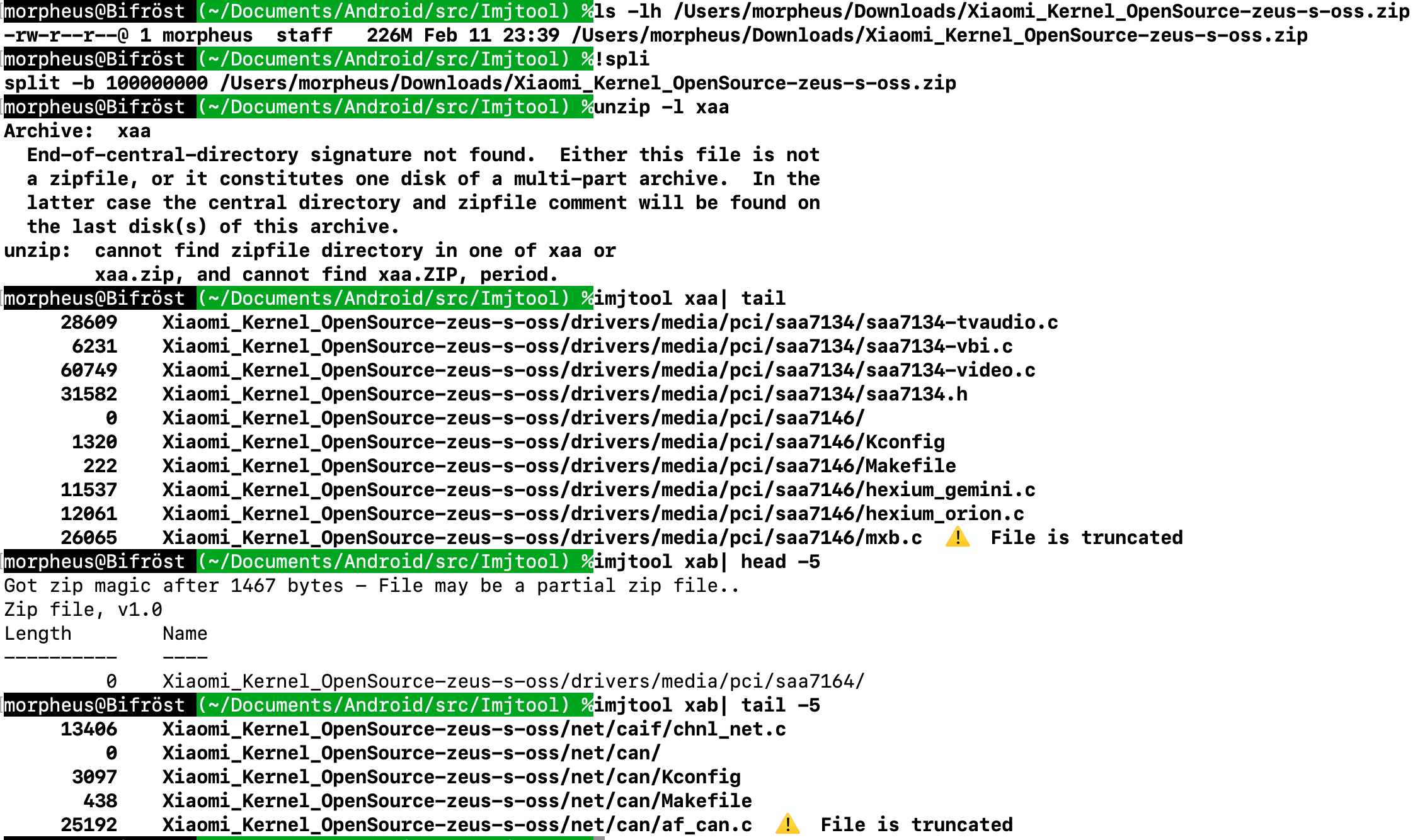
v2.0 -
|
| You are visitor 01402792 — GeezerVison does not store the pages you look up. Best viewed with Netscape Navigator 4.7 or Internet Explorer 6 at 800×600. No cookies required. |