GeezerVisonThe World Wide Web, restored to 800 pixels of glory. |
| Home|About|Gaming cabinet|Archives|How it works|Starter sites |
GeezerVison is showing www.phpied.com — Server-side React with PHP Server-side React with PHPProblem: Build web UIs This post is an initial hack to have React components render server-side in PHP. Previously...So you know about React and how to build your own components. And you know you can run JavaScript inside PHP scripts, thanks to v8js. So nothing can stop you from rendering React components on the server side in PHP. Which means you send the first view from the server and then continue from there. Step by step (oh baby!)
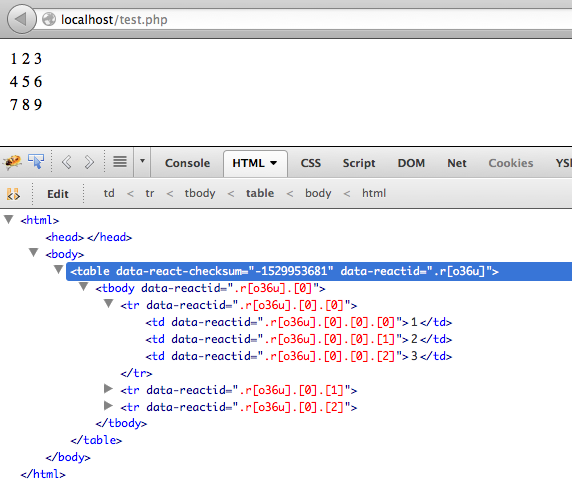
How (A-haw haw haw haw)First, the custom component goes into var Table = React.createClass({ render: function () { return ( React.DOM.table(null, React.DOM.tbody(null, this.props.data.map(function (row) { return ( React.DOM.tr(null, row.map(function (cell) { return React.DOM.td(null, cell); }))); })))); }}); Alternatively the more readable version goes to var Table = React.createClass({ render: function () { return ( <table><tbody> {this.props.data.map(function(row) { return ( <tr> {row.map(function(cell) { return <td>{cell}</td>; })} </tr>); })} </tbody></table> ); } }); Now, let's see about this <?php $v8 = new V8Js(); Hm, easy enough. Now let's start pushing some JS to an array to concatenate later. $react = array(); Concatenating code is ugly, but here in PHP we have to pass JS code to V8 as a string. Surely the following code can be cleaned up a bit by using external files, but for a quick hack it's just "perfect" :). // stubs, react $react[] = "var console = {warn: function(){}, error: print}"; $react[] = "var global = {}"; $react[] = file_get_contents('react/build/react.js'); $react[] = "var React = global.React"; React uses The Load custom react components: // my custom components $react[] = file_get_contents('react/build/table.js'); Now the "brains" of the app. We must fetch data somehow. This is where your legacy PHP can do its thing. We don't care about this as long as we end up with an array of data to put in a table // my application $data = array( // database, web services, whatevers array(1, 2, 3), array(4, 5, 6), array(7, 8, 9)); Now for the magic: instead of rendering a react component in a DOM node, you can render it to a string. This is an async operation, so you need to pass a callback. V8's $react[] = sprintf( "React.renderComponentToString(Table({data: %s}), print)", json_encode($data)); That's enough JavaScript! // concat all JS $react = implode(";\n", $react); Run the JavaScript: try { $v8->executeString($react); } catch (V8JsException $e) { // blow up spectacularly echo "<pre>"; var_dump($e); } Boom!
todo
Comments? Find me on BlueSky, Mastodon, LinkedIn, Threads, Twitter |
| You are visitor 01402792 — GeezerVison does not store the pages you look up. Best viewed with Netscape Navigator 4.7 or Internet Explorer 6 at 800×600. No cookies required. |