GeezerVisonThe World Wide Web, restored to 800 pixels of glory. |
| Home|About|Gaming cabinet|Archives|How it works|Starter sites |
GeezerVison is showing api.flutter.dev — Padding class - widgets library - Dart API Padding classA widget that insets its child by the given padding. When passing layout constraints to its child, padding shrinks the constraints by the given padding, causing the child to layout at a smaller size. Padding then sizes itself to its child's size, inflated by the padding, effectively creating empty space around the child.
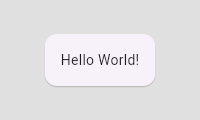
This snippet creates "Hello World!" Text inside a Card that is indented
by sixteen pixels in each direction.
link
Design discussionWhy use a Padding widget rather than a Container with a Container.padding property?There isn't really any difference between the two. If you supply a Container.padding argument, Container builds a Padding widget for you. Container doesn't implement its properties directly. Instead, Container combines a number of simpler widgets together into a convenient package. For example, the Container.padding property causes the container to build a Padding widget and the Container.decoration property causes the container to build a DecoratedBox widget. If you find Container convenient, feel free to use it. If not, feel free to build these simpler widgets in whatever combination meets your needs. In fact, the majority of widgets in Flutter are combinations of other simpler widgets. Composition, rather than inheritance, is the primary mechanism for building up widgets. See also:
Constructors
Properties
Methods
Operators
|
| You are visitor 01402503 — GeezerVison does not store the pages you look up. Best viewed with Netscape Navigator 4.7 or Internet Explorer 6 at 800×600. No cookies required. |