GV

GeezerVison

The World Wide Web, restored to 800 pixels of glory.

Home|About|Gaming cabinet|Archives|How it works|Starter sites

On this site

  • jQuery
  • jQuery UI
  • jQuery Mobile
  • Sizzle
  • QUnit
  • Plugins
  • Contribute
  • CLA
  • Style Guides
  • Bug Triage
  • Code
  • Documentation
  • Web Sites
  • Events

This view

  • Original page
  • New address

GeezerVison is showing api.jquery.com — click event | jQuery API Documentation

Bind an event handler to the "click" event, or trigger that event on an element.

Contents:

  • .on( "click" [, eventData ], handler )
    • .on( "click" [, eventData ], handler )
  • .trigger( "click" )
    • .trigger( "click" )

.on( "click" [, eventData ], handler )Returns: jQuery

Description: Bind an event handler to the "click" event.

  • version added: 1.7.on( "click" [, eventData ], handler )

    • "click"
      Type: string
      The string "click".
    • eventData
      Type: Anything
      An object containing data that will be passed to the event handler.
    • handler
      Type: Function( Event eventObject )
      A function to execute each time the event is triggered.

This page describes the click event. For the deprecated .click() method, see .click().

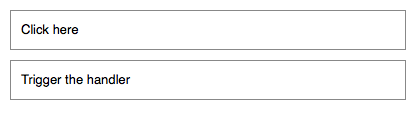
The click event is sent to an element when the mouse pointer is over the element, and the mouse button is pressed and released. Any HTML element can receive this event. For example, consider the HTML:

1
2
3
4
5
6
<div id="target">
Click here
</div>
<div id="other">
Trigger the handler
</div>
Figure 1 - Illustration of the rendered HTML

The event handler can be bound to any <div>:

1
2
3
$( "#target" ).on( "click", function() {
alert( "Handler for `click` called." );
} );

Now if we click on this element, the alert is displayed:

Handler for `click` called.

We can also trigger the event when a different element is clicked:

1
2
3
$( "#other" ).on( "click", function() {
$( "#target" ).trigger( "click" );
} );

After this code executes, clicking on Trigger the handler will also alert the message.

The click event is only triggered after this exact series of events:

  • The mouse button is depressed while the pointer is inside the element.
  • The mouse button is released while the pointer is inside the element.

This is usually the desired sequence before taking an action. If this is not required, the mousedown or mouseup event may be more suitable.

Example 1

Hide paragraphs on a page when they are clicked:

1
2
3
4
5
6
7
8
9
10
11
12
13
14
15
16
17
18
19
20
21
22
23
24
25
26
27
28
29
30
31
<!doctype html>
<html lang="en">
<head>
<meta charset="utf-8">
<title>on demo</title>
<style>
p {
color: red;
margin: 5px;
cursor: pointer;
}
p:hover {
background: yellow;
}
</style>
<script src="https://code.jquery.com/jquery-4.0.0.js"></script>
</head>
<body>
<p>First Paragraph</p>
<p>Second Paragraph</p>
<p>Yet one more Paragraph</p>
<script>
$( "p" ).on( "click", function() {
$( this ).slideUp();
} );
</script>
</body>
</html>

Demo:

Example 2

Trigger the click event on all the paragraphs on the page:

1
$( "p" ).trigger( "click" );

.trigger( "click" )Returns: jQuery

Description: Trigger the "click" event on an element.

  • version added: 1.0.trigger( "click" )

    • "click"
      Type: string
      The string "click".

See the description for .on( "click", ... ).

You are visitor 01402503 — GeezerVison does not store the pages you look up.
Best viewed with Netscape Navigator 4.7 or Internet Explorer 6 at 800×600. No cookies required.