GeezerVison is showing bbc.github.io — GEL Technical Guide: Breakout boxes
Breakout boxes
Breakout Boxes interject supplementary content within the flow of a document
Version:
0.1.0
Status:
Published
Introduction
Sometimes its worth noting or alerting users to certain information, but that information cannot be considered part of the main narrative for the document. This is what the Breakout box component is for.
Breakout boxes can contain tips, warnings, research notes, interesting facts, and all sorts of tangential information.
Recommended markup
The following example is a "Note" type breakout. The same structure should be used for other types of breakout, differing only in terms of content and iconography.
<aside class="gel-breakout-box" aria-labelledby="aside-1540915290281">
  <h4 aria-hidden="true" id="aside-1540915290281">
    <svg class="gel-icon gel-icon--text">
      <use xlink:href="/gel/static/images/gel-icons-core-set.svg#gel-icon-info"></use>
    </svg>
    The unique title for the breakout
  </h4>
  <!-- The content of the breakout; usually just a paragraph or two -->
</aside>
Notes
<aside>: The <aside> element is a sectioning element, and is identified as such (sometimes using the term 'complementary') in screen reader software. It is counted as a landmark[1] and included in screen readers' aggregated landmark menus, making it highly discoverable (JAWS opens a landmarks/regions menu with Insert + Ctrl + R)[2].
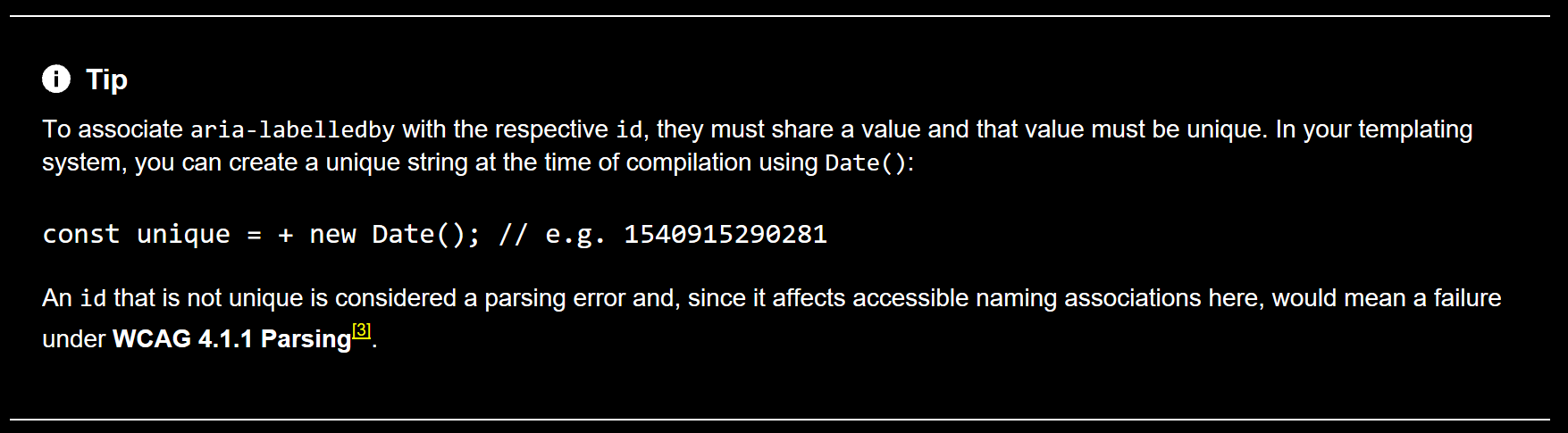
aria-labelledby: This property labels the <aside> by association to the heading's id. In aggregated landmark menus, this makes it possible to identify the Breakout box by its label. The label is announced along with the ('complementary') role when the user traverses into the <aside> element. It also labels the <aside> in landmark lists (see the previous point), so it should be unique — that is, not just "Note" or "Warning" in each case.
aria-hidden="true":Breakout boxes should not be considered part of the parent document's main structure; their headings are for labeling and presentational purposes only. The aria-hidden attribute removes the heading from the document outline (and screen reader navigation) but does not silence the text node as an associated label.
Recommended layout
The <h4> element is used to invoke a heading/label of a suitable size, despite its semantics being removed from the document outline (see Recommended markup).
The icon supplied to the heading must be from the GEL Iconography Set. It must have a fill of currentColor so that it matches the surround text colour and respects high contrast settings.
Windows High Contrast Mode
The background-color that demarcates the Breakout box from the surrounding page will be eliminated by Windows High Contrast Mode. A transparent top and bottom border is applied. This becomes visible as a solid colour when Windows HCM is turned on, achieving the same purpose of demarcation.
.gel-breakout-box {
  background: #eee;
  border-top: 1px solid transparent; /* for high contrast mode */
  border-bottom: 1px solid transparent; /* for high contrast mode */
}
Recommended behaviour
The Breakout box has no special behaviours; it is a static component.
Reference implementation
The following implementation is a copy of the aria-labelledby tip provided in this document.
You are visitor 01402503 — GeezerVison does not store the pages you look up. Best viewed with Netscape Navigator 4.7 or Internet Explorer 6 at 800×600. No cookies required.