GeezerVisonThe World Wide Web, restored to 800 pixels of glory. |
| Home|About|Gaming cabinet|Archives|How it works|Starter sites |
GeezerVison is showing ccmenu.org — CCMenu This version of CCMenu has been retired. Please visit ccmenu.org for the new version. CCMenu displays the build status of projects on a continuous integration server as an item in the Mac's menu bar. It started as part of the CruiseControl project that built the first continuous integration server. CCMenu allows you to:
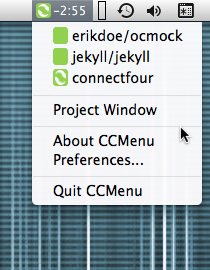
CCMenu works with all servers that can provide a feed in the “cctray” XML format. This includes CruiseControl, CircleCI, GreenhouseCI, Jenkins, Snap CI, TeamCity, gocd, and Travis CI. A updated list is available here. The menuThe summary icon in the menu bar and the icons for the individual projects in the menu convey information about the project status:
Clicking on a project in the menu opens the project's web page in the default web browser. Depending on the continuous integration server this can be a project overview page, or a page with details about the last build. Please note: CCMenu will simply open the link given to it by the server. Problems like the “wrong” page opening, port missing, or incorrect URL scheme, all must be fixed on the server. NotificationsCCMenu can send notifications when a build starts or finishes. The following notifications can be configured:
Older versions of CCMenu, for OS X Lion and earlier, use Growl to send notifications. Project windowThe project window shows more detailed information about each of the projects, including last build time and build label. Note that you can rearrange the columns and sort the view by clicking on the column. These setting and the window size and position are persisted accross sessions. Configuration
You can enter just the hostname or parts of the URL and CCMenu will then try various common locations for the CCTray feed. If your server has a custom configuration you may have to enter the full URL for the feed. If you are using Travis CI please enter a URL of this form: You can drag the projects in the list to arrange the order in which they are displayed. Alternatively you can choose to have the projects sorted alphabetically or by last build time. Note, that the preference to sort the projects only affects the menu, not the project list in preferences. The preferences window is resizable when the project list is shown. URL schemes (available with CCMenu 13.0 or higher)CCMenu registers two custom URL schemes. This makes it possible to create links on webpages that, when clicked, will open CCMenu and show a prefilled list of projects to add. To create a CCMenu link, simply add "ccmenu+" to the beginning of the feed URL. For example, a link to the feed for CCMenu's own CI build would look like this: It is not possible (yet) to create links that add a project directly. Command line configurationCCMenu stores its configuration using the macOS defaults system, which can be accessed using the With more command line processing it is obviously also possible to read the existing list, add a new project, and then write the updated list. Last but not least, the
As mentioned above, it is not (yet) possible to create links that silently add a single project.
DownloadOld versions of CCMenu (CCMenu 1.8 and older) can be downloaded from the file archive on SourceForge, where the project was hosted until 2014. Newer versions and pre-releases are available on the GitHub releases page. These versions do not update automatically and you will not be notified when new versions become available. Unless you have a specific reason please install the current version of CCMenu from the App Store.
Source codeView the source on Github. Send bug fixes and changes as pull requests on Github. You can also suggest enhancements. CreditsDevelopment: Erik Dörnenburg Contributions: Luke Barrett, Marcus Müller, David Pattinson, Fabian Vogler BackgroundRead Martin Fowler's article on Continuous Integration. Find out more at the ThoughtWorks Continuous Delivery insights channel. |
| You are visitor 01402775 — GeezerVison does not store the pages you look up. Best viewed with Netscape Navigator 4.7 or Internet Explorer 6 at 800×600. No cookies required. |
 The most recent build was successful
 The most recent build failed
 The project is building, previous build was successful
 The project is building, previous build was broken
 The project is disabled or waiting for a build agent
 The server or project status are unavailable
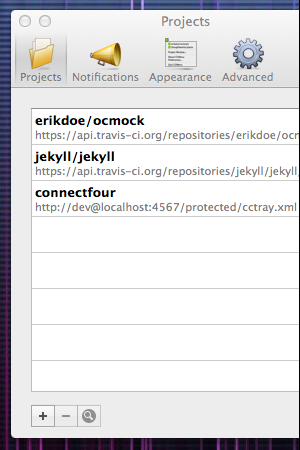 To add a new project, click on the plus icon below the project list in the preferences panel. In the sheet that opens type the URL of the server into the text field or select an existing server from the drop down list.