GeezerVisonThe World Wide Web, restored to 800 pixels of glory. |
| Home|About|Gaming cabinet|Archives|How it works|Starter sites |
GeezerVison is showing computingforgeeks.com — What are CentOS 8 New features? [Guide] IntroductionCentOS 8 has been released!!. I know most guys are asking “What are the new features in CentOS 8“?. Since the inception of CentOS in 2004, the world has felt the amazing service that the distribution has continued to proffer with excellence and a pinch of elegance. September 24th, 2019 marks another crucial time for this iconic brand as version 8 is released to perpetuate the streak of awesomeness that CentOS is reputed with. CentOS 8 has been finally released into your hands and you know what that means. Original content from computingforgeeks.com - post 30714It is another time to enjoy the stability, efficiency, and reliability that is handsomely made available for you. This article goes into the details of what awaits you in the new and fresh breathe infused into CentOS 8. We are going to look at what you should expect when CentOS 8 purrs for the first time in your server or desktop. Take a relaxing sigh, stay tuned and indulge in How To Install CentOS 8 Step by Step with Screenshots to check it out. The guide will be sub-divided into a per-feature design so that we can view New features, deprecated features, and changes clearly and easily. New features of CentOS 8 from upstream Release Notes include:Your Desktop Environment
If you are interested, Wayland happens to have the following features:
The Networking ArenaThe networking part of CentOS 8 has been revamped with the following new changes:
Useful resources: How to Install Ifconfig on RHEL 8 / CentOS 8 Minimal How to configure static IP address on RHEL 8 Configure Network Teaming/Bonding on RHEL 8 Software ManagementThe YUM package manager is now based on the DNF technology and it provides support for modular content, increased performance, and a well-designed stable API for integration with tooling. Installing software is now ensured by the new version of the YUM tool, which is based on the DNF technology (YUM v4). CentOS 7 used YUM v3 and the following are enhancements made on YUM v4:
YUM v4 is compatible with YUM v3 when using from the command line, editing or creating configuration files. Due to that, you can use the yum command and its particular options in the same way as on CentOS 7. Another thing worth mentioning is that CentOS 8 is distributed with RPM 4.14 which is different from the previous RPM 4.11 with more enhancements added.
Nonetheless, the most notable changes include:
Languages, web servers, and databasesYou will find the following programming languages in your new CentOS 8: Dynamic programming languages: Node.js is new, PHP 7.2, Ruby 2.5, Perl 5.26, SWIG 3.0 are now available. Database servers distributed with CentOS/RHEL 8: MariaDB 10.3, MySQL 8.0, PostgreSQL 10, PostgreSQL 9.6, and Redis 5. Web Servers: Apache HTTP Server 2.4 and introduction of nginx 1.14. Very helpful guides: How to Install Apache with mod_ssl & mod_http2 on RHEL 8 How to Install PHP 7.2 ,7.1 on RHEL 8 How to Install MySQL 8.0 on RHEL 8 How to Install MariaDB Database Server on RHEL 8 Install and Configure phpMyAdmin on RHEL 8 How to Install Node.js 10 LTS on RHEL 8 VirtualizationYou will encounter the following changes as far as virtualization is concerned:
Useful guide: How to install KVM on RHEL 8 Installation and image creationCentOS 8 uses Anaconda installer which now supports the LUKS2 disk encryption format. LUKS2 offers better features for instance, it extends the capabilities of the on-disk format and provides flexible ways of storing metadata. Security DetailsTighter security features have been added to the brand new release. For instance:
Kernel and OSCentOS 8 is based on Fedora 28 and upstream kernel 4.18. The following are available on this Kernel
Supported CPU Architectures are:
Infrastructure servicesCUPS logs are now handled by journald – In CentOS 7, CUPS logs were stored in specific files within the /var/log/cups directory. This is now changed because all types of CUPS logs are centrally-logged in the systemd journald daemon together with logs from other programs. You now jus use journalctl -u cups to access them. There are new BIND features. The following are some of them:
Cockpit web consoleCockpit is now part of Red Hat Enterprise Linux default repositories. You will get your web console automatically installed in the GUI version of CentOS 8. No more hassle because firewall ports required by the console are automatically open.
Deprecated FeaturesEven though these features have been deprecated, their support continues until the end of life of upstream RHEL 8. Some of the deprecated features include: Under File systems and storage
Under NetworkingNetwork scripts are deprecated in RHEL 8. The basic installation provides a new version of the ifup and ifdown scripts which call the NetworkManager service through the nmcli tool. To use ifup and ifdown commands, NetworkManager needs to be running. Under Security
Under Virtualizationvirt-manager has been deprecated. Cockpit is intended to become its replacement in a subsequent release. Reference RHEL 8 Upstream and CentOS 8 release notes ConclusionMajor changes can be seen to be done on the new CentOS 8 Release. All the way fro security to how to manage virtual machines, you should anticipate to find major enhancements all in a bid to make your Server management as easier and as secure as possible. Head over to Centos Download Page to get yours now and start playing with it. Also, read the following helpful guides: How to Install MongoDB 4 on RHEL 8 / CentOS 8 How to Install Webmin on RHEL 8 / CentOS 8 Install and Configure Redis Server on RHEL 8 How to Install and Configure Ansible on RHEL 8 How to Install and Configure Memcached on RHEL 8 
Kibet John
The power of technology can be blatantly perceived by everyone in the world today and its sway did not spare me. Kibet is a tech enthusiast, ComputingforGeeks writer, and an ardent lover of knowledge and new skills that make the world brighter. His interests lie in Storage systems, High Availability, Routing and Switching, Automation, Monitoring, and Arts. Keep reading AlmaLinux
Customize KDE Plasma Desktop with Themes|Modules|Extensions  CentOS
How To Extract .xz files on a Linux System 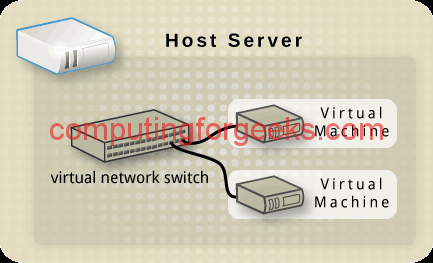 Virtualization
Configure KVM Networking With virsh, nmcli and brctl in Linux  Automation
Install JFrog Artifactory on CentOS 8 | Rocky Linux 8  Monitoring
Configure Graylog 7 Behind Nginx Reverse Proxy with Let’s Encrypt SSL  AlmaLinux
Setup Wazuh With Agent on Rocky 9 / Alma 9 / CentOS 9 Leave a Comment Cancel reply
|
| You are visitor 01402503 — GeezerVison does not store the pages you look up. Best viewed with Netscape Navigator 4.7 or Internet Explorer 6 at 800×600. No cookies required. |