GeezerVisonThe World Wide Web, restored to 800 pixels of glory. | |||||||||||||||||||||||||||||||||
| Home|About|Gaming cabinet|Archives|How it works|Starter sites | |||||||||||||||||||||||||||||||||
GeezerVison is showing computingforgeeks.com — Install Python 3.14 on Ubuntu 26.04 LTS (pip, venv, pyenv, uv) Python 3.14 ships as the default interpreter on Ubuntu 26.04 LTS. No PPAs, no deadsnakes repository, no compiling from source. A fresh install gives you Python 3.14.4 out of the box, complete with template strings (PEP 750), deferred annotation evaluation (PEP 649), and improved error messages. Original content from computingforgeeks.com - post 166030This guide walks through the full Python development setup: pip and venv for package management, pyenv for running multiple Python versions side by side, pipx for CLI tools, and uv as the modern fast package manager. By the end you will have a clean, production-ready Python environment on Ubuntu 26.04. Tested April 2026 | Ubuntu 26.04 LTS (Resolute Raccoon), Python 3.14.4, pip 25.1.1, uv 0.11.6 PrerequisitesBefore getting started, make sure your Ubuntu 26.04 system is up to date. If you are working with a fresh server, the initial server setup guide for Ubuntu 26.04 covers the basics.
Update the package index first: Verify the Default Python VersionUbuntu 26.04 includes Python 3.14 as the system interpreter. Confirm it is available: The output confirms Python 3.14.4: For the full version string with build details: You should see something like this: Install pip, venv, and Development HeadersThe base Python package does not include pip or venv. Install them along with the development headers (needed for compiling C extensions): Verify pip is working: Expected output: Create a Virtual EnvironmentVirtual environments isolate project dependencies from the system Python packages. This prevents version conflicts between projects and keeps the system Python clean. Create a new virtual environment for your project: Activate it: Your shell prompt changes to show the active environment name. Now install packages inside the venv: The packages install into the virtual environment only, leaving the system Python untouched: Check what is installed: You will see the full list of packages in the environment: To leave the virtual environment: Here is the full setup confirmed on a fresh Ubuntu 26.04 server: 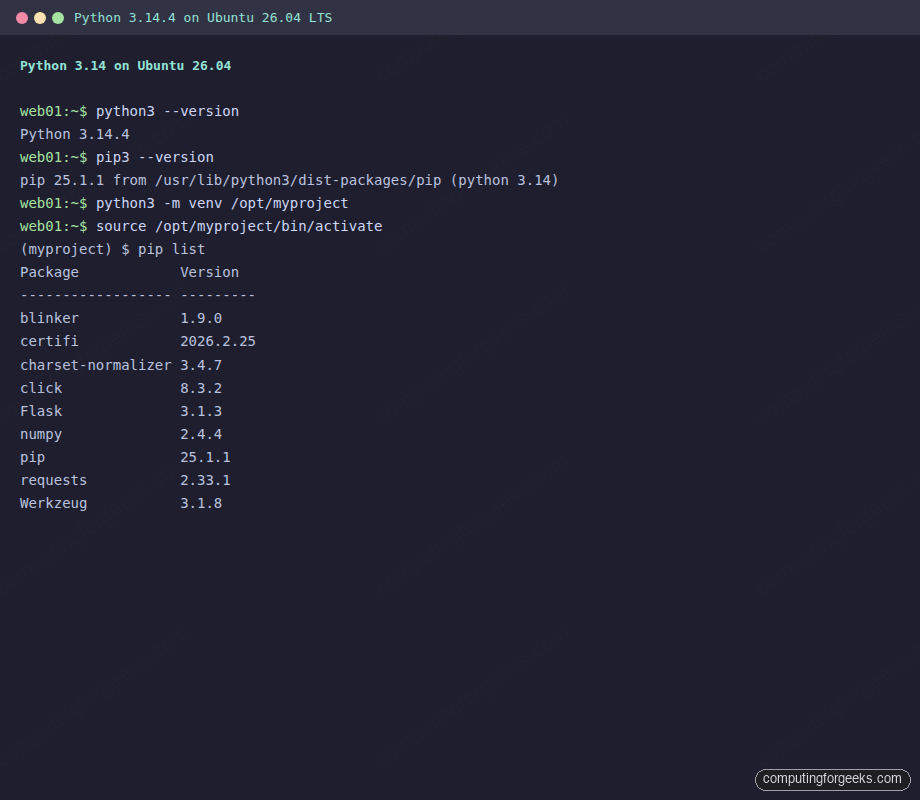 Run a Quick Flask ApplicationA fast way to verify everything works is to spin up a minimal Flask app. Create the file: Add the following content: Run it inside the virtual environment: Open a second terminal and test with curl: The response confirms Flask is running on Python 3.14: Press Install pyenv for Multiple Python VersionsSometimes you need an older Python version for a specific project, or you want to test against multiple interpreters. pyenv handles this without touching the system Python. Install Build Dependenciespyenv compiles Python from source, so you need the build toolchain: Install pyenvThe official installer pulls pyenv and its plugins in one step: Add pyenv to your shell. Append these lines to Confirm pyenv is installed: Output: Install Python 3.13 Alongside 3.14Install Python 3.13 (this takes a few minutes as it compiles from source): Once compiled, list the available versions: Both the system Python and the pyenv-managed 3.13 appear: Switch to Python 3.13 for the current shell session: The version changes immediately: Switch back to the system Python 3.14: Output: To set a default version for a specific project directory, use Install pipx for CLI Toolspipx installs Python command-line applications in isolated environments so they do not interfere with your project dependencies. Think of it as Install a tool (using pipx creates an isolated venv for black and exposes the binary on your PATH: List installed tools: Output: Install uv (Fast Python Package Manager)uv is a drop-in replacement for pip and venv, written in Rust. It resolves and installs packages 10 to 100 times faster than pip. If you are building containers or running CI pipelines, the speed difference is significant. It also handles project initialization and dependency locking, similar to what you would find in Node.js with npm. Install uv with the official installer: Load the new PATH: Verify the installation: Output: Create a Project with uvuv can scaffold a new Python project with a virtual environment and dependency tracking in one command: This creates a uv resolves and installs everything in under a second: List installed packages: Output: uv also generates a Python 3.14 New Features Worth KnowingPython 3.14 introduces several features that change how you write code. Here are the ones with the most practical impact. Template Strings (PEP 750)Template strings (t-strings) are the biggest language addition. They look like f-strings but use a Output: Each interpolation is a structured object with the value, the expression text, and formatting info. Libraries can process these safely instead of working with already-rendered strings. Deferred Evaluation of Annotations (PEP 649)In previous Python versions, using a class name in its own type annotations caused a Output: The new Improved Error Messages and Colored TracebacksPython 3.14 continues the trend of better error messages. Tracebacks now include color output by default when running in a terminal, making it easier to spot the relevant line in a stack trace. Misspelled variable names get better “did you mean?” suggestions, and type errors include more context about what went wrong. Python 3.14 vs 3.12: Key DifferencesIf you are upgrading from Ubuntu 24.04 (which ships Python 3.12), here is what changed. This comparison covers the features that affect day-to-day development and web application deployment.
The free-threaded build (no GIL) is available as an experimental option in 3.14 via the What Should You Use: pip, uv, or pipx?Each tool solves a different problem.
For most projects in 2026, uv with venv is the recommended stack. It handles project initialization, dependency locking, and virtual environment management in a single tool while staying fully compatible with the pip ecosystem. For performance-critical services or CLI tools where a compiled binary is preferred, Go on Ubuntu 26.04 is a solid alternative. Keep reading Ubuntu
Upgrade Ubuntu 24.04 to Ubuntu 26.04 LTS (Step by Step)  Security
UFW Firewall Commands with Examples on Ubuntu 26.04 / 24.04  Debian
Backup and Restore Linux Systems with Timeshift  Debian
Install TLP on Ubuntu, Fedora, Debian: Profiles and PPD Conflict  Monitoring
Secure the TICK Stack: InfluxDB Auth, Chronograf OAuth and HTTPS  Ubuntu
Install Gollum Wiki on Ubuntu 22.04|20.04|18.04 Leave a Comment Cancel reply
| |||||||||||||||||||||||||||||||||
| You are visitor 01402503 — GeezerVison does not store the pages you look up. Best viewed with Netscape Navigator 4.7 or Internet Explorer 6 at 800×600. No cookies required. |