Full path fuzzy file, buffer, mru, tag, ... finder for Vim.
- Written in pure Vimscript for MacVim, gVim and Vim 7.0+.
- Full support for Vim's regexp as search patterns.
- Built-in Most Recently Used (MRU) files monitoring and search.
- Built-in project's root finder.
- Open multiple files at once.
- Create new files and directories.
- Execute Ex commands on an opening file (jump to a line, to a string or do anything).
- Optional cross-sessions caching and history allow for fast initialization.
- Mappings and usage conform to Vim's conventions.
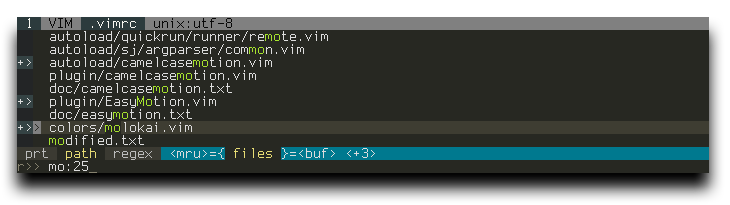
Screenshot: CtrlP in regex and full path mode with 3 files selected to open.
Basic Usage:
- Run
:CtrlP or :CtrlP [starting-directory] to invoke CtrlP in find file mode.
- Run
:CtrlPBuffer or :CtrlPMRU to start CtrlP in find buffer or find MRU file mode.
- Run
:CtrlPMixed to search in Files, Buffers and MRU files at the same time.
Check :help ctrlp-commands and :help ctrlp-extensions for other commands.
Once CtrlP is open:
- Press
<F5> to purge the cache for the current directory to get new files, remove deleted files and apply new ignore options.
- Press
<c-f> and <c-b> to cycle between modes.
- Press
<c-d> to switch to filename search instead of full path.
- Press
<c-r> to switch to regexp mode.
- Use
<c-j>, <c-k> or the arrow keys to navigate the result list.
- Use
<c-t> or <c-v>, <c-x> to open the selected entry in a new tab or in a new split.
- Use
<c-n>, <c-p> to select the next/previous string in the prompt's history.
- Use
<c-y> to create a new file and its parent directories.
- Use
<c-z> to mark/unmark multiple files and <c-o> to open them.
Run :help ctrlp-mappings or submit ? in CtrlP for more mapping help.
- Submit two or more dots
.. to go up the directory tree by one or multiple levels.
- End the input with a colon
: followed by a command to execute it after opening the file:
- Use
:25 to jump to line 25.
- Use
:/any\:\ string to jump to the first instance of any: string.
- Use
:+setfiletype\ myfiletype|25 to set the filetype to myfiletype then jump to line 25.
- Use
:diffthis when opening files marked by <c-z> to run :diffthis on the first 4 files.
Basic Options:
-
Change the default mapping and the default command to invoke CtrlP:
let g:ctrlp_map = '<c-p>'
let g:ctrlp_cmd = 'CtrlP'
-
When invoked, unless a starting directory is specified, CtrlP will set its local working directory according to this variable:
let g:ctrlp_working_path_mode = 'ra'
'c' - the directory of the current file.
'r' - the nearest ancestor that contains one of these directories or files: .git .hg .svn .bzr _darcs,
and your own root markers defined with the g:ctrlp_root_markers option.
'a' - like 'c', but only applies when the current working directory outside of CtrlP isn't a direct ancestor of the directory of the current file.
0 or '' (empty string) - disable this feature.
-
Exclude files or directories using Vim's
wildignore:
set wildignore+=*/tmp/*,*.so,*.swp,*.zip     " Linux/MacOSX
set wildignore+=*\\tmp\\*,*.swp,*.zip,*.exe  " Windows
And/Or CtrlP's own g:ctrlp_custom_ignore:
let g:ctrlp_custom_ignore = '\v[\/]\.(git|hg|svn)$'
let g:ctrlp_custom_ignore = {
	\ 'dir':  '\v[\/]\.(git|hg|svn)$',
	\ 'file': '\v\.(exe|so|dll)$',
	\ 'link': 'SOME_BAD_SYMBOLIC_LINKS',
	\ }
-
Specify an external tool to use for listing files instead of using Vim's globpath().
Use
%s in place of the target directory:
let g:ctrlp_user_command = 'find %s -type f'        " MacOSX/Linux
let g:ctrlp_user_command = 'dir %s /-n /b /s /a-d'  " Windows
Single VCS listing command:
let g:ctrlp_user_command = ['.git', 'cd %s && git ls-files']
let g:ctrlp_user_command = ['.git', 'cd %s && git ls-files . -co --exclude-standard', 'find %s -type f']
let g:ctrlp_user_command = ['.hg', 'hg --cwd %s locate -I .']
Multiple VCS listing commands:
let g:ctrlp_user_command = {
	\ 'types': {
		\ 1: ['.git', 'cd %s && git ls-files'],
		\ 2: ['.hg', 'hg --cwd %s locate -I .'],
		\ },
	\ 'fallback': 'find %s -type f'
	\ }
Check :help ctrlp-options for other options.
Get ctrlp.vim:
-
Clone the plugin into a separate directory:
$ cd ~/.vim
$ git clone https://github.com/ctrlpvim/ctrlp.vim.git bundle/ctrlp.vim
-
Add to your
~/.vimrc:
set runtimepath^=~/.vim/bundle/ctrlp.vim
-
Run at Vim's command line:
:helptags ~/.vim/bundle/ctrlp.vim/doc
-
Restart Vim and check
:help ctrlp.txt for usage instructions and configuration details.
Direct downloads:
Fork me on Github
