GeezerVisonThe World Wide Web, restored to 800 pixels of glory. |
| Home|About|Gaming cabinet|Archives|How it works|Starter sites |
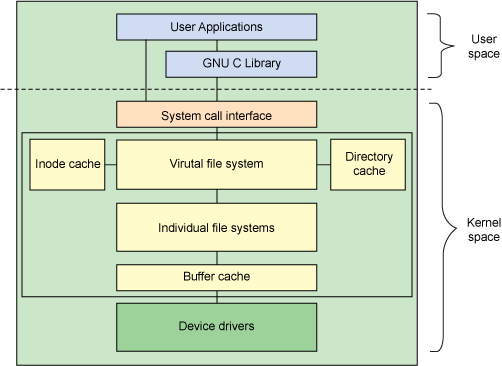
GeezerVison is showing developer.ibm.com — Anatomy of the Linux file system On this page The Linux file system architecture is an interesting example of abstracting complexity. Using a common set of API functions, a large variety of file systems can be supported on a large variety of storage devices. Take, for example, the What is a file system?I'll start with an answer to the most basic question, the definition of a file system. A file system is an organization of data and metadata on a storage device. With a vague definition like that, you know that the code required to support this will be interesting. As I mentioned, there are many types of file systems and media. With all of this variation, you can expect that the Linux file system interface is implemented as a layered architecture, separating the user interface layer from the file system implementation from the drivers that manipulate the storage devices. MountingAssociating a file system to a storage device in Linux is a process called mounting. The To illustrate the capabilities of the Linux file system layer (and the use of mount), create a file system in a file within the current file system. This is accomplished first by creating a file of a given size using Listing 1. Creating an initialized file You now have a file called file.img that's 10MB. Use the With the file now appearing as a block device (represented by /dev/loop0), create a file system on the device with Listing 2. Creating an ext2 file system with the loop device The file.img file, represented by the loop device ( Listing 3. Creating a mount point and mounting the file system through the loop device As shown in Listing 4, you can continue this process by creating a new file within the new mounted file system, associating it with a loop device, and creating another file system on it. Listing 4. Creating a new loop file system within a loop file system From this simple demonstration, it's easy to see how powerful the Linux file system (and the loop device) can be. You can use this same approach to create encrypted file systems with the loop device on a file. This is useful to protect your data by transiently mounting your file using the loop device when needed. File system architectureNow that you've seen file system construction in action, I'll get back to the architecture of the Linux file system layer. This article views the Linux file system from two perspectives. The first view is from the perspective of the high-level architecture. The second view digs in a little deeper and explores the file system layer from the major structures that implement it. High-level architectureWhile the majority of the file system code exists in the kernel (except for user-space file systems, which I'll note later), the architecture shown in Figure 1 shows the relationships between the major file system- related components in both user space and the kernel. Figure 1. Architectural view of the Linux file system components
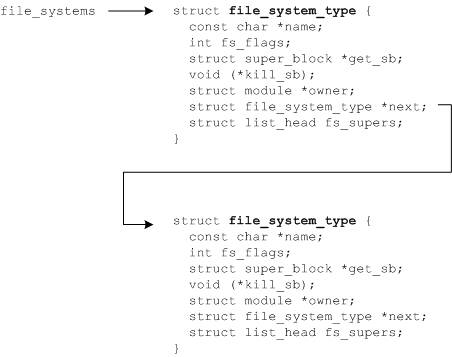
User space contains the applications (for this example, the user of the file system) and the GNU C Library (glibc), which provides the user interface for the file system calls (open, read, write, close). The system call interface acts as a switch, funneling system calls from user space to the appropriate endpoints in kernel space. The VFS is the primary interface to the underlying file systems. This component exports a set of interfaces and then abstracts them to the individual file systems, which may behave very differently from one another. Two caches exist for file system objects (inodes and dentries), which I'll define shortly. Each provides a pool of recently-used file system objects. Each individual file system implementation, such as ext2, JFS, and so on, exports a common set of interfaces that is used (and expected) by the VFS. The buffer cache buffers requests between the file systems and the block devices that they manipulate. For example, read and write requests to the underlying device drivers migrate through the buffer cache. This allows the requests to be cached there for faster access (rather than going back out to the physical device). The buffer cache is managed as a set of least recently used (LRU) lists. Note that you can use the That's the 20,000-foot view of the VFS and file system components. Now I'll look at the major structures that implement this subsystem. Major structuresLinux views all file systems from the perspective of a common set of objects. These objects are the superblock, inode, dentry, and file. At the root of each file system is the superblock, which describes and maintains state for the file system. Every object that is managed within a file system (file or directory) is represented in Linux as an inode. The inode contains all the metadata to manage objects in the file system (including the operations that are possible on it). Another set of structures, called dentries, is used to translate between names and inodes, for which a directory cache exists to keep the most-recently used around. The dentry also maintains relationships between directories and files for traversing file systems. Finally, a VFS file represents an open file (keeps state for the open file such as the write offset, and so on). Virtual file system layerThe VFS acts as the root level of the file-system interface. The VFS keeps track of the currently-supported file systems, as well as those file systems that are currently mounted. File systems can be dynamically added or removed from Linux using a set of registration functions. The kernel keeps a list of currently-supported file systems, which can be viewed from user space through the /proc file system. This virtual file also shows the devices currently associated with the file systems. To add a new file system to Linux, Registering a new file system places the new file system and its pertinent information onto a file_systems list (see Figure 2 and linux/include/linux/mount.h). This list defines the file systems that can be supported. You can view this list by typing Figure 2. File systems registered with the kernel
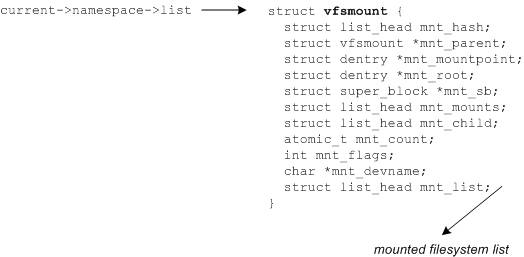
Another structure maintained in the VFS is the mounted file systems (see Figure 3). This provides the file systems that are currently mounted (see linux/include/linux/fs.h). This links to the Figure 3. The mounted file systems list
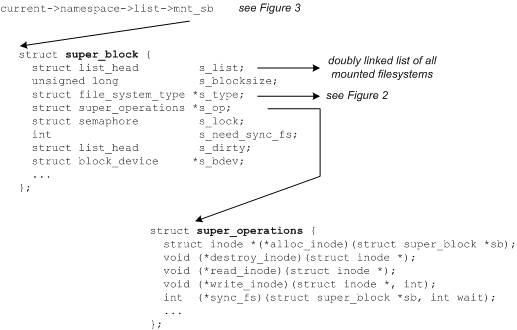
SuperblockThe superblock is a structure that represents a file system. It includes the necessary information to manage the file system during operation. It includes the file system name (such as ext2), the size of the file system and its state, a reference to the block device, and metadata information (such as free lists and so on). The superblock is typically stored on the storage medium but can be created in real time if one doesn't exist. You can find the superblock structure (see Figure 4) in ./linux/include/linux/fs.h. Figure 4. The superblock structure and inode operations
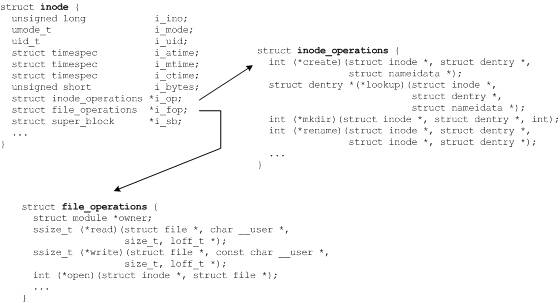
One important element of the superblock is a definition of the superblock operations. This structure defines the set of functions for managing inodes within the file system. For example, inodes can be allocated with inode and dentryThe inode represents an object in the file system with a unique identifier. The individual file systems provide methods for translating a filename into a unique inode identifier and then to an inode reference. A portion of the inode structure is shown in Figure 5 along with a couple of the related structures. Note in particular the Figure 5. The inode structure and its associated operations
The most-recently used inodes and dentries are kept in the inode and directory cache respectively. Note that for each inode in the inode cache there is a corresponding dentry in the directory cache. You can find the Buffer cacheExcept for the individual file system implementations (which can be found at ./linux/fs), the bottom of the file system layer is the buffer cache. This element keeps track of read and write requests from the individual file system implementations and the physical devices (through the device drivers). For efficiency, Linux maintains a cache of the requests to avoid having to go back out to the physical device for all requests. Instead, the most-recently used buffers (pages) are cached here and can be quickly provided back to the individual file systems. Interesting file systemsThis article spent no time exploring the individual file systems that are available within Linux, but it's worth note here, at least in passing. Linux supports a wide range of operating systems, from the old file systems such as MINIX, MS-DOS, and ext2. Linux also supports the new journaling file systems such as ext3, JFS, and ReiserFS. Additionally, Linux supports cryptographic file systems such as CFS and virtual file system such as /proc. One final file system worth noting is the Filesystem in Userspace, or FUSE. This is an interesting project that allows you to route file system requests through the VFS back into user space. So if you've ever toyed with the idea of creating your own file system, this is a great way to start. SummaryWhile the file system implementation is anything but trivial, it's a great example of a scalable and extensible architecture. The file system architecture has evolved over the years but has successfully supported many different types of file systems and many types of target storage devices. Using a plug-in based architecture with multiple levels of function indirection, it will be interesting to watch the evolution of the Linux file system in the near future. |
| You are visitor 01402503 — GeezerVison does not store the pages you look up. Best viewed with Netscape Navigator 4.7 or Internet Explorer 6 at 800×600. No cookies required. |