GeezerVisonThe World Wide Web, restored to 800 pixels of glory. | ||||
| Home|About|Gaming cabinet|Archives|How it works|Starter sites | ||||
GeezerVison is showing developer.mozilla.org — Storing the information you need — Variables - Learn web development | MDN Storing the information you need — VariablesAfter reading the last couple of articles you should now know what JavaScript is, what it can do for you, how you use it alongside other web technologies, and what its main features look like from a high level. In this article, we will get down to the real basics, looking at how to work with the most basic building blocks of JavaScript — Variables.
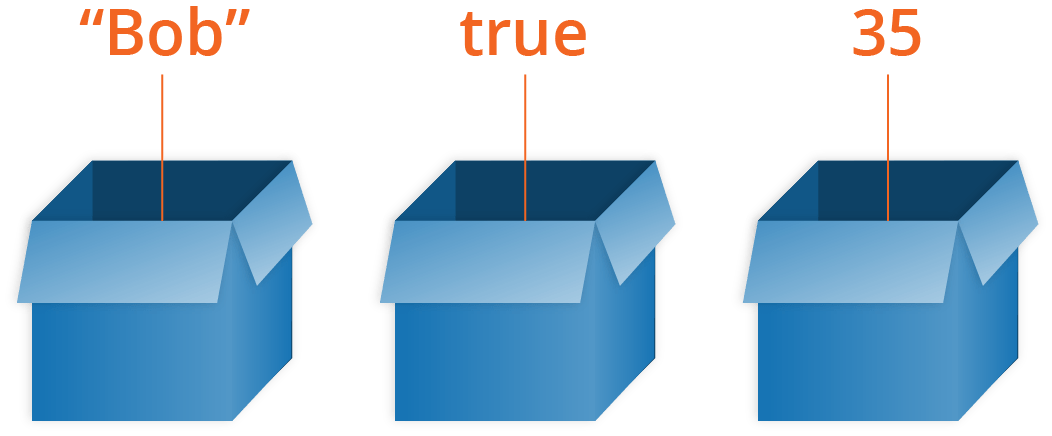
Tools you needThroughout this article, you'll be asked to type in lines of code to test your understanding of the content. If you are using a desktop browser, the best place to type your sample code is your browser's JavaScript console (see What are browser developer tools for more information on how to access this tool). What is a variable?A variable is a container for a value, like a number we might use in a sum, or a string that we might use as part of a sentence. Variable exampleLet's look at an example: html js In this example pressing the button runs some code. First, it changes the text on the button itself. Second, it shows a message of the number of times the button has been pressed. The number is stored in a variable. Each time the user presses the button, the number in the variable will increment by one. Without a variableTo understand why this is so useful, let's think about how we'd write this example without using a variable to store the count. It would end up looking something like this: html js You may not fully understand the syntax we are using (yet!), but you should be able to get the idea. Without a variable, we don't have a way of knowing how many times the button has been clicked. The message to the user will quickly be irrelevant when no information can be remembered. Variables just make sense, and as you learn more about JavaScript they will start to become second nature. One special thing about variables is that they can contain just about anything — not just strings and numbers. Variables can also contain complex data and even entire functions to do amazing things. You'll learn more about this as you go along. Note: We say variables contain values. This is an important distinction to make. Variables aren't the values themselves; they are containers for values. You can think of them being like little cardboard boxes that you can store things in.
Declaring a variableTo use a variable, you've first got to create it — more accurately, we call this declaring the variable. To do this, we type the keyword js Here we're creating two variables called Note:
In JavaScript, all code instructions should end with a semicolon ( You can test whether these values now exist in the execution environment by typing just the variable's name, e.g. js They currently have no value; they are empty containers. When you enter the variable names, you should get a value of js Note: Don't confuse a variable that exists but has no defined value with a variable that doesn't exist at all — they are very different things. In the box analogy you saw above, not existing would mean there's no box (variable) for a value to go in. No value defined would mean that there is a box, but it has no value inside it. Initializing a variableOnce you've declared a variable, you can initialize it with a value. You do this by typing the variable name, followed by an equals sign ( js Try going back to the console now and typing in these lines. You should see the value you've assigned to the variable returned in the console to confirm it, in each case. Again, you can return your variable values by typing their name into the console — try these again: js You can declare and initialize a variable at the same time, like this: js This is probably what you'll do most of the time, as it is quicker than doing the two actions on two separate lines. A note about varYou'll probably also see a different way to declare variables, using the js Back when JavaScript was first created, this was the only way to declare variables. The design of A couple of simple differences are explained below. We won't go into all the differences now, but you'll start to discover them as you learn more about JavaScript (if you really want to read about them now, feel free to check out our let reference page). For a start, if you write a multiline JavaScript program that declares and initializes a variable, you can actually declare a variable with js Note: This won't work when typing individual lines into a JavaScript console, just when running multiple lines of JavaScript in a web document. This works because of hoisting — read var hoisting for more detail on the subject. Hoisting no longer works with Secondly, when you use js But the following would throw an error on the second line: js You'd have to do this instead: js Again, this is a sensible language decision. There is no reason to redeclare variables — it just makes things more confusing. For these reasons and more, we recommend that you use Note:
If you are trying this code in your browser's console, prefer to copy & paste each of the code blocks here as a whole. There's a feature in Chrome's console where variable re-declarations with > let myName = "Chris"; let myName = "Bob"; // As one input: SyntaxError: Identifier 'myName' has already been declared > let myName = "Chris"; > let myName = "Bob"; // As two inputs: both succeed Updating a variableOnce a variable has been initialized with a value, you can change (or update) that value by giving it a different value. Try entering the following lines into your console: js An aside on variable naming rulesYou can call a variable pretty much anything you like, but there are limitations. Generally, you should stick to just using Latin characters (0-9, a-z, A-Z) and the underscore character.
Note: You can find a fairly complete list of reserved keywords to avoid at Lexical grammar — keywords. Good name examples: age myAge init initialColor finalOutputValue audio1 audio2 Bad name examples: 1 a _12 myage MYAGE var Document skjfndskjfnbdskjfb thisisareallylongvariablenameman Try creating a few more variables now, with the above guidance in mind. Variable typesThere are a few different types of data we can store in variables. In this section we'll describe these in brief, then in future articles, you'll learn about them in more detail. NumbersYou can store numbers in variables, either whole numbers like 30 (also called integers) or decimal numbers like 2.456 (also called floats or floating point numbers). You don't need to declare variable types in JavaScript, unlike some other programming languages. When you give a variable a number value, you don't include quotes: js StringsStrings are pieces of text. When you give a variable a string value, you need to wrap it in single or double quote marks; otherwise, JavaScript tries to interpret it as another variable name. js BooleansBooleans are true/false values — they can have two values, js Whereas in reality it would be used more like this: js This is using the "less than" operator ( ArraysAn array is a single object that contains multiple values enclosed in square brackets and separated by commas. Try entering the following lines into your console: js Once these arrays are defined, you can access each value by their location within the array. Try these lines: js The square brackets specify an index value corresponding to the position of the value you want returned. You might have noticed that arrays in JavaScript are zero-indexed: the first element is at index 0. ObjectsIn programming, an object is a structure of code that models a real-life object. You can have an object that represents a box and contains information about its width, length, and height, or you could have an object that represents a person, and contains data about their name, height, weight, what language they speak, how to say hello to them, and more. Try entering the following line into your console: js To retrieve the information stored in the object, you can use the following syntax: js Dynamic typingJavaScript is a "dynamically typed language", which means that, unlike some other languages, you don't need to specify what data type a variable will contain (numbers, strings, arrays, etc.). For example, if you declare a variable and give it a value enclosed in quotes, the browser treats the variable as a string: js Even if the value enclosed in quotes is just digits, it is still a string — not a number — so be careful: js Try entering the four lines above into your console one by one, and see what the results are. You'll notice that we are using a special operator called Constants in JavaScriptAs well as variables, you can declare constants. These are like variables, except that:
For example, using js If you try to do this using js Similarly, with js If you try to do this using js Note that although a constant in JavaScript must always name the same value, you can change the content of the value that it names. This isn't a useful distinction for simple types like numbers or booleans, but consider an object: js You can update, add, or remove properties of an object declared using js When to use const and when to use letIf you can't do as much with In this course, we adopt the following principle about when to use Use This means that if you can initialize a variable when you declare it, and don't need to reassign it later, make it a constant. SummaryBy now you should know a reasonable amount about JavaScript variables and how to create them. In the next article, we'll give you some tests that you can use to check how well you've understood and retained this information. | ||||
| You are visitor 01402503 — GeezerVison does not store the pages you look up. Best viewed with Netscape Navigator 4.7 or Internet Explorer 6 at 800×600. No cookies required. |