GeezerVisonThe World Wide Web, restored to 800 pixels of glory. | |||
| Home|About|Gaming cabinet|Archives|How it works|Starter sites | |||
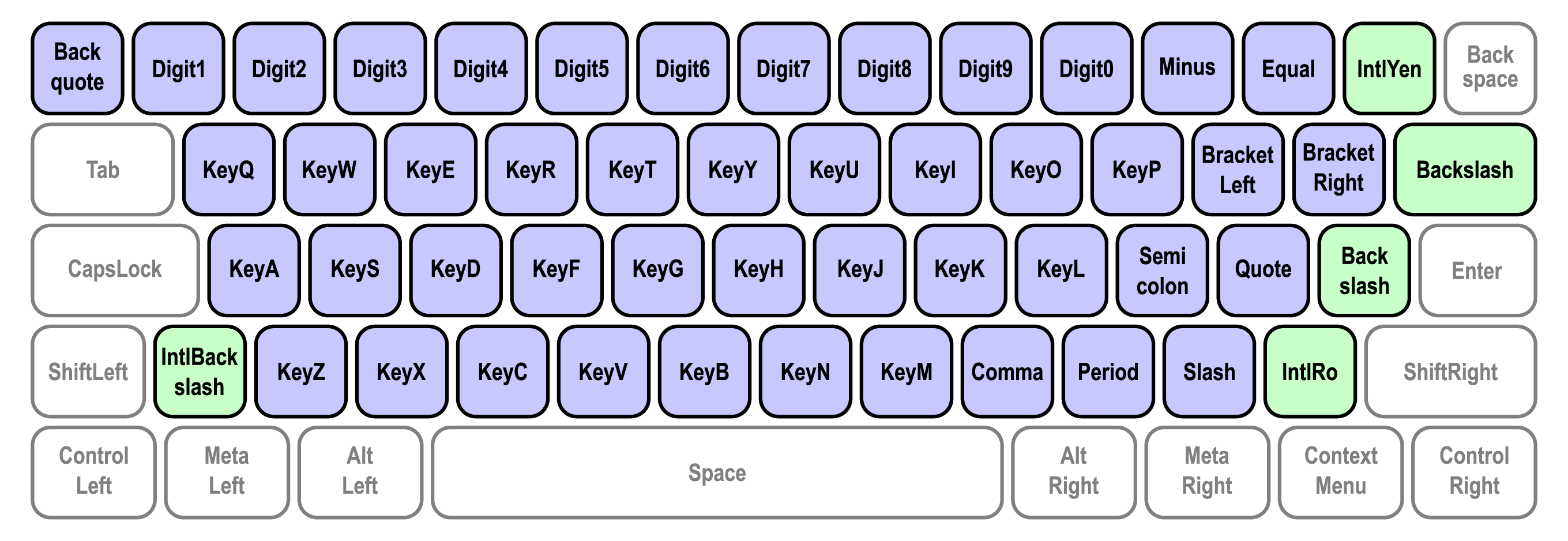
GeezerVison is showing developer.mozilla.org — Keyboard API - Web APIs | MDN Keyboard APIExperimental: This is an experimental technology The Keyboard API provides methods for working with a physical keyboard that is attached to a device running a browser. It provides several capabilities. Keyboard mapping provides an interface for retrieving the string generated by particular physical key on a keyboard to correctly identify that key to a user. Keyboard locking enables a web page to capture keys that are normally reserved by the user agent or the underlying operating system. The intended use of the Keyboard API is by web applications such as games or remote access apps that provide a fullscreen immersive experience. Concepts and usageKeyboard mappingOn physical keyboards, the The Keyboard Map API provides a way to retrieve the string generated by a particular key press, through the The following example demonstrates how to get the location-specific or layout-specific string associated with the key labeled W on an English QWERTY keyboard. js Keyboard lockingRichly interactive web pages, games, and remote-streaming experiences often require access to special keys and keyboard shortcuts while in fullscreen mode. Examples of such key/key combinations include Escape, Alt+Tab, and Ctrl+N. Those keys and key combinations are typically captured by the user agent or the underlying operating system, as illustrated in the following example. To capture the W, A, S, and D keys, call js This captures these keys regardless of which modifiers are used with the key press. Assuming a standard United States QWERTY layout, registering Writing system keysThe codes passed to "Writing system keys" are defined in the Writing System Keys section of the UI Events KeyboardEvent code Values spec, since the physical keys change meaning based on the current locale and keyboard layout. These keys are shown below. Blue keys are present on all standard keyboards while green keys are only available on some keyboards.
Interfaces
Extensions to other interfaces
Specifications
Browser compatibilityapi.Keyboardapi.KeyboardLayoutMap | |||
| You are visitor 01402503 — GeezerVison does not store the pages you look up. Best viewed with Netscape Navigator 4.7 or Internet Explorer 6 at 800×600. No cookies required. |