GeezerVisonThe World Wide Web, restored to 800 pixels of glory. |
| Home|About|Gaming cabinet|Archives|How it works|Starter sites |
GeezerVison is showing developforperformance.com — Wild select for C++ Wild select for C++By Kirk J Krauss What’s Here This is an introduction to a concept for querying semistructured UTF-8 content that’s organized in a hierarchy. The concept is implemented as a C++ method usable on a variety of data formats, such as JSON or XML. Several usage examples are provided here, including illustrative diagrams, corresponding code, and screenshots of that code’s output. The query acts essentially like an SQL SELECT statement with basic FROM, JOIN, WHERE, and ORDER BY clauses. But unlike an SQL query, this method’s query is based on a search pattern that includes one or more ‘*’ wildcards. The pattern also can include ‘?’ wildcards. The method applies outer portions of the search pattern to hierarchy traversal, typically over a specific nested tag sequence. At a depth specified by the calling routine, the method stops traversing the hierarchy and applies the remaining inner portion of the search pattern to matching specified elements, which can be values associated with tags. When there are multiple overall matches on the inner search pattern, the method passes back vectorized results for every match, including matches on each of the inner search pattern’s ‘*’ wildcards. Because the entire query is driven by understandable wildcard syntax along with just a single integer value to set a nesting depth, the method stands out for its ease of use. It also stands out for its performance, particularly for case-insensitive queries involving internationalized content. A variable-purpose search pattern What does “an integer value to set a nesting depth” mean? Simply put, the concept involves walking the search pattern from the outside in, while performing wildcard-delimited lookups on the hierarchy itself, to nest into it. These lookups against the outer portions of the search pattern are typically lookups for tags rather than for values. Once a specified level is reached – the level at which tags become immediately associated with values to be found within the content – those values can be directly referenced based on a count of the inner wildcards whose matches get placed in a vector that goes into a result set. More precisely, the concept involves these steps:
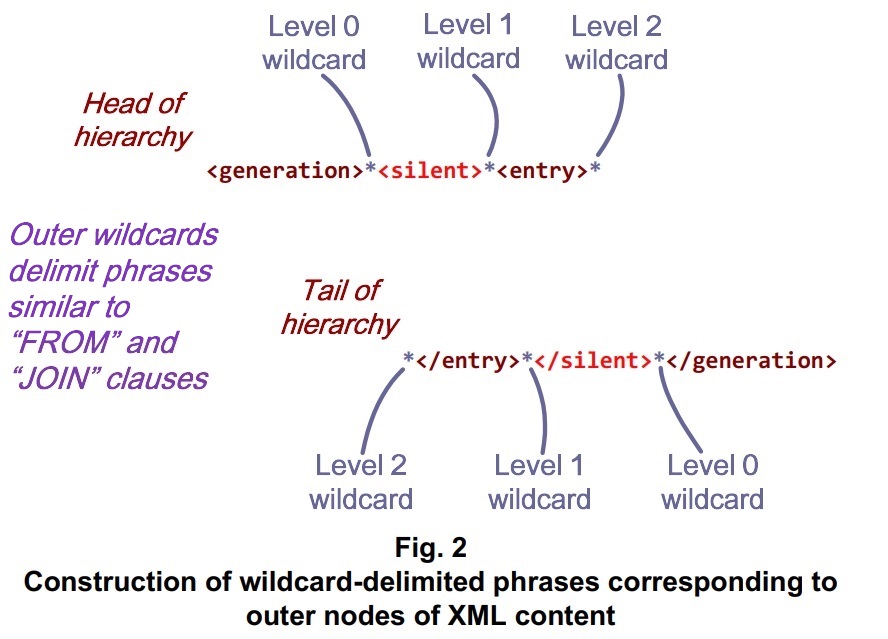
The concept is embodied in the ::pSelectWild() (case-sensitive) and ::casepSelectWild() (case-insensitive) methods of the FastUtf8::Uniseries C++ class, for performing wildcard-driven queries. Each of those methods is versatile enough to enable C++ code to find specific values for selected tags within JSON, XML, YAML, or other hierarchical content. Your code can switch among those (or other) semistructured data formats, with few or no C++ code changes. To change a query that targets an XML dataset to instead target a JSON dataset can be as simple as making the changes needed to switch between the loaded datasets themselves and then updating a line of understandable wildcard syntax, passable in just one call to either of the methods. Regarding performance, comparisons with XPath, std::regex, or the like are hardly appropriate. The ::casepSelectWild() method is built on the very same algorithm – coded with only minimal modifications – that uses greedy case folding to operate several times faster than Google-generated code dedicated to case-insensitive data extraction from bibliographical references via std::string methods. The ::pSelectWild() method is built just the same but skips the case folding. Implementations of the algorithm, invoked within a straightforward depth-first search, perform all central phases of each query, with an overall efficiency that might (almost) qualify as making “high-performance semistructured data processing” a non-oxymoron. The method’s design draws on multiple FastUtf8::Uniseries search methods: one for finding a specific slice within a larger slice that can be all or part of a UTF-8-encoded document, stream, mapped view, or slice within content bigger than physcial memory; one for finding a slice that matches a search pattern that contains wildcards, also within the larger slice; and one that not only finds wildcard matches but also creates the MatchVector of beginning and ending locations for each match. The result set returned by ::[case]pSelectWild() is a std::set of those MatchVectors, ordered by a selected match. That match can be thought of as an ordinal among the ‘*’ wildcards in the interior portion of the search pattern, or among all of the matches in each of the MatchVectors – which amounts to the same ordinal. Demos of the ::[case]pSelectWild() method, using JSON and XML content in multiple natural languages, are explored here. The complete demo code is available at GitHub > kirkjkrauss > FastUtf8 > Demos > JsonAndXmlDemo.cpp. Other FastUtf8::Uniseries demos also are available in the source files alongside that JSON and XML demo file. The demo program loads sample JSON and XML files also provided there. What’s a Uniseries, and what makes it fast? The FastUtf8 namespace includes, primarily, a Uniseries class that stores UTF-8 content. UTF-8 code points represent displayable elements, such as letters, numbers, logic symbols, or emoji. Each code point can occupy 1 to 4 bytes. A string of 7-bit ASCII text qualifies as UTF-8 content, but the Uniseries methods recognize it for what it is. They handle it via the standard C library. This makes FastUtf8 typically as speedy, for ASCII, as older ASCII-only string functionality. Most Uniseries methods for working with slices of mulitple-byte code points come in versions that return or accept pointers. For high-performance projects where use of pointers is normal, this direct pointer referencing is far more efficient than seeking a given slice by index, i.e., by code point count. Regarding leanness, FastUtf8 is about nothing more than UTF-8. It loads UTF-8 case-folding tables into memory, at init time, but does no such thing for UTF-16, UTF-32, or other content encodings, thereby minimizing the memory footprint needed for speedy case-insensitive internationalization. What’s more, the Uniseries methods include optimized wildcard techniques. A targeted wildcard search can be used to find content that matches a predetermined ‘*’ wildcard in a given search pattern. There are methods for searching content as a whole or for seeking a slice within a slice, and the slice sought may match a pattern that contains wildcards. A vectorized search adds the ability to extract any match on any ‘*’ wildcard(s) of choice. The [case]pSelectWild() functionality described here relies on both the slice-based and vectorized Uniseries methods for targeted wildcard search. XML example: US English The XML format provides a way to represent data via tags nested hierarchically. The example below is a list of authors and their birthdates and birthplaces, organized by generation. The outermost level of the hierarchy is denoted with opening and closing <generation> tags that make the organizing principle clear. Within those are further tags, known as child tags or branch/leaf tags, depending on which metaphor gets applied to the data model. One level below the <generation> tags, we have tags representing the lost and silent generations. At the level below those, we have somewhat repetitive sequences of <entry> tags. Suppose you’d like your application to select the silent generation authors born in New Jersey and to output their names and birthdates. It will need a way to traverse the hierarchy highlighted in shades of red, including the bright red <silent> tags but excluding the non-highlighted <lost> tags and anything within them. Whenever the traversal reaches the level between any <entry> and </entry> tags, your application will need a way to extract just the values within the <state> tags to check their values for matches on “NJ”. It also will need a way to return the values for the corresponding <surname> and <birthdate> tags to the caller. And let’s suppose that a case-insensitive match on the tags and values is another goal.
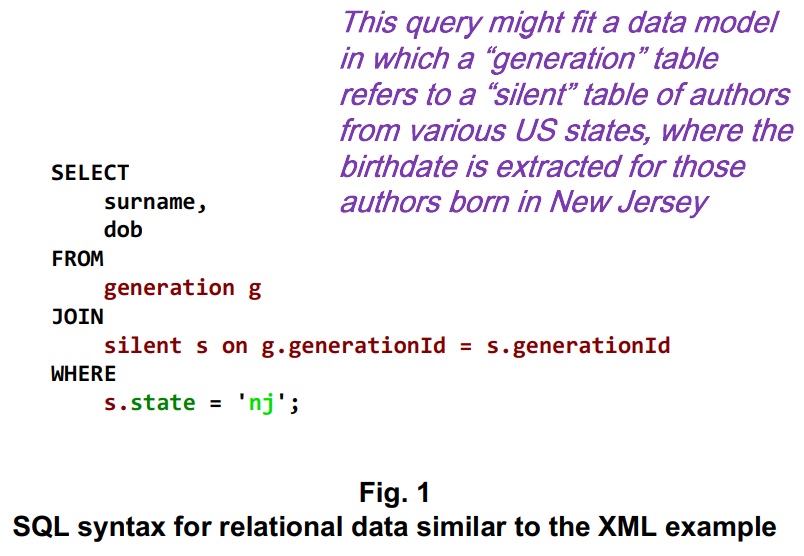
<?xml version=1.0?> If your approach had been to load the XML content into a relational database, you’d think of ways in which the data model implied by the XML hierarchy might be mapped into a relational schema. The schema might include a generation table in which each generation, such as lost or silent, has a unique Id associated with separate tables that contain the authors’ names, birthdates, and birthplaces. An SQL query for retrieval of the New Jersey born authors of the silent generation might look something like this:
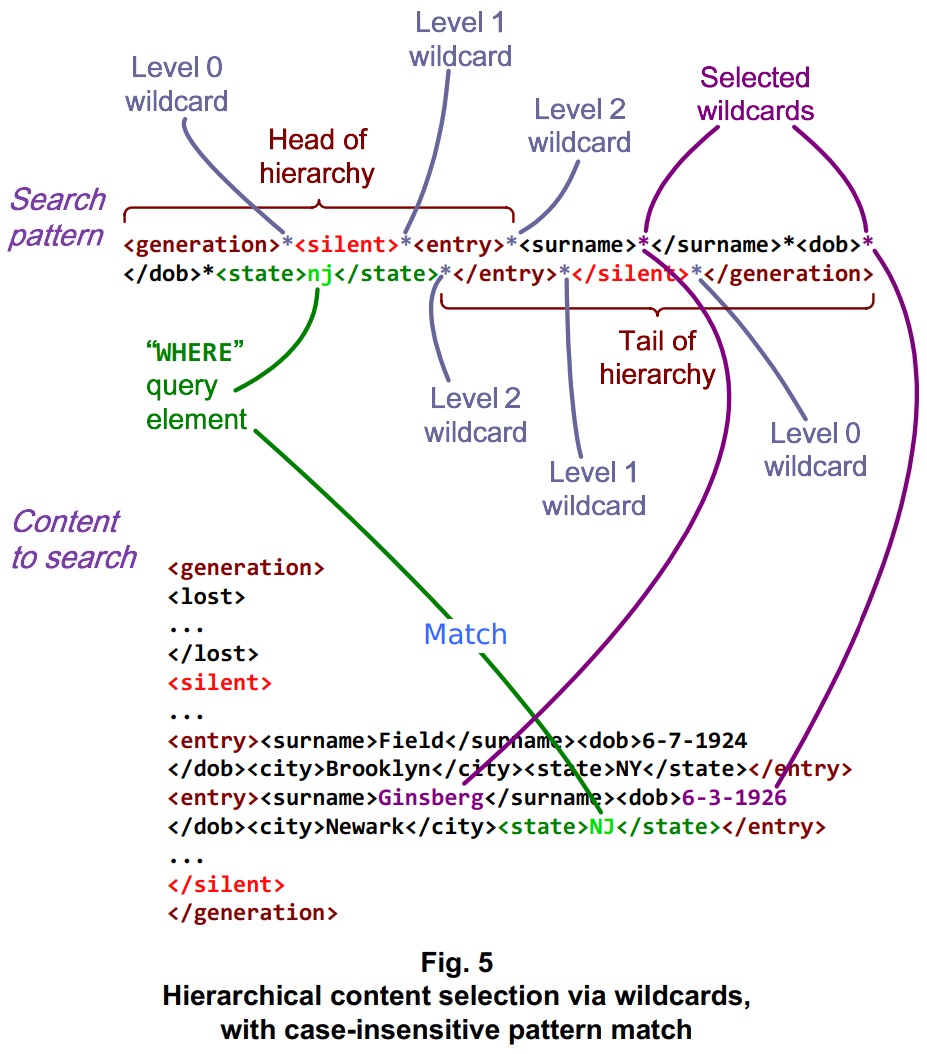
How to set up a similar wildcard-based query that draws its results directly from the XML content? For a case-insensitive query, we can call ::casepSelectWild(). The method takes a wildcard-based search pattern, along with an integer value that represents the level of the hierarchy at which to seek results, so the query is done in a single call. Given the way this XML content is organized, the method first traverses the hierarchy once to the level of the silent generation. Then it dives one level deeper for all entries within that segment of the hierarchy. For each of those entries, it checks for a tag-value pair matching the state of New Jersey. When it finds one of those matches, it extracts the matches on the inner ‘*’ wildcards corresponding to surnames and birthdates. To get the results back to the caller, ::casepSelectWild() returns a set of vectors: a std::set containing std::array members declared as MatchVector elements. This std::set is named a ResultSet. The relevant declarations appear in the fastutf8.h file: Listing One // Number of vectors that may be returned via a call to either of the
// Wild[Case]Select() family of functions.
constexpr std::size_t MAX_VECTORS = 0x1F;
// Maximum nesting leval, within hierarchical content, that may be
// traversed within any of the Wild[Case]Vectorize() or
// Wild[Case]Select() functions.
constexpr std::size_t MAX_LEVEL = 0x07;
// Number of matches on '*' wildcards that may be stored in a std::array
// returned via Wild[Case]Vectorize() or Wild[Case]Select().
constexpr std::size_t MAX_MATCHES = 0x0F;
// Maximum code point length.
constexpr std::size_t MAX_CODEPOINT = 0x04;
// The WildTarget structure represents an individual '*' wildcard match
// within vectorized wildcard search results.
struct WildTarget {
uint8_t *pBegin; // Pointer to first code point in a match on a '*'
uint8_t *pEnd; // Pointer to code point immediately after the match
};
// A MatchVector object contains matches corresponding to a single search
// on a pattern containing '*' wildcards.
struct MatchVector {
std::array<WildTarget, MAX_MATCHES> matches;
std::size_t vectorSize;
};
// Lexicographical comparator for ordering a set of vectors of '*' matches.
struct MatchComparator
{
std::size_t targetOffset; // "Order by" parameter.
MatchComparator(std::size_t offset) noexcept; // Sets targetOffset.
// This byte-by-byte comparator for individual code points is not locale-
// specific.
bool compareContent(
const uint8_t *pContentA,
const uint8_t *pContentB) const noexcept;
// This comparator determines whether two content ranges match.
bool isContentIdentical(
const uint8_t *pContentA,
const uint8_t *pContentB) const noexcept;
bool operator() (
const MatchVector& vectorA,
const MatchVector& vectorB) const noexcept;
};
// A ResultSet object contains vectorized wildcard search results.
using ResultSet = std::set<MatchVector, MatchComparator>;
For any ::[case]pSelectWild() query to work, the crucial factors include a suitable search pattern and an appropriate level at which to switch from traversing the hierarchy to populating the ResultSet. The function seeks that level via a depth-first search for each of the ‘*’-wildcard-delimited elements at the head of the search pattern, in the order they appear.
The level at which we reach the content we’re going to use to fill in the ResultSet is caller-specified. It’s the ::[case]pSelectWild() method’s third (iLevel) parameter. The method counts the ‘*’ wildcards corresponding to each level, from 0 to the iLevel value, from both ends of the given search pattern and content. This leaves the central portion of the search pattern to be matched against any portions of the XML content to be found at the specified level. “It’s worked so far, but we’re not out yet” (or: Population from Mudd)
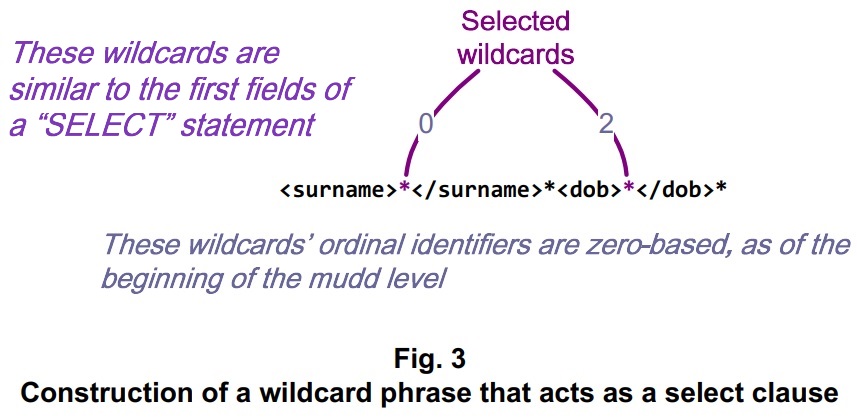
Having traversed the hierarchy, ::[case]pSelectWild() invokes a vectorized wildcard search function to find the matches that will populate the ResultSet. In our example, the vectorized wildcard search is applied, for each silent generation author, to the content about that author between the <entry> and </entry> tags. The ‘*’ wildcards whose matches are to be placed in the ResultSet are specified by their ordinal positions relative to the other ‘*’ wildcards at the level within the <entry> tags:
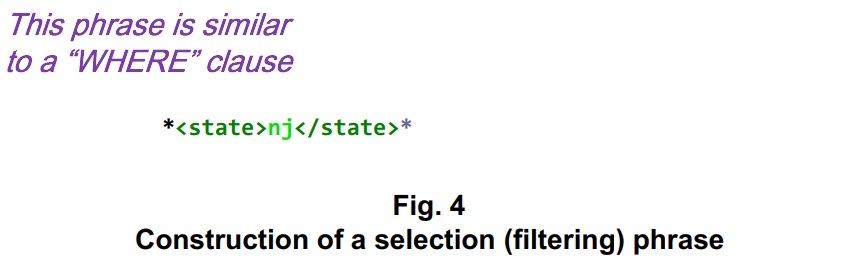
For semistructured data processing, generally speaking, what shall we call a level of a hierarchy within which the values we seek are just that? They may come with tags, but they don’t call for any further depth-first search. Some online sources speak of a node known as a “parent of leaves.” That mixed metaphor may be useful in some contexts, but to shift our wildcard-based search from seeking deeper levels to populating vectors for a ResultSet, the term “mudd” would seem more fitting. It’s at the mudd level that ::[case]pSelectWild() sifts the content for matches on any filtering pattern sought. The extracted ResultSet also comes from that level. When ::[case]pSelectWild() finds a match on the portion of the search pattern at the mudd level, it populates an element of the ResultSet with a MatchVector: a std::array containing pairs of pointers referring to the beginning and ending locations of each match on a ‘*’ wildcard. The caller then can choose the results of interest among the matches. For our XML example, these are shown as the selected wildcards of Fig. 3. To filter the results on the authors born in New Jersey is the same thing as to not place a ‘*’ wildcard where New Jersey belongs.
Overall, the strategy for constructing the mudd portion of the search pattern is to place a wildcard to target each field to select in the corresponding content, place code points that match any filtering criteria, and to “wildcard out” other content – that is, the portions the caller doesn’t care about. A concise search pattern can enable the ::casepSelectWild() method to select only the matches the caller needs. Here, the search pattern corresponding to the XML <entry> for Edward Field is padded with spaces to illustrate the ranges that match the ‘*’ wildcards prior to the <state> value. Since that value doesn’t match nj, the method disregards those matches and goes on to the next <entry>: Mudd-level XML content: Putting it all together, Fig. 5 shows how a match on one of the New Jersey born authors of the silent generation is achieved.
The code of Listing Two shows how the query is set up, from the step where the above XML content is loaded from disk to the step where author names and birthdates are displayed. This code is extracted from the JsonAndXmlDemo.cpp file included among the FastUtf8 Demos. Though the entries are in lexicographical order by surname in this example, the FastUtf8::ResultSet is designed to be constructed with the FastUtf8::MatchComparator functor, which can order the results by matches on any of the ‘*’ wildcards at the mudd level. Listing Two // This demo loads a sample file comprising US surnames, birth dates, and
// birth places (US states), organized by generation, in XML format. Within
// entries corresponding to the silent generation, it selects all case-
// insensitive matches on a specific state (New Jersey) and outputs the
// corresponding surnames and birth dates.
//
void XMLDemoAscii(void)
{
FastUtf8::Uniseries sSurname; // Name to be extracted from XML.
uint8_t *puzSurname, *puzSurnameEnd; // Content range comprising the name.
FastUtf8::Uniseries sDOB; // Date of birth to be extracted.
uint8_t *puzDOB, *puzDOBEnd; // Range comprising the date of birth.
uint8_t *puzMatch; // First match on the overall pattern.
uint8_t *pBuffer; // Block containing data from file.
// Load a sample XML file that contains mixed-case ASCII text.
pBuffer = LoadContent("TwentiethCenturyUS.xml");
if (!pBuffer)
{
std::cout << "Could not load TwentiethCenturyUS.xml" << std::endl;
return;
}
// When the buffer is wrapped in a Uniseries object, it gets deallocated
// when the object is destroyed, unless bDeallocOnDestruct is false.
FastUtf8::Uniseries sXML = FastUtf8::Uniseries(pBuffer,
/* bWrapBuffer = */ true, /* bDeallocOnDestruct = */ false);
// Prepare a lowercased state identifier for New Jersey.
uint8_t puzState[3] = "nj";
// Begin the selective targeted wildcard search at the top of the content.
uint8_t *pTopOfXML = sXML.getLength() ? sXML.getContent() : nullptr;
if (!pTopOfXML)
{
std::cout << "No content found in TwentiethCenturyUS.xml" << std::endl;
delete[] pBuffer;
return;
}
// Prepare a wildcarded search pattern to find silent generation authors
// whose birth state, as provided within the XML dataset, can be filled in.
FastUtf8::Uniseries sBeginPattern(
"<generation>*<silent>*<entry>*<surname>*</surname>*<dob>*</dob>*<state>");
FastUtf8::Uniseries sEndPattern(
"</state>*</entry>*</silent>*</generation>");
// Set the nesting level at which to seek matches within the loaded XML
// content. Because the zeroth nesting level is outside of any tags
// designated in the search pattern, iLevel corresponds to a count of '*'
// wildcards, starting with one, between each end of the overall pattern
// and the central portion to match to the array entries to be populated.
// The first (number 1) '*' wildcard is between "<generation>" and
// "<silent>".
const int iLevel = 3;
// The count of '*' wildcards restarts within the central portion of the
// search pattern. There, the zeroth '*' wildcard gets matched to the
// zeroth array element. We choose ordinals for matches on the 3rd and 5th
// '*' wildcards (zero-based) within the overall pattern.
const int iSurnameMatch = 3 - iLevel; // Choose the '*' within surname tags
const int iDOBMatch = 5 - iLevel; // Choose the '*' within dob tags
// Prepare an empty result set, to be ordered by surname.
const std::size_t iOrderBy = static_cast<std::size_t> (iSurnameMatch);
FastUtf8::MatchComparator fComparator(iOrderBy);
FastUtf8::ResultSet fResultSet(fComparator);
// Set up the search pattern so the authors' birth state matches "nj".
FastUtf8::Uniseries sPattern = sBeginPattern;
sPattern += puzState;
sPattern += sEndPattern;
// Retrieve matches on the '*' wildcards in the search pattern.
puzMatch = sXML.casepSelectWild(&fResultSet, sPattern, iLevel, pTopOfXML);
if (!puzMatch)
{
std::cout << "No match found for pattern containing state " << puzState;
std::cout << " in TwentiethCenturyUS.xml" << std::endl;
delete[] pBuffer;
return;
}
std::cout << "Searched TwentiethCenturyUS.xml for state " << puzState;
for (const FastUtf8::MatchVector& fVector : fResultSet)
{
puzSurname = fVector.matches[iSurnameMatch].pBegin;
puzSurnameEnd = fVector.matches[iSurnameMatch].pEnd;
puzDOB = fVector.matches[iDOBMatch].pBegin;
puzDOBEnd = fVector.matches[iDOBMatch].pEnd;
// Construct a Uniseries from the content between the pointers.
if (puzSurname)
{
sSurname.fromSlice(puzSurname, puzSurnameEnd);
if (puzDOB)
{
sDOB.fromSlice(puzDOB, puzDOBEnd);
}
}
else
{
sSurname = "No match found for ";
sSurname += puzState;
break;
}
std::cout << std::endl << " Finding: " << sSurname;
if (sDOB.getLength())
{
std::cout << " \t DOB:" << sDOB;
}
std::cout << std::endl;
}
std::cout << std::endl;
delete[] pBuffer;
return;
}
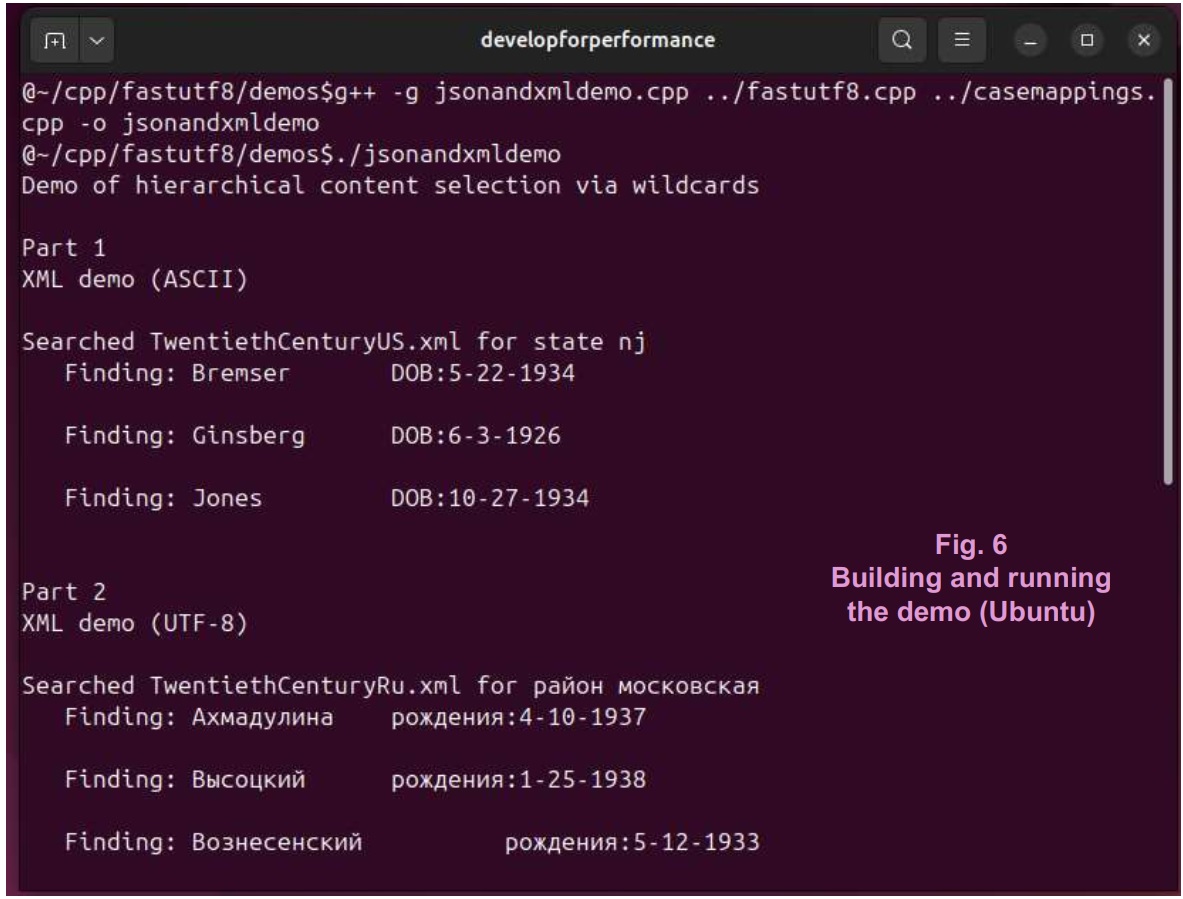
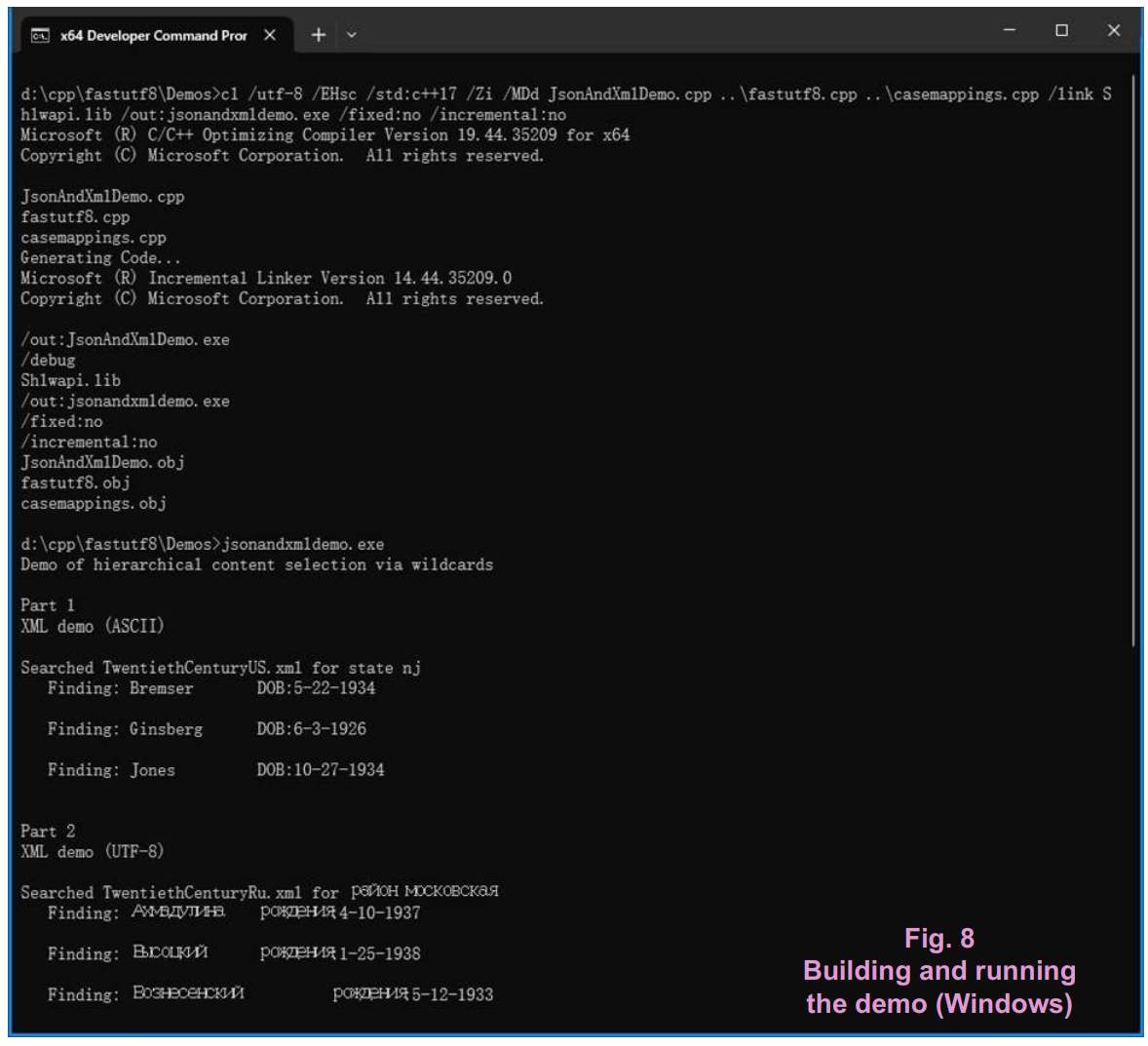
To build and run the demo code, you’ll need to include the fastutf8.h and casemappings.h files from the FastUtf8 project, and you’ll need to build the .cpp files corresponding to them.
The JsonAndXmlDemo.cpp file comes in four parts. The first part calls the code of Listing Two. The second part calls similar code that handles mixed case XML content – in Russian. XML example: mixed-case Russian Like the Latin alphabet that English speakers use, the Cyrillic alphabet that Russian speakers use is bicameral – it comes in mixed case. That’s no problem: we can do case-insensitive wildcard matches with any alphabet covered by the Unicode standard. The FastUtf8 methods are designed to handle the case folding task with an efficiency that comes close to what’s possible with old-fashioned ASCII text. The XML standard allows you to place Russian text wherever you could’ve placed English text: that is, as a tag or as a value. But if your application needs a way to select the silent generation authors born in the Moscow oblast and to output their names and birthdates, it won’t be able to stick with English tag names such as “generation” or “silent”. It will need a way to traverse the hierarchy in Russian, as highlighted in shades of red. Once that’s accomplished, it will need a way to extract just the values within the “район” tags to check them for case-insensitive matches on “московская”. It also will need a way to return the corresponding surnames and birthdates to the caller. As with the US English demo we’ve been discussing, let’s suppose that a case-insensitive match on the relevant tags and values is another goal.
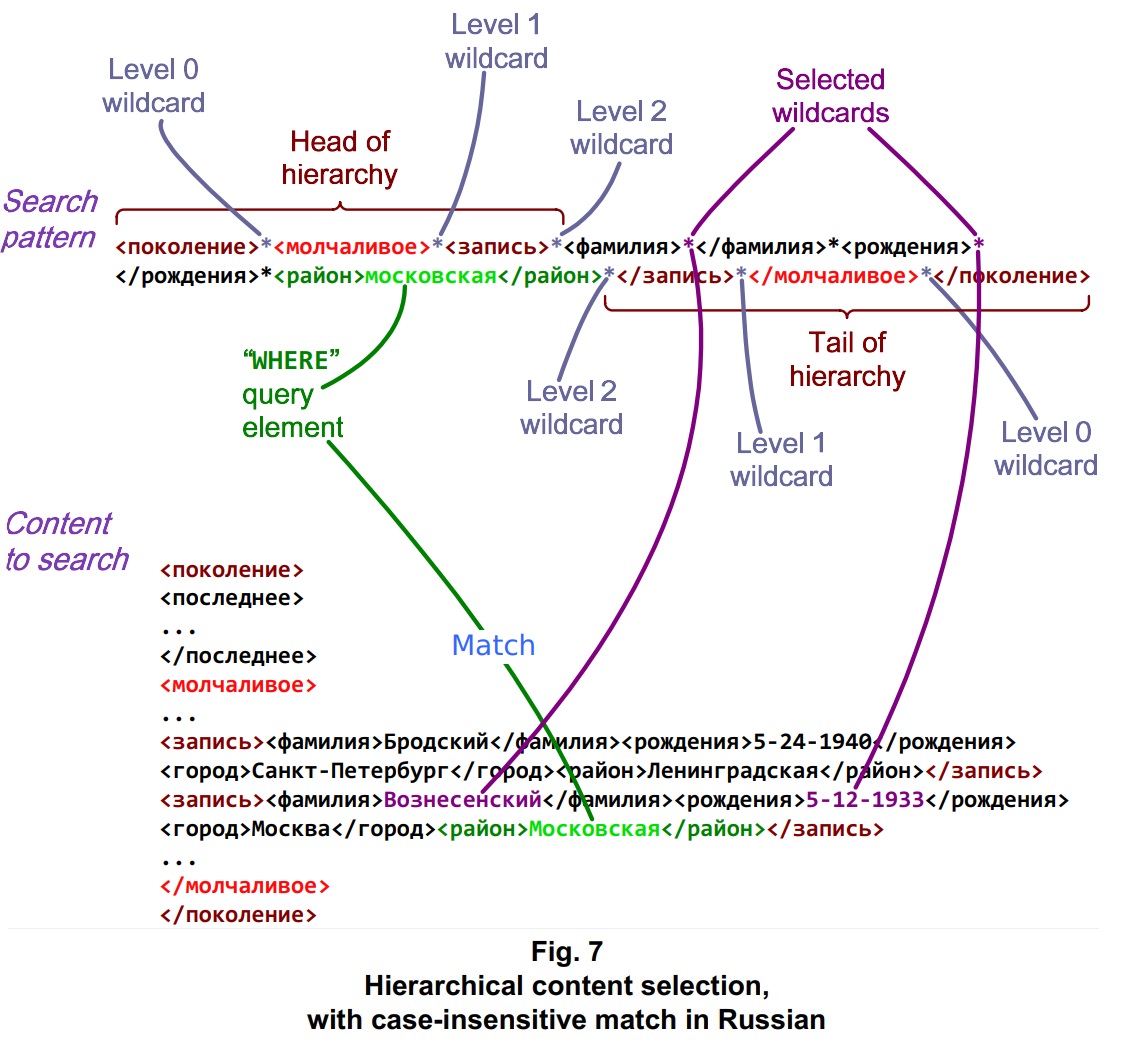
<?xml version=1.0?> This XML structure is identical to that of the previous demo. The search pattern that we pass to ::casepSelectWild() and the value of the iLevel parameter – 2 – are just the same, except this time the XML element names are in Russian. As with the previous demo, to traverse the hierarchy the method counts the ‘*’ wildcards corresponding to each level, from 0 to the iLevel value, from either end of the given search pattern and content. Head of hierarchy: Having traversed the hierarchy to reach the mudd (“parent of leaves”) level, the ::casepSelectWild() method searches for any match on the inner portion of the search pattern – the portion between the outermost iLevel ‘*’ wildcards. The XML tags and their values here correspond to names of Russian authors and their birthplace districts. As with the US English example, we can pad out a depiction of the search pattern, with spaces, to clearly observe that <район>Ленинградская</район> is not a match for <район>mосковская</район>: Mudd-level XML content: But for the entry after that in the XML content, we do have a match.
The code of Listing Three shows how the query is set up, from the step where the above XML content is loaded from disk to the step where author names and birthdates are displayed. This code gets called as Part 2, within the JsonAndXmlDemo.cpp source file. The logic is the same as in Listing Two, which handles US English demo: the difference is that the English text is exchanged for Russian text. Listing Three // This demo loads a sample file comprising mixed-case Russian surnames, birth
// dates, and birth places (районы or districts), organized by generation, in
// XML format. Within entries corresponding to the silent generation, it
// selects all case-insensitive matches on a specific район (mосковская) and
// outputs the corresponding surnames and birth dates.
//
void XMLDemoUtf8(void)
{
FastUtf8::Uniseries sSurname; // Name to be extracted from XML.
uint8_t *puzSurname, *puzSurnameEnd; // Content range comprising the name.
FastUtf8::Uniseries sDOB; // Date of birth to be extracted.
uint8_t *puzDOB, *puzDOBEnd; // Range comprising the date of birth.
uint8_t *puzMatch; // First match on the overall pattern.
uint8_t *pBuffer; // Block containing data from file.
// Load a sample XML file that contains mixed-case Russian text.
pBuffer = LoadContent("TwentiethCenturyRu.xml");
if (!pBuffer)
{
std::cout << "Could not load TwentiethCenturyRu.xml" << std::endl;
return;
}
// When the buffer is wrapped in a Uniseries object, it gets deallocated
// when the object is destroyed, unless bDeallocOnDestruct is false.
FastUtf8::Uniseries sXML = FastUtf8::Uniseries(pBuffer,
/* bWrapBuffer = */ true, /* bDeallocOnDestruct = */ false);
// The Moscow district is lowercased here but mixed case in the XML file.
uint8_t puzRaion[40] = "московская";
// Begin the selective targeted wildcard search at the top of the content.
uint8_t *pTopOfXML = sXML.getLength() ? sXML.getContent() : nullptr;
if (!pTopOfXML)
{
std::cout << "No content found in TwentiethCenturyRu.xml" << std::endl;
delete[] pBuffer;
return;
}
// Prepare a wildcarded search pattern to find молчаливое generation
// authors whose birth район can be filled in.
FastUtf8::Uniseries sBeginPattern(
"<поколение>*<молчаливое>*<запись>*<фамилия>*</фамилия>*<рождения>*</рождения>*<район>");
FastUtf8::Uniseries sEndPattern(
"</район>*</запись>*</молчаливое>*</поколение>");
// Set the nesting level at which to seek matches within the loaded XML
// content. The zeroth nesting level is outside of any tags. Accordingly,
// the first (number 1) '*' wildcard is between "<поколение>" and
// "<молчаливое>".
const int iLevel = 3;
// The count of '*' wildcards restarts within the central portion of the
// search pattern. There, the zeroth '*' wildcard gets matched to the
// zeroth array element. We choose ordinals for matches on the 3rd and 5th
// '*' wildcards (zero-based) within the overall pattern.
const int iSurnameMatch = 3 - iLevel; // Choose the '*' within surname tags
const int iDOBMatch = 5 - iLevel; // Choose the '*' within dob tags
// Prepare an empty result set, to be ordered by surname.
const std::size_t iOrderBy = static_cast<std::size_t> (iSurnameMatch);
FastUtf8::MatchComparator fComparator(iOrderBy);
FastUtf8::ResultSet fResultSet(fComparator);
// Set the authors' birth район to matche "московская".
FastUtf8::Uniseries sPattern = sBeginPattern;
sPattern += puzRaion;
sPattern += sEndPattern;
// Retrieve matches on the '*' wildcards in the search pattern.
puzMatch = sXML.casepSelectWild(&fResultSet, sPattern, iLevel, pTopOfXML);
if (!puzMatch)
{
std::cout << "No match found for pattern containing район " << puzRaion;
std::cout << " in TwentiethCenturyRu.xml" << std::endl;
delete[] pBuffer;
return;
}
std::cout << "Searched TwentiethCenturyRu.xml for район " << puzRaion;
for (const FastUtf8::MatchVector& fVector : fResultSet)
{
puzSurname = fVector.matches[iSurnameMatch].pBegin;
puzSurnameEnd = fVector.matches[iSurnameMatch].pEnd;
puzDOB = fVector.matches[iDOBMatch].pBegin;
puzDOBEnd = fVector.matches[iDOBMatch].pEnd;
// Construct a Uniseries from the content between the pointers.
if (puzSurname)
{
sSurname.fromSlice(puzSurname, puzSurnameEnd);
if (puzDOB)
{
sDOB.fromSlice(puzDOB, puzDOBEnd);
}
}
else
{
sSurname = "No match found for ";
sSurname += puzRaion;
break;
}
std::cout << std::endl << " Находка: " << sSurname;
if (sDOB.getLength())
{
std::cout << " \t рождения:" << sDOB;
}
std::cout << std::endl;
}
std::cout << std::endl;
delete[] pBuffer;
return;
}
As with other FastUtf8 code, the ::casepSelectWild() method is platform-neutral.
Alternate versions of the XML files are included in the Demos path, with differing schematic arrangements. Their names are TwentiethCenturyUS2.xml and TwentiethCenturyRu2.xml. These files can be loaded in place of the files named in the above listings, to demonstrate the ::casepSelectWild() method’s flexibility traversing hierarchical content. Though the hierarchy in these alternate files requires added traversal, it’s similar enough that the call to ::casepSelectWild() – and in fact the entire code other than names of the files to load – needs no modification. JSON example: US English JSON is a popular format for documents comprising hierarchical data. The JSON example below is quite similar to XML example discussed previously: it’s the same collection of authors and their birthdates and birthplaces, organized by generation. The outermost level of the hierarchy is denoted with a "generation" tag with opening and closing braces. Within the braces are "lost" and "silent"” tags, each followed by nested content in braces. At the level below those braces are "entry" tags, each with a bracketed series of authors and information about them, identical to the information in the XML example. As with the XML demo, suppose you’d like your application to select the silent generation authors born in New Jersey and to output their names and birthdates. It will need a way to traverse the hierarchy highlighted in shades of red, including the bright red "silent" tags but excluding the non-highlighted "lost" tags. The lost generation content from the JSON sample file is elided here for brevity.
{ As with the XML examples, we arrange a case-insensitive wildcard-based query that traverses the JSON hierarchy to the specified level. Whenever it reaches that level, it checks for a match on the inner portion of the search pattern, between its head and tail portions. For each of those overall matches, it populates its result set to include each match – within the JSON content – on each ‘*’ wildcard in the inner portion of the search pattern. Head of hierarchy: Because there are more levels to this JSON hierarchy than to the XML hierarchy of the previous examples, the iLevel parameter that gets passed to the ::casepSelectWild() method is increased accordingly. The method searches for any match on the inner portion of the search pattern between the outer iLevel ‘*’ wildcards of the head and tail portions of the search pattern. The remaining portion of the search pattern not only seeks matches at the mudd level but also assigns wildcards to the surname and dob values. The caller can afterwards extract the locations of the matching content snippets among the ResultSet. We also can “wildcard out” any carriage return (\r), newline (\n), and white space (\t, \f, etc.) code points in the JSON content. But we don’t fail to include the complete tag-value pair for the state of New Jersey, because we want to select the entries for that state. Doing so will exclude this entry for Edward Field. Mudd-level JSON content: Other than the modified search pattern and increased iLevel value, the example code that handles the JSON content is hardly changed from the XML examples. Listing Four // This demo loads a sample file comprising US surnames, birth dates, and
// birth places (US states), organized by generation, in JSON format.
// Within entries corresponding to the silent generation, it selects all
// case-insensitive matches on a specific state (New Jersey) and outputs
// the corresponding surnames and birth dates.
//
void JsonDemoAscii(void)
{
FastUtf8::Uniseries sSurname; // Name to be extracted from XML.
uint8_t *puzSurname, *puzSurnameEnd; // Content range comprising the name.
FastUtf8::Uniseries sDOB; // Date of birth to be extracted.
uint8_t *puzDOB, *puzDOBEnd; // Range comprising the date of birth.
uint8_t *puzMatch; // First match on the overall pattern.
uint8_t *pBuffer; // Block containing data from file.
// Load a sample JSON file that contains mixed-case ASCII text.
pBuffer = LoadContent("TwentiethCenturyUS.json");
if (!pBuffer)
{
std::cout << "Could not load TwentiethCenturyUS.json" << std::endl;
return;
}
// When the buffer is wrapped in a Uniseries object, by default it gets
// deallocated when the object is destroyed.
FastUtf8::Uniseries sJson = FastUtf8::Uniseries(pBuffer,
/* bWrapBuffer = */ true);
// Prepare a lowercased state identifier for New Jersey.
uint8_t puzState[3] = "nj";
// Begin the selective targeted wildcard search at the top of the content.
uint8_t *pTopOfJson = sJson.getLength() ? sJson.getContent() : nullptr;
if (!pTopOfJson)
{
std::cout << "No content found in TwentiethCenturyUS.json" << std::endl;
return;
}
// Prepare a wildcarded search pattern to find silent generation authors
// whose birth state, as provided within the JSON dataset, matches "nj".
FastUtf8::Uniseries sBeginPattern(
"{*\"generation\": {*\"silent\": {*\"entry\": [*{*\"surname\": \"*\",*\"dob\": \"*\",*\"state\": \"");
FastUtf8::Uniseries sEndPattern(
"\"*}*]*}*}*}");
// Set the nesting level at which to seek matches within the loaded JSON
// content. Because the zeroth nesting level is outside of any tags
// designated in the search pattern, iLevel corresponds to a count of '*'
// wildcards, starting with one, between each end of the overall pattern
// and the central portion to match to the array entries to be populated.
// The first (number 1) '*' wildcard is between the first opening brace
// and "generation".
const int iLevel = 5;
// The count of '*' wildcards restarts within the central portion of the
// search pattern. There, the zeroth '*' wildcard gets matched to the
// zeroth array element. We choose ordinals for matches on the 5th and 7th
// '*' wildcards (zero-based) within the overall pattern.
const int iSurnameMatch = 5 - iLevel; // Choose the '*' after surname
const int iDOBMatch = 7 - iLevel; // Choose the '*' after dob
// Prepare an empty result set, to be ordered by surname.
const std::size_t iOrderBy = static_cast<std::size_t> (iSurnameMatch);
FastUtf8::MatchComparator fComparator(iOrderBy);
FastUtf8::ResultSet fResultSet(fComparator);
FastUtf8::Uniseries sPattern = sBeginPattern;
sPattern += puzState;
sPattern += sEndPattern;
// Retrieve matches on the '*' wildcards in the search pattern.
puzMatch = sJson.casepSelectWild(&fResultSet, sPattern, iLevel, pTopOfJson);
if (!puzMatch)
{
std::cout << "No match found for pattern containing state " << puzState;
std::cout << " in TwentiethCenturyUS.json" << std::endl;
return;
}
std::cout << "Searched TwentiethCenturyUS.json for state " << puzState;
for (const FastUtf8::MatchVector& fVector : fResultSet)
{
puzSurname = fVector.matches[iSurnameMatch].pBegin;
puzSurnameEnd = fVector.matches[iSurnameMatch].pEnd;
puzDOB = fVector.matches[iDOBMatch].pBegin;
puzDOBEnd = fVector.matches[iDOBMatch].pEnd;
// Construct a Uniseries from the content between the pointers.
if (puzSurname)
{
sSurname.fromSlice(puzSurname, puzSurnameEnd);
if (puzDOB)
{
sDOB.fromSlice(puzDOB, puzDOBEnd);
}
}
else
{
sSurname = "No match found for ";
sSurname += puzState;
break;
}
std::cout << std::endl << " Finding: " << sSurname;
if (sDOB.getLength())
{
std::cout << " \t DOB:" << sDOB;
}
std::cout << std::endl;
}
std::cout << std::endl;
return;
}
The above code for extracting authors’ names and birthplaces from mixed-case JSON content is called as Part 3, within the JsonAndXmlDemo.cpp file.
Part 4 of the JSON and XML demo calls similar code, of Listing Five, that handles mixed case JSON content in Russian. JSON example: mixed-case Russian C++ code that’s versatile enough to select values from XML content or JSON content, with the choice of format made by changing a single line of text that has wildcards in it, can switch between natural languages very easily. The only changes are to the tags and values within that single line. Here’s a Russian counterpart to the English-language JSON content above.
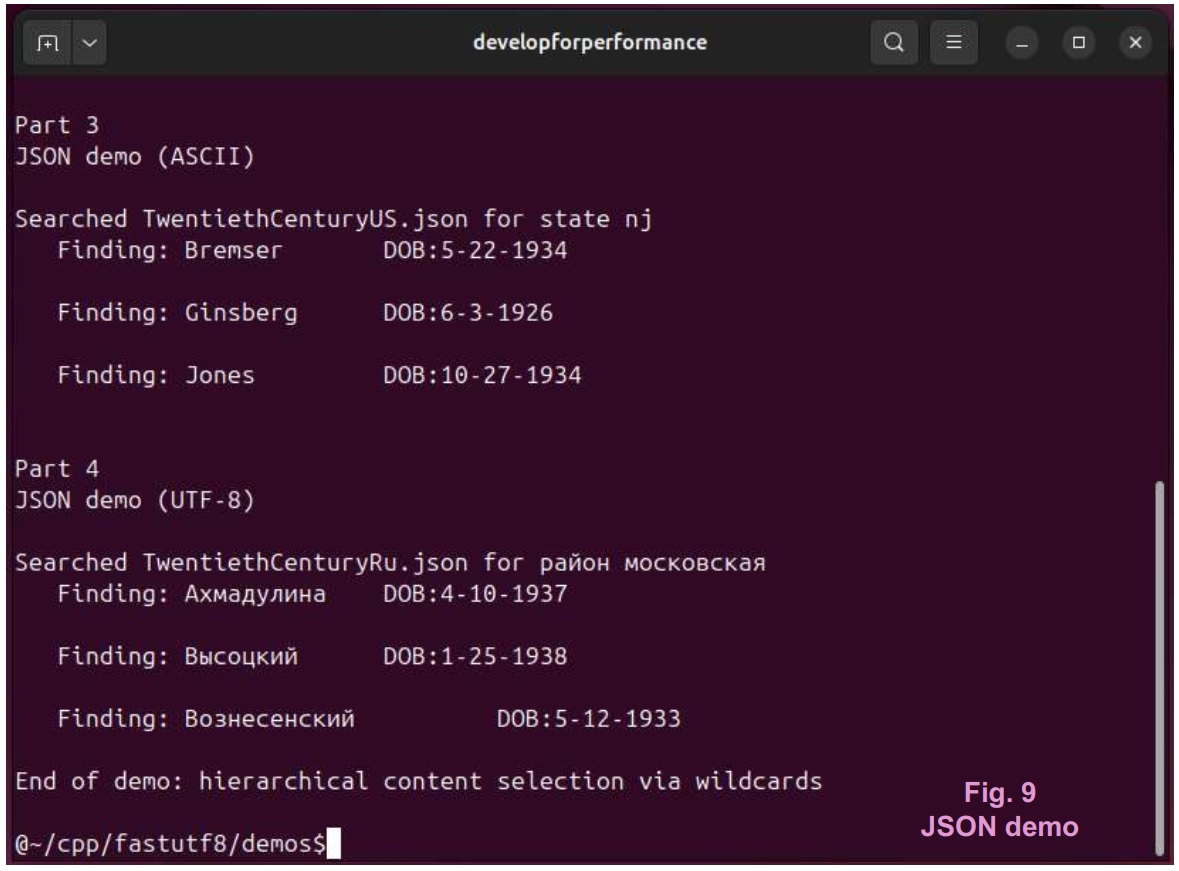
{ Here are the outer portions of the search pattern, in Russian: Head of hierarchy: Here’s a snippet from the JSON content that’s not a match for the inner portion of the search pattern, because the value associated with the "район" tag is not "московская". Mudd-level JSON content: When we do find a match, the ResultSet gets populated with a MatchVector that contains pointers to the beginning and ending of each match on each ‘*’ wildcard. Ths code of Listing Five loads the JSON sample file in Russian. Its output is shown as the last part of the JSON and XML demo, in Fig. 9 (above). Listing Five // This demo loads a sample file comprising mixed-case Russian surnames, birth
// dates, and birth places (районы or districts), organized by generation, in
// JSON format. Within entries corresponding to the silent generation, it
// selects all case-insensitive matches on a specific район (московская) and
// outputs the corresponding surnames and birth dates.
//
void JsonDemoUtf8(void)
{
FastUtf8::Uniseries sSurname; // Name to be extracted from XML.
uint8_t *puzSurname, *puzSurnameEnd; // Content range comprising the name.
FastUtf8::Uniseries sDOB; // Date of birth to be extracted.
uint8_t *puzDOB, *puzDOBEnd; // Range comprising the date of birth.
uint8_t *puzMatch; // First match on the overall pattern.
uint8_t *pBuffer; // Block containing data from file.
// Load a sample JSON file that contains mixed-case Russian text.
pBuffer = LoadContent("TwentiethCenturyRu.json");
if (!pBuffer)
{
std::cout << "Could not load TwentiethCenturyRu.json" << std::endl;
return;
}
// When the buffer is wrapped in a Uniseries object, by default it gets
// deallocated when the object is destroyed.
FastUtf8::Uniseries sJson = FastUtf8::Uniseries(pBuffer,
/* bWrapBuffer = */ true);
// The Moscow district is lowercased here but mixed case in the JSON file.
uint8_t puzRaion[40] = "московская";
// Begin the selective targeted wildcard search at the top of the content.
uint8_t *pTopOfJson = sJson.getLength() ? sJson.getContent() : nullptr;
if (!pTopOfJson)
{
std::cout << "No content found in TwentiethCenturyRu.json" << std::endl;
return;
}
// Prepare a wildcarded search pattern to find silent generation authors
// whose birth район, as provided within the JSON dataset, matches
// "московская".
FastUtf8::Uniseries sBeginPattern(
"{*\"поколение\": {*\"молчаливое\": {*\"запись\": [*{*\"фамилия\": \"*\",*\"рождения\": \"*\",*\"район\": \"");
FastUtf8::Uniseries sEndPattern(
"\"*}*]*}*}*}");
// Set the nesting level at which to seek matches within the loaded JSON
// content. Because the zeroth nesting level is outside of any tags
// designated in the search pattern, iLevel corresponds to a count of '*'
// wildcards, starting with one, between each end of the overall pattern
// and the central portion to match to the array entries to be populated.
// The first (number 1) '*' wildcard is between the first opening brace
// and "поколение".
const int iLevel = 5;
// The count of '*' wildcards restarts within the central portion of the
// search pattern. There, the zeroth '*' wildcard gets matched to the
// zeroth array element. We choose ordinals for matches on the 5th and 7th
// '*' wildcards (zero-based) within the overall pattern.
const int iSurnameMatch = 5 - iLevel; // Choose the '*' after surname
const int iDOBMatch = 7 - iLevel; // Choose the '*' after dob
// Prepare an empty result set, to be ordered by surname.
const std::size_t iOrderBy = static_cast<std::size_t> (iSurnameMatch);
FastUtf8::MatchComparator fComparator(iOrderBy);
FastUtf8::ResultSet fResultSet(fComparator);
FastUtf8::Uniseries sPattern = sBeginPattern;
sPattern += puzRaion;
sPattern += sEndPattern;
// Retrieve matches on the '*' wildcards in the search pattern.
puzMatch = sJson.casepSelectWild(&fResultSet, sPattern, iLevel, pTopOfJson);
if (!puzMatch)
{
std::cout << "No match found for pattern containing район " << puzRaion;
std::cout << " in TwentiethCenturyRu.json" << std::endl;
return;
}
std::cout << "Searched TwentiethCenturyRu.json for район " << puzRaion;
for (const FastUtf8::MatchVector& fVector : fResultSet)
{
puzSurname = fVector.matches[iSurnameMatch].pBegin;
puzSurnameEnd = fVector.matches[iSurnameMatch].pEnd;
puzDOB = fVector.matches[iDOBMatch].pBegin;
puzDOBEnd = fVector.matches[iDOBMatch].pEnd;
// Construct a Uniseries from the content between the pointers.
if (puzSurname)
{
sSurname.fromSlice(puzSurname, puzSurnameEnd);
if (puzDOB)
{
sDOB.fromSlice(puzDOB, puzDOBEnd);
}
}
else
{
sSurname = "No match found for ";
sSurname += puzRaion;
break;
}
std::cout << std::endl << " Находка: " << sSurname;
if (sDOB.getLength())
{
std::cout << " \t рождения:" << sDOB;
}
std::cout << std::endl;
}
std::cout << std::endl;
return;
}
In use: Fitting the concept with your data The ::[case]pSelectWild() methods are designed and coded with smallish data targets in mind. Does the very idea of “smallish data target” exclude a “huge JSON file that causes memory overcommitment when loaded” – if that’s the kind of data you’ve got? For large datasets, the methods can be aimed at specific target portions. Your code can pass in a beginning and ending location of a slice, which becomes the focus of the query, and can cover a large data set in multiple slices passed to the method over multiple calls. Why do all this slicing? A search through UTF-8 content is, by nature, a brute force operation. A common-sense data organization for large datasets allows for ways to minimize whole-content searches generally. Storing a cache of locations of useful starting and ending points within the loaded dataset is as useful to developer of a semistructured data management system as is the careful consideration of primary and secondary keys, materialized views, and inner and outer joins to the developer working with a relational database. Also, if a large dataset causes memory overcommitment in a case where only certain portions of it are being queried, aiming the query at those portions may reduce significant paging overhead. Because ::[case]pSelectWild() is designed with that reasoning in mind, all the data structures it creates reside on the stack. This guarantees that none of them can be leaked and that there aren’t any conditions that can lead to heap-related overhead. That is, with every bit of the method’s internal data on the stack, there’s no way for heap space to get repeatedly allocated and deallocated during processing. This design leads to certain limitations. There’s a maximum number of wildcards per search pattern and a corresponding maximum MatchVector size. There’s also a maximum number of those vectors that ::[case]pSelectWild() may return in a ResultSet. And there’s a maximum level the method may reach via its depth-first search. These limits are specified in fastutf8.h near the top of the FastUtf8 namespace scope. The functions named in the comments are the workhorse routines for the ::[case]pSelectWild() methods. Listing Six namespace FastUtf8
{
...
//
// Data, data structures, and methods for working with hierarchical content
// selection via wildcards and with vectorized wildcard search.
//
// If the following value is true, the Wild[Case]Select functions seek a
// complete match on the inbound search pattern. Otherwise, these
// functions stop seeking a match after the last '*' wildcard in the
// pattern and return any result of vectorized wildcard search on the
// portion of the pattern corresponding to the specified nesting level.
// Setting this value to false may be useful for finding matches within
// incomplete or streaming data sets.
constexpr bool g_bMatchAllTails = true;
// Number of vectors that may be returned via a call to either of the
// Wild[Case]Select() family of functions.
constexpr std::size_t MAX_VECTORS = 0x1F;
// Maximum nesting leval, within hierarchical content, that may be
// traversed within any of the Wild[Case]Vectorize() or
// Wild[Case]Select() functions.
constexpr std::size_t MAX_LEVEL = 0x07;
// Number of matches on '*' wildcards that may be stored in a std::array
// returned via Wild[Case]Vectorize() or Wild[Case]Select().
constexpr std::size_t MAX_MATCHES = 0x0F;
...
}
The first thing you might think about, if you find your code hitting the MAX_VECTORS or MAX_MATCHES limits, is how to aim your query at a particular slice of your content. The ::[case]pFind() and ::[case]pFindSlice()methods can locate specific tags within the content. The::[case]pFindWild() and ::[case]pFindWildSlice() methods can do the same with a search pattern that includes wildcards. From one or more of those methods, your code can obtain pointers to be passed to ::[case]pSelectWild() as the beginning and ending locations, within your semistructured content, of the query’s target slice. For a query that needs to traverse a hierarchy deeper than the predefined MAX_LEVEL value, or for a query that needs more matches than are available given the MAX_MATCHES value, will building with sufficiently increased values cause a crisis for the stack? Probably not, so long as the values are reasonable. The MAX_LEVEL value is used to determine the number of WildTarget instances that will live in two arrays. The MAX_MATCHES value is used to determine the number of WildTarget instances that will live in a MatchVector. Each WildTarget instance is the size of two pointers. The default values are limited to minimize the footprint of these arrays and of any MatchVector on the stack, for best performance among the relatively shallow hierarchies typical of commonplace semistructured data. You may be wondering... Q: Does the outer search pattern, corresponding to the data hierarchy, have to be set up in the form opening_tag_1*opening_tag_2*opening_tag_3 ... closing_tag_3*closing_tag_2*closing_tag_1? A: That’s the basic concept. You can place ‘?’ wildcards anywhere within the outermost ‘*’ wildcards, to widen the possibilities. You also might skip a ‘*’ if your data has a tightly nested arrangement, like in the TwentiethCenturyUS2.xml and TwentiethCenturyRu2.xml files in the Demos path:
... There’s nothing to gain, though, from skipping that ‘*’ in the pattern. The <generation>*<silent>*<entry>* ... *</entry>*</silent>*</generation> sequence allows for additional code points, such as line breaks, to be placed between the tags. Q: Is there a way to match a ‘?’ wildcard in an outermost tag? A: This is disabled for performance reasons – the search for an outermost tag might scan a lot of bytes, and wildcard checks are skipped for speed – but there are easy workarounds. The search pattern can begin with a ‘*’ to get those wildcard checks to happen first thing. Or an up-front call to one of the wildcard search methods, like ::casepFindWildSlice(), can find that match, and you can set up your hierarchical search to start from there. Q: How about a way to search for a ‘*’ wildcard match within a tag? A: That’s another situation for calling ::casepFindWildSlice(). For example, to find any opening XML tag that has the sequence “gen” in it, the search pattern for that call can look like <*gen*>. The ending of the overall match, returned from the call to that method, can serve as a starting location for a ::casepSelectWild() call. Q: Can the ::casepSelectWild() method start searching anywhere in the hierarchy, not necessarily at or before its root? A: Yes, so long as one or more levels remain above the mudd. When the method finds a match on the opening tag at the beginning of the search pattern, it will consider that a zeroth-level tag and continue depth-first from there, returning when the search works its way back to that level. Q: If I want to bypass the hierarchical spelunking, can I just get a MatchVector that has locations of matches on every ‘*’ wildcard in a search pattern? A: That’s a vectorized wildcard search. You can set up a call to casepVectorizeWild() to make it happen. Q: Regarding query capabililities, how does the ::[case]pSelectWild() method compare with an SQL SELECT statement? A: The ::[case]pSelectWild() method covers just the basics:
Q: How does the method’s performance compare with that of a relational database? A: A developer working with a relational database can carefully plan aspects ranging from the data model to the query parameters, in order for the system to meet user needs such as managing contention over write access to portions of the dataset, keeping everyone’s picture of the data current up to the millisecond, scaling the data across a data center, or handling a heavy transaction processing load. A relational system designed for needs like those might handle a SELECT query in a small fraction of the time required for any method that tackles raw semistructured data directly. That said, what if your users can work off a relatively fixed snapshot of data that fits into one machine’s virtual memory? What if while developing your data hierarchy and query targets, you’re careful enough to keep your system feeling peppy, yet you spend a small fraction of the time that a developer, working with a relational database, would spend on its data model and query arrangement? In case you’re on the fence about whether you need a relational database for handling your SELECT-style queries, the ::[case]pSelectWild() method may be helpful. If you choose it over the relational database, your users may not notice a difference. Only some actual usability testing, for performance, will let you know for sure which way to go. Q: Can I use the method with my existing internationalization package? A: No, it’s coded from the group up based on FastUtf8’s text-handling mechanisms. That’s a significant factor in its performance. Q: Can I use it with my other packages for working with semistructured data? A: Yes. FastUtf8 specializes in SELECT-style and other lookup queries. It also covers ordinary UTF-8 content validation, comparison, tokenization, and other in-memory techniques. It’s intended to fit into most any data management scenario that involves UTF-8. The FastUtf8 source code is available at GitHub > kirkjkrauss > FastUtf8. The above source code listings are extracted from that code, including code from the FastUtf8.h file and from the JsonAndXmlDemo.cpp file in the Demos path. The listings are formatted using the SyntaxHighlighter library, copyright (c) 2004-2013, Alex Gorbatchev. Generational boundaries are surmised per numerical figures provided in William Strauss and Neil Howe’s book titled The Fourth Turning, published by Broadway Books (1997). The term “mudd” and the quote “It’s worked so far, but we’re not out yet” are taken from an episode of the original Star Trek series, titled “I, Mudd.” The character Harry Mudd finds himself serving as a data point subject to machine assessment. Based on the assessment, the machines deem Mudd’s species unfit for self-governance and plot a takeover of human society. As a first step toward that goal, they depopulate the starship Enterprise for their own use. Though the machines feature strong AI, their cognitive brittleness makes them vulnerable to human wit, which can lead to their breakdown. The remaining machines might sum up the story like this: the Enterprise crew has beamed down, found Mudd, and beamed up with its correct population, leaving him where they’ve found him. All other materials copyright © 2026 developforperformance.com. |
| You are visitor 01402503 — GeezerVison does not store the pages you look up. Best viewed with Netscape Navigator 4.7 or Internet Explorer 6 at 800×600. No cookies required. |