GV

GeezerVison

The World Wide Web, restored to 800 pixels of glory.

Home|About|Gaming cabinet|Archives|How it works|Starter sites

On this site

  • Documentation
  • Get Started with Google Cloud
  • Product List
  • Cloud Customer Care
  • Agent Platform
  • Apigee API Management
  • BigQuery
  • Compute Engine
  • Cloud CDN
  • Cloud Run
  • Cloud Storage
  • Cloud SQL
  • Gemini Enterprise
  • Google Kubernetes Engine

This view

  • Original page
  • New address

GeezerVison is showing docs.cloud.google.com — Managing Firestore in Datastore mode from the Console | Google Cloud Documentation

Managing Firestore in Datastore mode from the Console Stay organized with collections Save and categorize content based on your preferences.

This page describes how to view and manage the entities, indexes, and statistics for the data your application stores in your database.

Viewing Datastore statistics

  1. In the Google Cloud console, go to the Databases page.

    Go to Databases

  2. Select the required database from the list of databases.

  3. In the navigation menu, click Datastore Studio to view data for the entities in your application, as well as statistics for the built-in and composite indexes.

The dashboard should look like:
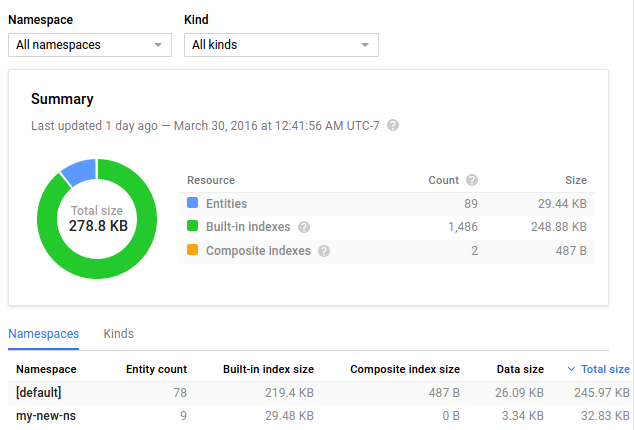
Datastore Dashboard

For more information about the statistics on this page, see Viewing Statistics in the Console.

Viewing indexes

  1. In the Google Cloud console, go to the Databases page.

    Go to Databases

  2. Select the required database from the list of databases.

  3. In the navigation menu, click Indexes to view a table of your application's indexes.

For each index, you should see its status, such as whether it is ready to serve your application. You should also see the amount of storage space used by the index and the number of entries in each index.

Viewing entities

  1. In the Google Cloud console, go to the Databases page.

    Go to Databases

  2. Select the required database from the list of databases.

  3. In the navigation menu, click Datastore Studio to view the entities that your application stored in your database.

You should see:
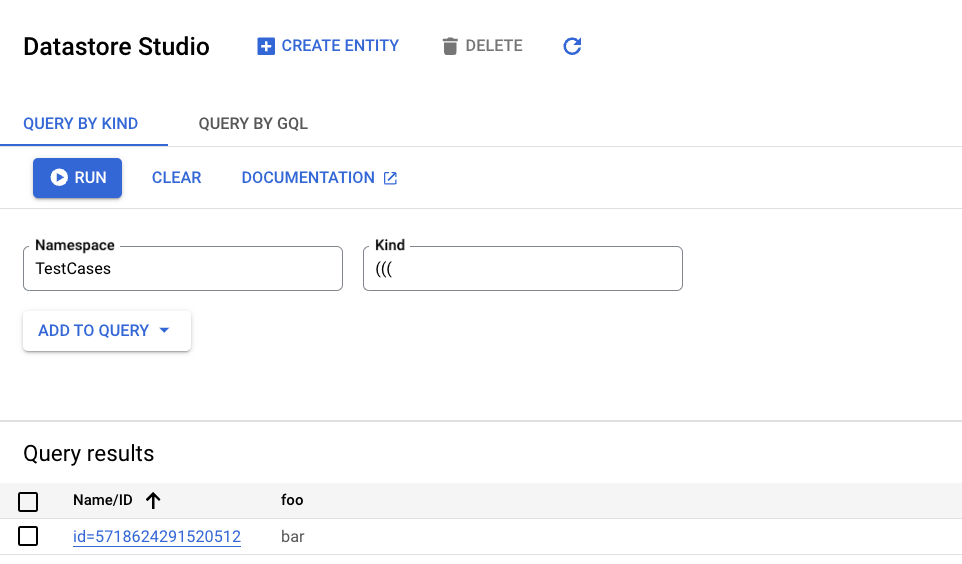
Datastore Studio page

You can also create, update, delete, and query entities on this page. Learn how in the Quickstart.

Note: While individual entities are removed almost immediately, a namespace container may remain visible for several days to a week after the final entity within it is removed.

What's next?

  • Get details about Statistics in the Console.

Except as otherwise noted, the content of this page is licensed under the Creative Commons Attribution 4.0 License, and code samples are licensed under the Apache 2.0 License. For details, see the Google Developers Site Policies. Java is a registered trademark of Oracle and/or its affiliates.

Last updated 2026-11-10 UTC.

You are visitor 01402503 — GeezerVison does not store the pages you look up.
Best viewed with Netscape Navigator 4.7 or Internet Explorer 6 at 800×600. No cookies required.