GeezerVisonThe World Wide Web, restored to 800 pixels of glory. | ||||||||||||||||
| Home|About|Gaming cabinet|Archives|How it works|Starter sites | ||||||||||||||||
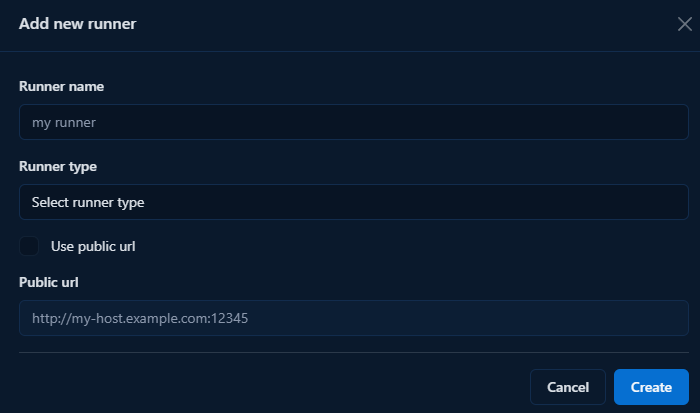
GeezerVison is showing docs.codebox.davidebianchi.eu — Runner - Codebox v0.0.62-rc3 documentation Runner¶To run workspaces, a runner is required. The runner connects to the Codebox server and is used to manage workspaces. You can find a guide here on how to set up a runner. Warning A runner can be connected to only one server. If you want to share a machine across multiple Codebox instances, you need to define a separate runner for each instance. Warning A runner can be registered only by administrators. Register new runner¶Before starting a new runner instance, you must first register it on the Codebox server. This process will generate a token and an ID for the runner. You can find a guide on how to create a new runner here:
Deploy the runner¶The recommended installation procedure involves using the Docker stack defined in the Docker Compose installation (recommended)¶Warning Docker and Docker Compose are required, please install them before proceeding. To install Codebox Runner, the first step is to download the wget https://gitlab.com/api/v4/projects/69007830/repository/files/docker-compose.yml/raw?ref=main -O docker-compose.yml or if you prefer to use curl: curl --output docker-compose.yml "https://gitlab.com/api/v4/projects/69007830/repository/files/docker-compose.yml/raw?ref=main" The stack requires some configuration provided by environment variables to start:
Now you can start your Docker stack: docker compose up Note You can also launch a Codebox Runner using Portainer by creating a new stack and copying the contents of the Debian package installation¶As an alternative to the containerized deployment, Codebox Runner can be installed using the Debian package available from the project’s release page. Note The Docker Compose deployment remains the recommended installation method. When using the Debian package, Docker, Docker Compose and Dev Containers support must be installed and configured manually on the host machine. Install the package using your preferred package manager: sudo dpkg -i codebox-runner_<version>_amd64.deb The package installs and registers the sudo nano /etc/codebox-runner/codebox-runner.env Configure the following variables:
Once the configuration file has been updated, start the service manually for the first time: sudo systemctl start codebox-runner You can verify that the runner is running correctly with: sudo systemctl status codebox-runner Updating the runner¶The update procedure depends on the installation method used. Docker Compose deployment¶When using the Docker deployment, updating the runner simply requires changing the image tag in the docker compose pull docker compose up -d Debian package installation¶When using the Debian package, updating the runner consists of installing the new package version: sudo dpkg -i codebox-runner_<new_version>_amd64.deb The installation process automatically updates the existing installation and restarts the Timeouts¶The Codebox runner has specific timeouts for its start, stop, and delete operations. These are implemented to prevent a workspace from becoming unrecoverable. The default values are:
These values can be overridden using environment variables:
| ||||||||||||||||
| You are visitor 01402775 — GeezerVison does not store the pages you look up. Best viewed with Netscape Navigator 4.7 or Internet Explorer 6 at 800×600. No cookies required. |