GeezerVisonThe World Wide Web, restored to 800 pixels of glory. |
| Home|About|Gaming cabinet|Archives|How it works|Starter sites |
GeezerVison is showing docs.flightsimulator.com — SimConnect SDK SIMCONNECT SDKThe SimConnect SDK can be used by programmers to write add-on components that communicate with Microsoft Flight Simulator 2020. Both in-process modules and out-of-process executables have access to the SimConnect API, noting the following:
Typically the components and modules using the SimConnect SDK will perform one or more of the following:
The pages available in this section are:
You can find information on how you can use the DevMode SimConnect debug tool to help you find issues and errors with your SimConnect apps here:
You can also find additional helpful information from the following pages:
Finally, there are some pages relating to legacy files that could be used for configuring and debugging SimConnect client/server communications (these files can still be used, although it's not recommended any longer and the functionality may be removed or changed in the future):
SetupThis section describes how to set up a working development environment for SimConnect.
WebAssembly ModulesWebAssembly modules can use SimConnect internally, provided as part of the SDK. It is only required to
C/C++ ProjectsTo build SimConnect add-ons, the recommended Visual Studio version is Visual Studio 2019, with a minimum version of 2005. To build the project, make sure you have completed the following steps.
For out-of-process applications, start a new Console Application project if the add-on will have no user interface. Start a new MFC Application if the add-on will have a user interface. In either case, set the platform as include "SimConnect.h" The dependencies can be either configured Using the Property Manager, or via Manual Configuration.
Using the Property ManagerThe SDK now provides Visual Studio property sheet. It can be included in: Property Manager -> (select project) -> Add Existing Property Sheet And selecting the Property Sheet provided in the SDK: $(MSFS_SDK)\SimConnect SDK\VS\SimConnectClient.props
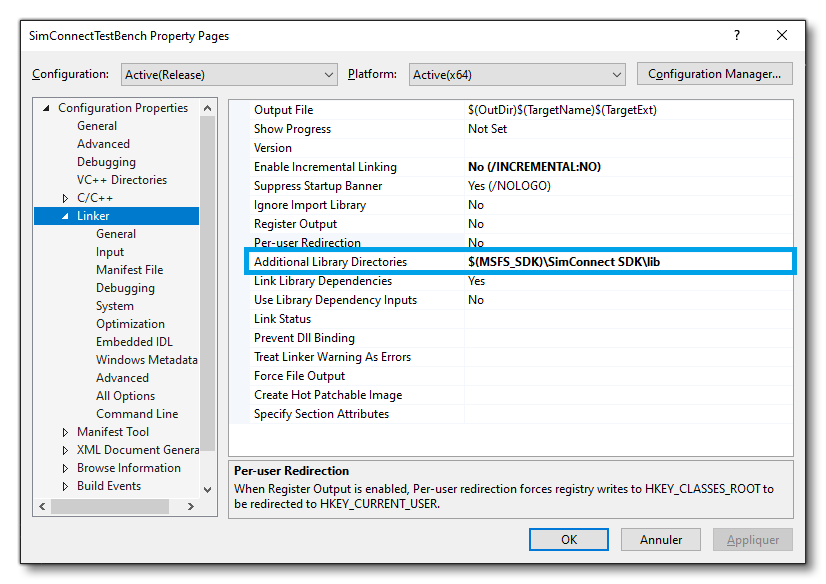
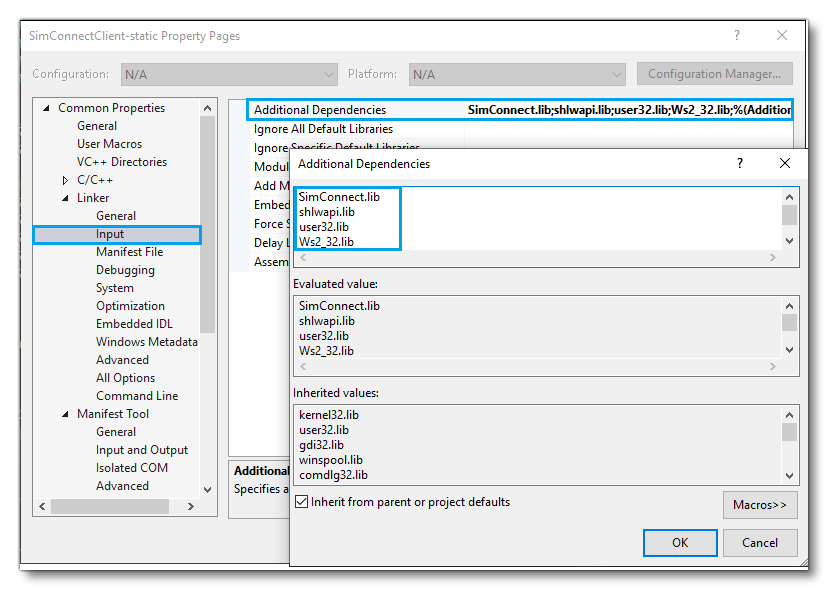
Manual ConfigurationAlternatively, the configuration can be performed manually, by performing the following steps:
C# / .NET / VB.NET ProjectsFor C#, or other .NET language add-ons, refer to the special section on Programming SimConnect Clients using Managed Code, but general procedure is:
Design ConsiderationsThe design of a SimConnect add-on involves writing a client to communicate with a server running within Microsoft Flight Simulator 2020. The client opens up communications with the server, then requests that certain events and certain object information is passed to it. The client then waits for the information to be received from the server, and then processes it appropriately.
The recommended method of writing an add-on is to build it out-of-process as an application (an
SimConnect makes extensive use of ID numbers defined by the client. There are ID numbers for requests, data definitions, events, groups, and so on. These ID numbers should be unique for the client. Re-using an ID will result in the previous call using that ID becoming obsolete, and thus being ignored by the server.
|
| You are visitor 01402792 — GeezerVison does not store the pages you look up. Best viewed with Netscape Navigator 4.7 or Internet Explorer 6 at 800×600. No cookies required. |