GeezerVisonThe World Wide Web, restored to 800 pixels of glory. | ||||||||||||||||||||||||||||||||||
| Home|About|Gaming cabinet|Archives|How it works|Starter sites | ||||||||||||||||||||||||||||||||||
GeezerVison is showing docs.gradle.org — The Java Platform Plugin The Java Platform Plugin
version 9.9.3
The Java Platform plugin brings the ability to declare platforms for the Java ecosystem. A platform can be used for different purposes:
A platform is a special kind of software component which doesn’t contain any sources: it is only used to reference other libraries, so that they play well together during dependency resolution. Platforms can be published as Gradle Module Metadata and Maven BOMs.
UsageTo use the Java Platform plugin, include the following in your build script: build.gradle.kts
build.gradle
API and runtime separationA major difference between a Maven BOM and a Java platform is that in Gradle dependencies and constraints are declared and scoped to a configuration and the ones extending it. While many users will only care about declaring constraints for compile time dependencies, thus inherited by runtime and tests ones, it allows declaring dependencies or constraints that only apply to runtime or test. For this purpose, the plugin exposes two configurations that can be used to declare dependencies: build.gradle.kts
build.gradle
Note that this example makes use of constraints and not dependencies. In general, this is what you would like to do: constraints will only apply if such a component is added to the dependency graph, either directly or transitively. This means that all constraints listed in a platform would not add a dependency unless another component brings it in: they can be seen as recommendations.
By default, in order to avoid the common mistake of adding a dependency in a platform instead of a constraint, Gradle will fail if you try to do so. If, for some reason, you also want to add dependencies in addition to constraints, you need to enable it explicitly: build.gradle.kts
build.gradle
Dependency configurationsThe Java Platform plugin adds the configurations described below. Configuration diagramThe diagram below shows how the Java Platform plugin’s configurations relate to each other. For an explanation of what it means for a configuration to be declarable, resolvable, or consumable, see Declarable, Resolvable, and Consumable configurations. 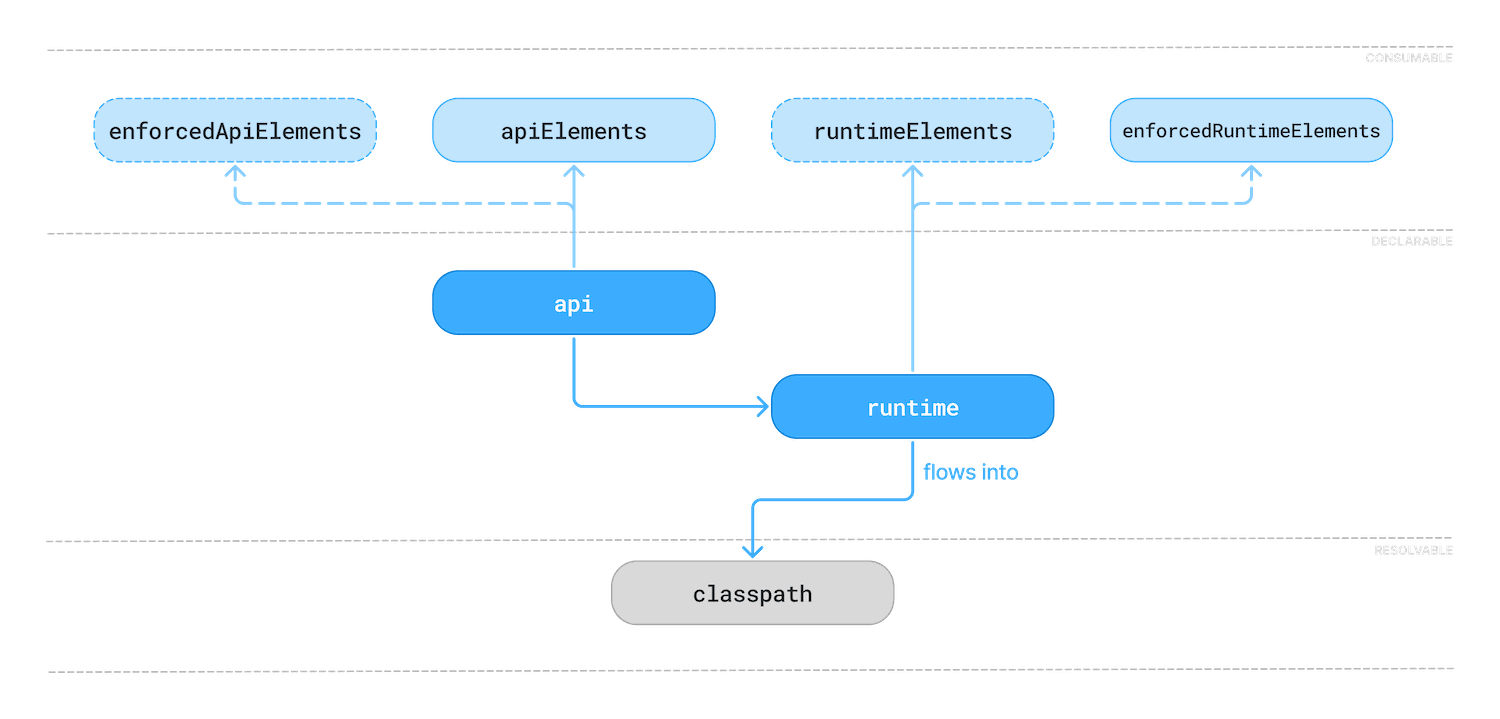
The tables below give the full reference for each configuration shown above. Declarable Configurations
Consumable Configurations
Resolvable Configurations
Local project constraintsIf you have a multi-project build and want to publish a platform that links to subprojects, you can do it by declaring constraints on the subprojects which belong to the platform, as in the example below: build.gradle.kts
build.gradle
The project notation will become a classical Sourcing constraints from another platformSometimes the platform you define is an extension of another existing platform. In order to have your platform include the constraints from that third party platform, it needs to be imported as a build.gradle.kts
build.gradle
Publishing platformsPublishing Java platforms is done by applying the build.gradle.kts
build.gradle
This will generate a BOM file for the platform, with a Consuming platformsBecause a Java Platform is a special kind of component, a dependency on a Java platform has to be declared using the build.gradle.kts
build.gradle
And then have subprojects depend on the platform to get recommendations: build.gradle.kts
build.gradle
| ||||||||||||||||||||||||||||||||||
| You are visitor 01402775 — GeezerVison does not store the pages you look up. Best viewed with Netscape Navigator 4.7 or Internet Explorer 6 at 800×600. No cookies required. |