GeezerVison is showing docs.gradle.org — The Java Plugin
The Java Plugin
version 9.9.3
The Java plugin adds Java compilation along with testing and bundling capabilities to a project.
It serves as the basis for many of the other JVM language Gradle plugins.
You can find a comprehensive introduction and overview to the Java Plugin in the Building Java Projects chapter.
|
|
As indicated above, this plugin adds basic building blocks for working with JVM projects.
Its feature set has been superseded by other plugins, offering more features based on your project type.
Instead of applying it directly to your project, you should look into the java-library or application plugins or one of the supported alternative JVM language.
|
To use the Java plugin, include the following in your build script:
The Java plugin adds a number of tasks to your project, as shown below.
compileJava — JavaCompile-
Depends on: All tasks which contribute to the compilation classpath, including jar tasks from projects that are on the classpath via project dependencies
Compiles production Java source files using the JDK compiler.
processResources — ProcessResources-
Copies production resources into the production resources directory.
classes-
Depends on: compileJava, processResources
This is an aggregate task that just depends on other tasks.
Other plugins may attach additional compilation tasks to it.
compileTestJava — JavaCompile-
Depends on: classes, and all tasks that contribute to the test compilation classpath
Compiles test Java source files using the JDK compiler.
processTestResources — Copy-
Copies test resources into the test resources directory.
testClasses-
Depends on: compileTestJava, processTestResources
This is an aggregate task that just depends on other tasks.
Other plugins may attach additional test compilation tasks to it.
jar — Jar-
Depends on: classes
Assembles the production JAR file, based on the classes and resources attached to the main source set.
javadoc — Javadoc-
Depends on: classes
Generates API documentation for the production Java source using Javadoc.
test — Test-
Depends on: testClasses, and all tasks which produce the test runtime classpath
Runs the unit tests using JUnit or TestNG.
clean — Delete-
Deletes the project build directory.
cleanTaskName — Delete-
Deletes files created by the specified task.
For example, cleanJar will delete the JAR file created by the jar task and cleanTest will delete the test results created by the test task.
For each source set you add to the project, the Java plugin adds the following tasks:
compileSourceSetJava — JavaCompile-
Depends on: All tasks which contribute to the source set’s compilation classpath
Compiles the given source set’s Java source files using the JDK compiler.
processSourceSetResources — Copy-
Copies the given source set’s resources into the resources directory.
sourceSetClasses — Task-
Depends on: compileSourceSetJava, processSourceSetResources
Prepares the given source set’s classes and resources for packaging and execution.
Some plugins may add additional compilation tasks for the source set.
The Java plugin attaches some of its tasks to the lifecycle tasks defined by the Base Plugin — which the Java Plugin applies automatically — and it also adds a few other lifecycle tasks:
assemble-
Depends on: jar
Aggregate task that assembles all the archives in the project.
This task is added by the Base Plugin.
check-
Depends on: test
Aggregate task that performs verification tasks, such as running the tests.
Some plugins add their own verification tasks to check.
You should also attach any custom Test tasks to this lifecycle task if you want them to execute for a full build.
This task is added by the Base Plugin.
build-
Depends on: check, assemble
Aggregate tasks that performs a full build of the project.
This task is added by the Base Plugin.
buildConfigName — task rule-
Depends on: all tasks that generate the artifacts attached to the named — ConfigName — configuration
Assembles the artifacts for the specified configuration.
This rule is added by the Base Plugin.
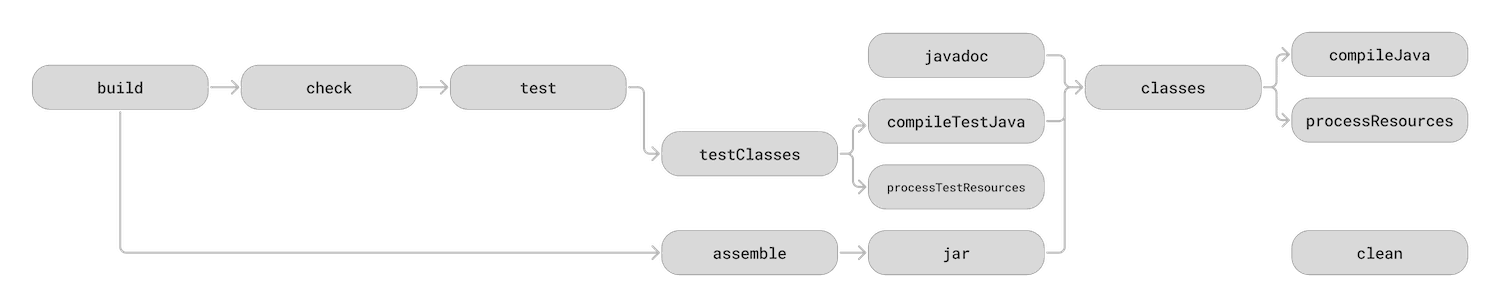
The following diagram shows the relationships between these tasks.
The Java plugin assumes the project layout shown below.
None of these directories need to exist or have anything in them.
The Java plugin will compile whatever it finds, and handles anything which is missing.
src/main/java-
Production Java source.
src/main/resources-
Production resources, such as XML and properties files.
src/test/java-
Test Java source.
src/test/resources-
Test resources.
src/sourceSet/java-
Java source for the source set named sourceSet.
src/sourceSet/resources-
Resources for the source set named sourceSet.
You configure the project layout by configuring the appropriate source set.
This is discussed in more detail in the following sections.
Here is a brief example which changes the main Java and resource source directories.
build.gradle.kts
sourceSets {
    main {
        java {
            setSrcDirs(listOf("src/java"))
        }
        resources {
            setSrcDirs(listOf("src/resources"))
        }
    }
}
build.gradle
sourceSets {
    main {
        java {
            srcDirs = ['src/java']
        }
        resources {
            srcDirs = ['src/resources']
        }
    }
}
main-
Contains the production source code of the project, which is compiled and assembled into a JAR.
test-
Contains your test source code, which is compiled and executed using JUnit or TestNG.
These are typically unit tests, but you can include any test in this source set as long as they all share the same compilation and runtime classpaths.
The following table lists some of the important properties of a source set.
You can find more details in the API documentation for SourceSet.
name — (read-only) String-
The name of the source set, used to identify it.
output — (read-only) SourceSetOutput-
The output files of the source set, containing its compiled classes and resources.
output.classesDirs — (read-only) FileCollection-
Default value: layout.buildDirectory.dir("classes/java/$name"), e.g. build/classes/java/main
The directories to generate the classes of this source set into.
May contain directories for other JVM languages, e.g. build/classes/kotlin/main.
output.resourcesDir — File-
Default value: layout.buildDirectory.dir("resources/$name"), e.g. build/resources/main
The directory to generate the resources of this source set into.
compileClasspath — FileCollection-
Default value: ${name}CompileClasspath configuration
The classpath to use when compiling the source files of this source set.
annotationProcessorPath — FileCollection-
Default value: ${name}AnnotationProcessor configuration
The processor path to use when compiling the source files of this source set.
runtimeClasspath — FileCollection-
Default value: $output, ${name}RuntimeClasspath configuration
The classpath to use when executing the classes of this source set.
java — (read-only) SourceDirectorySet-
The Java source files of this source set.
Contains only .java files found in the Java source directories, and excludes all other files.
java.srcDirs — Set<File>-
Default value: src/$name/java, e.g. src/main/java
The source directories containing the Java source files of this source set.
You can set this to any value that is described in this section.
java.destinationDirectory — DirectoryProperty-
Default value: layout.buildDirectory.dir("classes/java/$name"), e.g. build/classes/java/main
The directory to generate compiled Java sources into.
You can set this to any value that is described in this section.
resources — (read-only) SourceDirectorySet-
The resources of this source set.
Contains only resources, and excludes any .java files found in the resource directories.
Other plugins, such as the Groovy Plugin, exclude additional types of files from this collection.
resources.srcDirs — Set<File>-
Default value: [src/$name/resources]
The directories containing the resources of this source set.
You can set this to any type of value that is described in this section.
allJava — (read-only) SourceDirectorySet-
Default value: Same as java property
All Java files of this source set.
Some plugins, such as the Groovy Plugin, add additional Java source files to this collection.
allSource — (read-only) SourceDirectorySet-
Default value: Sum of everything in the resources and java properties
All source files of this source set of any language.
This includes all resource files and all Java source files.
Some plugins, such as the Groovy Plugin, add additional source files to this collection.
Adding a JAR containing the classes of a source set:
build.gradle.kts
tasks.register<Jar>("intTestJar") {
    from(sourceSets["intTest"].output)
}
build.gradle
tasks.register('intTestJar', Jar) {
    from sourceSets.intTest.output
}
Generating Javadoc for a source set:
build.gradle.kts
tasks.register<Javadoc>("intTestJavadoc") {
    source(sourceSets["intTest"].allJava)
    classpath = sourceSets["intTest"].compileClasspath
}
build.gradle
tasks.register('intTestJavadoc', Javadoc) {
    source sourceSets.intTest.allJava
    classpath = sourceSets.intTest.compileClasspath
}
Adding a test suite to run the tests in a source set:
build.gradle.kts
tasks.register<Test>("intTest") {
    testClassesDirs = sourceSets["intTest"].output.classesDirs
    classpath = sourceSets["intTest"].runtimeClasspath
}
build.gradle
tasks.register('intTest', Test) {
    testClassesDirs = sourceSets.intTest.output.classesDirs
    classpath = sourceSets.intTest.runtimeClasspath
}
The Java plugin adds a number of dependency configurations to your project, as shown below.
Tasks such as compileJava and test then use one or more of those configurations to get the corresponding files and use them, for example by placing them on a compilation or runtime classpath.
The role of each configuration is described in the following tables.
|
|
For information on the default and archives configurations, please consult the
Base Plugin reference documentation.
|
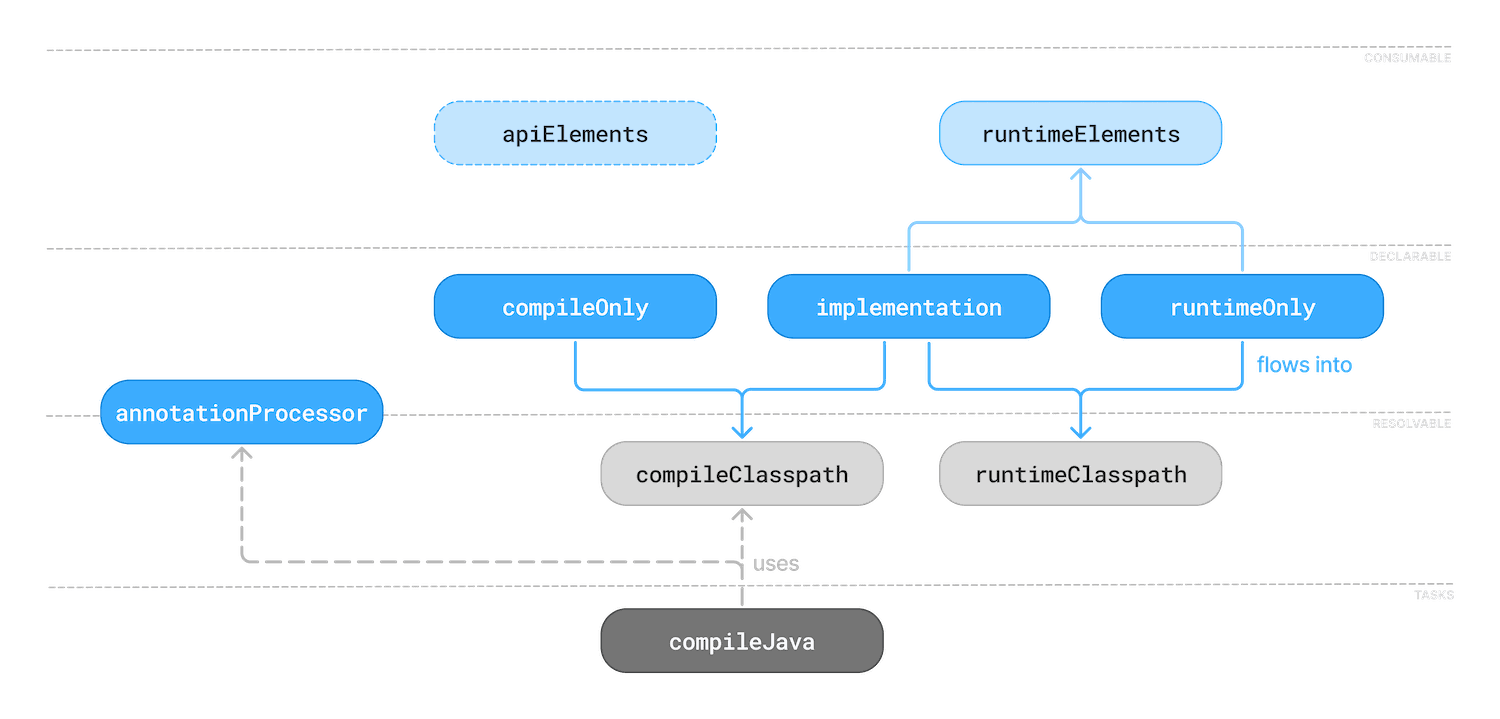
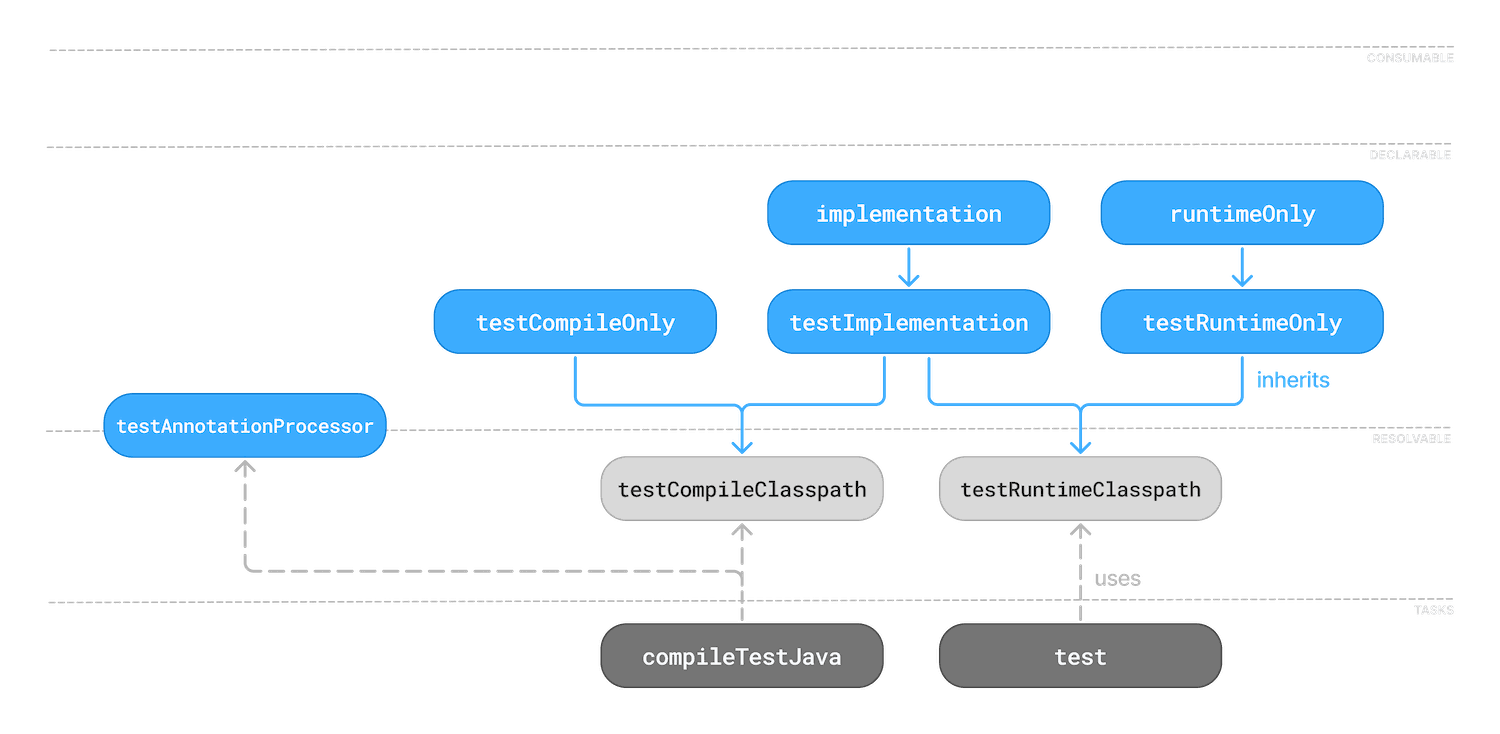
The diagrams below show how the Java plugin’s configurations relate to each other and to the tasks that use them, for the main and test source sets.
For an explanation of what it means for a configuration to be declarable, resolvable, or consumable, see Declarable, Resolvable, and Consumable configurations.
The tables below give the full reference for each configuration shown above.
| Configuration name |
Role |
Description |
implementation
|
Declarable |
Represents dependencies that are required both at compile time and runtime for the main source set of a project (i.e., implementation only dependencies). |
compileOnly
|
Declarable |
Represents dependencies that are required only at compile time and are not included in the runtime classpath (i.e., compile time only dependencies, not used at runtime). |
runtimeOnly
|
Declarable |
Represents dependencies that are required only at runtime and are not included in the compile classpath (i.e., dependencies required only at runtime). |
testImplementation (extends implementation)
|
Declarable |
Represents dependencies that are required both at compile time and runtime for the test source set of a project (i.e., implementation only dependencies for tests). |
testCompileOnly
|
Declarable |
Represents dependencies that are required only at compile time for the test source set of a project and are not included in the runtime classpath (i.e., additional dependencies only for compiling tests, not used at runtime). |
testRuntimeOnly (extends runtimeOnly)
|
Declarable |
Represents dependencies that are required only at runtime for the test source set of a project (i.e., runtime only dependencies for running tests). |
annotationProcessor
|
Declarable |
Represents annotation processors used during the compilation of a project’s source code (i.e., annotation processors used during compilation). |
| Configuration name |
Role |
Description |
apiElements
|
Consumable |
Represents the elements exposed to consumers that compile against this project, such as other projects that depend on it or components published from it. Under the Java Plugin alone, this configuration carries no declared dependencies of its own — it exposes only this project’s compiled classes. The Java Library Plugin adds the api and compileOnlyApi configurations, whose dependencies are then also exposed here. |
runtimeElements (extends runtimeOnly, implementation)
|
Consumable |
Represents the elements exposed to consumers that run against this project, such as other projects that depend on it or components published from it. Includes the dependencies from both runtimeOnly and implementation configurations, since implementation dependencies are required at runtime even though they are not part of the compile-time API. |
| Configuration name |
Role |
Description |
compileClasspath (extends compileOnly, implementation)
|
Resolvable |
Represents the classpath used when compiling the main sources, which includes dependencies from both compileOnly and implementation configurations. Used by the compileJava task. |
runtimeClasspath (extends runtimeOnly, implementation)
|
Resolvable |
Represents the classpath used to run the main sources, which includes dependencies from both runtimeOnly and implementation configurations. |
testCompileClasspath (extends testCompileOnly, testImplementation)
|
Resolvable |
Represents the classpath used to compile the test sources, which includes dependencies from both testCompileOnly and testImplementation configurations. Used by the compileTestJava task. |
testRuntimeClasspath (extends testRuntimeOnly, testImplementation)
|
Resolvable |
Represents the classpath used to run the test sources, which includes dependencies from both testRuntimeOnly and testImplementation configurations. Used by the test task. |
For each source set you add to the project, the Java plugins adds the following dependency configurations:
sourceSetImplementation-
Compile time dependencies for the given source set.
Used by sourceSetCompileClasspath, sourceSetRuntimeClasspath.
sourceSetCompileOnly-
Compile time only dependencies for the given source set, not used at runtime.
sourceSetCompileClasspath extends sourceSetCompileOnly, sourceSetImplementation-
Compile classpath, used when compiling source.
Used by compileSourceSetJava.
sourceSetAnnotationProcessor-
Annotation processors used during compilation of this source set.
sourceSetRuntimeOnly-
Runtime only dependencies for the given source set.
sourceSetRuntimeClasspath extends sourceSetRuntimeOnly, sourceSetImplementation-
Runtime classpath contains elements of the implementation, as well as runtime only elements.
The Java plugin adds the java extension to the project.
This allows you to configure a number of Java-related properties inside a dedicated DSL block.
build.gradle.kts
java {
    toolchain {
        languageVersion = JavaLanguageVersion.of(17)
    }
}
build.gradle
java {
    toolchain {
        languageVersion = JavaLanguageVersion.of(17)
    }
}
Below is the list of properties and DSL functions with short explanations available inside the java extension.
toolchain-
Java toolchain to be used by tasks using JVM tools, such as compilation and execution.
Default value: build JVM toolchain.
JavaVersion sourceCompatibility-
Java version compatibility to use when compiling Java source.
Default value: language version of the toolchain from this extension.
Note that using a toolchain is preferred to using a compatibility setting for most cases.
JavaVersion targetCompatibility-
Java version to generate classes for.
Default value: sourceCompatibility.
Note that using a toolchain is preferred to using a compatibility setting for most cases.
withJavadocJar()-
Automatically packages Javadoc and creates a variant javadocElements with an artifact -javadoc.jar, which will be part of the publication.
withSourcesJar()-
Automatically packages source code and creates a variant sourceElements with an artifact -sources.jar, which will be part of the publication.
docsDir — DirectoryProperty-
The directory to generate documentation into.
Default value: layout.buildDirectory.dir("docs")
testResultsDir — DirectoryProperty-
The directory to generate test result .xml files into.
Default value: layout.buildDirectory.dir("test-results")
testReportDir — DirectoryProperty-
The directory to generate the test report into. Default value: reporting.baseDirectory.dir("tests"), e.g. build/reports/tests
|
|
The directories for library archives (libs) and distributions (distributions), along with the archive base name, are configured on the base extension — via base.libsDirectory, base.distsDirectory, and base.archivesName respectively.
|
(read-only) SourceSetContainer sourceSets-
Contains the project’s source sets.
Default value: Not null SourceSetContainer
Manifest manifest-
The manifest to include in all JAR files.
Default value: an empty manifest.
modularity.inferModulePath-
Controls whether Gradle infers the module path (instead of the classpath) for tasks that have a module-info.java.
See Building Modules for the Java Module System.
Default value: true
consistentResolution(Action)-
Configures dependency resolution consistency so that the compile and runtime classpaths of the project resolve to the same dependency versions. Incubating.
(read-only) boolean autoTargetJvmDisabled-
Tells whether automatic JVM targeting is disabled.
When enabled (the default), Gradle refuses to use a dependency built for a more recent JVM than this module’s target compatibility.
Default value: false
components.java-
A SoftwareComponent for publishing the production JAR created by the jar task.
This component includes the runtime dependency information for the JAR.
Gradle comes with a sophisticated incremental Java compiler that is active by default.
This gives you the following benefits
-
Incremental builds are much faster.
-
The smallest possible number of class files are changed.
Classes that don’t need to be recompiled remain unchanged in the output directory.
An example scenario when this is really useful is using JRebel — the fewer output classes are changed the quicker the JVM can use refreshed classes.
To help you understand how incremental compilation works, the following provides a high-level overview:
-
Gradle will recompile all classes affected by a change.
-
A class is affected if it has been changed or if it depends on another affected class.
This works no matter if the other class is defined in the same project, another project or even an external library.
-
A class’s dependencies are determined from type references in its bytecode or symbol analysis via a compiler plugin.
-
Since source-retention annotations are not visible in bytecode, changes to a source-retention annotation will result in full recompilation.
-
You can improve incremental compilation performance by applying good software design principles like loose coupling.
For instance, if you put an interface between a concrete class and its dependents, the dependent classes are only recompiled when the interface changes, but not when the implementation changes.
-
The class analysis is cached in the project directory, so the first build after a clean checkout can be slower. Consider turning off the incremental compiler on your build server.
-
The class analysis is also an output stored in the build cache, which means that if a compilation output is fetched from the build cache, then the incremental compilation analysis will be too and the next compilation will be incremental.
-
If you are using an annotation processor that reads resources (e.g. a configuration file), you need to declare those resources as an input of the compile task.
-
If a resource file is changed, Gradle will trigger a full recompilation.
-
Using a custom executable or javaHome deactivates some optimizations.
The compile task does not use incremental build immediately after a compile error or if a Java constant changes.
Use toolchains instead if possible.
-
Having a source structure that does not match the package names, while legal for compilation, might end up causing trouble in the toolchain.
Even more if annotation processing and caching are involved.
Starting with Gradle 4.7, the incremental compiler also supports incremental annotation processing.
All annotation processors need to opt in to this feature, otherwise they will trigger a full recompilation.
As a user you can see which annotation processors are triggering full recompilations in the --info log.
Incremental annotation processing will be deactivated if a custom executable or javaHome is configured on the compile task.
Gradle supports incremental compilation for two common categories of annotation processors: "isolating" and "aggregating".
Please consult the information below to decide which category fits your processor.
You can then register your processor for incremental compilation using a file in the processor’s META-INF directory.
The format is one line per processor, with the fully qualified name of the processor class and its case-insensitive category separated by a comma.
processor/src/main/resources/META-INF/gradle/incremental.annotation.processors
org.gradle.EntityProcessor,isolating
org.gradle.ServiceRegistryProcessor,dynamic
If your processor can only decide at runtime whether it is incremental or not, you can declare it as "dynamic" in the META-INF descriptor
and return its true type at runtime using the Processor#getSupportedOptions() method.
processor/src/main/java/org/gradle/ServiceRegistryProcessor.java
@Override
public Set<String> getSupportedOptions() {
    return Collections.singleton("org.gradle.annotation.processing.aggregating");
}
Both categories have the following limitations:
-
They can only read CLASS or RUNTIME retention annotations.
-
They can only read parameter names if the user passes the -parameters compiler argument.
-
They must generate their files using the Filer API.
Writing files any other way will result in silent failures later on, as these files won’t be cleaned up correctly.
If your processor does this, it cannot be incremental.
-
They must not depend on compiler-specific APIs like com.sun.source.util.Trees.
Gradle wraps the processing APIs, so attempts to cast to compiler-specific types will fail.
If your processor does this, it cannot be incremental, unless you have some fallback mechanism.
-
If they use Filer#createResource,
the location argument must be one of these values from StandardLocation: CLASS_OUTPUT, SOURCE_OUTPUT, or NATIVE_HEADER_OUTPUT.
Any other argument will disable incremental processing.
The fastest category, these look at each annotated element in isolation, creating generated files or validation messages for it.
For instance an EntityProcessor could create a <TypeName>Repository for each type annotated with @Entity.
processor/src/main/java/org/gradle/EntityProcessor.java
Set<? extends Element> entities = roundEnv.getElementsAnnotatedWith(entityAnnotation);
for (Element entity : entities) {
    createRepository((TypeElement) entity);
}
"Isolating" processors have the following additional limitations:
-
They must make all decisions (code generation, validation messages) for an annotated type based on information reachable from its AST.
This means you can analyze the types' super-class, method return types, annotations etc., even transitively.
But you cannot make decisions based on unrelated elements in the RoundEnvironment.
Doing so will result in silent failures because too few files will be recompiled later.
If your processor needs to make decisions based on a combination of otherwise unrelated elements, mark it as "aggregating" instead.
-
They must provide exactly one originating element for each file generated with the Filer API.
If zero or many originating elements are provided, Gradle will recompile all source files.
When a source file is recompiled, Gradle will recompile all files generated from it.
When a source file is deleted, the files generated from it are deleted.
These can aggregate several source files into one or more output files or validation messages.
For instance, a ServiceRegistryProcessor could create a single ServiceRegistry with one method for each type annotated with @Service.
processor/src/main/java/org/gradle/ServiceRegistryProcessor.java
JavaFileObject serviceRegistry = filer.createSourceFile("ServiceRegistry");
Writer writer = serviceRegistry.openWriter();
writer.write("public class ServiceRegistry {");
for (Element service : roundEnv.getElementsAnnotatedWith(serviceAnnotation)) {
    addServiceCreationMethod(writer, (TypeElement) service);
}
writer.write("}");
writer.close();
Gradle will always reprocess (but not recompile) all annotated files that the processor was registered for.
Gradle will always recompile any files the processor generates.
|
|
Many popular annotation processors support incremental annotation processing (see the table below).
Check with the annotation processor project directly for the most up-to-date information and documentation.
|
| Annotation Processor |
Supported since |
Details |
|
|
|
|
|
|
|
|
|
|
|
|
|
|
|
|
|
Hidden behind a feature toggle
|
|
|
2.18 Feature toggle support, 2.24 Enabled by default
|
|
|
Hidden behind a feature toggle
|
|
|
|
|
|
|
|
|
|
|
|
|
|
|
|
|
|
|
|
|
|
|
|
|
|
|
|
|
|
|
|
|
|
|
|
|
|
|
2.2.0 Feature toggle support, 2.3.0-alpha02 Enabled by default
|
|
|
|
|
|
|
|
|
|
|
|
|
|
|
|
|
|
|
|
|
|
|
|
|
|
|
Hidden behind a feature toggle
|
|
|
|
If a dependent project has changed in an ABI-compatible way (only its private API has changed), then Java compilation tasks will be up-to-date.
This means that if project A depends on project B and a class in B is changed in an ABI-compatible way (typically, changing only the body of a method), then Gradle won’t recompile A.
Some of the types of changes that do not affect the public API and are ignored:
-
Changing a method body
-
Changing a comment
-
Adding, removing or changing private methods, fields, or inner classes
-
Adding, removing or changing a resource
-
Changing the name of jars or directories in the classpath
-
Renaming a parameter
Since implementation details matter for annotation processors, they must be declared separately on the annotation processor path.
Gradle ignores annotation processors on the compile classpath.
build.gradle.kts
dependencies {
    // The dagger compiler and its transitive dependencies will only be found on annotation processing classpath
    annotationProcessor("com.google.dagger:dagger-compiler:2.44")

    // And we still need the Dagger library on the compile classpath itself
    implementation("com.google.dagger:dagger:2.44")
}
build.gradle
dependencies {
    // The dagger compiler and its transitive dependencies will only be found on annotation processing classpath
    annotationProcessor 'com.google.dagger:dagger-compiler:2.44'

    // And we still need the Dagger library on the compile classpath itself
    implementation 'com.google.dagger:dagger:2.44'
}
|