GeezerVisonThe World Wide Web, restored to 800 pixels of glory. |
| Home|About|Gaming cabinet|Archives|How it works|Starter sites |
GeezerVison is showing docs.lammps.org — 10.6.5. LAMMPS GitHub tutorial — LAMMPS documentation 10.6.5. LAMMPS GitHub tutorialwritten by Stefan Paquay, updated in 2026 by Axel Kohlmeyer This document describes how to use git and GitHub to contribute changes or additions you have made to LAMMPS to the official LAMMPS distribution. Contributions to LAMMPS are submitted as pull requests on GitHub, where they are automatically tested and reviewed by the LAMMPS developers before they are included. For more information on the requirements to have your code included into LAMMPS please see this page. This tutorial is meant for people with little or no experience with git
and GitHub. It uses the PreparationsCreate a GitHub accountFirst of all, you need a GitHub account. Go to GitHub and click on the “Sign up” button to create one. Install and configure gitYou need the git config --global user.name "Your Name" git config --global user.email "[email protected]" Set up access to GitHub with SSH keysTo upload (“push”) changes to GitHub, git has to authenticate you.
GitHub does not accept your account password for that. The simplest
way for use with the ssh-keygen -t ed25519 -C "[email protected]" and accept the default file location. Then display the public part of the key with: cat ~/.ssh/id_ed25519.pub
Copy the output and add it to your GitHub account: click on your profile picture in the top right corner of the GitHub website, select “Settings”, then “SSH and GPG keys”, then “New SSH key”, paste the key, and click on “Add SSH key”. Please see the GitHub documentation on SSH keys for more details. Note Alternatively, you can use the GitHub command-line tool and run Forking the repositoryYou cannot upload changes directly to the official LAMMPS repository. Instead you first create your own copy of it on GitHub, a so-called fork. Go to the LAMMPS repository on GitHub and click on the “Fork” button (1): 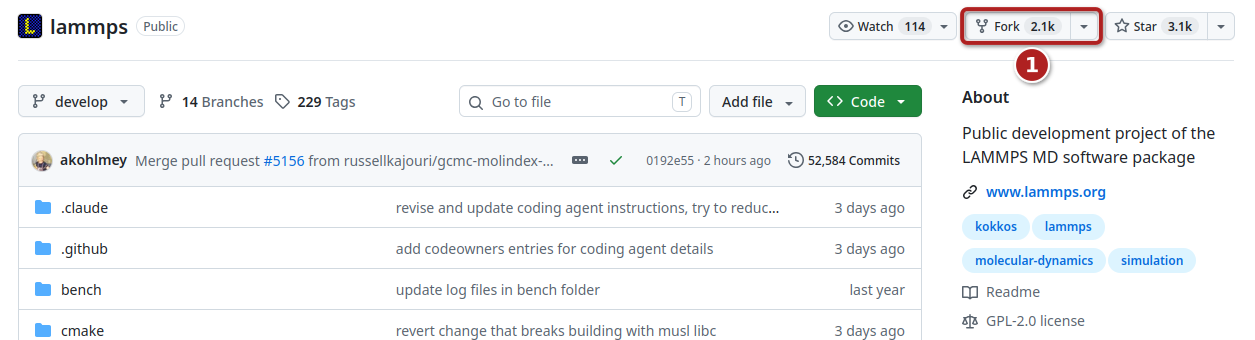
The “Fork” button on the LAMMPS GitHub page On the next page, keep the default settings and click on “Create fork” (1). The option “Copy the develop branch only” (2) should remain selected, since all contributions to LAMMPS must be based on the develop branch: 
Creating a fork of the LAMMPS repository This creates a fork of the LAMMPS repository under your GitHub account,
e.g. Working with your fork on your local machineClone your forkNext you create a local copy (a clone) of your fork on your machine. On the GitHub page of your fork, click on the “Code” button (1), select “SSH” (2), and copy the URL (3): 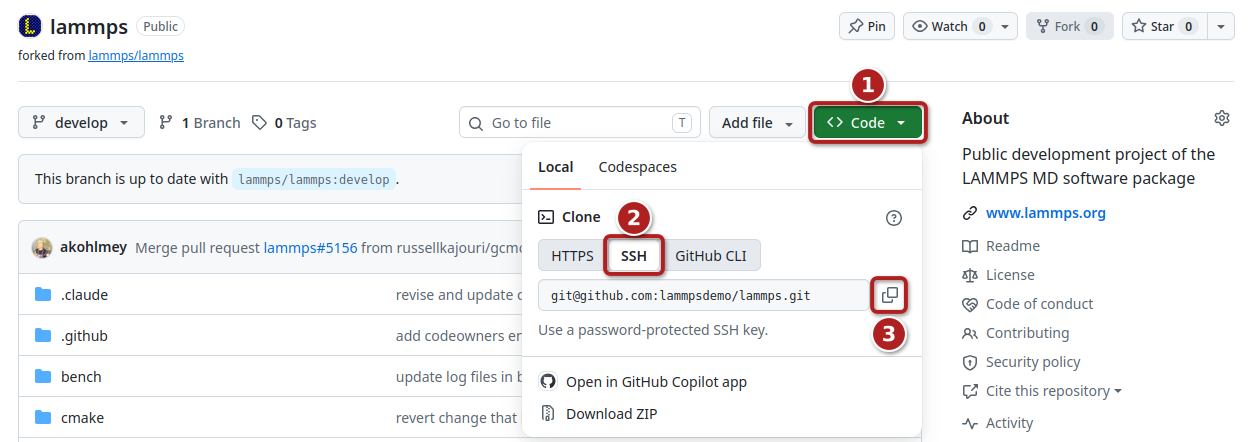
Copying the URL of your fork Then clone the repository and change into the new folder: git clone [email protected]:<your user name>/lammps.git cd lammps To be able to get the latest changes from the official LAMMPS repository later, add it as an additional remote repository named “upstream”: git remote add upstream https://github.com/lammps/lammps.git The command Create a feature branchAll changes for one specific feature or bug fix are made in a separate feature branch, which contains only the modifications relevant to that feature, e.g. for a new fix only its source and header files and its documentation. For every new feature or bug fix, create a new branch from the latest version of the develop branch of the official repository. In this example the branch is called “my-new-feature”: git fetch upstream git switch --no-track -c my-new-feature upstream/develop The Note Do not make changes in the develop branch of your fork, and never use the same branch for unrelated changes. This will make it much easier to keep your changes separate and to get them included into LAMMPS. Make and commit your changesNow make your changes, compile and test LAMMPS, and check that your
changes follow the requirements for contributions and the programming style.
The command git add src/EXTRA-FIX/fix_my_new_feature.cpp src/EXTRA-FIX/fix_my_new_feature.h git add doc/src/fix_my_new_feature.rst git commit -m "add fix my/new/feature" Warning Do not use You can make as many commits in your branch as you like. Upload your changes to GitHubTo upload (“push”) your branch to your fork on GitHub for the first time, use: git push -u origin my-new-feature After that, a plain Filing a pull requestSo far, all changes were made only in your copies of LAMMPS. To ask for your changes to be included into the official LAMMPS version, you need to file a pull request. After pushing a branch, GitHub shows a banner on the page of your fork (and the LAMMPS repository) with a “Compare & pull request” button (1): 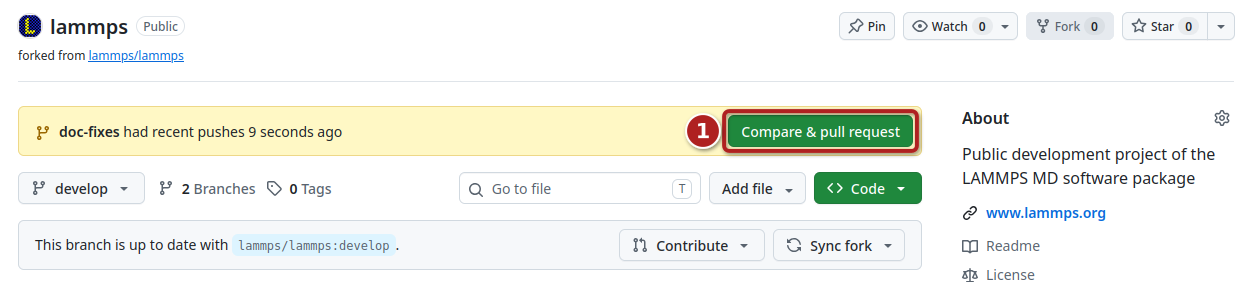
Starting a new pull request This opens the form for a new pull request: 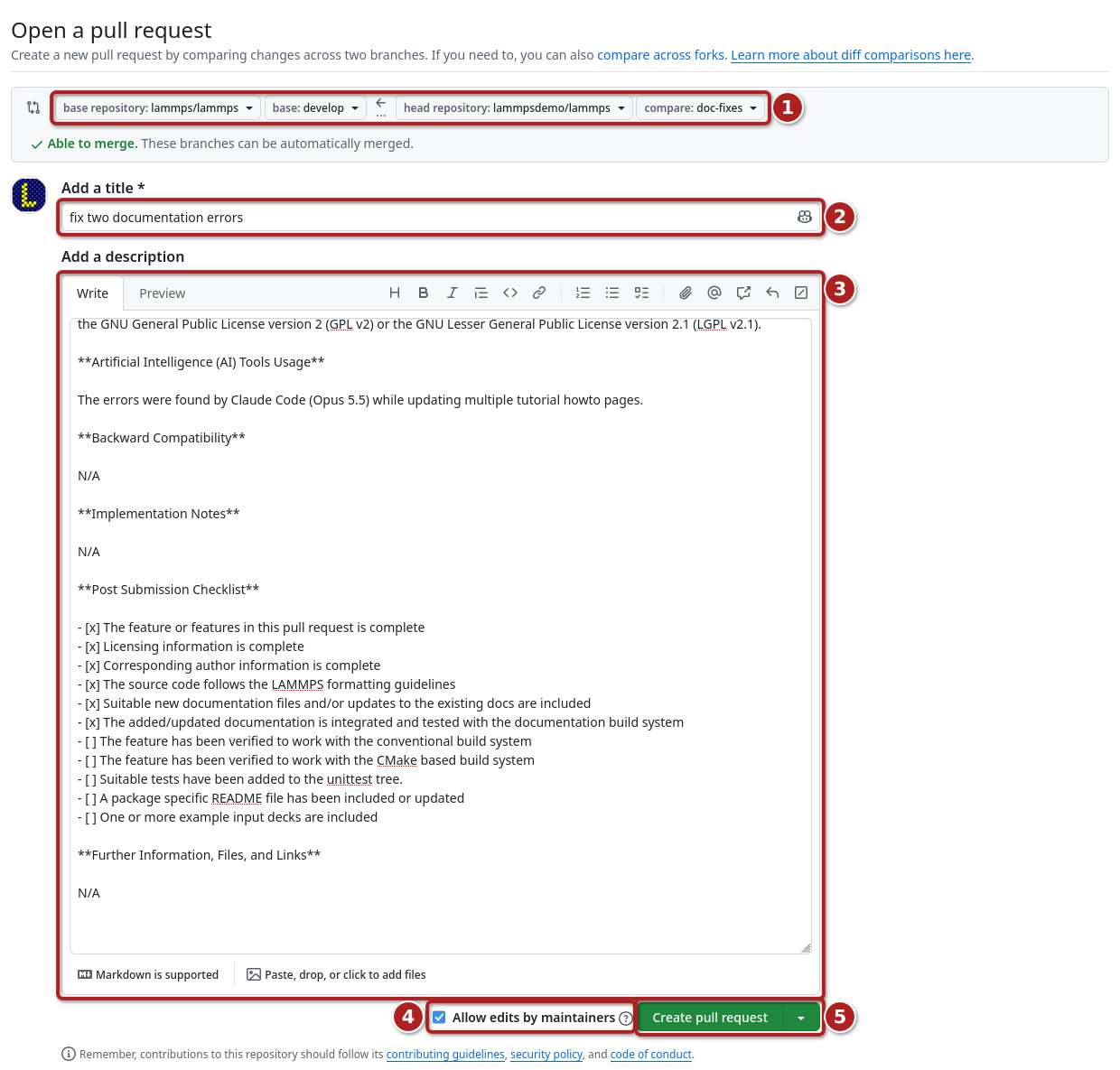
Creating a pull request Please check and fill in the following:
After filing a pull requestAutomated checksAfter filing the pull request, several automated checks are started. They test, for example, whether your changes compile on several platforms and with different settings, pass the unit tests, and follow some of the LAMMPS formatting conventions. The status of these checks is shown at the bottom of the “Conversation” tab of the pull request (1): 
Automated checks of a pull request If any of the checks are failing, your pull request will not be merged. Click on a failed check (or open the “Checks” tab) to see what went wrong. It is your responsibility to remove the reason(s) for the failed test(s). If you need help with this, please add a comment to the pull request explaining your problem. Updating a pull requestAny additional commits you push to your feature branch automatically become part of the pull request. After each push, the automated checks are run again. This way you can add changes that you forgot, or that were requested by the LAMMPS developers. LAMMPS developers may also push changes to your branch (if you allowed edits from maintainers). Thus, before continuing to work on your branch, always update your local copy first with: git pull
If the develop branch has changed in the meantime in a way that conflicts with your changes, you need to merge those changes into your branch, resolve the conflicts, and push the result: git fetch upstream git merge upstream/develop git push Note Please do not use Reviews, labels, and assignmentsEvery pull request is reviewed by LAMMPS developers. Some reviewers are requested automatically, since they are associated with the modified files in the .github/CODEOWNERS file. Reviewers and other developers may comment on your changes or request specific changes from you. Please respond to these comments; if requested changes are not addressed, your pull request cannot be merged. Before a pull request can be merged, it has to pass all automated tests and has to be approved by at least two LAMMPS developers with write access to the repository, where merging the pull request counts as one approval. The reviewers (1), the assigned LAMMPS developer (2), the labels (3), and the milestone (4) of the pull request are shown on the right side of the page: 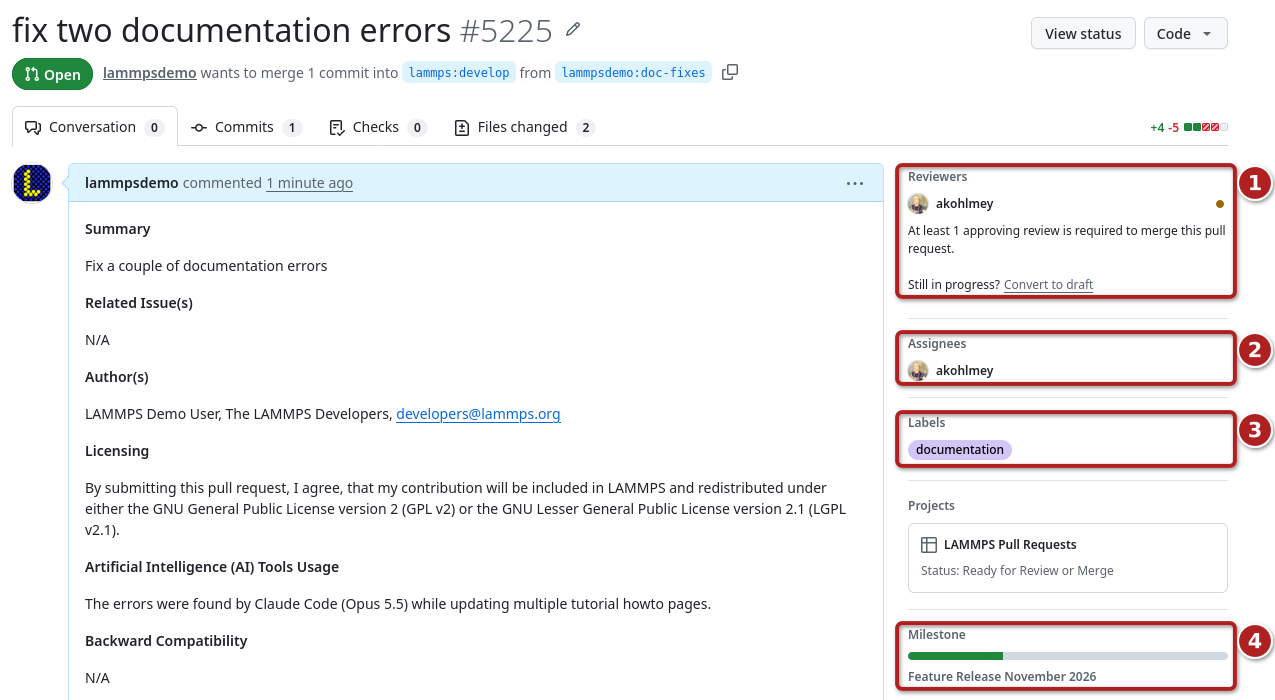
Reviewers, assignee, labels, and milestone of a pull request LAMMPS developers may assign a pull request to a developer who looks after it and determines what is needed before it can be merged. The milestone indicates the release in which the pull request is planned to be included. The labels are mostly for bookkeeping purposes, but a few of them are important: needs_work means that the pull request is not complete and changes from you are required, work_in_progress means that changes are still being made (by you or a LAMMPS developer), and ready_for_merge means that the pull request is considered complete and ready to be merged. Sometimes LAMMPS developers do not push changes to your branch directly,
but instead file a pull request in your fork (a “reverse pull
request”) for you to review. If you agree with the changes, you can
merge them on the GitHub page of that pull request, and then update your
local copy with Note Contributors of new packages or other significant contributions are invited to become LAMMPS project collaborators with “Triage” permissions. This allows them to help with reviewing pull requests and some administrative tasks, but their approvals are informational only. More details about the processing of pull requests by the LAMMPS developers are in the file doc/github-development-workflow.md. After the pull request is mergedWhen everything is fine, a LAMMPS developer will merge your pull request into the develop branch, and the pull request page shows a “Delete branch” button (1). Use it to delete the feature branch from your fork on GitHub, since it is no longer needed: 
A merged pull request Then update the develop branch on your local machine and delete the local feature branch: git switch develop git pull upstream develop git branch -d my-new-feature If you want to keep the develop branch of your fork on GitHub up to
date as well, use the “Sync fork” button on the GitHub page of your
fork, or push the updated local branch with Using the GitHub command-line toolMany of the steps on the GitHub website can also be done with the
GitHub command-line tool gh repo fork lammps/lammps --clone # create a fork and clone it gh pr create --draft # file a (draft) pull request for the current branch gh pr checks # show the status of the automated checks gh pr view --web # open the pull request in the web browser Please see the section on the GitHub command-line interface for more examples. LAMMPS branches and releasesAll new features and bug fixes are submitted to the develop branch. In addition, there are several other branches in the LAMMPS repository: the release branch is updated from the develop branch as part of a “feature release”, and stable (together with release) is updated from develop when a “stable release” is made. In between stable releases, selected bug fixes and infrastructure updates are back-ported from the develop branch to the maintenance branch and occasionally merged into stable as an update release. The release tags follow the pattern “patch_<Day><Month><Year>”, e.g. “patch_10Sep2025”. Stable releases have additional “stable_<Day><Month><Year>” tags, and update releases are tagged with “stable_<Day><Month><Year>_update<Number>”. |
| You are visitor 01402775 — GeezerVison does not store the pages you look up. Best viewed with Netscape Navigator 4.7 or Internet Explorer 6 at 800×600. No cookies required. |