AWS Lambda is a Serverless Function as a Service (FaaS) platform that lets you run code in your preferred programming language on the AWS ecosystem.
AWS Lambda automatically scales your code to meet demand and handles server provisioning, management, and maintenance.
AWS Lambda allows you to break down your application into smaller, independent functions that integrate seamlessly with AWS services.
LocalStack allows you to use the Lambda APIs to create, deploy, and test your Lambda functions.
The supported APIs are available on our API coverage section, which provides information on the extent of Lambda’s integration with LocalStack.
This guide is designed for users new to Lambda and assumes basic knowledge of the AWS CLI and our lstk aws command.
Start your LocalStack container using your preferred method.
We will demonstrate how to create a Lambda function with a Function URL.
With the Function URL property, you can call a Lambda Function via an HTTP API call.
With the Function URL property, there is now a new way to call a Lambda Function via HTTP API call using the CreateFunctionURLConfig API.
To create a URL for invoking the function, run the following command:
Terminal window
lstkawslambdacreate-function-url-config\
--function-namelocalstack-lambda-url-example\
--auth-typeNONE
This will generate a HTTP URL that can be used to invoke the Lambda function.
The URL will be in the format http://<XXXXXXXX>.lambda-url.us-east-1.localhost.localstack.cloud:4566.
The table below shows feature coverage for all supported event sources for the latest version of LocalStack.
Unlike API operation coverage, this table illustrates the functional and behavioural coverage of LocalStack’s Lambda Event Source Mapping implementation.
Where necessary, footnotes are used to provide additional context.
Lambda layers let you include additional code and dependencies in your Lambda functions.
With a valid LocalStack license, you can deploy Lambda Layers locally to streamline your development and testing process.
echo' print("Debug output from Lambda function")' >> /tmp/testlambda.py
(cd/tmp; ziptestlambda.ziptestlambda.py)
lstkawslambdacreate-function\
--function-namefunc1\
--runtimepython3.8\
--rolearn:aws:iam::000000000000:role/lambda-role\
--handlertestlambda.handler\
--timeout30\
--zip-filefileb:///tmp/testlambda.zip\
--layers$LAYER_ARN
Here, we’ve defined a Lambda function called handler() that imports the util() function from our layer1 Lambda Layer.
We then used the CreateFunction API to create this Lambda function in LocalStack, specifying the layer1 Lambda Layer as a dependency.
To test our Lambda function and see the output from the Lambda Layer, we can invoke the function and check the logs (with DEBUG=1 enabled).
Here’s an example:
If your Lambda function references a layer in real AWS, you can integrate it into your local dev environment by making it accessible to the 886468871268 AWS account ID.
This account is managed by LocalStack on AWS.
To grant access to your layer, run the following command:
Terminal window
awslambdaadd-layer-version-permission\
--layer-nametest-layer\
--version-number1\
--statement-idlayerAccessFromLocalStack\
--principal886468871268\
--actionlambda:GetLayerVersion
Replace test-layer and 1 with the name and version number of your layer, respectively.
After granting access, the next time you reference the layer in one of your local Lambda functions using the AWS Lambda layer ARN, the layer will be automatically pulled down and integrated into your local dev environment.
LocalStack provides local testing support for Lambda Managed Instances. We support all of the new APIs, as well as the CloudFormation and Terraform resource types. All the same configuration is therefore possible on your local machine, without needing to modify your infrastructure as code (IaC).
Lambda Durable Functions run checkpointed, replayable workflows that can continue for up to one year.
LocalStack supports durable executions for Node.js 22 and 24, Python 3.13 and 3.14, Java 17, 21, and 25, and .NET 8 and 10.
LocalStack currently has the following limitations:
KMSKeyArn is validated, stored, merged, and returned, but LocalStack does not use the key to encrypt durable execution data.
LocalStack does not emit durable execution monitoring events to CloudWatch or EventBridge.
LocalStack does not enforce API request-per-second throttling or the account-level running-executions quota.
LocalStack enforces the checkpoint protocol limits, including 3,000 operations and 100 MB of written state per execution.
Lambda Debug Mode supports durable executions.
Replays use the debug environment pinned to the execution, and LocalStack defers ExecutionTimeout while execution is paused at a breakpoint.
LocalStack uses a custom implementation of the
AWS Lambda Runtime Interface Emulator
to match the behavior of AWS Lambda as closely as possible while providing additional features
such as hot reloading.
We ship our custom implementation as a Golang binary, which gets copied into each Lambda container under /var/rapid/init.
This init binary is used as the entry point for every Lambda container.
Our custom implementation offers additional configuration options,
but these configurations are primarily intended for LocalStack developers and could change in the future.
The LocalStack configurationLAMBDA_DOCKER_FLAGS can be used to configure all Lambda containers,
for example LAMBDA_DOCKER_FLAGS=-e LOCALSTACK_INIT_LOG_LEVEL=debug.
Some noteworthy configurations include:
LOCALSTACK_INIT_LOG_LEVEL defines the log level of the Golang binary.
Values: trace, debug, info, warn (default), error, fatal, panic
LOCALSTACK_USER defines the system user executing the Lambda runtime.
Values: sbx_user1051 (default), root (skip dropping root privileges)
The full list of configurations is defined in the Golang function
InitLsOpts.
Lambda execution environments communicate back to the LocalStack container for runtime APIs, credentials, logs, and calls to emulated AWS services.
If your host, Docker daemon, or Kubernetes cluster injects http_proxy or https_proxy into Lambda containers, that internal traffic must bypass the proxy.
LocalStack automatically adds the configured LOCALSTACK_HOST host, and the runtime LOCALSTACK_HOSTNAME when present, to the Lambda execution environment’s no_proxy variable.
If your function already defines no_proxy, LocalStack preserves the existing entries and prepends the LocalStack hosts.
In Kubernetes deployments, make sure admission controllers or proxy-injection policies do not overwrite the no_proxy value after LocalStack creates Lambda pods.
If your cluster-level policy manages no_proxy, include the LocalStack host used by your deployment, for example localhost.localstack.cloud or the host configured through LOCALSTACK_HOST.
LocalStack provides various tools to help you develop, debug, and test your AWS Lambda functions more efficiently.
Hot reloading: With Lambda hot reloading, you can continuously apply code changes to your Lambda functions without needing to redeploy them manually.
To learn more about how to use hot reloading with LocalStack, check out our hot reloading documentation.
Remote debugging: LocalStack’s remote debugging functionality allows you to attach a debugger to your Lambda function using your preferred IDE.
To get started with remote debugging in LocalStack, see our debugging documentation.
Lambda VS Code Extension: LocalStack’s Lambda VS Code Extension supports deploying and invoking Python Lambda functions through AWS SAM or AWS CloudFormation.
To get started with the Lambda VS Code Extension, see our Lambda VS Code Extension documentation.
API for querying Lambda runtimes: LocalStack offers a metadata API to query the list of Lambda runtimes via GET http://localhost.localstack.cloud:4566/_aws/lambda/runtimes.
It returns the Supported Runtimes matching AWS parity (i.e., excluding deprecated runtimes) and offers additional filters for deprecated runtimes and all runtimes (GET /_aws/lambda/runtimes?filter=all).
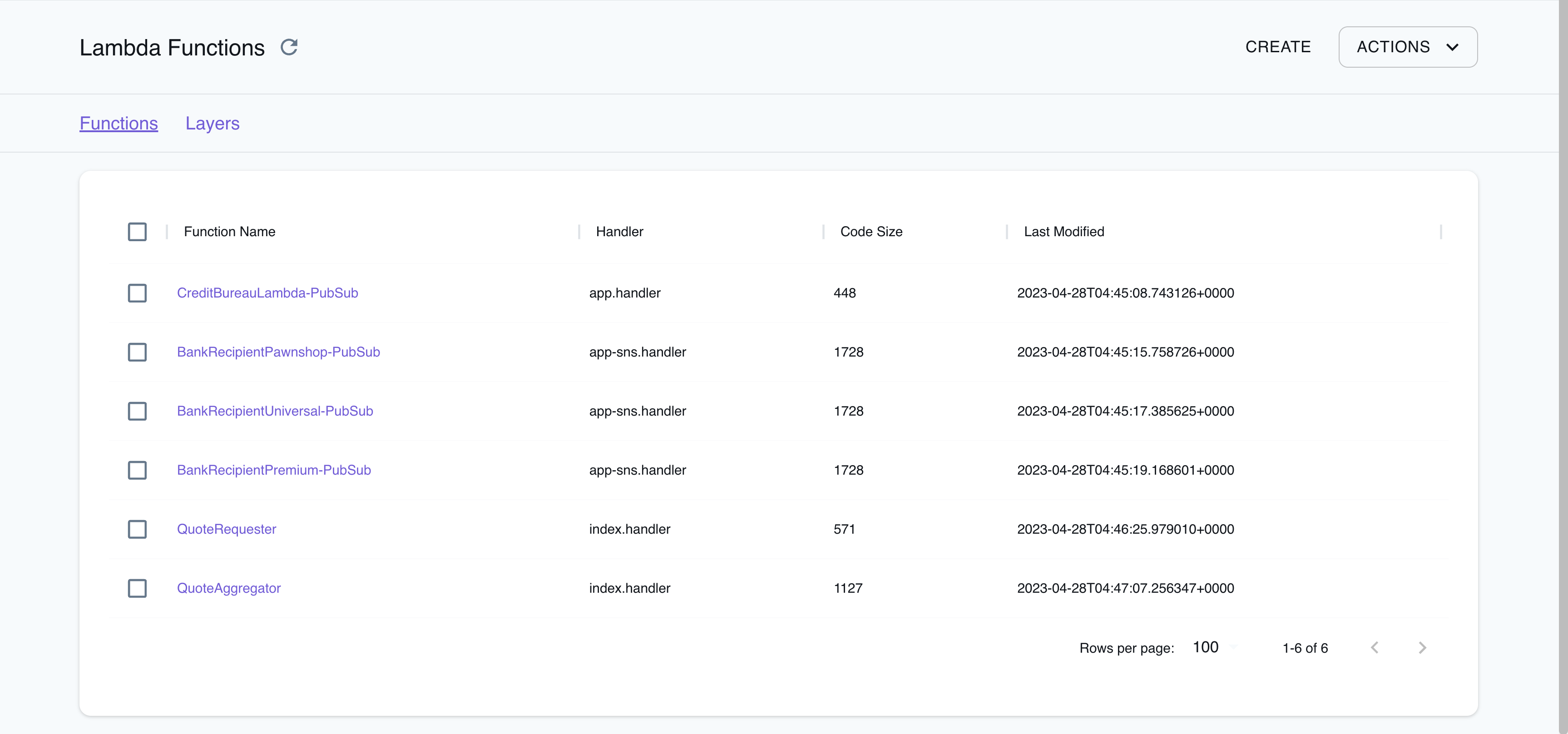
The LocalStack Web Application provides a Resource Browser for managing Lambda resources.
You can access the Resource Browser by opening the LocalStack Web Application in your browser, navigating to the Resources section, and then clicking on Lambda under the Compute section.
The Resource Browser displays Functions and Layers resources.
You can click on individual resources to view their details.
The Resource Browser allows you to perform the following actions:
Create Functions & Layers: Create a new Lambda function or a new Lambda Layer by clicking on Create API button on top-right and creating a new configuration by clicking on Submit button.
View Function & Layer Details: Click on any function or layer to view detailed information such as the resource’s name, ARN, runtime, handler, and more.
You can also navigate across different versions of the resource.
Delete Functions & Layers: To delete a function or layer, select the resource from the Resource Browser, click on the Remove Selected button at the top-right of the screen, and confirm the deletion by clicking on the Continue button.
As part of the LocalStack 2.0 release, the Lambda provider has been migrated to v2 (formerly known as asf).
With the new implementation, the following changes have been introduced:
To run Lambda functions in LocalStack, mount the Docker socket into the LocalStack container.
Add the following Docker volume mount to your LocalStack startup configuration: /var/run/docker.sock:/var/run/docker.sock.
You can find an example of this configuration in our official docker-compose.yml file.
The v2 provider discontinues Lambda Executor Modes such as LAMBDA_EXECUTOR=local.
Previously, this mode was used as a fallback when the Docker socket was unavailable in the LocalStack container, but many users unintentionally used it instead of the configured LAMBDA_EXECUTOR=docker.
The new provider now behaves similarly to the old docker-reuse executor and does not require such configuration.
The Lambda containers are now reused between invocations.
The changes made to the filesystem (such as in /tmp) will persist between subsequent invocations if the function is dispatched to the same container.
This is known as a warm start (see Operating Lambda for more information).
To ensure that each invocation starts with a fresh container, you can set the LAMBDA_KEEPALIVE_MS configuration option to 0 milliseconds, to force cold starts.
The platform uses official Docker base images pulled from public.ecr.aws/lambda/, instead of lambci, and supports both arm64 and x86_64 architectures.
The Lambda functions filesystem now matches the AWS Lambda production environment.
The ARM containers for compatible runtimes are based on Amazon Linux 2, and ARM-compatible hosts can create functions with the arm64 architecture.
Lambda functions in LocalStack resolve AWS domains, such as s3.amazonaws.com, to the LocalStack container.
This domain resolution is DNS-based and can be disabled by setting DNS_ADDRESS=0.
For more information, refer to Transparent Endpoint Injection.
Previously, LocalStack provided patched AWS SDKs to redirect AWS API calls transparently to LocalStack.
The new provider may generate more exceptions due to invalid input.
For instance, while the old provider accepted arbitrary strings (such as r1) as Lambda roles when creating a function, the new provider validates role ARNs using a regular expression that requires them to be in the format arn:aws:iam::000000000000:role/lambda-role.
However, it currently does not verify whether the role actually exists.
The new Lambda provider now follows the AWS Lambda state model, while creating and updating Lambda functions, which allows for asynchronous processing.
Functions are always created in the Pending state and move to Active once they are ready to accept invocations.
Previously, the functions were created synchronously by blocking until the function state was active.
The configuration LAMBDA_SYNCHRONOUS_CREATE=1 can force synchronous function creation, but it is not recommended.
LocalStack’s Lambda implementation, allows you to customize the Lambda execution environment using the Lambda Extensions API.
This API allows for advanced monitoring, observability, or developer tooling, providing greater control and flexibility over your Lambda functions.
Lambda functions can also be run on hosts with multi-architecture support, allowing you to leverage LocalStack’s Lambda API to develop and test Lambda functions with high parity.
The following configuration options from the old provider are discontinued in the new provider:
The LAMBDA_EXECUTOR and specifically, the LAMBDA_EXECUTOR=local options are no longer supported.
The LAMBDA_STAY_OPEN_MODE is now the default behavior and can be removed.
Instead, use the LAMBDA_KEEPALIVE_MS option to configure how long containers should be kept running in between invocations.
The LAMBDA_REMOTE_DOCKER option is not used anymore since the new provider automatically copies zip files and configures hot reloading.
The LAMBDA_CODE_EXTRACT_TIME option is no longer used because function creation is now asynchronous.
The LAMBDA_FALLBACK_URL, SYNCHRONOUS_KINESIS_EVENTS, SYNCHRONOUS_SNS_EVENTS and LAMBDA_FORWARD_URL options are currently not supported.
The LAMBDA_CONTAINER_REGISTRY option is not used anymore.
Instead, use the more flexible LAMBDA_RUNTIME_IMAGE_MAPPING option to customize individual runtimes.
The LAMBDA_XRAY_INIT option is no longer needed because the X-Ray daemon is always initialized.
However, the new provider still supports the following configuration options:
The BUCKET_MARKER_LOCAL option has a new default value, hot-reload.
The former default value __local__ is an invalid bucket name.
The LAMBDA_TRUNCATE_STDOUT option.
The LAMBDA_DOCKER_NETWORK option.
The LAMBDA_DOCKER_FLAGS option.
The LAMBDA_REMOVE_CONTAINERS option.
The LAMBDA_DOCKER_DNS option since LocalStack 2.2.
The HOSTNAME_FROM_LAMBDA option since LocalStack 3.0.
Lambda Hot Reloading shows how to use hot reloading to update function code and layers without having to redeploy them.
Lambda Function URL shows how to use HTTP to invoke a Lambda function via its Function URL.
Lambda Layers demonstrates how to use Lambda layers, which are reusable packages of code that can be shared across multiple functions.
Lambda PHP/Bref shows how to use PHP/Bref with and without fpm, using the Serverless framework and AWS CDK.
Lambda Container Images demonstrates how to use Lambda functions packaged as container images, which can be built using Docker and pushed to a local ECR registry.
Lambda X-Ray shows how to instrument Lambda functions for X-Ray using Powertools and the X-Ray SDK.
In the old Lambda provider, Lambda functions were executed within the LocalStack container using the local executor mode.
This mode was used as a fallback if the Docker socket was unavailable in the LocalStack container.
However, many users inadvertently used the local executor mode instead of the intended Docker executor mode, which caused unexpected behavior.
If you encounter the following error message, you may be using the local executor mode:
To fix this issue, add the Docker volume mount /var/run/docker.sock:/var/run/docker.sock to your LocalStack startup.
Refer to our sample docker-compose.yml file as an example.
If the function is still in the Pending state, the output will include a "State": "Pending" field and a "StateReason": "The function is being created." message.
Once the function is active, the "State" field will change to "Active" and the "LastUpdateStatus" field will indicate the status of the last update.
If you are using LocalStack versions prior to 2.0, and encounter a NotImplementedError in the LocalStack logs and an InternalFailure (501) error in the client while creating a Lambda function using the CreateFunction API, check your PROVIDER_OVERRIDE_LAMBDA configuration.
You might encounter this error if it is set to legacy.
The available Metadata properties may not have full parity with AWS depending on the event source (read more at Understanding event filtering basics). ↩
For SQS Standard, LocalStack spawns multiple concurrent pollers per event source mapping (LAMBDA_EVENT_SOURCE_MAPPING_SQS_POLLER_COUNT, default 5), and ScalingConfig.MaximumConcurrency caps the poller count when set. For SQS FIFO, a single poller is always used to preserve message-group ordering, so the scaling configuration is accepted but has no effect. ↩
For SQS Standard, only MinimumPollers is honored (it sets the poller count); MaximumPollers has no effect. For SQS FIFO, the single-poller model means the configuration is accepted but ignored. ↩
Was this page helpful?
You are visitor 01402503 — GeezerVison does not store the pages you look up. Best viewed with Netscape Navigator 4.7 or Internet Explorer 6 at 800×600. No cookies required.