GeezerVisonThe World Wide Web, restored to 800 pixels of glory. |
| Home|About|Gaming cabinet|Archives|How it works|Starter sites |
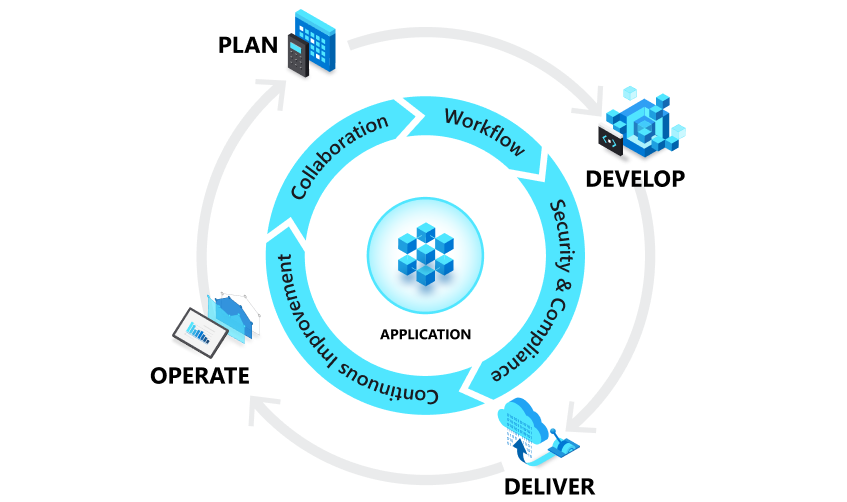
GeezerVison is showing learn.microsoft.com — What is DevOps? - Azure DevOps Note Access to this page requires authorization. You can try signing in or changing directories. Access to this page requires authorization. You can try changing directories. What is DevOps?DevOps combines development (Dev) and operations (Ops) to unite people, process, and technology in application planning, development, delivery, and operations. DevOps enables coordination and collaboration between formerly siloed roles like development, IT operations, quality engineering, and security. Teams adopt DevOps culture, practices, and tools to increase confidence in the applications they build, respond better to customer needs, and achieve business goals faster. DevOps helps teams continually provide value to customers by producing better, more reliable products. DevOps and the application lifecycleDevOps influences the application lifecycle throughout its planning, development, delivery, and operations phases. Each phase relies on the other phases, and the phases aren't role-specific. A DevOps culture involves all roles in each phase to some extent. The following diagram illustrates the phases of the DevOps application lifestyle:
DevOps goals and benefitsWhen a team adopts DevOps culture, practices, and tools, they can achieve amazing things:
Accelerate time to marketThrough increased efficiencies, improved team collaboration, automation tools, and continuous deployment--teams are able to rapidly reduce the time from product inception to market launch.
Adapt to the market and competitionA DevOps culture demands teams have a customer-first focus. By marrying agility, team collaboration, and focus on the customer experience, teams can continuously deliver value to their customers and increase their competitiveness in the marketplace.
Maintain system stability and reliabilityBy adopting continuous improvement practices, teams are able to build in increased stability and reliability of the products and services they deploy. These practices help reduce failures and risk.
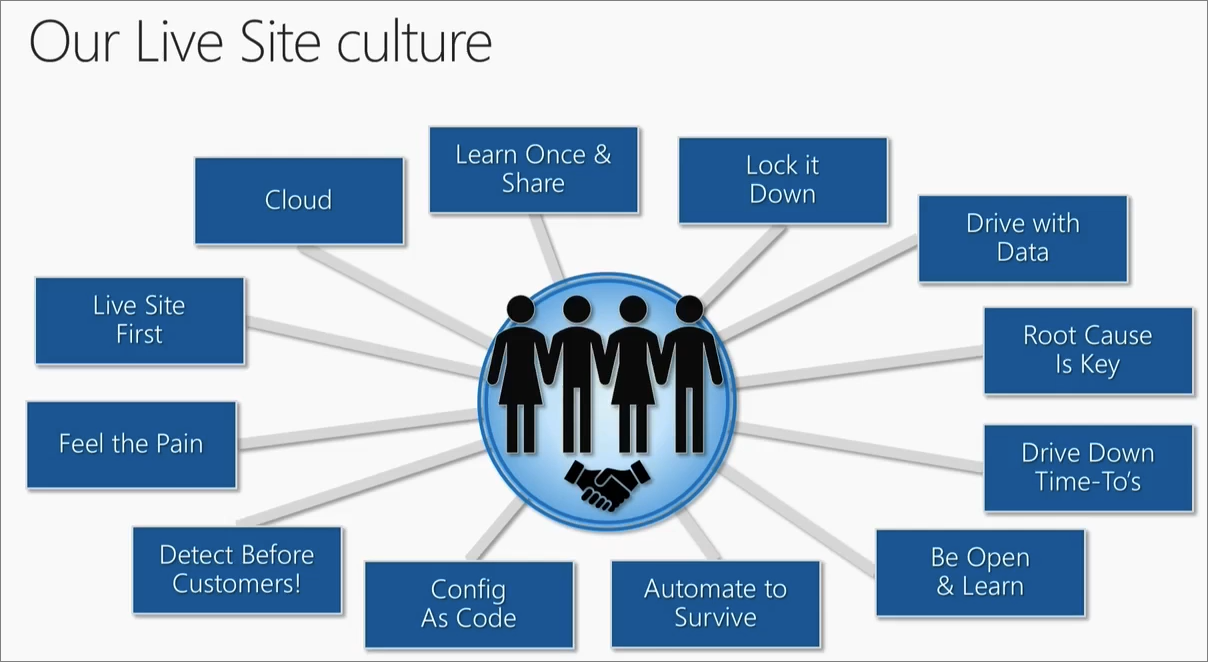
Improve the mean time to recoveryThe mean time to recovery metric indicates how long it takes to to recover from a failure or breach. To manage software failures, security breaches, and continuous improvement plans, teams should measure and work to improve this metric. Adopt a DevOps cultureTo fully implement DevOps, you must adopt a DevOps culture. Cultivating a DevOps culture requires deep changes in the way people work and collaborate. When organizations commit to a DevOps culture, they create an environment for high-performing teams to evolve. While adopting DevOps practices automates and optimizes processes through technology, without a shift to a DevOps culture within the organization and its people, you won't gain the full benefits of DevOps. The following image captures key aspects of Microsoft's live site culture.
The following practices are key components of a DevOps culture:
Implement DevOps practicesYou implement DevOps by following DevOps practices (described in the sections that follow) throughout the application lifecycle. Some of these practices help accelerate, automate, and improve a specific phase. Others span several phases, helping teams create seamless processes that help improve productivity. Continuous integration and continuous delivery (CI/CD)Continuous Integration (CI) is the practice used by development teams to automate, merge, and test code. CI helps to catch bugs early in the development cycle, which makes them less expensive to fix. Automated tests execute as part of the CI process to ensure quality. CI systems produce artifacts and feed them to release processes to drive frequent deployments. Continuous Delivery (CD) is a process by which code is built, tested, and deployed to one or more test and production environments. Deploying and testing in multiple environments increases quality. CD systems produce deployable artifacts, including infrastructure and apps. Automated release processes consume these artifacts to release new versions and fixes to existing systems. Systems that monitor and send alerts run continually to drive visibility into the entire CD process. Version ControlVersion control is the practice of managing code in versions—tracking revisions and change history to make code easy to review and recover. This practice is usually implemented using version control systems such as Git, which allow multiple developers to collaborate in authoring code. These systems provide a clear process to merge code changes that happen in the same files, handle conflicts, and roll back changes to earlier states. The use of version control is a fundamental DevOps practice, helping development teams work together, divide coding tasks between team members, and store all code for easy recovery if needed. Version control is also a necessary element in other practices such as continuous integration and infrastructure as code. Agile software developmentAgile is a software development approach that emphasizes team collaboration, customer and user feedback, and high adaptability to change through short release cycles. Teams that practice Agile provide continual changes and improvements to customers, collect their feedback, then learn and adjust based on customer wants and needs. Agile is substantially different from other more traditional frameworks such as waterfall, which includes long release cycles defined by sequential phases. Kanban and Scrum are two popular frameworks associated with Agile. Infrastructure as codeInfrastructure as code defines system resources and topologies in a descriptive manner that allows teams to manage those resources as they would code. Those definitions can also be stored and versioned in version control systems, where they can be reviewed and reverted—again like code. Practicing infrastructure as code helps teams deploy system resources in a reliable, repeatable, and controlled way. Infrastructure as code also helps automate deployment and reduces the risk of human error, especially for complex large environments. This repeatable, reliable solution for environment deployment lets teams maintain development and testing environments that are identical to production. Duplicating environments to different data centers and cloud platforms likewise becomes simpler and more efficient. Configuration managementConfiguration management refers to managing the state of resources in a system including servers, virtual machines, and databases. Using configuration management tools, teams can roll out changes in a controlled, systematic way, reducing the risks of modifying system configuration. Teams use configuration management tools to track system state and help avoid configuration drift, which is how a system resource’s configuration deviates over time from the desired state defined for it. Along with infrastructure as code, it's easy to templatize and automate system definition and configuration, which help teams operate complex environments at scale. Continuous monitoringContinuous monitoring means having full, real-time visibility into the performance and health of the entire application stack. This visibility ranges from the underlying infrastructure running the application to higher-level software components. Visibility is accomplished through the collection of telemetry and metadata and setting of alerts for predefined conditions that warrant attention from an operator. Telemetry comprises event data and logs collected from various parts of the system, which are stored where they can be analyzed and queried. High-performing DevOps teams ensure they set actionable, meaningful alerts and collect rich telemetry so they can draw insights from vast amounts of data. These insights help the team mitigate issues in real time and see how to improve the application in future development cycles. PlanningIn the planning phase, DevOps teams ideate, define, and describe the features and capabilities of the applications and systems they plan to build. Teams track task progress at low and high levels of granularity, from single products to multiple product portfolios. Teams use the following DevOps practices to plan with agility and visibility:
For an overview of the several lessons learned and practices Microsoft adopted to support DevOps planning across the company's software teams, see How Microsoft plans with DevOps. DevelopmentThe development phase includes all aspects of developing software code. In this phase, DevOps teams do the following tasks:
To innovate rapidly without sacrificing quality, stability, and productivity, DevOps teams:
For an overview of the development practices Microsoft adopted to support their shift to DevOps, see How Microsoft develops with DevOps. DeliverDelivery is the process of consistently and reliably deploying applications into production environments, ideally via continuous delivery (CD). In the delivery phase, DevOps teams:
Delivery also includes deploying and configuring the delivery environment's foundational infrastructure. DevOps teams use technologies like infrastructure as code (IaC), containers, and microservices to deliver fully governed infrastructure environments. Safe deployment practices can identify issues before they affect the customer experience. These practices help DevOps teams deliver frequently with ease, confidence, and peace of mind. Core DevOps principles and processes Microsoft evolved to provide efficient delivery systems are described in How Microsoft delivers software with DevOps. OperationsThe operations phase involves maintaining, monitoring, and troubleshooting applications in production environments, including hybrid or public clouds like Azure. DevOps teams aim for system reliability, high availability, strong security, and zero downtime. Automated delivery and safe deployment practices help teams identify and mitigate issues quickly when they occur. Maintaining vigilance requires rich telemetry, actionable alerting, and full visibility into applications and underlying systems. Practices Microsoft uses to operate complex online platforms are described in How Microsoft operates reliable systems with DevOps. Next steps
Other resources
Training and Certifications
FeedbackWas this page helpful? NoAdditional resources
|
| You are visitor 01402792 — GeezerVison does not store the pages you look up. Best viewed with Netscape Navigator 4.7 or Internet Explorer 6 at 800×600. No cookies required. |