Document Information
Preface
Part I Introduction
1. Overview
2. Using the Tutorial Examples
Part II The Web Tier
3. Getting Started with Web Applications
4. Java Servlet Technology
5. JavaServer Pages Technology
The Example JSP Pages
The Life Cycle of a JSP Page
Translation and Compilation
Execution
Buffering
Handling JSP Page Errors
Creating Static Content
Response and Page Encoding
Creating Dynamic Content
Using Objects within JSP Pages
Using Implicit Objects
Using Application-Specific Objects
Using Shared Objects
Unified Expression Language
Immediate and Deferred Evaluation Syntax
Immediate Evaluation
Deferred Evaluation
Value and Method Expressions
Value Expressions
Method Expressions
Defining a Tag Attribute Type
Deactivating Expression Evaluation
Literal Expressions
Resolving Expressions
Process of Expression Evaluation
EL Resolvers
Implicit Objects
Operators
Reserved Words
Examples of EL Expressions
Functions
Using Functions
Defining Functions
JavaBeans Components
JavaBeans Component Design Conventions
Creating and Using a JavaBeans Component
Setting JavaBeans Component Properties
Retrieving JavaBeans Component Properties
Using Custom Tags
Declaring Tag Libraries
Including the Tag Library Implementation
Reusing Content in JSP Pages
Transferring Control to Another Web Component
jsp:param Element
Including an Applet
Setting Properties for Groups of JSP Pages
Deactivating EL Expression Evaluation
Declaring Page Encodings
Defining Implicit Includes
Eliminating Extra White Space
Further Information about JavaServer Pages Technology
6. JavaServer Pages Documents
7. JavaServer Pages Standard Tag Library
8. Custom Tags in JSP Pages
9. Scripting in JSP Pages
10. JavaServer Faces Technology
11. Using JavaServer Faces Technology in JSP Pages
12. Developing with JavaServer Faces Technology
13. Creating Custom UI Components
14. Configuring JavaServer Faces Applications
15. Internationalizing and Localizing Web Applications
Part III Web Services
16. Building Web Services with JAX-WS
17. Binding between XML Schema and Java Classes
18. Streaming API for XML
19. SOAP with Attachments API for Java
Part IV Enterprise Beans
20. Enterprise Beans
21. Getting Started with Enterprise Beans
22. Session Bean Examples
23. A Message-Driven Bean Example
Part V Persistence
24. Introduction to the Java Persistence API
25. Persistence in the Web Tier
26. Persistence in the EJB Tier
27. The Java Persistence Query Language
Part VI Services
28. Introduction to Security in the Java EE Platform
29. Securing Java EE Applications
30. Securing Web Applications
31. The Java Message Service API
32. Java EE Examples Using the JMS API
33. Transactions
34. Resource Connections
35. Connector Architecture
Part VII Case Studies
36. The Coffee Break Application
37. The Duke's Bank Application
Part VIII Appendixes
A. Java Encoding Schemes
B. About the Authors
Index
|
|
The Java EE 5 Tutorial
|
 |
What Is a JSP Page?
A JSP page is a text document that contains two types of text: static
data, which can be expressed in any text-based format (such as HTML, SVG,
WML, and XML), and JSP elements, which construct dynamic content.
The recommended file extension for the source file of a JSP page
is .jsp. The page can be composed of a top file that
includes other files that contain either a complete JSP page or a fragment
of a JSP page. The recommended extension for the source file of a
fragment of a JSP page is .jspf.
The JSP elements in a JSP page can be expressed in two
syntaxes, standard and XML, though any given file can use only one syntax.
A JSP page in XML syntax is an XML document and can be
manipulated by tools and APIs for XML documents. This chapter and Chapters Chapter 7, JavaServer Pages Standard Tag Library
through Chapter 9, Scripting in JSP Pages document only the standard syntax. The XML syntax is covered in
Chapter 6, JavaServer Pages Documents.
A Simple JSP Page Example
The web page in Figure 5-1 is a form that allows you to select
a locale and displays the date in a manner appropriate to the locale.
Figure 5-1 Localized Date Form 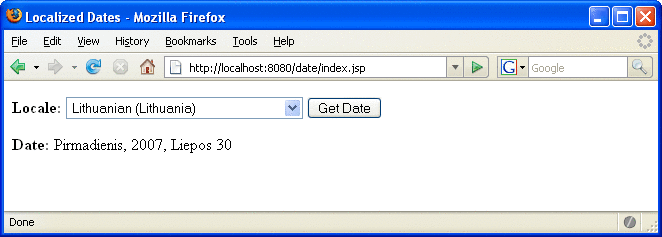 The source code for this example is in the tut-install/javaeetutorial5/examples/web/date/ directory. The
JSP page, index.jsp, appears below; it is a typical mixture of static HTML
markup and JSP elements. If you have developed web pages, you are probably
familiar with the HTML document structure statements (<head>, <body>, and so on) and the
HTML statements that create a form (<form>) and a menu (<select>).
The lines in bold in the example code contain the following types
of JSP constructs:
A page directive (<%@page ... %>) sets the content type returned by the page.
Tag library directives (<%@taglib ... %>) import custom tag libraries.
jsp:useBean is a standard element that creates an object containing a collection of locales and initializes an identifier that points to that object.
JSP expression language expressions (${ }) retrieve the value of object properties. The values are used to set custom tag attribute values and create dynamic content.
Custom tags (see Chapter 8, Custom Tags in JSP Pages) set a variable (c:set), iterate over a collection of locale names (c:forEach), and conditionally insert HTML text into the response (c:if, c:choose, c:when, c:otherwise).
jsp:setProperty is another standard element that sets the value of an object property.
A function (f:equals) tests the equality of an attribute and the current item of a collection. (A built-in == operator is usually used to test equality.)
Here is the JSP page:
<%@ page contentType="text/html; charset=UTF-8" %>
<%@ taglib uri="http://java.sun.com/jsp/jstl/core
"
         prefix="c" %>
<%@ taglib uri="/functions" prefix="f" %>
<html>
<head><title>Localized Dates</title></head>
<body bgcolor="white">
<jsp:useBean id="locales" scope="application"
    class="mypkg.MyLocales"/>

<form name="localeForm" action="index.jsp" method="post">
<c:set var="selectedLocaleString" value="${param.locale}" />
<c:set var="selectedFlag"
     value="${!empty selectedLocaleString}" />
<b>Locale:</b>
<select name=locale>
<c:forEach var="localeString" items="${locales.localeNames}" >
<c:choose>
    <c:when test="${selectedFlag}">
        <c:choose>
            <c:when
                 test="${f:equals(selectedLocaleString, localeString)}" >
                <option selected>${localeString}</option>
            </c:when>
            <c:otherwise>
                <option>${localeString}</option>
            </c:otherwise>
        </c:choose>
    </c:when>
    <c:otherwise>
        <option>${localeString}</option>
    </c:otherwise>
</c:choose>
</c:forEach>
</select>
<input type="submit" name="Submit" value="Get Date">
</form>

<c:if test="${selectedFlag}" >
    <jsp:setProperty name="locales"
        property="selectedLocaleString"
        value="${selectedLocaleString}" />
    <jsp:useBean id="date" class="mypkg.MyDate"/>
    <jsp:setProperty name="date" property="locale"
        value="${locales.selectedLocale}"/>
    <b>Date: </b>${date.date}</c:if>
</body>
</html>
To deploy the date application with NetBeans IDE, follow these steps:
Start the Application Server.
In NetBeans IDE, select File→Open Project.
In the Open Project dialog, navigate to:
tut-install/javaeetutorial5/examples/web/ Select the date folder.
Select the Open as Main Project check box.
Click Open Project.
In the Projects tab, right-click the date project, and select Undeploy and Deploy.
To deploy the date application with the Ant tool, follow these steps:
In a terminal window, go to tut-install/javaeetutorial5/examples/web/date/.
Type ant. This command will spawn any necessary compilations, copy files to the tut-install/javaeetutorial5/examples/web/date/build/ directory, and create a WAR file.
Start the Application Server.
Type ant deploy.
To run the example, do the following:
Set the character encoding in your browser to UTF-8.
Open your browser to http://localhost:8080/date.
You will see a combo box whose entries are locales. Select a locale and click Get Date. You will see the date expressed in a manner appropriate for that locale.
Some of the characters might not display properly if you don’t have the
appropriate language files installed on your machine. Consult the user guide or online
help for your operating system to determine how you can install these language
files.
Copyright © 2010, Oracle and/or its affiliates. All rights reserved. Legal Notices
|


