GeezerVisonThe World Wide Web, restored to 800 pixels of glory. |
| Home|About|Gaming cabinet|Archives|How it works|Starter sites |
GeezerVison is showing docs.oracle.com — 48.2 Securing Web Applications - Java Platform, Enterprise Edition: The Java EE Tutorial (Release 7) 48.2 Securing Web ApplicationsWeb applications are created by application developers who give, sell, or otherwise transfer the application to an application deployer for installation into a runtime environment. Application developers communicate how to set up security for the deployed application by using annotations or deployment descriptors. This information is passed on to the deployer, who uses it to define method permissions for security roles, set up user authentication, and set up the appropriate transport mechanism. If the application developer doesn't define security requirements, the deployer will have to determine the security requirements independently. Some elements necessary for security in a web application cannot be specified as annotations for all types of web applications. This chapter explains how to secure web applications using annotations wherever possible. It explains how to use deployment descriptors where annotations cannot be used. 48.2.1 Specifying Security ConstraintsA security constraint is used to define the access privileges to a collection of resources using their URL mapping. If your web application uses a servlet, you can express the security constraint information by using annotations. Specifically, you use the If your web application does not use a servlet, however, you must specify a The following subelements can be part of a
48.2.1.1 Specifying a Web Resource CollectionA web resource collection consists of the following subelements.
48.2.1.2 Specifying an Authorization ConstraintAn authorization constraint ( An authorization constraint establishes a requirement for authentication and names the roles authorized to access the URL patterns and HTTP methods declared by this security constraint. If there is no authorization constraint, the container must accept the request without requiring user authentication. If there is an authorization constraint but no roles are specified within it, the container will not allow access to constrained requests under any circumstances. Each role name specified here must either correspond to the role name of one of the For more information about security roles, see Declaring Security Roles. For information on mapping security roles, see Mapping Roles to Users and Groups. For a servlet, the 48.2.1.3 Specifying a Secure ConnectionA user data constraint ( The strength of the required protection is defined by the value of the transport guarantee, as follows.
Note: In practice, Java EE servers treat theCONFIDENTIAL and INTEGRAL transport guarantee values identically.The user data constraint is handy to use in conjunction with basic and form-based user authentication. When the login authentication method is set to To guarantee that data is transported over a secure connection, ensure that SSL support is configured for your server. SSL support is already configured for GlassFish Server. Note: After you switch to SSL for a session, you should never accept any non-SSL requests for the rest of that session. For example, a shopping site might not use SSL until the checkout page, and then it might switch to using SSL to accept your card number. After switching to SSL, you should stop listening to non-SSL requests for this session. The reason for this practice is that the session ID itself was not encrypted on the earlier communications. This is not so bad when you're only doing your shopping, but after the credit card information is stored in the session, you don't want anyone to use that information to fake the purchase transaction against your credit card. This practice could be easily implemented by using a filter.48.2.1.4 Specifying Security Constraints for ResourcesYou can create security constraints for resources within your application. For example, you could allow users with the role of <!-- SECURITY CONSTRAINT #1 --> <security-constraint> <web-resource-collection> <web-resource-name>wholesale</web-resource-name> <url-pattern>/acme/wholesale/*</url-pattern> </web-resource-collection> <auth-constraint> <role-name>PARTNER</role-name> </auth-constraint> <user-data-constraint> <transport-guarantee>CONFIDENTIAL</transport-guarantee> </user-data-constraint> </security-constraint> <!-- SECURITY CONSTRAINT #2 --> <security-constraint> <web-resource-collection> <web-resource-name>retail</web-resource-name> <url-pattern>/acme/retail/*</url-pattern> </web-resource-collection> <auth-constraint> <role-name>CLIENT</role-name> </auth-constraint> <user-data-constraint> <transport-guarantee>CONFIDENTIAL</transport-guarantee> </user-data-constraint> </security-constraint> 48.2.2 Specifying Authentication MechanismsA user authentication mechanism specifies
When an authentication mechanism is specified, the user must be authenticated before access is granted to any resource that is constrained by a security constraint. There can be multiple security constraints applying to multiple resources, but the same authentication method will apply to all constrained resources in an application. Before you can authenticate a user, you must have a database of user names, passwords, and roles configured on your web or application server. For information on setting up the user database, see Managing Users and Groups in GlassFish Server. The Java EE platform supports the following authentication mechanisms:
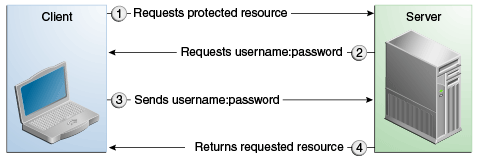
Basic, form-based, and digest authentication are discussed in this section. Client and mutual authentication are discussed in Chapter 50, "Java EE Security: Advanced Topics". HTTP basic authentication and form-based authentication are not very secure authentication mechanisms. Basic authentication sends user names and passwords over the Internet as Base64-encoded text. Form-based authentication sends this data as plain text. In both cases, the target server is not authenticated. Therefore, these forms of authentication leave user data exposed and vulnerable. If someone can intercept the transmission, the user name and password information can easily be decoded. However, when a secure transport mechanism, such as SSL, or security at the network level, such as the Internet Protocol Security (IPsec) protocol or virtual private network (VPN) strategies, is used in conjunction with basic or form-based authentication, some of these concerns can be alleviated. To specify a secure transport mechanism, use the elements described in Specifying a Secure Connection. 48.2.2.1 HTTP Basic AuthenticationSpecifying HTTP basic authentication requires that the server request a user name and password from the web client and verify that the user name and password are valid by comparing them against a database of authorized users in the specified or default realm. Basic authentication is the default when you do not specify an authentication mechanism. When basic authentication is used, the following actions occur.
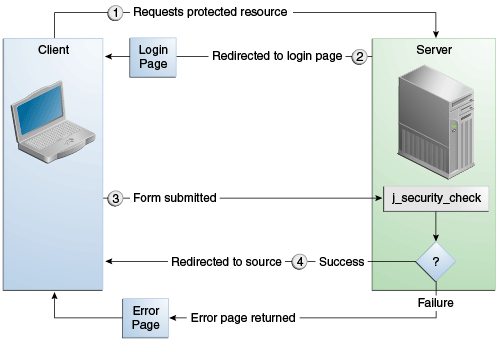
Figure 48-1 shows what happens when you specify HTTP basic authentication. 48.2.2.2 Form-Based AuthenticationForm-based authentication allows the developer to control the look and feel of the login authentication screens by customizing the login screen and error pages that an HTTP browser presents to the end user. When form-based authentication is declared, the following actions occur.
Figure 48-2 shows what happens when you specify form-based authentication. The section The hello1-formauth Example: Form-Based Authentication with a JavaServer Faces Application is an example application that uses form-based authentication. When you create a form-based login, be sure to maintain sessions using cookies or SSL session information. For authentication to proceed appropriately, the action of the login form must always be <form method="POST" action="j_security_check"> <input type="text" name="j_username"> <input type="password" name="j_password"> </form> 48.2.2.3 Digest AuthenticationLike basic authentication, digest authentication authenticates a user based on a user name and a password. However, unlike basic authentication, digest authentication does not send user passwords over the network. Instead, the client sends a one-way cryptographic hash of the password and additional data. Although passwords are not sent on the wire, digest authentication requires that clear-text password equivalents be available to the authenticating container so that it can validate received authenticators by calculating the expected digest. 48.2.3 Specifying an Authentication Mechanism in the Deployment DescriptorTo specify an authentication mechanism, use the
Note: Another way to specify form-based authentication is to use theauthenticate, login, and logout methods of HttpServletRequest, as discussed in Authenticating Users Programmatically.When you try to access a web resource that is constrained by a The following example shows how to declare form-based authentication in your deployment descriptor: <login-config>
<auth-method>FORM</auth-method>
<realm-name>file</realm-name>
<form-login-config>
<form-login-page>/login.xhtml</form-login-page>
<form-error-page>/error.xhtml</form-error-page>
</form-login-config>
</login-config>
The login and error page locations are specified relative to the location of the deployment descriptor. Examples of login and error pages are shown in Creating the Login Form and the Error Page. The following example shows how to declare digest authentication in your deployment descriptor: <login-config>
<auth-method>DIGEST</auth-method>
</login-config>
48.2.4 Declaring Security RolesYou can declare security role names used in web applications by using the The following snippet of a deployment descriptor declares the roles that will be used in an application using the <security-constraint>
<web-resource-collection>
<web-resource-name>Protected Area</web-resource-name>
<url-pattern>/security/protected/*</url-pattern>
<http-method>PUT</http-method>
<http-method>DELETE</http-method>
<http-method>GET</http-method>
<http-method>POST</http-method>
</web-resource-collection>
<auth-constraint>
<role-name>manager</role-name>
</auth-constraint>
</security-constraint>
<!-- Security roles used by this web application -->
<security-role>
<role-name>manager</role-name>
</security-role>
<security-role>
<role-name>employee</role-name>
</security-role>
In this example, the The The |
| You are visitor 01402775 — GeezerVison does not store the pages you look up. Best viewed with Netscape Navigator 4.7 or Internet Explorer 6 at 800×600. No cookies required. |