GeezerVison is showing docs.python.org — pathlib — Object-oriented filesystem paths
pathlib — Object-oriented filesystem paths
Source code: Lib/pathlib.py
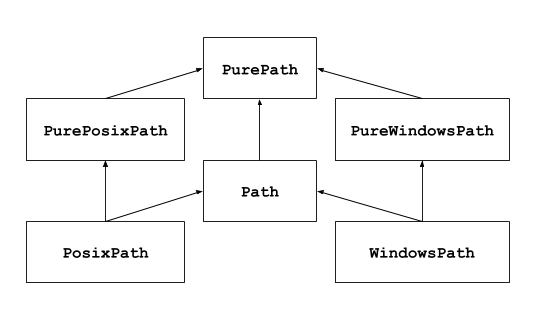
This module offers classes representing filesystem paths with semantics
appropriate for different operating systems. Path classes are divided
between pure paths, which provide purely computational
operations without I/O, and concrete paths, which
inherit from pure paths but also provide I/O operations.
If you’ve never used this module before or just aren’t sure which class is
right for your task, Path is most likely what you need. It instantiates
a concrete path for the platform the code is running on.
Pure paths are useful in some special cases; for example:
If you want to manipulate Windows paths on a Unix machine (or vice versa).
You cannot instantiate a WindowsPath when running on Unix, but you
can instantiate PureWindowsPath. You want to make sure that your code only manipulates paths without actually
accessing the OS. In this case, instantiating one of the pure classes may be
useful since those simply don’t have any OS-accessing operations.
See also
PEP 428: The pathlib module – object-oriented filesystem paths.
See also
For low-level path manipulation on strings, you can also use the
os.path module.
Basic use
Importing the main class:
>>> from pathlib import Path
Listing subdirectories:
>>> p = Path('.')
>>> [x for x in p.iterdir() if x.is_dir()]
[PosixPath('.hg'), PosixPath('docs'), PosixPath('dist'),
 PosixPath('__pycache__'), PosixPath('build')]
Listing Python source files in this directory tree:
>>> list(p.glob('**/*.py'))
[PosixPath('test_pathlib.py'), PosixPath('setup.py'),
 PosixPath('pathlib.py'), PosixPath('docs/conf.py'),
 PosixPath('build/lib/pathlib.py')]
Navigating inside a directory tree:
>>> p = Path('/etc')
>>> q = p / 'init.d' / 'reboot'
>>> q
PosixPath('/etc/init.d/reboot')
>>> q.resolve()
PosixPath('/etc/rc.d/init.d/halt')
Querying path properties:
>>> q.exists()
True
>>> q.is_dir()
False
Opening a file:
>>> with q.open() as f: f.readline()
...
'#!/bin/bash\n'
Pure paths
Pure path objects provide path-handling operations which don’t actually
access a filesystem. There are three ways to access these classes, which
we also call flavours:
-
class pathlib.PurePath(*pathsegments)
A generic class that represents the system’s path flavour (instantiating
it creates either a PurePosixPath or a PureWindowsPath):
>>> PurePath('setup.py')      # Running on a Unix machine
PurePosixPath('setup.py')
Each element of pathsegments can be either a string representing a
path segment, an object implementing the os.PathLike interface
which returns a string, or another path object:
>>> PurePath('foo', 'some/path', 'bar')
PurePosixPath('foo/some/path/bar')
>>> PurePath(Path('foo'), Path('bar'))
PurePosixPath('foo/bar')
When pathsegments is empty, the current directory is assumed:
>>> PurePath()
PurePosixPath('.')
If a segment is an absolute path, all previous segments are ignored
(like os.path.join()):
>>> PurePath('/etc', '/usr', 'lib64')
PurePosixPath('/usr/lib64')
>>> PureWindowsPath('c:/Windows', 'd:bar')
PureWindowsPath('d:bar')
On Windows, the drive is not reset when a rooted relative path
segment (e.g., r'\foo') is encountered:
>>> PureWindowsPath('c:/Windows', '/Program Files')
PureWindowsPath('c:/Program Files')
Spurious slashes and single dots are collapsed, but double dots ('..')
and leading double slashes ('//') are not, since this would change the
meaning of a path for various reasons (e.g. symbolic links, UNC paths):
>>> PurePath('foo//bar')
PurePosixPath('foo/bar')
>>> PurePath('//foo/bar')
PurePosixPath('//foo/bar')
>>> PurePath('foo/./bar')
PurePosixPath('foo/bar')
>>> PurePath('foo/../bar')
PurePosixPath('foo/../bar')
(a naïve approach would make PurePosixPath('foo/../bar') equivalent
to PurePosixPath('bar'), which is wrong if foo is a symbolic link
to another directory)
Pure path objects implement the os.PathLike interface, allowing them
to be used anywhere the interface is accepted.
Changed in version 3.6: Added support for the os.PathLike interface.
-
class pathlib.PurePosixPath(*pathsegments)
A subclass of PurePath, this path flavour represents non-Windows
filesystem paths:
>>> PurePosixPath('/etc')
PurePosixPath('/etc')
pathsegments is specified similarly to PurePath.
-
class pathlib.PureWindowsPath(*pathsegments)
A subclass of PurePath, this path flavour represents Windows
filesystem paths, including UNC paths:
>>> PureWindowsPath('c:/Program Files/')
PureWindowsPath('c:/Program Files')
>>> PureWindowsPath('//server/share/file')
PureWindowsPath('//server/share/file')
pathsegments is specified similarly to PurePath.
Regardless of the system you’re running on, you can instantiate all of
these classes, since they don’t provide any operation that does system calls.
General properties
Paths are immutable and hashable. Paths of a same flavour are comparable
and orderable. These properties respect the flavour’s case-folding
semantics:
>>> PurePosixPath('foo') == PurePosixPath('FOO')
False
>>> PureWindowsPath('foo') == PureWindowsPath('FOO')
True
>>> PureWindowsPath('FOO') in { PureWindowsPath('foo') }
True
>>> PureWindowsPath('C:') < PureWindowsPath('d:')
True
Paths of a different flavour compare unequal and cannot be ordered:
>>> PureWindowsPath('foo') == PurePosixPath('foo')
False
>>> PureWindowsPath('foo') < PurePosixPath('foo')
Traceback (most recent call last):
  File "<stdin>", line 1, in <module>
TypeError: '<' not supported between instances of 'PureWindowsPath' and 'PurePosixPath'
Operators
The slash operator helps create child paths, like os.path.join().
If the argument is an absolute path, the previous path is ignored.
On Windows, the drive is not reset when the argument is a rooted
relative path (e.g., r'\foo'):
>>> p = PurePath('/etc')
>>> p
PurePosixPath('/etc')
>>> p / 'init.d' / 'apache2'
PurePosixPath('/etc/init.d/apache2')
>>> q = PurePath('bin')
>>> '/usr' / q
PurePosixPath('/usr/bin')
>>> p / '/an_absolute_path'
PurePosixPath('/an_absolute_path')
>>> PureWindowsPath('c:/Windows', '/Program Files')
PureWindowsPath('c:/Program Files')
A path object can be used anywhere an object implementing os.PathLike
is accepted:
>>> import os
>>> p = PurePath('/etc')
>>> os.fspath(p)
'/etc'
The string representation of a path is the raw filesystem path itself
(in native form, e.g. with backslashes under Windows), which you can
pass to any function taking a file path as a string:
>>> p = PurePath('/etc')
>>> str(p)
'/etc'
>>> p = PureWindowsPath('c:/Program Files')
>>> str(p)
'c:\\Program Files'
Similarly, calling bytes on a path gives the raw filesystem path as a
bytes object, as encoded by os.fsencode():
Note
Calling bytes is only recommended under Unix. Under Windows,
the unicode form is the canonical representation of filesystem paths.
Accessing individual parts
To access the individual “parts” (components) of a path, use the following
property:
-
PurePath.parts
A tuple giving access to the path’s various components:
>>> p = PurePath('/usr/bin/python3')
>>> p.parts
('/', 'usr', 'bin', 'python3')

>>> p = PureWindowsPath('c:/Program Files/PSF')
>>> p.parts
('c:\\', 'Program Files', 'PSF')
(note how the drive and local root are regrouped in a single part)
Methods and properties
Pure paths provide the following methods and properties:
-
PurePath.drive
A string representing the drive letter or name, if any:
>>> PureWindowsPath('c:/Program Files/').drive
'c:'
>>> PureWindowsPath('/Program Files/').drive
''
>>> PurePosixPath('/etc').drive
''
UNC shares are also considered drives:
>>> PureWindowsPath('//host/share/foo.txt').drive
'\\\\host\\share'
-
PurePath.root
A string representing the (local or global) root, if any:
>>> PureWindowsPath('c:/Program Files/').root
'\\'
>>> PureWindowsPath('c:Program Files/').root
''
>>> PurePosixPath('/etc').root
'/'
UNC shares always have a root:
>>> PureWindowsPath('//host/share').root
'\\'
If the path starts with more than two successive slashes,
PurePosixPath collapses them:
>>> PurePosixPath('//etc').root
'//'
>>> PurePosixPath('///etc').root
'/'
>>> PurePosixPath('////etc').root
'/'
Note
This behavior conforms to The Open Group Base Specifications Issue 6,
paragraph 4.11 Pathname Resolution:
“A pathname that begins with two successive slashes may be interpreted in
an implementation-defined manner, although more than two leading slashes
shall be treated as a single slash.”
-
PurePath.anchor
The concatenation of the drive and root:
>>> PureWindowsPath('c:/Program Files/').anchor
'c:\\'
>>> PureWindowsPath('c:Program Files/').anchor
'c:'
>>> PurePosixPath('/etc').anchor
'/'
>>> PureWindowsPath('//host/share').anchor
'\\\\host\\share\\'
-
PurePath.parents
An immutable sequence providing access to the logical ancestors of
the path:
>>> p = PureWindowsPath('c:/foo/bar/setup.py')
>>> p.parents[0]
PureWindowsPath('c:/foo/bar')
>>> p.parents[1]
PureWindowsPath('c:/foo')
>>> p.parents[2]
PureWindowsPath('c:/')
Changed in version 3.10: The parents sequence now supports slices and negative index values.
-
PurePath.parent
The logical parent of the path:
>>> p = PurePosixPath('/a/b/c/d')
>>> p.parent
PurePosixPath('/a/b/c')
You cannot go past an anchor, or empty path:
>>> p = PurePosixPath('/')
>>> p.parent
PurePosixPath('/')
>>> p = PurePosixPath('.')
>>> p.parent
PurePosixPath('.')
Note
This is a purely lexical operation, hence the following behaviour:
>>> p = PurePosixPath('foo/..')
>>> p.parent
PurePosixPath('foo')
If you want to walk an arbitrary filesystem path upwards, it is
recommended to first call Path.resolve() so as to resolve
symlinks and eliminate ".." components.
-
PurePath.name
A string representing the final path component, excluding the drive and
root, if any:
>>> PurePosixPath('my/library/setup.py').name
'setup.py'
UNC drive names are not considered:
>>> PureWindowsPath('//some/share/setup.py').name
'setup.py'
>>> PureWindowsPath('//some/share').name
''
-
PurePath.suffix
The file extension of the final component, if any:
>>> PurePosixPath('my/library/setup.py').suffix
'.py'
>>> PurePosixPath('my/library.tar.gz').suffix
'.gz'
>>> PurePosixPath('my/library').suffix
''
-
PurePath.suffixes
A list of the path’s file extensions:
>>> PurePosixPath('my/library.tar.gar').suffixes
['.tar', '.gar']
>>> PurePosixPath('my/library.tar.gz').suffixes
['.tar', '.gz']
>>> PurePosixPath('my/library').suffixes
[]
-
PurePath.stem
The final path component, without its suffix:
>>> PurePosixPath('my/library.tar.gz').stem
'library.tar'
>>> PurePosixPath('my/library.tar').stem
'library'
>>> PurePosixPath('my/library').stem
'library'
-
PurePath.as_posix()
Return a string representation of the path with forward slashes (/):
>>> p = PureWindowsPath('c:\\windows')
>>> str(p)
'c:\\windows'
>>> p.as_posix()
'c:/windows'
-
PurePath.as_uri()
Represent the path as a file URI. ValueError is raised if
the path isn’t absolute.
>>> p = PurePosixPath('/etc/passwd')
>>> p.as_uri()
'file:///etc/passwd'
>>> p = PureWindowsPath('c:/Windows')
>>> p.as_uri()
'file:///c:/Windows'
-
PurePath.is_absolute()
Return whether the path is absolute or not. A path is considered absolute
if it has both a root and (if the flavour allows) a drive:
>>> PurePosixPath('/a/b').is_absolute()
True
>>> PurePosixPath('a/b').is_absolute()
False

>>> PureWindowsPath('c:/a/b').is_absolute()
True
>>> PureWindowsPath('/a/b').is_absolute()
False
>>> PureWindowsPath('c:').is_absolute()
False
>>> PureWindowsPath('//some/share').is_absolute()
True
-
PurePath.is_relative_to(*other)
Return whether or not this path is relative to the other path.
>>> p = PurePath('/etc/passwd')
>>> p.is_relative_to('/etc')
True
>>> p.is_relative_to('/usr')
False
If multiple arguments are supplied, they are joined together.
This method is string-based; it neither accesses the filesystem nor treats
“..” segments specially. The following code is equivalent:
>>> u = PurePath('/usr')
>>> u == p or u in p.parents
False
-
PurePath.is_reserved()
With PureWindowsPath, return True if the path is considered
reserved under Windows, False otherwise. With PurePosixPath,
False is always returned.
>>> PureWindowsPath('nul').is_reserved()
True
>>> PurePosixPath('nul').is_reserved()
False
File system calls on reserved paths can fail mysteriously or have
unintended effects.
-
PurePath.joinpath(*other)
Calling this method is equivalent to combining the path with each of
the other arguments in turn:
>>> PurePosixPath('/etc').joinpath('passwd')
PurePosixPath('/etc/passwd')
>>> PurePosixPath('/etc').joinpath(PurePosixPath('passwd'))
PurePosixPath('/etc/passwd')
>>> PurePosixPath('/etc').joinpath('init.d', 'apache2')
PurePosixPath('/etc/init.d/apache2')
>>> PureWindowsPath('c:').joinpath('/Program Files')
PureWindowsPath('c:/Program Files')
-
PurePath.match(pattern)
Match this path against the provided glob-style pattern. Return True
if matching is successful, False otherwise.
If pattern is relative, the path can be either relative or absolute,
and matching is done from the right:
>>> PurePath('a/b.py').match('*.py')
True
>>> PurePath('/a/b/c.py').match('b/*.py')
True
>>> PurePath('/a/b/c.py').match('a/*.py')
False
If pattern is absolute, the path must be absolute, and the whole path
must match:
>>> PurePath('/a.py').match('/*.py')
True
>>> PurePath('a/b.py').match('/*.py')
False
As with other methods, case-sensitivity follows platform defaults:
>>> PurePosixPath('b.py').match('*.PY')
False
>>> PureWindowsPath('b.py').match('*.PY')
True
-
PurePath.relative_to(*other)
Compute a version of this path relative to the path represented by
other. If it’s impossible, ValueError is raised:
>>> p = PurePosixPath('/etc/passwd')
>>> p.relative_to('/')
PurePosixPath('etc/passwd')
>>> p.relative_to('/etc')
PurePosixPath('passwd')
>>> p.relative_to('/usr')
Traceback (most recent call last):
  File "<stdin>", line 1, in <module>
  File "pathlib.py", line 694, in relative_to
    .format(str(self), str(formatted)))
ValueError: '/etc/passwd' is not in the subpath of '/usr' OR one path is relative and the other absolute.
If multiple arguments are supplied, they are joined together.
NOTE: This function is part of PurePath and works with strings. It does not check or access the underlying file structure.
-
PurePath.with_name(name)
Return a new path with the name changed. If the original path
doesn’t have a name, ValueError is raised:
>>> p = PureWindowsPath('c:/Downloads/pathlib.tar.gz')
>>> p.with_name('setup.py')
PureWindowsPath('c:/Downloads/setup.py')
>>> p = PureWindowsPath('c:/')
>>> p.with_name('setup.py')
Traceback (most recent call last):
  File "<stdin>", line 1, in <module>
  File "/home/antoine/cpython/default/Lib/pathlib.py", line 751, in with_name
    raise ValueError("%r has an empty name" % (self,))
ValueError: PureWindowsPath('c:/') has an empty name
-
PurePath.with_stem(stem)
Return a new path with the stem changed. If the original path
doesn’t have a name, ValueError is raised:
>>> p = PureWindowsPath('c:/Downloads/draft.txt')
>>> p.with_stem('final')
PureWindowsPath('c:/Downloads/final.txt')
>>> p = PureWindowsPath('c:/Downloads/pathlib.tar.gz')
>>> p.with_stem('lib')
PureWindowsPath('c:/Downloads/lib.gz')
>>> p = PureWindowsPath('c:/')
>>> p.with_stem('')
Traceback (most recent call last):
  File "<stdin>", line 1, in <module>
  File "/home/antoine/cpython/default/Lib/pathlib.py", line 861, in with_stem
    return self.with_name(stem + self.suffix)
  File "/home/antoine/cpython/default/Lib/pathlib.py", line 851, in with_name
    raise ValueError("%r has an empty name" % (self,))
ValueError: PureWindowsPath('c:/') has an empty name
-
PurePath.with_suffix(suffix)
Return a new path with the suffix changed. If the original path
doesn’t have a suffix, the new suffix is appended instead. If the
suffix is an empty string, the original suffix is removed:
>>> p = PureWindowsPath('c:/Downloads/pathlib.tar.gz')
>>> p.with_suffix('.bz2')
PureWindowsPath('c:/Downloads/pathlib.tar.bz2')
>>> p = PureWindowsPath('README')
>>> p.with_suffix('.txt')
PureWindowsPath('README.txt')
>>> p = PureWindowsPath('README.txt')
>>> p.with_suffix('')
PureWindowsPath('README')
Concrete paths
Concrete paths are subclasses of the pure path classes. In addition to
operations provided by the latter, they also provide methods to do system
calls on path objects. There are three ways to instantiate concrete paths:
-
class pathlib.Path(*pathsegments)
A subclass of PurePath, this class represents concrete paths of
the system’s path flavour (instantiating it creates either a
PosixPath or a WindowsPath):
>>> Path('setup.py')
PosixPath('setup.py')
pathsegments is specified similarly to PurePath.
-
class pathlib.PosixPath(*pathsegments)
A subclass of Path and PurePosixPath, this class
represents concrete non-Windows filesystem paths:
>>> PosixPath('/etc')
PosixPath('/etc')
pathsegments is specified similarly to PurePath.
-
class pathlib.WindowsPath(*pathsegments)
A subclass of Path and PureWindowsPath, this class
represents concrete Windows filesystem paths:
>>> WindowsPath('c:/Program Files/')
WindowsPath('c:/Program Files')
pathsegments is specified similarly to PurePath.
You can only instantiate the class flavour that corresponds to your system
(allowing system calls on non-compatible path flavours could lead to
bugs or failures in your application):
>>> import os
>>> os.name
'posix'
>>> Path('setup.py')
PosixPath('setup.py')
>>> PosixPath('setup.py')
PosixPath('setup.py')
>>> WindowsPath('setup.py')
Traceback (most recent call last):
  File "<stdin>", line 1, in <module>
  File "pathlib.py", line 798, in __new__
    % (cls.__name__,))
NotImplementedError: cannot instantiate 'WindowsPath' on your system
Methods
Concrete paths provide the following methods in addition to pure paths
methods. Many of these methods can raise an OSError if a system
call fails (for example because the path doesn’t exist).
-
classmethod Path.cwd()
Return a new path object representing the current directory (as returned
by os.getcwd()):
>>> Path.cwd()
PosixPath('/home/antoine/pathlib')
-
classmethod Path.home()
Return a new path object representing the user’s home directory (as
returned by os.path.expanduser() with ~ construct). If the home
directory can’t be resolved, RuntimeError is raised.
>>> Path.home()
PosixPath('/home/antoine')
-
Path.stat(*, follow_symlinks=True)
Return a os.stat_result object containing information about this path, like os.stat().
The result is looked up at each call to this method.
This method normally follows symlinks; to stat a symlink add the argument
follow_symlinks=False, or use lstat().
>>> p = Path('setup.py')
>>> p.stat().st_size
956
>>> p.stat().st_mtime
1327883547.852554
Changed in version 3.10: The follow_symlinks parameter was added.
-
Path.chmod(mode, *, follow_symlinks=True)
Change the file mode and permissions, like os.chmod().
This method normally follows symlinks. Some Unix flavours support changing
permissions on the symlink itself; on these platforms you may add the
argument follow_symlinks=False, or use lchmod().
>>> p = Path('setup.py')
>>> p.stat().st_mode
33277
>>> p.chmod(0o444)
>>> p.stat().st_mode
33060
Changed in version 3.10: The follow_symlinks parameter was added.
-
Path.exists()
Whether the path points to an existing file or directory:
>>> Path('.').exists()
True
>>> Path('setup.py').exists()
True
>>> Path('/etc').exists()
True
>>> Path('nonexistentfile').exists()
False
Note
If the path points to a symlink, exists() returns whether the
symlink points to an existing file or directory.
-
Path.expanduser()
Return a new path with expanded ~ and ~user constructs,
as returned by os.path.expanduser(). If a home directory can’t be
resolved, RuntimeError is raised.
>>> p = PosixPath('~/films/Monty Python')
>>> p.expanduser()
PosixPath('/home/eric/films/Monty Python')
-
Path.glob(pattern)
Glob the given relative pattern in the directory represented by this path,
yielding all matching files (of any kind):
>>> sorted(Path('.').glob('*.py'))
[PosixPath('pathlib.py'), PosixPath('setup.py'), PosixPath('test_pathlib.py')]
>>> sorted(Path('.').glob('*/*.py'))
[PosixPath('docs/conf.py')]
Patterns are the same as for fnmatch, with the addition of “**”
which means “this directory and all subdirectories, recursively”. In other
words, it enables recursive globbing:
>>> sorted(Path('.').glob('**/*.py'))
[PosixPath('build/lib/pathlib.py'),
 PosixPath('docs/conf.py'),
 PosixPath('pathlib.py'),
 PosixPath('setup.py'),
 PosixPath('test_pathlib.py')]
Note
Using the “**” pattern in large directory trees may consume
an inordinate amount of time.
Raises an auditing event pathlib.Path.glob with arguments self, pattern.
Changed in version 3.11: Return only directories if pattern ends with a pathname components
separator (sep or altsep).
-
Path.group()
Return the name of the group owning the file. KeyError is raised
if the file’s gid isn’t found in the system database.
-
Path.is_dir()
Return True if the path points to a directory (or a symbolic link
pointing to a directory), False if it points to another kind of file.
False is also returned if the path doesn’t exist or is a broken symlink;
other errors (such as permission errors) are propagated.
-
Path.is_file()
Return True if the path points to a regular file (or a symbolic link
pointing to a regular file), False if it points to another kind of file.
False is also returned if the path doesn’t exist or is a broken symlink;
other errors (such as permission errors) are propagated.
-
Path.is_mount()
Return True if the path is a mount point: a point in a
file system where a different file system has been mounted. On POSIX, the
function checks whether path’s parent, path/.., is on a different
device than path, or whether path/.. and path point to the same
i-node on the same device — this should detect mount points for all Unix
and POSIX variants. Not implemented on Windows.
-
Path.is_symlink()
Return True if the path points to a symbolic link, False otherwise.
False is also returned if the path doesn’t exist; other errors (such
as permission errors) are propagated.
-
Path.is_socket()
Return True if the path points to a Unix socket (or a symbolic link
pointing to a Unix socket), False if it points to another kind of file.
False is also returned if the path doesn’t exist or is a broken symlink;
other errors (such as permission errors) are propagated.
-
Path.is_fifo()
Return True if the path points to a FIFO (or a symbolic link
pointing to a FIFO), False if it points to another kind of file.
False is also returned if the path doesn’t exist or is a broken symlink;
other errors (such as permission errors) are propagated.
-
Path.is_block_device()
Return True if the path points to a block device (or a symbolic link
pointing to a block device), False if it points to another kind of file.
False is also returned if the path doesn’t exist or is a broken symlink;
other errors (such as permission errors) are propagated.
-
Path.is_char_device()
Return True if the path points to a character device (or a symbolic link
pointing to a character device), False if it points to another kind of file.
False is also returned if the path doesn’t exist or is a broken symlink;
other errors (such as permission errors) are propagated.
-
Path.iterdir()
When the path points to a directory, yield path objects of the directory
contents:
>>> p = Path('docs')
>>> for child in p.iterdir(): child
...
PosixPath('docs/conf.py')
PosixPath('docs/_templates')
PosixPath('docs/make.bat')
PosixPath('docs/index.rst')
PosixPath('docs/_build')
PosixPath('docs/_static')
PosixPath('docs/Makefile')
The children are yielded in arbitrary order, and the special entries
'.' and '..' are not included. If a file is removed from or added
to the directory after creating the iterator, whether a path object for
that file be included is unspecified.
-
Path.lchmod(mode)
Like Path.chmod() but, if the path points to a symbolic link, the
symbolic link’s mode is changed rather than its target’s.
-
Path.lstat()
Like Path.stat() but, if the path points to a symbolic link, return
the symbolic link’s information rather than its target’s.
-
Path.mkdir(mode=0o777, parents=False, exist_ok=False)
Create a new directory at this given path. If mode is given, it is
combined with the process’ umask value to determine the file mode
and access flags. If the path already exists, FileExistsError
is raised.
If parents is true, any missing parents of this path are created
as needed; they are created with the default permissions without taking
mode into account (mimicking the POSIX mkdir -p command).
If parents is false (the default), a missing parent raises
FileNotFoundError.
If exist_ok is false (the default), FileExistsError is
raised if the target directory already exists.
If exist_ok is true, FileExistsError will not be raised unless the given
path already exists in the file system and is not a directory (same
behavior as the POSIX mkdir -p command).
Changed in version 3.5: The exist_ok parameter was added.
-
Path.open(mode='r', buffering=-1, encoding=None, errors=None, newline=None)
Open the file pointed to by the path, like the built-in open()
function does:
>>> p = Path('setup.py')
>>> with p.open() as f:
...     f.readline()
...
'#!/usr/bin/env python3\n'
-
Path.owner()
Return the name of the user owning the file. KeyError is raised
if the file’s uid isn’t found in the system database.
-
Path.read_bytes()
Return the binary contents of the pointed-to file as a bytes object:
>>> p = Path('my_binary_file')
>>> p.write_bytes(b'Binary file contents')
20
>>> p.read_bytes()
b'Binary file contents'
-
Path.read_text(encoding=None, errors=None)
Return the decoded contents of the pointed-to file as a string:
>>> p = Path('my_text_file')
>>> p.write_text('Text file contents')
18
>>> p.read_text()
'Text file contents'
The file is opened and then closed. The optional parameters have the same
meaning as in open().
-
Path.readlink()
Return the path to which the symbolic link points (as returned by
os.readlink()):
>>> p = Path('mylink')
>>> p.symlink_to('setup.py')
>>> p.readlink()
PosixPath('setup.py')
-
Path.rename(target)
Rename this file or directory to the given target, and return a new Path
instance pointing to target. On Unix, if target exists and is a file,
it will be replaced silently if the user has permission.
On Windows, if target exists, FileExistsError will be raised.
target can be either a string or another path object:
>>> p = Path('foo')
>>> p.open('w').write('some text')
9
>>> target = Path('bar')
>>> p.rename(target)
PosixPath('bar')
>>> target.open().read()
'some text'
The target path may be absolute or relative. Relative paths are interpreted
relative to the current working directory, not the directory of the Path
object.
It is implemented in terms of os.rename() and gives the same guarantees.
Changed in version 3.8: Added return value, return the new Path instance.
-
Path.replace(target)
Rename this file or directory to the given target, and return a new Path
instance pointing to target. If target points to an existing file or
empty directory, it will be unconditionally replaced.
The target path may be absolute or relative. Relative paths are interpreted
relative to the current working directory, not the directory of the Path
object.
Changed in version 3.8: Added return value, return the new Path instance.
-
Path.absolute()
Make the path absolute, without normalization or resolving symlinks.
Returns a new path object:
>>> p = Path('tests')
>>> p
PosixPath('tests')
>>> p.absolute()
PosixPath('/home/antoine/pathlib/tests')
-
Path.resolve(strict=False)
Make the path absolute, resolving any symlinks. A new path object is
returned:
>>> p = Path()
>>> p
PosixPath('.')
>>> p.resolve()
PosixPath('/home/antoine/pathlib')
“..” components are also eliminated (this is the only method to do so):
>>> p = Path('docs/../setup.py')
>>> p.resolve()
PosixPath('/home/antoine/pathlib/setup.py')
If the path doesn’t exist and strict is True, FileNotFoundError
is raised. If strict is False, the path is resolved as far as possible
and any remainder is appended without checking whether it exists. If an
infinite loop is encountered along the resolution path, RuntimeError
is raised.
New in version 3.6: The strict argument (pre-3.6 behavior is strict).
-
Path.rglob(pattern)
This is like calling Path.glob() with “**/” added in front of the
given relative pattern:
>>> sorted(Path().rglob("*.py"))
[PosixPath('build/lib/pathlib.py'),
 PosixPath('docs/conf.py'),
 PosixPath('pathlib.py'),
 PosixPath('setup.py'),
 PosixPath('test_pathlib.py')]
Raises an auditing event pathlib.Path.rglob with arguments self, pattern.
Changed in version 3.11: Return only directories if pattern ends with a pathname components
separator (sep or altsep).
-
Path.rmdir()
Remove this directory. The directory must be empty.
-
Path.samefile(other_path)
Return whether this path points to the same file as other_path, which
can be either a Path object, or a string. The semantics are similar
to os.path.samefile() and os.path.samestat().
An OSError can be raised if either file cannot be accessed for some
reason.
>>> p = Path('spam')
>>> q = Path('eggs')
>>> p.samefile(q)
False
>>> p.samefile('spam')
True
-
Path.symlink_to(target, target_is_directory=False)
Make this path a symbolic link pointing to target.
On Windows, a symlink represents either a file or a directory, and does not
morph to the target dynamically. If the target is present, the type of the
symlink will be created to match. Otherwise, the symlink will be created
as a directory if target_is_directory is True or a file symlink (the
default) otherwise. On non-Windows platforms, target_is_directory is ignored.
>>> p = Path('mylink')
>>> p.symlink_to('setup.py')
>>> p.resolve()
PosixPath('/home/antoine/pathlib/setup.py')
>>> p.stat().st_size
956
>>> p.lstat().st_size
8
Note
The order of arguments (link, target) is the reverse
of os.symlink()’s.
-
Path.hardlink_to(target)
Make this path a hard link to the same file as target.
Note
The order of arguments (link, target) is the reverse
of os.link()’s.
-
Path.link_to(target)
Make target a hard link to this path.
Warning
This function does not make this path a hard link to target, despite
the implication of the function and argument names. The argument order
(target, link) is the reverse of Path.symlink_to() and
Path.hardlink_to(), but matches that of os.link().
-
Path.touch(mode=0o666, exist_ok=True)
Create a file at this given path. If mode is given, it is combined
with the process’ umask value to determine the file mode and access
flags. If the file already exists, the function succeeds if exist_ok
is true (and its modification time is updated to the current time),
otherwise FileExistsError is raised.
-
Path.unlink(missing_ok=False)
Remove this file or symbolic link. If the path points to a directory,
use Path.rmdir() instead.
If missing_ok is false (the default), FileNotFoundError is
raised if the path does not exist.
If missing_ok is true, FileNotFoundError exceptions will be
ignored (same behavior as the POSIX rm -f command).
Changed in version 3.8: The missing_ok parameter was added.
-
Path.write_bytes(data)
Open the file pointed to in bytes mode, write data to it, and close the
file:
>>> p = Path('my_binary_file')
>>> p.write_bytes(b'Binary file contents')
20
>>> p.read_bytes()
b'Binary file contents'
An existing file of the same name is overwritten.
-
Path.write_text(data, encoding=None, errors=None, newline=None)
Open the file pointed to in text mode, write data to it, and close the
file:
>>> p = Path('my_text_file')
>>> p.write_text('Text file contents')
18
>>> p.read_text()
'Text file contents'
An existing file of the same name is overwritten. The optional parameters
have the same meaning as in open().
Changed in version 3.10: The newline parameter was added.
Correspondence to tools in the os module
Below is a table mapping various os functions to their corresponding
PurePath/Path equivalent.
Footnotes
©
Copyright
2001-2026, Python Software Foundation.
This page is licensed under the Python Software Foundation License Version 2.
Examples, recipes, and other code in the documentation are additionally licensed under the Zero Clause BSD License.
See History and License for more information.
The Python Software Foundation is a non-profit corporation.
Please donate.
Last updated on Oct 26, 2026 (16:21 UTC).
Found a bug?
Created using Sphinx 7.2.6.
|