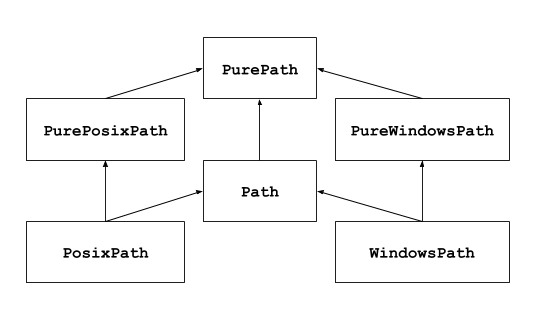
This module offers classes representing filesystem paths with semantics
appropriate for different operating systems. Path classes are divided
between pure paths, which provide purely computational
operations without I/O, and concrete paths, which
inherit from pure paths but also provide I/O operations.
If you’ve never used this module before or just aren’t sure which class is
right for your task, Path is most likely what you need. It instantiates
a concrete path for the platform the code is running on.
Pure paths are useful in some special cases; for example:
If you want to manipulate Windows paths on a Unix machine (or vice versa).
You cannot instantiate a WindowsPath when running on Unix, but you
can instantiate PureWindowsPath.
You want to make sure that your code only manipulates paths without actually
accessing the OS. In this case, instantiating one of the pure classes may be
useful since those simply don’t have any OS-accessing operations.
See also
PEP 428: The pathlib module – object-oriented filesystem paths.
See also
For low-level path manipulation on strings, you can also use the
os.path module.
Pure path objects provide path-handling operations which don’t actually
access a filesystem. There are three ways to access these classes, which
we also call flavours:
A generic class that represents the system’s path flavour (instantiating
it creates either a PurePosixPath or a PureWindowsPath):
>>> PurePath('setup.py')# Running on a Unix machinePurePosixPath('setup.py')
Each element of pathsegments can be either a string representing a
path segment, or an object implementing the os.PathLike interface
where the __fspath__() method returns a string,
such as another path object:
Spurious slashes and single dots are collapsed, but double dots ('..')
and leading double slashes ('//') are not, since this would change the
meaning of a path for various reasons (e.g. symbolic links, UNC paths):
(a naïve approach would make PurePosixPath('foo/../bar') equivalent
to PurePosixPath('bar'), which is wrong if foo is a symbolic link
to another directory)
Pure path objects implement the os.PathLike interface, allowing them
to be used anywhere the interface is accepted.
Changed in version 3.6: Added support for the os.PathLike interface.
Paths of a different flavour compare unequal and cannot be ordered:
>>> PureWindowsPath('foo')==PurePosixPath('foo')False>>> PureWindowsPath('foo')<PurePosixPath('foo')Traceback (most recent call last):
File "<stdin>", line 1, in <module>TypeError: '<' not supported between instances of 'PureWindowsPath' and 'PurePosixPath'
The slash operator helps create child paths, like os.path.join().
If the argument is an absolute path, the previous path is ignored.
On Windows, the drive is not reset when the argument is a rooted
relative path (e.g., r'\foo'):
The string representation of a path is the raw filesystem path itself
(in native form, e.g. with backslashes under Windows), which you can
pass to any function taking a file path as a string:
This behavior conforms to The Open Group Base Specifications Issue 6,
paragraph 4.11 Pathname Resolution:
“A pathname that begins with two successive slashes may be interpreted in
an implementation-defined manner, although more than two leading slashes
shall be treated as a single slash.”
If you want to walk an arbitrary filesystem path upwards, it is
recommended to first call Path.resolve() so as to resolve
symlinks and eliminate ".." components.
Compute a version of this path relative to the path represented by
other. If it’s impossible, ValueError is raised:
>>> p=PurePosixPath('/etc/passwd')>>> p.relative_to('/')PurePosixPath('etc/passwd')>>> p.relative_to('/etc')PurePosixPath('passwd')>>> p.relative_to('/usr')Traceback (most recent call last):
File "<stdin>", line 1, in <module>
File "pathlib.py", line 941, in relative_toraiseValueError(error_message.format(str(self),str(formatted)))ValueError: '/etc/passwd' is not in the subpath of '/usr' OR one path is relative and the other is absolute.
When walk_up is false (the default), the path must start with other.
When the argument is true, .. entries may be added to form the
relative path. In all other cases, such as the paths referencing
different drives, ValueError is raised.:
>>> p.relative_to('/usr',walk_up=True)PurePosixPath('../etc/passwd')>>> p.relative_to('foo',walk_up=True)Traceback (most recent call last):
File "<stdin>", line 1, in <module>
File "pathlib.py", line 941, in relative_toraiseValueError(error_message.format(str(self),str(formatted)))ValueError: '/etc/passwd' is not on the same drive as 'foo' OR one path is relative and the other is absolute.
Warning
This function is part of PurePath and works with strings.
It does not check or access the underlying file structure.
This can impact the walk_up option as it assumes that no symlinks
are present in the path; call resolve() first if
necessary to resolve symlinks.
Changed in version 3.12: The walk_up parameter was added (old behavior is the same as walk_up=False).
Deprecated since version 3.12, will be removed in version 3.14: Passing additional positional arguments is deprecated; if supplied,
they are joined with other.
Return a new path with the name changed. If the original path
doesn’t have a name, ValueError is raised:
>>> p=PureWindowsPath('c:/Downloads/pathlib.tar.gz')>>> p.with_name('setup.py')PureWindowsPath('c:/Downloads/setup.py')>>> p=PureWindowsPath('c:/')>>> p.with_name('setup.py')Traceback (most recent call last):
File "<stdin>", line 1, in <module>
File "/home/antoine/cpython/default/Lib/pathlib.py", line 751, in with_nameraiseValueError("%r has an empty name"%(self,))ValueError: PureWindowsPath('c:/') has an empty name
Return a new path with the stem changed. If the original path
doesn’t have a name, ValueError is raised:
>>> p=PureWindowsPath('c:/Downloads/draft.txt')>>> p.with_stem('final')PureWindowsPath('c:/Downloads/final.txt')>>> p=PureWindowsPath('c:/Downloads/pathlib.tar.gz')>>> p.with_stem('lib')PureWindowsPath('c:/Downloads/lib.gz')>>> p=PureWindowsPath('c:/')>>> p.with_stem('')Traceback (most recent call last):
File "<stdin>", line 1, in <module>
File "/home/antoine/cpython/default/Lib/pathlib.py", line 861, in with_stemreturnself.with_name(stem+self.suffix)
File "/home/antoine/cpython/default/Lib/pathlib.py", line 851, in with_nameraiseValueError("%r has an empty name"%(self,))ValueError: PureWindowsPath('c:/') has an empty name
Return a new path with the suffix changed. If the original path
doesn’t have a suffix, the new suffix is appended instead. If the
suffix is an empty string, the original suffix is removed:
Create a new path object of the same type by combining the given
pathsegments. This method is called whenever a derivative path is created,
such as from parent and relative_to(). Subclasses may
override this method to pass information to derivative paths, for example:
Concrete paths are subclasses of the pure path classes. In addition to
operations provided by the latter, they also provide methods to do system
calls on path objects. There are three ways to instantiate concrete paths:
A subclass of PurePath, this class represents concrete paths of
the system’s path flavour (instantiating it creates either a
PosixPath or a WindowsPath):
You can only instantiate the class flavour that corresponds to your system
(allowing system calls on non-compatible path flavours could lead to
bugs or failures in your application):
>>> importos>>> os.name'posix'>>> Path('setup.py')PosixPath('setup.py')>>> PosixPath('setup.py')PosixPath('setup.py')>>> WindowsPath('setup.py')Traceback (most recent call last):
File "<stdin>", line 1, in <module>
File "pathlib.py", line 798, in __new__%(cls.__name__,))NotImplementedError: cannot instantiate 'WindowsPath' on your system
Some concrete path methods can raise an OSError if a system call fails
(for example because the path doesn’t exist).
Return a new path object representing the user’s home directory (as
returned by os.path.expanduser() with ~ construct). If the home
directory can’t be resolved, RuntimeError is raised.
Return a new path with expanded ~ and ~user constructs,
as returned by os.path.expanduser(). If a home directory can’t be
resolved, RuntimeError is raised.
If the path doesn’t exist and strict is True, FileNotFoundError
is raised. If strict is False, the path is resolved as far as possible
and any remainder is appended without checking whether it exists. If an
infinite loop is encountered along the resolution path, RuntimeError
is raised.
Changed in version 3.6: The strict parameter was added (pre-3.6 behavior is strict).
Return True if the path is a mount point: a point in a
file system where a different file system has been mounted. On POSIX, the
function checks whether path’s parent, path/.., is on a different
device than path, or whether path/.. and path point to the same
i-node on the same device — this should detect mount points for all Unix
and POSIX variants. On Windows, a mount point is considered to be a drive
letter root (e.g. c:\), a UNC share (e.g. \\server\share), or a
mounted filesystem directory.
Added in version 3.7.
Changed in version 3.12: Windows support was added.
Return whether this path points to the same file as other_path, which
can be either a Path object, or a string. The semantics are similar
to os.path.samefile() and os.path.samestat().
An OSError can be raised if either file cannot be accessed for some
reason.
The children are yielded in arbitrary order, and the special entries
'.' and '..' are not included. If a file is removed from or added
to the directory after creating the iterator, it is unspecified whether
a path object for that file is included.
If the path is not a directory or otherwise inaccessible, OSError is
raised.
Patterns are the same as for fnmatch, with the addition of “**”
which means “this directory and all subdirectories, recursively”. In other
words, it enables recursive globbing:
This method calls Path.is_dir() on the top-level directory and
propagates any OSError exception that is raised. Subsequent
OSError exceptions from scanning directories are suppressed.
By default, or when the case_sensitive keyword-only argument is set to
None, this method matches paths using platform-specific casing rules:
typically, case-sensitive on POSIX, and case-insensitive on Windows.
Set case_sensitive to True or False to override this behaviour.
Note
Using the “**” pattern in large directory trees may consume
an inordinate amount of time.
Raises an auditing eventpathlib.Path.glob with arguments self, pattern.
Changed in version 3.11: Return only directories if pattern ends with a pathname components
separator (sep or altsep).
Changed in version 3.12: The case_sensitive parameter was added.
Glob the given relative pattern recursively. This is like calling
Path.glob() with “**/” added in front of the pattern, where
patterns are the same as for fnmatch:
By default, or when the case_sensitive keyword-only argument is set to
None, this method matches paths using platform-specific casing rules:
typically, case-sensitive on POSIX, and case-insensitive on Windows.
Set case_sensitive to True or False to override this behaviour.
Raises an auditing eventpathlib.Path.rglob with arguments self, pattern.
Changed in version 3.11: Return only directories if pattern ends with a pathname components
separator (sep or altsep).
Changed in version 3.12: The case_sensitive parameter was added.
Generate the file names in a directory tree by walking the tree
either top-down or bottom-up.
For each directory in the directory tree rooted at self (including
self but excluding ‘.’ and ‘..’), the method yields a 3-tuple of
(dirpath,dirnames,filenames).
dirpath is a Path to the directory currently being walked,
dirnames is a list of strings for the names of subdirectories in dirpath
(excluding '.' and '..'), and filenames is a list of strings for
the names of the non-directory files in dirpath. To get a full path
(which begins with self) to a file or directory in dirpath, do
dirpath/name. Whether or not the lists are sorted is file
system-dependent.
If the optional argument top_down is true (which is the default), the triple for a
directory is generated before the triples for any of its subdirectories
(directories are walked top-down). If top_down is false, the triple
for a directory is generated after the triples for all of its subdirectories
(directories are walked bottom-up). No matter the value of top_down, the
list of subdirectories is retrieved before the triples for the directory and
its subdirectories are walked.
When top_down is true, the caller can modify the dirnames list in-place
(for example, using del or slice assignment), and Path.walk()
will only recurse into the subdirectories whose names remain in dirnames.
This can be used to prune the search, or to impose a specific order of visiting,
or even to inform Path.walk() about directories the caller creates or
renames before it resumes Path.walk() again. Modifying dirnames when
top_down is false has no effect on the behavior of Path.walk() since the
directories in dirnames have already been generated by the time dirnames
is yielded to the caller.
By default, errors from os.scandir() are ignored. If the optional
argument on_error is specified, it should be a callable; it will be
called with one argument, an OSError instance. The callable can handle the
error to continue the walk or re-raise it to stop the walk. Note that the
filename is available as the filename attribute of the exception object.
By default, Path.walk() does not follow symbolic links, and instead adds them
to the filenames list. Set follow_symlinks to true to resolve symlinks
and place them in dirnames and filenames as appropriate for their targets, and
consequently visit directories pointed to by symlinks (where supported).
Note
Be aware that setting follow_symlinks to true can lead to infinite
recursion if a link points to a parent directory of itself. Path.walk()
does not keep track of the directories it has already visited.
Note
Path.walk() assumes the directories it walks are not modified during
execution. For example, if a directory from dirnames has been replaced
with a symlink and follow_symlinks is false, Path.walk() will
still try to descend into it. To prevent such behavior, remove directories
from dirnames as appropriate.
Note
Unlike os.walk(), Path.walk() lists symlinks to directories in
filenames if follow_symlinks is false.
This example displays the number of bytes used by all files in each directory,
while ignoring __pycache__ directories:
This next example is a simple implementation of shutil.rmtree().
Walking the tree bottom-up is essential as rmdir() doesn’t allow
deleting a directory before it is empty:
# Delete everything reachable from the directory "top".# CAUTION: This is dangerous! For example, if top == Path('/'),# it could delete all of your files.forroot,dirs,filesintop.walk(top_down=False):fornameinfiles:(root/name).unlink()fornameindirs:(root/name).rmdir()
Create a file at this given path. If mode is given, it is combined
with the process’s umask value to determine the file mode and access
flags. If the file already exists, the function succeeds when exist_ok
is true (and its modification time is updated to the current time),
otherwise FileExistsError is raised.
Create a new directory at this given path. If mode is given, it is
combined with the process’s umask value to determine the file mode
and access flags. If the path already exists, FileExistsError
is raised.
If parents is true, any missing parents of this path are created
as needed; they are created with the default permissions without taking
mode into account (mimicking the POSIX mkdir-p command).
If parents is false (the default), a missing parent raises
FileNotFoundError.
If exist_ok is false (the default), FileExistsError is
raised if the target directory already exists.
If exist_ok is true, FileExistsError will not be raised unless the given
path already exists in the file system and is not a directory (same
behavior as the POSIX mkdir-p command).
Changed in version 3.5: The exist_ok parameter was added.
Make this path a symbolic link pointing to target.
On Windows, a symlink represents either a file or a directory, and does not
morph to the target dynamically. If the target is present, the type of the
symlink will be created to match. Otherwise, the symlink will be created
as a directory if target_is_directory is true or a file symlink (the
default) otherwise. On non-Windows platforms, target_is_directory is ignored.
Rename this file or directory to the given target, and return a new
Path instance pointing to target. On Unix, if target exists
and is a file, it will be replaced silently if the user has permission.
On Windows, if target exists, FileExistsError will be raised.
target can be either a string or another path object:
The target path may be absolute or relative. Relative paths are interpreted
relative to the current working directory, not the directory of the
Path object.
It is implemented in terms of os.rename() and gives the same guarantees.
Changed in version 3.8: Added return value, return the new Path instance.
Rename this file or directory to the given target, and return a new
Path instance pointing to target. If target points to an
existing file or empty directory, it will be unconditionally replaced.
The target path may be absolute or relative. Relative paths are interpreted
relative to the current working directory, not the directory of the
Path object.
Changed in version 3.8: Added return value, return the new Path instance.
Change the file mode and permissions, like os.chmod().
This method normally follows symlinks. Some Unix flavours support changing
permissions on the symlink itself; on these platforms you may add the
argument follow_symlinks=False, or use lchmod().
The Python Software Foundation is a non-profit corporation.
Please donate.
Last updated on Oct 26, 2026 (15:00 UTC).
Found a bug?
Created using Sphinx 8.2.3.
You are visitor 01402503 — GeezerVison does not store the pages you look up. Best viewed with Netscape Navigator 4.7 or Internet Explorer 6 at 800×600. No cookies required.