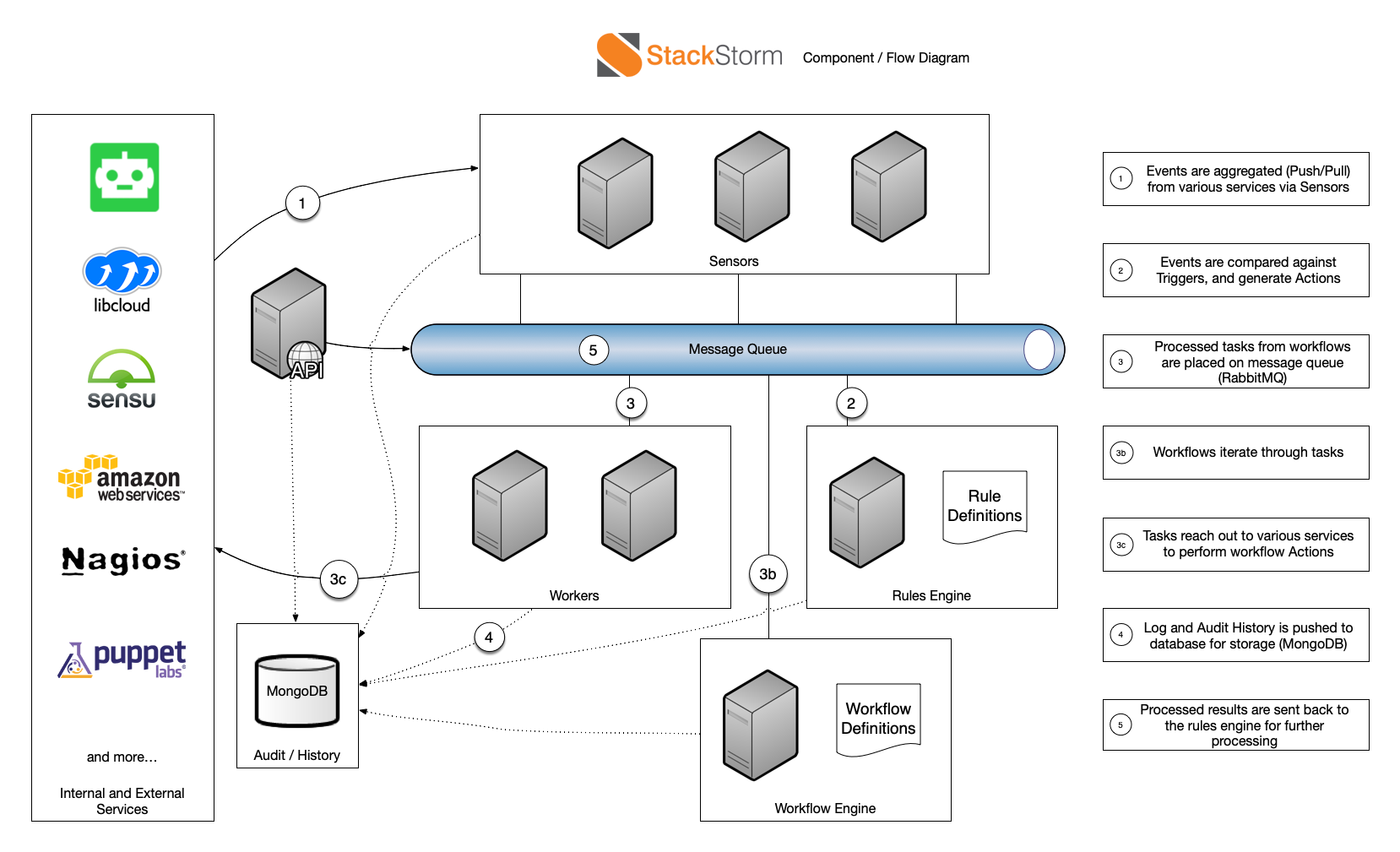
StackStorm is a platform for integration and automation across services and tools. It ties together
your existing infrastructure and application environment so you can more easily automate that
environment. It has a particular focus on taking actions in response to events.
StackStorm helps automate common operational patterns. Some examples are:
Facilitated Troubleshooting - triggering on system failures captured by Nagios, Sensu, New
Relic and other monitoring systems, running a series of diagnostic checks on physical nodes,
OpenStack or Amazon instances, and application components, and posting results to a shared
communication context, like Slack or JIRA.
Automated remediation - identifying and verifying hardware failure on OpenStack compute
node, properly evacuating instances and emailing admins about potential downtime, but if
anything goes wrong - freezing the workflow and calling PagerDuty to wake up a human.
Continuous deployment - build and test with Jenkins, provision a new AWS cluster, turn on
some traffic with the load balancer, and roll-forward or roll-back, based on NewRelic app
performance data.
StackStorm helps you compose these and other operational patterns as rules and workflows or actions.
These rules and workflows - the content within the StackStorm platform - are stored as code which
means they support the same approach to collaboration that you use today for code development.
They can be shared with the broader open source community, for example via the StackStorm
community.
StackStorm plugs into the environment via the extensible set of adapters containing sensors and actions.
Sensors are Python plugins for either inbound or outbound integration that receives or
watches for events respectively. When an event from external systems occurs and is processed by
a sensor, a StackStorm trigger will be emitted into the system.
Triggers are StackStorm representations of external events. There are generic triggers (e.g.
timers, webhooks) and integration triggers (e.g. Sensu alert, JIRA issue updated). A new trigger
type can be defined by writing a sensor plugin.
Actions are StackStorm outbound integrations. There are generic actions (ssh, REST call),
integrations (OpenStack, Docker, Puppet), or custom actions. Actions are either Python plugins,
or any scripts, consumed into StackStorm by adding a few lines of metadata. Actions can be invoked
directly by user via CLI or API, or used and called as part of rules and workflows.
Rules map triggers to actions (or to workflows), applying matching criteria and mapping
trigger payload to action inputs.
Workflows stitch actions together into “uber-actions”, defining the order, transition
conditions, and passing the data. Most automations are more than one-step and thus need more
than one action. Workflows, just like “atomic” actions, are available in the Action library, and
can be invoked manually or triggered by rules.
Packs are the units of content deployment. They simplify the management and sharing of StackStorm
pluggable content by grouping integrations (triggers and actions) and automations (rules and
workflows). A growing number of packs are available on StackStorm Exchange. Users can create their own packs, share them on Github, or submit to
the StackStorm Exchange.
Audit trail of action executions, manual or automated, is recorded and stored with full
details of triggering context and execution results. It is also captured in audit logs for
integrating with external logging and analytical tools: LogStash, Splunk, statsd, syslog.
StackStorm is a service with modular architecture. It comprises loosely coupled service components that
communicate over the message bus, and scales horizontally to deliver automation at scale. StackStorm
has a Web UI, a CLI client, and of course a full REST API. We also ship Python client bindings to
make life easier for developers.
StackStorm is new and under active development. We are very keen to engage the community, to get
feedback and refine our directions. Contributions are always welcome!
You are visitor 01402503 — GeezerVison does not store the pages you look up. Best viewed with Netscape Navigator 4.7 or Internet Explorer 6 at 800×600. No cookies required.