GeezerVisonThe World Wide Web, restored to 800 pixels of glory. | ||||||||||||||||||
| Home|About|Gaming cabinet|Archives|How it works|Starter sites | ||||||||||||||||||
GeezerVison is showing docs.voltdb.com — Chapter 3. Designing Your VoltDB Application DocumentationChapter 3. Designing Your VoltDB ApplicationVoltDB produces ACID-compliant, relational databases using a subset of ANSI-standard SQL for defining the schema and accessing the data. So designing a VoltDB application is very much like designing any other database application. The difference is that VoltDB requires you to be more organized and planful in your design:
These are not unreasonable requirements for high-performance applications. In fact, for 20 years or more OLTP application designers have used these design principles to get the most out of commercial database products. The difference is that VoltDB actually takes advantage of these principles to provide exponentially better throughput without sacrificing any of the value of a fully-transactional database. The following sections provide guidelines for designing VoltDB applications. 3.1. Designing the DatabaseVoltDB is a relational database product. Relational databases consist of tables and columns, with constraints, index keys, and aggregated views. VoltDB also uses standard SQL database definition language (DDL) statements to specify the database schema. So designing the schema for a VoltDB database uses the same skills and knowledge as designing a database for Oracle, MySQL, or any other relational database product. For example, let's assume you are designing a flight reservation system. At its simplest, the application requires database tables for the flights, the customers, and the reservations. Your database schema might look like the following: 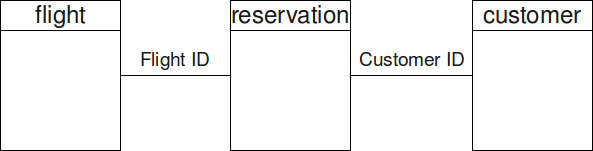 Figure 3.1 shows how the schema looks as defined in standard SQL DDL. Figure 3.1. Example Reservation Schema CREATE TABLE Flight ( FlightID INTEGER UNIQUE NOT NULL, DepartTime TIMESTAMP NOT NULL, Origin VARCHAR(3) NOT NULL, Destination VARCHAR(3) NOT NULL, NumberOfSeats INTEGER NOT NULL, PRIMARY KEY(FlightID) ); CREATE TABLE Reservation ( ReserveID INTEGER UNIQUE NOT NULL, FlightID INTEGER NOT NULL, CustomerID INTEGER NOT NULL, Seat VARCHAR(5) DEFAULT NULL, Confirmed TINYINT DEFAULT '0', PRIMARY KEY(ReserveID) ); CREATE TABLE Customer ( CustomerID INTEGER UNIQUE NOT NULL, FirstName VARCHAR(15), LastName VARCHAR (15), PRIMARY KEY(CustomerID) ); But a schema is not all you need to define the database (or the application) effectively. You also need to know the expected volume and workload. For our example, let's assume that we expect the following volume of data at any given time:
We can also define a set of functions the application must perform and the expected frequency. Again, for the sake of our example, let's assume the following is the estimated workload. Table 3.1. Example Application Workload
This additional information about the volume and workload affects the design of both the database and the application, because it impacts what SQL queries need to be written and what keys to use for accessing the data. In the case of VoltDB, you use this additional information to configure the database and optimize performance. Specifically, you want to partition the individual tables to ensure that the most frequent transactions are single-partitioned. The following sections discuss how to partition a database to maximize throughput, using the flight reservation case study as an example. 3.1.1. Partitioning Database TablesThe goal of partitioning the database tables is to ensure that the most frequent transactions are single-partitioned. This is particularly important for queries that modify the data, such as INSERT, UPDATE, and DELETE statements. Looking at the workload for the reservation system, the key transactions to focus on are looking up a flight, seeing if a flight is available (in other words, has sufficient space), looking up a reservation, and making a reservation. Of these transactions, only the last modifies the database. 3.1.1.1. Choosing a Partition ColumnWe will discuss the Flight table later. But first let's look at the Reservation table. Reservation has a primary key, ReserveID, which is a unique identifier for the reservation. Looking at the schema alone, ReserveID might look like a good column to use to partition the table. However, looking at the workload, there are only two transactions that are keyed to the reservation ID (looking up a reservation by ID and canceling a reservation), which occur only 200 times a second. Whereas, seeing if a flight has available seats, which requires looking up reservations by the Flight ID, occurs 5,000 times a second, or 25 times as frequently. Therefore, the Reservation table needs to be partitioned on the FlightID column. Moving to the Customer table, it also has a unique identifier, CustomerID. Although customers might need to look up their record by name, the first and last names are not guaranteed to be unique and so CustomerID is used for most data access. Therefore, CustomerID is the best column to use for partitioning the Customer table. Once you choose the columns to use for partitioning your database tables, you can define your partitioning choices in the database schema. Specifying the partitioning along with the schema DDL helps keep all of the database structural information in one place. You define the partitioning scheme using the PARTITION TABLE Reservation ON COLUMN FlightID; PARTITION TABLE Customer ON COLUMN CustomerID; 3.1.1.2. Rules for Partitioning TablesThe following are the rules to keep in mind when choosing a column by which to partition a table:
3.1.2. Replicating TablesThe previous section describes how to choose a partitioning column for database tables, using the Reservation and Customer tables as examples. But what about the Flight table? It is possible to partition the Flight table (for example, on the FlightID column). However, not all tables benefit from partitioning. Small, mostly read-only tables can be replicated across all of the partitions of a VoltDB database. This is particularly useful when a table is not accessed by a single column primarily. 3.1.2.1. Choosing Replicated TablesLooking at the workload of the flight reservation example, the Flight table has the most frequent accesses (at 10,000 a second). However, these transactions are read-only and may involve any combination of three columns: the point of origin, the destination, and the departure time. Because of the nature of this transaction, it makes it hard to partition the table in a way that would make it single-partitioned. Fortunately, the number of flights available for booking at any given time is limited (estimated at 2,000) and so the size of the table is relatively small (approximately 36 megabytes). In addition, all of the transactions involving the Flight table are read-only except when new flights are added and at take off (when the records are deleted). Therefore, Flight is a good candidate for replication. Note that the Customer table is also largely read-only. However, because of the volume of data in the Customer table (a million records), it is not a good candidate for replication, which is why it is partitioned. 3.1.2.2. Specifying Replicated TablesIn VoltDB, you do not explicitly state that a table is replicated. If you do not specify a partitioning column in the database schema, the table will by default be replicated. So, in our flight reservation example, there is no explicit action required to replicate the Flight table. However, it is very important to specify partitioning information for tables that you want to partition. If not, they will be replicated by default, significantly changing the performance characteristics of your application. | ||||||||||||||||||
| You are visitor 01402775 — GeezerVison does not store the pages you look up. Best viewed with Netscape Navigator 4.7 or Internet Explorer 6 at 800×600. No cookies required. |