GeezerVisonThe World Wide Web, restored to 800 pixels of glory. |
| Home|About|Gaming cabinet|Archives|How it works|Starter sites |
GeezerVison is showing docs.voltdb.com — Chapter 12. Database Replication DocumentationChapter 12. Database ReplicationThere are times when it is useful to create a copy of a database. Not just a snapshot of a moment in time, but a live, constantly updated copy. K-safety maintains redundant copies of partitions within a single VoltDB database, which helps protect the database cluster against individual node failure. Database replication also creates a copy. However, database replication creates and maintains a separate and distinct copy of the entire database. Database replication can be used for:
The next section, Section 12.1, “How Database Replication Works”, explains the principles behind database replication in VoltDB. Section 12.2, “Database Replication in Action” provides step-by-step instructions for establishing and managing database replication using the functions and features of VoltDB, including: 12.1. How Database Replication WorksDatabase replication involves duplicating the contents of one database cluster (known as the master) to another database cluster (known as the replica). The contents of the replica cluster are completely controlled by the master, which is why this arrangement is sometimes referred to as a master/slave relationship. The replica database can be in the rack next to the master, in the next room, the next building, or another city entirely. The location depends upon your goals for replication. For example, if you are using replication for disaster recovery, geographic separation of the master and replica is required. If you are using replication for hot standby or offloading read-only queries, the physical location may not be important. Figure 12.1. The Components of Database Replication 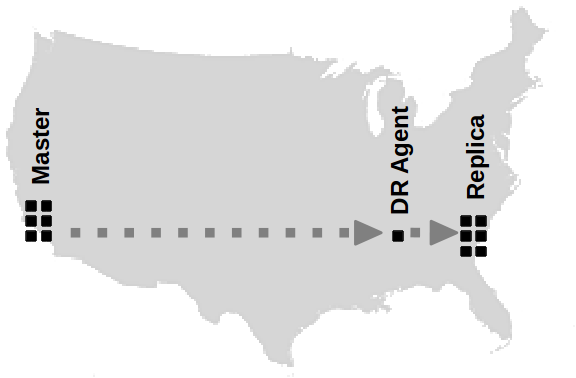 The process of retrieving completed transactions from the master and applying them to the replica is managed by a separate process called the Data Replication (DR) agent. The DR agent is critical to the replication process. It performs the following tasks:
12.1.1. Starting ReplicationDatabase Replication is easy to establish:
Note that the DR agent can be located anywhere. However, the replication process is optimized for the DR agent to be co-located with the replica database (as shown in Figure 12.1, “The Components of Database Replication”). Communication between the DR agent and the master database is kept to a minimum to avoid bottlenecks; only write transactions are replicated and the messages between the master and the agent are compressed. Whereas the DR agent sends transactions to the replica using standard client invocations. Therefore, when distributing the database across a wide-area network (WAN), locating the DR agent near the replica is recommended. 12.1.2. Replication and Existing DatabasesIf data already exists in the master database when the DR agent starts replication, the master first creates a snapshot of the current contents and passes the snapshot to the DR agent so the master and the replica can start from the same point. The master then queues and transmits all subsequent transactions to the agent, as shown in Figure 12.2, “Replicating an Existing Database”. Figure 12.2. Replicating an Existing Database 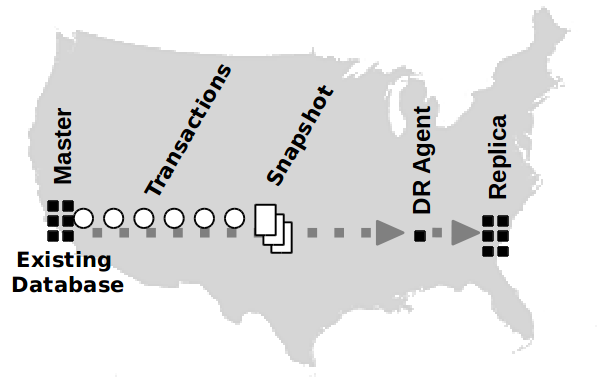 12.1.3. Database Replication and Disaster RecoveryIf unforeseen events occur that make the master database unreachable, database replication lets you replace the master with the replica and restore normal business operations with as little downtime as possible. You switch the replica from read-only to a fully functional database by promoting it to a master itself. To do this, perform the following steps:
Figure 12.3, “Promoting the Replica” illustrates how database replication reduces the risk of major disasters by allowing the replica to replace the master if the master becomes unavailable. Figure 12.3. Promoting the Replica 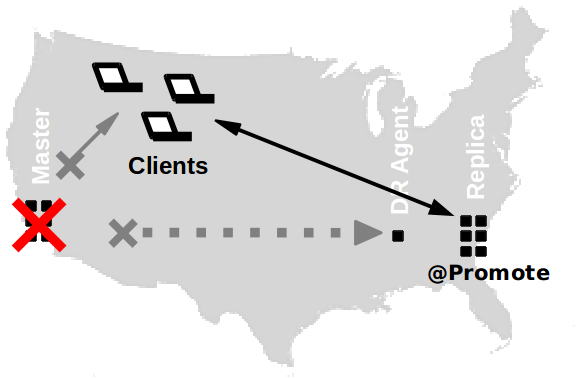 Once the master is offline and the replica is promoted to a master itself, the data is no longer being replicated. As soon as normal business operations have been re-established, it is a good idea to also re-establish replication. This can be done using any of the following options:
12.1.4. Database Replication and CompletenessIt is important to note that, unlike K-safety where multiple copies of each partition are updated simultaneously, database replication involves shipping completed transactions from the master database to the replica. Because replication happens after the fact, there is no guarantee that the contents of the master and replica cluster are identical at any given point in time. Instead, the replica database 'catches up" with the master after the transactions are received and processed by the DR agent. If the master cluster crashes, there is no guarantee that the DR agent has managed to retrieve all transactions that were queued on the master. Therefore, it is possible that some transactions that completed on the master are not reproduced on the replica. The decision whether to promote the replica or wait for the master to return (and hopefully recover all transactions from the command log) is not an easy one. Promoting the replica and using it to replace the original master may involve losing one or more transactions. However, if the master cannot be recovered or cannot not be recovered quickly, waiting for the master to return can result in significant business loss or interruption. Your own business requirements and the specific situation that caused the outage will determine which choice to make. However, database replication makes the choice possible and significantly eases the dangers of unforeseen events. 12.1.5. Database Replication and Read-only ClientsWhile database replication is occurring, the replica responds to write transactions (INSERT, UPDATE, and DELETE) from the DR agent only. Other clients can connect to the replica and use it for read-only transactions, including read-only ad hoc queries and system procedures. Any attempt to perform a write transaction from a client other than the DR agent returns an error. There will always be some delay between a transaction completing on the master and being replayed on the replica. However, for read operations that do not require real-time accuracy (such as reporting), the replica can provide a useful source for offloading certain less-frequent, read-only transactions from the master. Figure 12.4. Read-Only Access to the Replica 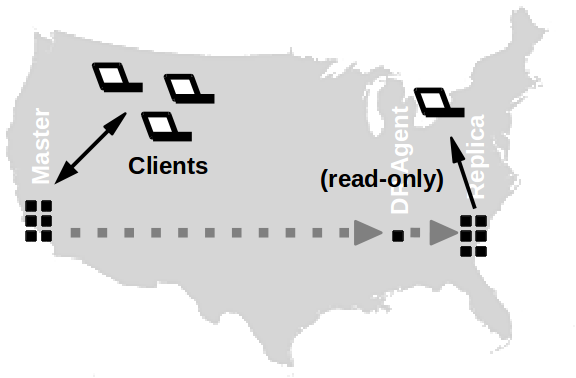 |
| You are visitor 01402775 — GeezerVison does not store the pages you look up. Best viewed with Netscape Navigator 4.7 or Internet Explorer 6 at 800×600. No cookies required. |