GeezerVisonThe World Wide Web, restored to 800 pixels of glory. |
| Home|About|Gaming cabinet|Archives|How it works|Starter sites |
GeezerVison is showing docs.voltdb.com — Chapter 15. Importing and Exporting Live Data DocumentationChapter 15. Importing and Exporting Live DataVoltDB is an in-memory, transaction processing database. It excels at managing large volumes of transactions in real-time. However, transaction processing is often only one aspect of the larger business context and data needs to transition from system to system as part of the overall solution. The process of moving from one database to another as data moves through the system is often referred to as Extract, Transform, and Load (ETL). VoltDB supports ETL through the ability to selectively export data as it is committed to the database, as well as the ability to import data through multiple standard protocols. Exporting data differs from save and restore (as described in Chapter 13, Saving & Restoring a VoltDB Database) in several ways:
The target for exporting data from VoltDB may be another database, a repository (such as a sequential log file), or a process (such as a system monitor or accounting system). No matter what the target, VoltDB helps automate the process for you. This chapter explains how to plan for and implement the exporting of live data using VoltDB. For import, VoltDB supports both one-time import through data loading utilities and ongoing import as part of the database process. The following sections describe how to use VoltDB export and import in detail. 15.1. Understanding ExportVoltDB lets you automate the export process by specifying streams in the schema as sources for export. Streams act just like tables, except no data is actually stored in the database. At runtime, any data written to the specified streams is sent to the selected export connector, which queues the data for export. Then, asynchronously, the connector sends the queued export data to the selected output target. Which export connector runs depends on the target you choose when setting up export in the configuration file. Currently, VoltDB provides connectors for exporting to files, for exporting to other business processes via a distributed message queue or HTTP, and for exporting to other databases via JDBC. The connector processes are managed by the database servers themselves, helping to distribute the work and ensure maximum throughput. Figure 15.1, “Overview of the Export Process” illustrates the basic export procedure, where streams B and D are specified as export streams. (Streams can be used for other things besides export. This chapter focuses on their use for export but see the description of the CREATE STREAM statement for other uses.) Figure 15.1. Overview of the Export Process 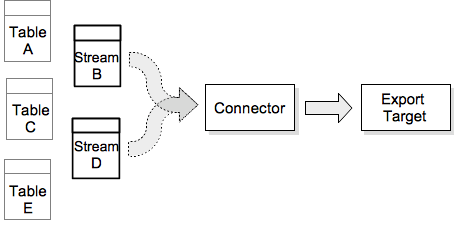 Note that you do not need to modify the schema or the client application to turn exporting of live data on and off. The application's stored procedures insert data into the streams; but it is the database configuration that determines whether export actually occurs at runtime. When a stored procedure uses an SQL INSERT statement to write data into a export stream, rather than storing that data in the database, it is handed off to the connector when the stored procedure successfully commits the transaction.[4] Export streams have several important characteristics:
Of course, there are restrictions to export streams. Since they have no storage associated with them, they are for INSERT only. Any attempt to SELECT, UPDATE, or DELETE data from streams will result in an error. [4] There is no guarantee on the latency of export between the connector and the export target. The export function is transactionally correct; no export occurs if the stored procedure rolls back and the export data is in the appropriate transaction order. But the flow of export data from the connector to the target is not synchronous with the completion of the transaction. There may be several seconds delay before the export data reaches the target. |
| You are visitor 01402775 — GeezerVison does not store the pages you look up. Best viewed with Netscape Navigator 4.7 or Internet Explorer 6 at 800×600. No cookies required. |