GeezerVisonThe World Wide Web, restored to 800 pixels of glory. | ||||||
| Home|About|Gaming cabinet|Archives|How it works|Starter sites | ||||||
GeezerVison is showing docs.voltdb.com — 5.3. Installing Stored Procedures into the Database Documentation5.3. Installing Stored Procedures into the DatabaseWhen your stored procedure code is ready, you need to get the procedures into the database and ready to use. You first compile the procedure code, create a jar file, and load the resulting jar file into the database. Then you need to declare in the schema which procedures are stored procedures. Finally, depending on which table each stored procedure accesses, you need to partition each procedure to match the table partitioning. These processes are covered in the following sections: These sections show how to use DDL to declare and partition stored procedures in the database schema. If you find you need to modify the schema, see Section 4.6, “Modifying the Schema”. 5.3.1. Compiling, Packaging, and Loading Stored ProceduresThe VoltDB stored procedures are written as Java classes, so you compile them using the Java compiler. Anytime you update your stored procedure code, remember to recompile, package, and reload it into the database using the following steps: $ javac -classpath "./:/opt/voltdb/voltdb/*" \ The steps are described as follows:
Before a stored procedure can be called by a client application, you need to declare it in the schema, which is described next. 5.3.2. Declaring Stored Procedures in the SchemaTo make your stored procedures accessible in the database, you must declare them in the schema using the CREATE PROCEDURE statement. Be sure to identify all of your stored procedures or they will not be available to the client applications at runtime. Also, before you declare a procedure, ensure the tables and columns the procedure accesses are in the schema. The following DDL statements declare five stored procedures, identifying them by their class name: $ sqlcmd 1> CREATE PROCEDURE FROM CLASS fadvisor.procedures.LookupFlight; 2> CREATE PROCEDURE FROM CLASS fadvisor.procedures.HowManySeats; 3> CREATE PROCEDURE FROM CLASS fadvisor.procedures.MakeReservation; 4> CREATE PROCEDURE FROM CLASS fadvisor.procedures.CancelReservation; 5> CREATE PROCEDURE FROM CLASS fadvisor.procedures.RemoveFlight; For some situations, you can create stored procedures directly in the schema using SQL instead of loading Java code. See how to use the CREATE PROCEDURE AS statement in Section 7.2, “Shortcut for Defining Simple Stored Procedures”. For more about modifying a schema with DDL, see Section 4.6, “Modifying the Schema”. 5.3.3. Partitioning Stored Procedures in the SchemaWe want the most frequently used stored procedures to be single-partitioned. This means that the procedure executes in the one partition that also has the data it needs. Single-partitioned stored procedures do not have the overhead of processing across multiple partitions and servers, wasting time searching through the data of the entire table. To ensure single-partitioned efficiency, the parameter the stored procedure uses to identify its required data must be the same as the column on which the table rows are partitioned. Remember that in our sample application the RESERVATION table is partitioned on FLIGHTID. Let's say you create a stored procedure, MakeReservation(), with two arguments, flight_id and customer_id. The following figure shows how the stored procedure will automatically execute in the partition that has the requested row. Figure 5.3. Stored Procedures Execute in the Appropriate Partition Based on the Partitioned Parameter Value 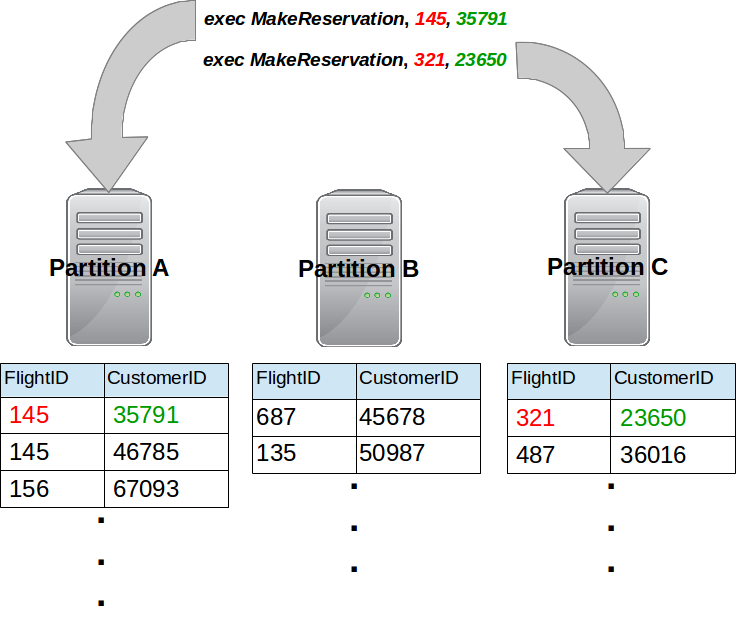 If you do not declare a procedure as single-partitioned, it is assumed to be multi-partitioned by default. The advantage of multi-partitioned stored procedures is that they have full access to all of the data in the database, across all partitions. However, the real focus of VoltDB, and the way to achieve maximum throughput for your application, is through the use of single-partitioned stored procedures. 5.3.3.1. How to Declare Single-Partition ProceduresBefore declaring a single-partitioned procedure, ensure the following prerequisites:
When you declare a stored procedure as single-partitioned, you must specify both the associated table and the column on which it is partitioned using the PARTITION ON clause in the CREATE PROCEDURE statement. The following example uses the RESERVATION table and the FLIGHTID column as the partitioning column. For example: CREATE PROCEDURE
PARTITION ON
TABLE Reservation COLUMN FlightID
FROM CLASS fadvisor.procedures.MakeReservation;The PARTITION ON clause assumes that the partitioning column value is also the first parameter to the stored
procedure. Suppose you wish to partition a stored procedure on the third parameter such as the procedure
CREATE PROCEDURE
    PARTITION ON
       TABLE Customer COLUMN CustomerID PARAMETER 2
    FROM CLASS fadvisor.procedures. GetCustomerDetails;
5.3.3.2. Queries in Single-Partitioned Stored ProceduresSingle-partitioned stored procedures are special because they operate independently of other partitions, which is why they are so fast. At the same time, single-partitioned stored procedures operate on only a subset of the entire data, that is, only the data within the specified partition. CautionIt is the application developer's responsibility to ensure that the queries in a single-partitioned stored procedure are truly single-partitioned. VoltDB does not warn you about SELECT or DELETE statements that might return incomplete results. For example, if your single-partitioned procedure attempts to operate on a range of values for the partitioning column, the range is incomplete and includes only a subset of the table data that is in the current partition. VoltDB does generate a runtime error if you attempt to INSERT a row that does not belong in the current partition. After you partition a procedure, your stored procedure can operate on only those records in the partitioned table that are identified by the partitioning column, in this example the RESERVATION table identified by a FLIGHTID. Your stored procedure can operate on records in replicated tables because all partitions have the same copy of a replicated table. However, for other partitioned tables, the stored procedure can only operate on those records if both tables are partitioned on the same attribute. In this example that would be FLIGHTID. In other words, the following rules apply:
For example, the RESERVATION table can be joined with the FLIGHT table (which is replicated). However, the RESERVATION table cannot be joined with the CUSTOMER table in a single-partitioned stored procedure because the two tables use different partitioning columns. (CUSTOMER is partitioned on the CUSTOMERID column.) The following are examples of invalid SQL queries for a single-partitioned stored procedure partitioned on FLIGHTID:
| ||||||
| You are visitor 01402775 — GeezerVison does not store the pages you look up. Best viewed with Netscape Navigator 4.7 or Internet Explorer 6 at 800×600. No cookies required. |
 -d ./obj \
*.java
$ jar cvf myproc.jar -C obj .
 $ sqlcmd
 1> load classes myproc.jar;
2> show classes;