GeezerVisonThe World Wide Web, restored to 800 pixels of glory. | ||||||||||||||||||
| Home|About|Gaming cabinet|Archives|How it works|Starter sites | ||||||||||||||||||
GeezerVison is showing docs.voltdb.com — 4.3. Analyzing Data Volume and Workload Documentation4.3. Analyzing Data Volume and WorkloadA schema is not all you need to define the database effectively. You also need to know the expected volume and workload on the database. For our example, let's assume that we expect the following volume of data at any given time:
This additional information about the volume and workload affects the design of both the database and the client application, because it impacts what SQL queries need to be written for accessing the data and what attributes (columns) to share between tables. Table 4.1, “Example Application Workload” defines a set of procedures the application must perform. The table also shows the estimated workload as expected frequency of each procedure. Procedures in bold modify the database. Table 4.1. Example Application Workload
You can make your procedures that access the database transactional by defining them as VoltDB stored procedures. This means each stored procedure call completes or rolls back if necessary, thus maintaining data integrity. Stored procedures are described in detail in Chapter 5, Designing Stored Procedures to Access the Database. In our analysis we also need to consider referential integrity, where relationships are maintained between tables with shared columns that link tables together. For example, Figure 4.3, “Diagram Representing the Flight Reservation System” shows that the Flight table links to the Reservation table where FlightID is the shared column. Similarly, the Customer table links to the Reservation table where CustomerID is the common column. Figure 4.3. Diagram Representing the Flight Reservation System 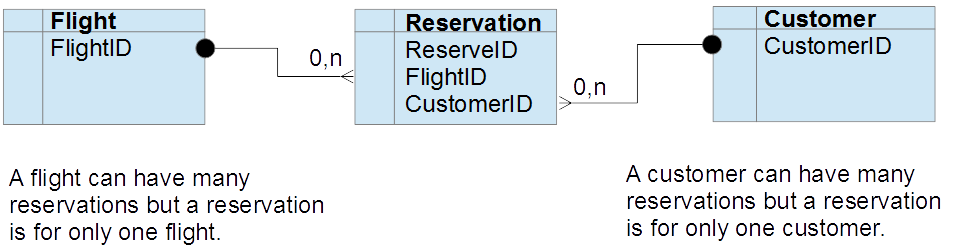 Since VoltDB stored procedures are transactional, you can use stored procedures to maintain referential integrity between tables as data is added or removed. For example, if a customer record is removed from the Customer table, all reservations for that customer need to be removed from the Reservations table as well. With VoltDB, you use all this additional information about volume and workload to configure the database and optimize performance. Specifically, you want to partition the individual tables to ensure efficiency. Partitioning is described next. | ||||||||||||||||||
| You are visitor 01402775 — GeezerVison does not store the pages you look up. Best viewed with Netscape Navigator 4.7 or Internet Explorer 6 at 800×600. No cookies required. |