GeezerVisonThe World Wide Web, restored to 800 pixels of glory. | ||||||||||||||||||||||||||||||||||||||||||||||||
| Home|About|Gaming cabinet|Archives|How it works|Starter sites | ||||||||||||||||||||||||||||||||||||||||||||||||
GeezerVison is showing docs.wxpython.org — wx.ComboBox — wxPython 4.3.2 Docs
|


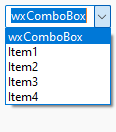
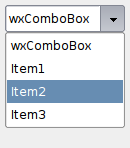
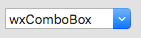


Default constructor. |
|
Creates the combobox for two-step construction. |
|
Hides the list box portion of the combo box. |
|
Finds an item whose label matches the given string. |
|
Returns the number of items in the control. |
|
Returns the item being selected right now. |
|
Same as |
|
Returns the index of the selected item or |
|
Gets the current selection span. |
|
Returns the label of the item with the given index. |
|
Gets the text currently selected in the control. |
|
Returns |
|
Returns |
|
Shows the list box portion of the combo box. |
|
Same as |
|
Changes the text of the specified combobox item. |
|
Same as |
|
Sets the text for the combobox text field. |
 Properties Summary

See |
|
See |
|
 Class API

- class wx.ComboBox(Control, ItemContainer, TextEntry)
Possible constructors:
ComboBox() -> None

ComboBox(parent, id=ID_ANY, value='', pos=DefaultPosition,
         size=DefaultSize, choices=[], style=0, validator=DefaultValidator,
         name=ComboBoxNameStr) -> None
A combobox is like a combination of an edit control and a listbox.
Methods
- __init__(self, *args, **kw)
 Overloaded Implementations:
__init__ (self)
Default constructor.
- Return type:
None
__init__ (self, parent, id=ID_ANY, value=’’, pos=DefaultPosition, size=DefaultSize, choices=[], style=0, validator=DefaultValidator, name=ComboBoxNameStr)
Constructor, creating and showing a combobox.
- Parameters:
parent (wx.Window) – Parent window. Must not be nullptr.
id (wx.WindowID) – Window identifier. The value
wx.ID_ANYindicates a default value.value (string) – Initial selection string. An empty string indicates no selection.
pos (wx.Point) – Window position.
size (wx.Size) – Window size. If DefaultSize is specified then the window is sized appropriately.
choices (list of strings) – An array of strings with which to initialise the control.
style (long) – Window style. See wx.ComboBox.
validator (wx.Validator) – Window validator.
name (string) – Window name.
- Return type:
None
- Create(self, parent, id=ID_ANY, value='', pos=DefaultPosition, size=DefaultSize, choices=[], style=0, validator=DefaultValidator, name=ComboBoxNameStr)
Creates the combobox for two-step construction.
Derived classes should call or replace this function. See wx.ComboBox for further details.
- Parameters:
parent (wx.Window)
id (wx.WindowID)
value (string)
pos (wx.Point)
size (wx.Size)
choices (list of strings)
style (long)
validator (wx.Validator)
name (string)
- Return type:
bool
- Dismiss(self)
Hides the list box portion of the combo box.
Currently this method is implemented in wxMSW, wxGTK and OSX/Cocoa.
Notice that calling this function will generate a
wxEVT_COMBOBOX_CLOSEUPevent except under wxOSX where generation of this event is not supported at all.- Return type:
None
Added in version 2.9.1.
- FindString(self, string, caseSensitive=False)
Finds an item whose label matches the given string.
- Parameters:
string (string) – String to find.
caseSensitive (bool) – Whether search is case sensitive (default is not).
- Return type:
int
- Returns:
The zero-based position of the item, or
wx.NOT_FOUNDif the string was not found.
- static GetClassDefaultAttributes(variant=WINDOW_VARIANT_NORMAL)
- Parameters:
variant (WindowVariant)
- Return type:
- GetCurrentSelection(self)
Returns the item being selected right now.
This function does the same things as
wx.Choice.GetCurrentSelectionand returns the item currently selected in the dropdown list if it’s open or the same thing aswx.ControlWithItems.GetSelectionotherwise.- Return type:
int
- GetInsertionPoint(self)
Same as
wx.TextEntry.GetInsertionPoint.- Return type:
int
Note
Under wxMSW, this function always returns 0 if the combobox doesn’t have the focus.
- GetSelection(self)
Returns the index of the selected item or
NOT_FOUNDif no item is selected.- Return type:
int
- Returns:
The position of the current selection.
See also
- GetTextSelection(self)
Gets the current selection span.
If the returned values are equal, there was no selection. Please note that the indices returned may be used with the other wx.TextCtrl methods but don’t necessarily represent the correct indices into the string returned by
GetValuefor multiline controls under Windows (at least,) you should useGetStringSelectionto get the selected text.- Return type:
Tuple[int, int]
- GetString(self, n)
Returns the label of the item with the given index.
The index must be valid, i.e. less than the value returned by
GetCount, otherwise an assert is triggered. Notably, this function can’t be called if the control is empty.- Parameters:
n (int) – The zero-based index.
- Return type:
str
- Returns:
The label of the item.
- GetStringSelection(self)
Gets the text currently selected in the control.
If there is no selection, the returned string is empty.
- Return type:
str
- IsListEmpty(self)
Returns
Trueif the list of combobox choices is empty.Use this method instead of (not available in this class)
IsEmptyto test if the list of items is empty.- Return type:
bool
Added in version 2.9.3.
- IsTextEmpty(self)
Returns
Trueif the text of the combobox is empty.Use this method instead of (not available in this class)
IsEmptyto test if the text currently entered into the combobox is empty.- Return type:
bool
Added in version 2.9.3.
- Popup(self)
Shows the list box portion of the combo box.
Currently this method is implemented in wxMSW, wxGTK and OSX/Cocoa.
Notice that calling this function will generate a
wxEVT_COMBOBOX_DROPDOWNevent except under wxOSX where generation of this event is not supported at all.- Return type:
None
Added in version 2.9.1.
- SetSelection(self, *args, **kw)
- Overloaded Implementations:
SetSelection (self, from_, to_)
Same as
wx.TextEntry.SetSelection.- Parameters:
from_ (long)
to_ (long)
- Return type:
None
SetSelection (self, n)
Sets the selection to the given item n or removes the selection entirely if n ==
NOT_FOUND.Note that this does not cause any command events to be emitted nor does it deselect any other items in the controls which support multiple selections.
- Parameters:
n (int) – The string position to select, starting from zero.
- Return type:
None
See also
SetString,SetStringSelection
- SetString(self, n, text)
Changes the text of the specified combobox item.
Notice that if the item is the currently selected one, i.e. if its text is displayed in the text part of the combobox, then the text is also replaced with the new text.
- Parameters:
n (int)
text (string)
- Return type:
None
- SetTextSelection(self, from_, to_)
Same as
wx.TextEntry.SetSelection.- Parameters:
from_ (long)
to_ (long)
- Return type:
None
- SetValue(self, text)
Sets the text for the combobox text field.
For normal, editable comboboxes with a text entry field calling this method will generate a
wxEVT_TEXTevent, consistently withwx.TextEntry.SetValuebehaviour, usewx.TextEntry.ChangeValueif this is undesirable.For controls with
CB_READONLYstyle the method behaves somewhat differently: the string must be in the combobox choices list (the check for this is case-insensitive) andwxEVT_TEXTis not generated in this case.- Parameters:
text (string) – The text to set.
- Return type:
None
Properties
- CurrentSelection
- InsertionPoint
- Selection
See
GetSelectionandSetSelection
- StringSelection

Best viewed with Netscape Navigator 4.7 or Internet Explorer 6 at 800×600. No cookies required.