GeezerVisonThe World Wide Web, restored to 800 pixels of glory. | ||||||||||||||||||||||
| Home|About|Gaming cabinet|Archives|How it works|Starter sites | ||||||||||||||||||||||
GeezerVison is showing docs.wxpython.org — wx.DirDialog — wxPython 4.3.2 Docs
|


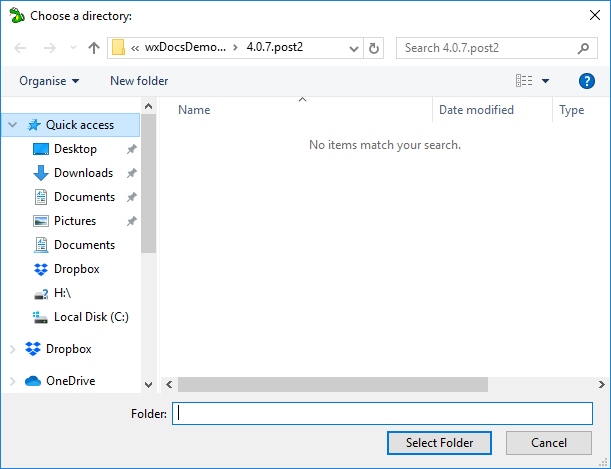
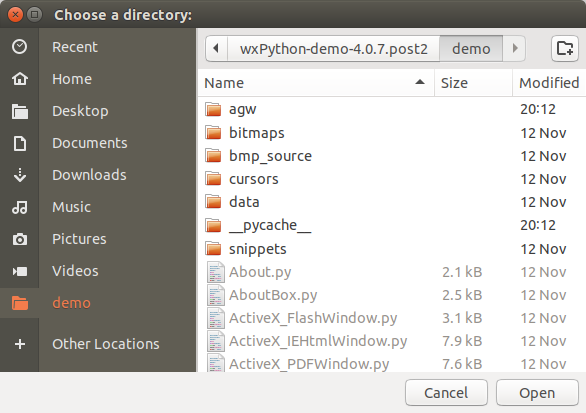


Constructor. |
|
Returns the message that will be displayed on the dialog. |
|
Returns the default or user-selected path. |
|
Returns a list of the currently selected paths. |
|
Sets the message that will be displayed on the dialog. |
|
Sets the default path. |
|
Shows the dialog, returning |
 Properties Summary

See |
|
See |
 Class API

- class wx.DirDialog(Dialog)
Possible constructors:
DirDialog(parent, message=DirSelectorPromptStr, defaultPath='',
          style=DD_DEFAULT_STYLE, pos=DefaultPosition, size=DefaultSize,
          name=DirDialogNameStr) -> None
This class represents the directory chooser dialog.
Methods
- __init__(self, parent, message=DirSelectorPromptStr, defaultPath='', style=DD_DEFAULT_STYLE, pos=DefaultPosition, size=DefaultSize, name=DirDialogNameStr)
Constructor.
Use
ShowModalto show the dialog.- Parameters:
parent (wx.Window) – Parent window.
message (string) – Message to show on the dialog.
defaultPath (string) – The default path, or the empty string.
style (long) – The dialog style, see
DD_*styles for more info.pos (wx.Point) – Dialog position. Ignored under Windows.
size (wx.Size) – Dialog size. Ignored under Windows.
name (string) – The dialog name, not used.
- Return type:
None
- static GetClassDefaultAttributes(variant=WINDOW_VARIANT_NORMAL)
- Parameters:
variant (WindowVariant)
- Return type:
- GetMessage(self)
Returns the message that will be displayed on the dialog.
- Return type:
str
- GetPath(self)
Returns the default or user-selected path.
- Return type:
str
Note
This function can’t be used with dialogs which have the
DD_MULTIPLEstyle, useGetPathsinstead.
- GetPaths(self)
Returns a list of the currently selected paths.
- Return type:
List[str]
- SetMessage(self, message)
Sets the message that will be displayed on the dialog.
- Parameters:
message (string)
- Return type:
None
- SetPath(self, path)
Sets the default path.
- Parameters:
path (string)
- Return type:
None
- ShowModal(self)
Shows the dialog, returning
ID_OKif the user pressedwx.OK, andID_CANCELotherwise.- Return type:
int
Properties
- Message
See
GetMessageandSetMessage
Best viewed with Netscape Navigator 4.7 or Internet Explorer 6 at 800×600. No cookies required.