GeezerVisonThe World Wide Web, restored to 800 pixels of glory. | ||||||||||||||||||||||||||||||||||||||||||||||||||||||||||||||||||
| Home|About|Gaming cabinet|Archives|How it works|Starter sites | ||||||||||||||||||||||||||||||||||||||||||||||||||||||||||||||||||
GeezerVison is showing docs.wxpython.org — wx.FileDialog — wxPython 4.3.2 Docs
|




Constructor. |
|
Add a directory to the list of shortcuts shown in the dialog. |
|
Returns the path of the file currently selected in dialog. |
|
Returns the file type filter index currently selected in dialog. |
|
Returns the default directory. |
|
If functions |
|
Returns the default filename. |
|
Returns a list of filenames chosen in the dialog. This function |
|
Returns the index into the list of filters supplied, optionally, in the wildcard parameter. |
|
Returns the message that will be displayed on the dialog. |
|
Returns the full path (directory and filename) of the selected file. |
|
Returns a list of the full paths of the files chosen. This function |
|
Returns the file dialog wildcard. |
|
Set the hook to be used for customizing the dialog contents. |
|
Sets the default directory. |
|
Sets the default filename. |
|
Sets the default filter index, starting from zero. |
|
Sets the message that will be displayed on the dialog. |
|
Sets the path (the combined directory and filename that will be returned when the dialog is dismissed). |
|
Sets the wildcard, which can contain multiple file types, for example: “ |
|
Shows the dialog, returning |
 Properties Summary

See |
|
See |
|
See |
|
See |
|
See |
|
See |
|
See |
|
See |
 Class API

- class wx.FileDialog(Dialog)
Possible constructors:
FileDialog(parent, message=FileSelectorPromptStr, defaultDir='',
           defaultFile='', wildcard=FileSelectorDefaultWildcardStr,
           style=FD_DEFAULT_STYLE, pos=DefaultPosition, size=DefaultSize,
           name=FileDialogNameStr) -> None
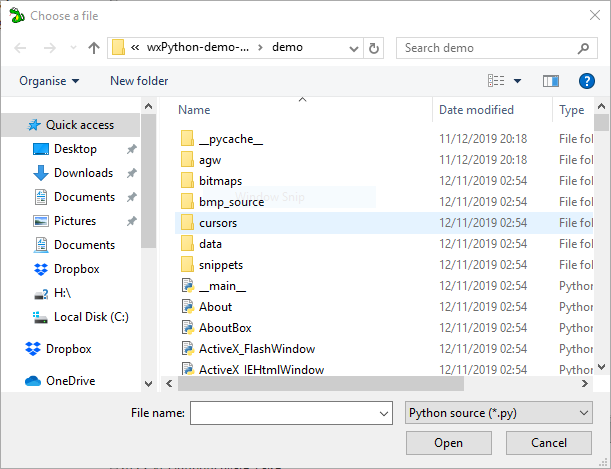
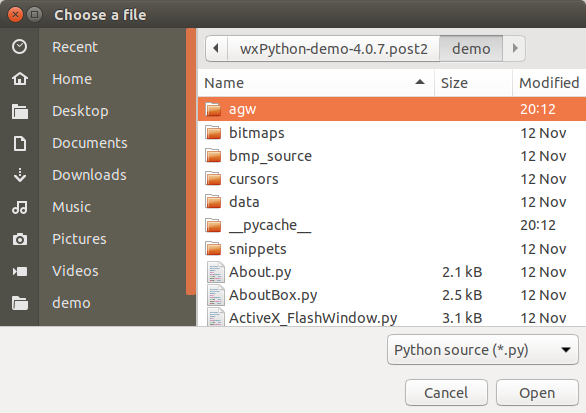
This class represents the file chooser dialog.
Methods
- __init__(self, parent, message=FileSelectorPromptStr, defaultDir='', defaultFile='', wildcard=FileSelectorDefaultWildcardStr, style=FD_DEFAULT_STYLE, pos=DefaultPosition, size=DefaultSize, name=FileDialogNameStr)
Constructor.
Use
ShowModalto show the dialog.- Parameters:
parent (wx.Window) – Parent window.
message (string) – Message to show on the dialog.
defaultDir (string) – The default directory, or the empty string.
defaultFile (string) – The default filename, or the empty string.
wildcard (string) – A wildcard, such as “x.x” or “
BMPfiles (.bmp)|.bmp|GIF files (.gif)|.gif”.style (long) – A dialog style. See
FD_*styles for more info.pos (wx.Point) – Dialog position. Not implemented.
size (wx.Size) – Dialog size. Not implemented.
name (string) – Dialog name. Not implemented.
- Return type:
None
- AddShortcut(self, directory, flags=0)
Add a directory to the list of shortcuts shown in the dialog.
File dialogs on many platforms display a fixed list of directories which can be easily selected by the user. This function allows to add an application-defined directory to this list, which can be convenient for the programs that use specific directories for their files instead of the default user document directory (see wx.StandardPaths).
Currently this function is only implemented in wxMSW and wxGTK and does nothing under the other platforms. Moreover, in wxMSW this function is incompatible with the use of
SetExtraControlCreator, if you need to use this function and customize the dialog contents, please use the newerSetCustomizeHookinstead.The dialogs sample shows the use of this function by adding two custom shortcuts corresponding to the subdirectories of
WXWINenvironment variable if it is defined.- Parameters:
directory (string) – The full path to the directory, which should exist.
flags (int) – Can be set to
FD_SHORTCUT_BOTTOM(which is also the default behaviour) to add the shortcut after the existing ones, orFD_SHORTCUT_TOPto add it before them. Support for the latter flag is only available in wxMSW, in wxGTK the shortcuts are always added to the bottom of the list.
- Return type:
bool
- Returns:
Trueon success orFalseif shortcut couldn’t be added, e.g. because this functionality is not available on the current platform.
Added in version 4.3/wxWidgets-3.3.0.
Note
In wxMSW, the shortcuts appear in a separate section called “Application Links” by default. To change the title of this section, the application can specify a value of the
FileDescriptionfield of the version information structure in its resource file –
- static GetClassDefaultAttributes(variant=WINDOW_VARIANT_NORMAL)
- Parameters:
variant (WindowVariant)
- Return type:
- GetCurrentlySelectedFilename(self)
Returns the path of the file currently selected in dialog.
Notice that this file is not necessarily going to be accepted by the user, so calling this function mostly makes sense from an update UI event handler of a custom file dialog extra control to update its state depending on the currently selected file.
Currently this function is fully implemented under GTK and MSW and always returns an empty string elsewhere.
- Return type:
str
- Returns:
The path of the currently selected file or an empty string if nothing is selected.
Added in version 2.9.5.
See also
SetExtraControlCreator
- GetCurrentlySelectedFilterIndex(self)
Returns the file type filter index currently selected in dialog.
Notice that this file type filter is not necessarily going to be the one finally accepted by the user, so calling this function mostly makes sense from an update UI event handler of a custom file dialog extra control to update its state depending on the currently selected file type filter.
Currently this function is fully implemented under macOS and MSW and always returns
NOT_FOUNDelsewhere.- Return type:
int
- Returns:
The 0-based index of the currently selected file type filter or
wx.NOT_FOUNDif nothing is selected.
Added in version 4.1/wxWidgets-3.1.3: - MSW
Added in version 4.1/wxWidgets-3.1.5: - macOS
See also
SetExtraControlCreatorSee also
See also
- GetDirectory(self)
Returns the default directory.
- Return type:
str
- GetExtraControl(self)
If functions
SetExtraControlCreatorandShowModalwere called, returns the extra window.Otherwise returns nullptr.
- Return type:
Added in version 2.9.0.
- GetFilename(self)
Returns the default filename.
- Return type:
str
Note
This function can’t be used with dialogs which have the
FD_MULTIPLEstyle, useGetFilenamesinstead.
- GetFilenames(self)
Returns a list of filenames chosen in the dialog. This function should only be used with the dialogs which have wx.``MULTIPLE`` style, use GetFilename for the others.
- Return type:
List[str]
- GetFilterIndex(self)
Returns the index into the list of filters supplied, optionally, in the wildcard parameter.
Before the dialog is shown, this is the index which will be used when the dialog is first displayed.
After the dialog is shown, this is the index selected by the user.
- Return type:
int
- GetMessage(self)
Returns the message that will be displayed on the dialog.
- Return type:
str
- GetPath(self)
Returns the full path (directory and filename) of the selected file.
- Return type:
str
Note
This function can’t be used with dialogs which have the
FD_MULTIPLEstyle, useGetPathsinstead.
- GetPaths(self)
Returns a list of the full paths of the files chosen. This function should only be used with the dialogs which have wx.``MULTIPLE`` style, use GetPath for the others.
- Return type:
List[str]
- GetWildcard(self)
Returns the file dialog wildcard.
- Return type:
str
- SetCustomizeHook(self, customizeHook)
Set the hook to be used for customizing the dialog contents.
This function can be called before calling
ShowModalto specify that the dialog contents should be customized using the provided hook. See wx.FileDialogCustomizeHook documentation and Dialogs Sample for the examples of using it.- Parameters:
customizeHook (wx.FileDialogCustomizeHook) – The hook object that will be used by the dialog. This object must remain valid at least until
ShowModalreturns.- Return type:
bool
- Returns:
Trueif the hook was successfully set orFalseif customizing the file dialog is not supported by the current platform.
Added in version 4.1/wxWidgets-3.1.7.
Note
In order to define a custom hook object, /filedlgcustomize.h must be included in addition to the usual /filedlg.h header.
- SetDirectory(self, directory)
Sets the default directory.
- Parameters:
directory (string)
- Return type:
None
- SetFilename(self, setfilename)
Sets the default filename.
In wxGTK this will have little effect unless a default directory has previously been set.
- Parameters:
setfilename (string)
- Return type:
None
- SetFilterIndex(self, filterIndex)
Sets the default filter index, starting from zero.
- Parameters:
filterIndex (int)
- Return type:
None
- SetMessage(self, message)
Sets the message that will be displayed on the dialog.
- Parameters:
message (string)
- Return type:
None
- SetPath(self, path)
Sets the path (the combined directory and filename that will be returned when the dialog is dismissed).
- Parameters:
path (string)
- Return type:
None
- SetWildcard(self, wildCard)
Sets the wildcard, which can contain multiple file types, for example: “
BMPfiles (.bmp)|.bmp|GIF files (.gif)|.gif”.- Parameters:
wildCard (string)
- Return type:
None
- ShowModal(self)
Shows the dialog, returning
ID_OKif the user pressedwx.OK, andID_CANCELotherwise.- Return type:
int
Properties
- CurrentlySelectedFilename
- CurrentlySelectedFilterIndex
- Directory
See
GetDirectoryandSetDirectory
- ExtraControl
See
GetExtraControl
- Filename
See
GetFilenameandSetFilename
- Filenames
See
GetFilenames
- FilterIndex
See
GetFilterIndexandSetFilterIndex
- Message
See
GetMessageandSetMessage
- Wildcard
See
GetWildcardandSetWildcard
Best viewed with Netscape Navigator 4.7 or Internet Explorer 6 at 800×600. No cookies required.