GeezerVisonThe World Wide Web, restored to 800 pixels of glory. | ||||||||||||||
| Home|About|Gaming cabinet|Archives|How it works|Starter sites | ||||||||||||||
GeezerVison is showing docs.wxpython.org — wx.FilePickerCtrl — wxPython 4.3.2 Docs
|





Creates this widget with the given parameters. |
|
Returns the absolute path of the currently selected file. |
|
Set the directory to show when starting to browse for files. |
|
Sets the absolute path of the currently selected file. |
 Properties Summary

 Class API

- class wx.FilePickerCtrl(PickerBase)
Possible constructors:
FilePickerCtrl() -> None

FilePickerCtrl(parent, id=ID_ANY, path='',
               message=FileSelectorPromptStr, wildcard=FileSelectorDefaultWildcardStr,
               pos=DefaultPosition, size=DefaultSize, style=FLP_DEFAULT_STYLE,
               validator=DefaultValidator, name=FilePickerCtrlNameStr) -> None
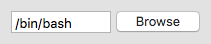
This control allows the user to select a file.
Methods
- __init__(self, *args, **kw)
 Overloaded Implementations:
__init__ (self)
- Return type:
None
__init__ (self, parent, id=ID_ANY, path=’’, message=FileSelectorPromptStr, wildcard=FileSelectorDefaultWildcardStr, pos=DefaultPosition, size=DefaultSize, style=FLP_DEFAULT_STYLE, validator=DefaultValidator, name=FilePickerCtrlNameStr)
Initializes the object and calls
Createwith all the parameters.- Parameters:
parent (wx.Window)
id (wx.WindowID)
path (string)
message (string)
wildcard (string)
pos (wx.Point)
size (wx.Size)
style (long)
validator (wx.Validator)
name (string)
- Return type:
None
- Create(self, parent, id=ID_ANY, path='', message=FileSelectorPromptStr, wildcard=FileSelectorDefaultWildcardStr, pos=DefaultPosition, size=DefaultSize, style=FLP_DEFAULT_STYLE, validator=DefaultValidator, name=FilePickerCtrlNameStr)
Creates this widget with the given parameters.
- Parameters:
parent (wx.Window) – Parent window, must not be non-null.
id (wx.WindowID) – The identifier for the control.
path (string) – The initial file shown in the control. Must be a valid path to a file or the empty string.
message (string) – The message shown to the user in the wx.FileDialog shown by the control.
wildcard (string) – A wildcard which defines user-selectable files (use the same syntax as for wx.FileDialog’s wildcards).
pos (wx.Point) – Initial position.
size (wx.Size) – Initial size.
style (long) – The window style, see
FLP_flags.validator (wx.Validator) – Validator which can be used for additional data checks.
name (string) – Control name.
- Return type:
bool
- Returns:
Trueif the control was successfully created orFalseif creation failed.
- static GetClassDefaultAttributes(variant=WINDOW_VARIANT_NORMAL)
- Parameters:
variant (WindowVariant)
- Return type:
- GetPath(self)
Returns the absolute path of the currently selected file.
- Return type:
str
- SetInitialDirectory(self, dir)
Set the directory to show when starting to browse for files.
This function is mostly useful for the file picker controls which have no selection initially to configure the directory that should be shown if the user starts browsing for files as otherwise the directory of initially selected file is used, which is usually the desired behaviour and so the directory specified by this function is ignored in this case.
- Parameters:
dir (string)
- Return type:
None
Added in version 2.9.4.
- SetPath(self, filename)
Sets the absolute path of the currently selected file.
If the control uses
FLP_FILE_MUST_EXISTand does not useFLP_USE_TEXTCTRLstyle, the filename must be a name of an existing file and will be simply ignored by the native wxGTK implementation if this is not the case (the generic implementation used under the other platforms accepts even invalid file names currently, but this is subject to change in the future, don’t rely on being able to use non-existent paths with it).- Parameters:
filename (string)
- Return type:
None
Properties

Best viewed with Netscape Navigator 4.7 or Internet Explorer 6 at 800×600. No cookies required.