GeezerVisonThe World Wide Web, restored to 800 pixels of glory. | ||||||||||
| Home|About|Gaming cabinet|Archives|How it works|Starter sites | ||||||||||
GeezerVison is showing docs.wxpython.org — wx.FindReplaceDialog — wxPython 4.3.2 Docs
|




Creates the dialog; use |
|
Get the wx.FindReplaceData object used by this dialog. |
 Properties Summary

See |
 Class API

- class wx.FindReplaceDialog(Dialog)
Possible constructors:
FindReplaceDialog() -> None

FindReplaceDialog(parent, data, title='', style=0) -> None
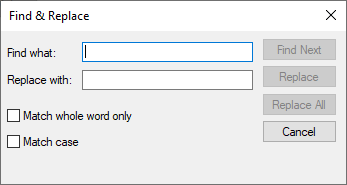
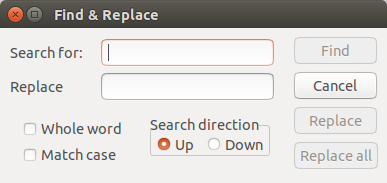
FindReplaceDialog is a standard modeless dialog which is used to allow the user to search for some text (and possibly replace it with something else).
Methods
- __init__(self, *args, **kw)
 Overloaded Implementations:
__init__ (self)
- Return type:
None
__init__ (self, parent, data, title=’’, style=0)
After using default constructor
Createmust be called.The parent and data parameters must be non-null.
- Parameters:
parent (wx.Window)
data (wx.FindReplaceData)
title (string)
style (int)
- Return type:
None
- Create(self, parent, data, title='', style=0)
Creates the dialog; use
wx.Window.Showto show it on screen.The parent and data parameters must be non-null.
- Parameters:
parent (wx.Window)
data (wx.FindReplaceData)
title (string)
style (int)
- Return type:
bool
- static GetClassDefaultAttributes(variant=WINDOW_VARIANT_NORMAL)
- Parameters:
variant (WindowVariant)
- Return type:
- GetData(self)
Get the wx.FindReplaceData object used by this dialog.
- Return type:
Properties

Best viewed with Netscape Navigator 4.7 or Internet Explorer 6 at 800×600. No cookies required.