GeezerVisonThe World Wide Web, restored to 800 pixels of glory. | ||||||||||||||||||||||||||||||
| Home|About|Gaming cabinet|Archives|How it works|Starter sites | ||||||||||||||||||||||||||||||
GeezerVison is showing docs.wxpython.org — wx.FontPickerCtrl — wxPython 4.3.2 Docs
|



Creates this widget with given parameters. |
|
Returns the maximum point size value allowed for the user-chosen font. |
|
Returns the minimum point size value allowed for the user-chosen font. |
|
Returns the currently selected colour. |
|
Returns the currently selected font. |
|
Sets the maximum point size value allowed for the user-chosen font. |
|
Sets the minimum point size value allowed for the user-chosen font. |
|
Sets the font colour. |
|
Sets the currently selected font. |
 Properties Summary

See |
|
See |
|
See |
|
See |
 Class API

- class wx.FontPickerCtrl(PickerBase)
Possible constructors:
FontPickerCtrl() -> None

FontPickerCtrl(parent, id=ID_ANY, font=NullFont, pos=DefaultPosition,
               size=DefaultSize, style=FNTP_DEFAULT_STYLE, validator=DefaultValidator,
               name=FontPickerCtrlNameStr) -> None
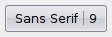
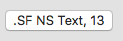
This control allows the user to select a font.
Methods
- __init__(self, *args, **kw)
 Overloaded Implementations:
__init__ (self)
- Return type:
None
__init__ (self, parent, id=ID_ANY, font=NullFont, pos=DefaultPosition, size=DefaultSize, style=FNTP_DEFAULT_STYLE, validator=DefaultValidator, name=FontPickerCtrlNameStr)
Initializes the object and calls
Createwith all the parameters.- Parameters:
parent (wx.Window)
id (wx.WindowID)
font (wx.Font)
pos (wx.Point)
size (wx.Size)
style (long)
validator (wx.Validator)
name (string)
- Return type:
None
- Create(self, parent, id=ID_ANY, font=NullFont, pos=DefaultPosition, size=DefaultSize, style=FNTP_DEFAULT_STYLE, validator=DefaultValidator, name=FontPickerCtrlNameStr)
Creates this widget with given parameters.
- Parameters:
parent (wx.Window) – Parent window, must not be non-null.
id (wx.WindowID) – The identifier for the control.
font (wx.Font) – The initial font shown in the control. If
wx.NullFontis given, the default font is used.pos (wx.Point) – Initial position.
size (wx.Size) – Initial size.
style (long) – The window style, see
FNTP_flags.validator (wx.Validator) – Validator which can be used for additional data checks.
name (string) – Control name.
- Return type:
bool
- Returns:
Trueif the control was successfully created orFalseif creation failed.
- static GetClassDefaultAttributes(variant=WINDOW_VARIANT_NORMAL)
- Parameters:
variant (WindowVariant)
- Return type:
- GetMaxPointSize(self)
Returns the maximum point size value allowed for the user-chosen font.
- Return type:
int
- GetMinPointSize(self)
Returns the minimum point size value allowed for the user-chosen font.
- Return type:
int
Added in version 4.1/wxWidgets-3.1.1.
- GetSelectedColour(self)
Returns the currently selected colour.
Note that the colour of the font can only be set by the user under Windows currently, elsewhere this method simply returns the colour previously set by
SetSelectedColouror black if it hadn’t been called.- Return type:
Added in version 4.1/wxWidgets-3.1.0.
- GetSelectedFont(self)
Returns the currently selected font.
Note that this function is completely different from
wx.Window.GetFont.- Return type:
- SetMaxPointSize(self, max)
Sets the maximum point size value allowed for the user-chosen font.
The default value is 100. Note that big fonts can require a lot of memory and
CPUtime both for creation and for rendering; thus, specially because the user has the option to specify the fontsize through a text control (seewx.FNTP_USE_TEXTCTRL), it’s a good idea to put a limit to the maximum font size when huge fonts do not make much sense.- Parameters:
max (int)
- Return type:
None
- SetMinPointSize(self, min)
Sets the minimum point size value allowed for the user-chosen font.
The default value is 0.
- Parameters:
min (int)
- Return type:
None
Added in version 4.1/wxWidgets-3.1.1.
- SetSelectedColour(self, colour)
Sets the font colour.
The font colour is actually only used under Windows currently, but this function is available under all platforms for consistency.
- Parameters:
colour (wx.Colour)
- Return type:
None
Added in version 4.1/wxWidgets-3.1.0.
- SetSelectedFont(self, font)
Sets the currently selected font.
Note that this function is completely different from
wx.Window.SetFont.- Parameters:
font (wx.Font)
- Return type:
None
Properties
- MaxPointSize
See
GetMaxPointSizeandSetMaxPointSize
- MinPointSize
See
GetMinPointSizeandSetMinPointSize
- SelectedColour
See
GetSelectedColourandSetSelectedColour
- SelectedFont
See
GetSelectedFontandSetSelectedFont

Best viewed with Netscape Navigator 4.7 or Internet Explorer 6 at 800×600. No cookies required.