GeezerVisonThe World Wide Web, restored to 800 pixels of glory. | ||||||||||||||||||||||||||||||||||||||||||||||||||||||||
| Home|About|Gaming cabinet|Archives|How it works|Starter sites | ||||||||||||||||||||||||||||||||||||||||||||||||||||||||
GeezerVison is showing docs.wxpython.org — wx.Frame — wxPython 4.3.2 Docs
|


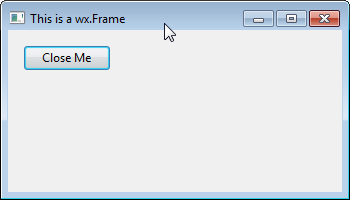
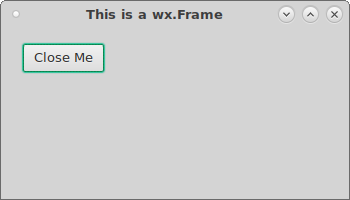
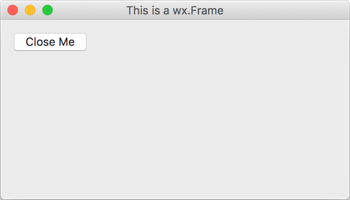


Default constructor. |
|
Centres the frame on the display. |
|
Used in two-step frame construction. |
|
Creates a status bar at the bottom of the frame. |
|
Creates a toolbar at the top or left of the frame. |
|
Method used to show help string of the selected menu toolbar item. |
|
Returns the origin of the frame client area (in client coordinates). |
|
Returns a pointer to the menubar currently associated with the frame (if any). |
|
Returns a pointer to the status bar currently associated with the frame (if any). |
|
Returns the status bar pane used to display menu and toolbar help. |
|
Returns a pointer to the toolbar currently associated with the frame (if any). |
|
Virtual function called when a status bar is requested by |
|
Virtual function called when a toolbar is requested by |
|
Simulate a menu command. |
|
Tells the frame to show the given menu bar. |
|
Associates a status bar with the frame. |
|
Set the status bar pane used to display menu and toolbar help. |
|
Sets the status bar text and updates the status bar display. |
|
Sets the widths of the fields in the status bar. |
|
Associates a toolbar with the frame. |
|
Set the frame modality. |
 Properties Summary

See |
|
See |
|
See |
|
See |
 Class API

- class wx.Frame(TopLevelWindow)
Possible constructors:
Frame() -> None

Frame(parent, id=ID_ANY, title='', pos=DefaultPosition,
      size=DefaultSize, style=DEFAULT_FRAME_STYLE, name=FrameNameStr) -> None
A frame is a window whose size and position can (usually) be changed by the user.
Methods
- __init__(self, *args, **kw)
 Overloaded Implementations:
__init__ (self)
Default constructor.
- Return type:
None
__init__ (self, parent, id=ID_ANY, title=’’, pos=DefaultPosition, size=DefaultSize, style=DEFAULT_FRAME_STYLE, name=FrameNameStr)
Constructor, creating the window.
- Parameters:
parent (wx.Window) – The window parent. This may be, and often is, nullptr. If it is non-null, the frame will be minimized when its parent is minimized and restored when it is restored (although it will still be possible to minimize and restore just this frame itself).
id (wx.WindowID) – The window identifier. It may take a value of -1 to indicate a default value.
title (string) – The caption to be displayed on the frame’s title bar.
pos (wx.Point) – The window position. The value DefaultPosition indicates a default position, chosen by either the windowing system or wxWidgets, depending on platform.
size (wx.Size) – The window size. The value DefaultSize indicates a default size, chosen by either the windowing system or wxWidgets, depending on platform.
style (long) – The window style. See wx.Frame class description.
name (string) – The name of the window. This parameter is used to associate a name with the window. This is not the same as the title of the window.
- Return type:
None
See also
- Centre(self, direction=BOTH)
Centres the frame on the display.
- Parameters:
direction (int) – The parameter may be
wx.HORIZONTAL,wx.VERTICALorwx.BOTH.- Return type:
None
- Create(self, parent, id=ID_ANY, title='', pos=DefaultPosition, size=DefaultSize, style=DEFAULT_FRAME_STYLE, name=FrameNameStr)
Used in two-step frame construction.
See wx.Frame for further details.
- CreateStatusBar(self, number=1, style=STB_DEFAULT_STYLE, id=0, name=StatusBarNameStr)
Creates a status bar at the bottom of the frame.
- Parameters:
number (int) – The number of fields to create. Specify a value greater than 1 to create a multi-field status bar.
style (long) – The status bar style. See wx.StatusBar for a list of valid styles.
id (wx.WindowID) – The status bar window identifier. If -1, an identifier will be chosen by wxWidgets.
name (string) – The status bar window name.
- Return type:
- Returns:
A pointer to the status bar if it was created successfully, nullptr otherwise.
Note
The width of the status bar is the whole width of the frame (adjusted automatically when resizing), and the height and text size are chosen by the host windowing system.
See also
- CreateToolBar(self, style=TB_DEFAULT_STYLE, id=ID_ANY, name=ToolBarNameStr)
Creates a toolbar at the top or left of the frame.
- Parameters:
style (long) – The toolbar style. See wx.ToolBar for a list of valid styles.
id (wx.WindowID) – The toolbar window identifier. If -1, an identifier will be chosen by wxWidgets.
name (string) – The toolbar window name.
- Return type:
- Returns:
A pointer to the toolbar if it was created successfully, nullptr otherwise.
Note
By default, the toolbar is an instance of wx.ToolBar. To use a different class, override
OnCreateToolBar. When a toolbar has been created with this function, or made known to the frame withwx.Frame.SetToolBar, the frame will manage the toolbar position and adjust the return value fromwx.Window.GetClientSizeto reflect the available space for application windows. Under PocketPC, you should always use this function for creating the toolbar to be managed by the frame, so that wxWidgets can use a combined menubar and toolbar. Where you manage your own toolbars, create a wx.ToolBar as usual.See also
- DoGiveHelp(self, text, show)
Method used to show help string of the selected menu toolbar item.
This method is called by the default
wxEVT_MENU_HIGHLIGHTevent handler and also by wx.ToolBar to show the optional help string associated with the selected menu or toolbar item. It can be overridden if the default behaviour of showing this string in the frame status bar is not appropriate.- Parameters:
text (string) – The help string to show, may be empty. The default implementation simply shows this string in the frame status bar (after remembering its previous text to restore it later).
show (bool) – Whether the help should be shown or hidden. The default implementation restores the previously saved status bar text when it is
False.
- Return type:
None
See also
- static GetClassDefaultAttributes(variant=WINDOW_VARIANT_NORMAL)
- Parameters:
variant (WindowVariant)
- Return type:
- GetClientAreaOrigin(self)
Returns the origin of the frame client area (in client coordinates).
It may be different from (0, 0) if the frame has a toolbar.
- Return type:
- GetMenuBar(self)
Returns a pointer to the menubar currently associated with the frame (if any).
- Return type:
See also
- GetStatusBar(self)
Returns a pointer to the status bar currently associated with the frame (if any).
- Return type:
See also
- GetStatusBarPane(self)
Returns the status bar pane used to display menu and toolbar help.
- Return type:
int
See also
- GetToolBar(self)
Returns a pointer to the toolbar currently associated with the frame (if any).
- Return type:
See also
- OnCreateStatusBar(self, number, style, id, name)
Virtual function called when a status bar is requested by
CreateStatusBar.- Parameters:
number (int) – The number of fields to create.
style (long) – The window style. See wx.StatusBar for a list of valid styles.
id (wx.WindowID) – The window identifier. If -1, an identifier will be chosen by wxWidgets.
name (string) – The window name.
- Return type:
- Returns:
A status bar object.
Note
An application can override this function to return a different kind of status bar. The default implementation returns an instance of wx.StatusBar.
See also
- OnCreateToolBar(self, style, id, name)
Virtual function called when a toolbar is requested by
CreateToolBar.- Parameters:
style (long) – The toolbar style. See wx.ToolBar for a list of valid styles.
id (wx.WindowID) – The toolbar window identifier. If -1, an identifier will be chosen by wxWidgets.
name (string) – The toolbar window name.
- Return type:
- Returns:
A toolbar object.
Note
An application can override this function to return a different kind of toolbar. The default implementation returns an instance of wx.ToolBar.
See also
- PopStatusText(self, number=0)
- Parameters:
number (int)
- Return type:
None
- ProcessCommand(self, id)
Simulate a menu command.
- Parameters:
id (int) – The identifier for a menu item.
- Return type:
bool
- PushStatusText(self, text, number=0)
- Parameters:
text (string)
number (int)
- Return type:
None
- SetMenuBar(self, menuBar)
Tells the frame to show the given menu bar.
- Parameters:
menuBar (wx.MenuBar) – The menu bar to associate with the frame.
- Return type:
None
Note
If the frame is destroyed, the menu bar and its menus will be destroyed also, so do not delete the menu bar explicitly (except by resetting the frame’s menu bar to another frame or nullptr). Under Windows, a size event is generated, so be sure to initialize data members properly before calling
SetMenuBar. Note that on some platforms, it is not possible to call this function twice for the same frame object.See also
- SetStatusBar(self, statusBar)
Associates a status bar with the frame.
If statusBar is nullptr, then the status bar, if present, is detached from the frame, but not deleted.
- Parameters:
statusBar (wx.StatusBar)
- Return type:
None
See also
- SetStatusBarPane(self, n)
Set the status bar pane used to display menu and toolbar help.
Using -1 disables help display.
- Parameters:
n (int)
- Return type:
None
- SetStatusText(self, text, number=0)
Sets the status bar text and updates the status bar display.
This is a simple wrapper for
wx.StatusBar.SetStatusTextwhich doesn’t do anything if the frame has no status bar, i.e.GetStatusBarreturns nullptr.- Parameters:
text (string) – The text for the status field.
number (int) – The status field (starting from zero).
- Return type:
None
Note
Use an empty string to clear the status bar.
See also
- SetStatusWidths(self, widths)
Sets the widths of the fields in the status bar.
- Parameters:
widths (list of integers) – Must contain an array of n integers, each of which is a status field width in pixels. A value of -1 indicates that the field is variable width; at least one field must be -1. You should delete this array after calling
SetStatusWidths.- Return type:
None
- SetToolBar(self, toolBar)
Associates a toolbar with the frame.
- Parameters:
toolBar (wx.ToolBar)
- Return type:
None
- SetWindowModality(self, modality)
Set the frame modality.
Call this function before showing the frame to make it modal to the application (
wx.WindowMode.AppModal) or just to the parent window (wx.WindowMode.WindowModal).- Parameters:
modality (WindowMode)
- Return type:
None
Added in version 4.3/wxWidgets-3.3.2.
Note
Changing the frame modality after it has been shown has no effect
Properties
- MenuBar
See
GetMenuBarandSetMenuBar
- StatusBar
See
GetStatusBarandSetStatusBar
- StatusBarPane
See
GetStatusBarPaneandSetStatusBarPane
- ToolBar
See
GetToolBarandSetToolBar

Best viewed with Netscape Navigator 4.7 or Internet Explorer 6 at 800×600. No cookies required.