GeezerVisonThe World Wide Web, restored to 800 pixels of glory. | ||||||||||||||||||||||||||||||||||||||||||||||||||||||||||||
| Home|About|Gaming cabinet|Archives|How it works|Starter sites | ||||||||||||||||||||||||||||||||||||||||||||||||||||||||||||
GeezerVison is showing docs.wxpython.org — wx.ListBox — wxPython 4.3.2 Docs
|


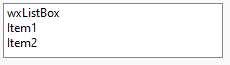
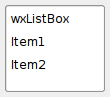
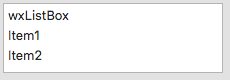


Default constructor. |
|
Creates the listbox for two-step construction. |
|
Deselects an item in the list box. |
|
Ensure that the item with the given index is currently shown. |
|
Finds an item whose label matches the given string. |
|
Returns the number of items in the control. |
|
Return the number of items that can fit vertically in the visible area of the listbox. |
|
Returns the index of the selected item or |
|
Fill an array of ints with the positions of the currently selected items. |
|
Returns the label of the item with the given index. |
|
Return the index of the topmost visible item. |
|
return |
|
Returns the item located at point, or |
|
Insert the given number of strings before the specified position. |
|
Determines whether an item is selected. |
|
Return |
|
Set the specified item to be the first visible item. |
|
Set the background colour of an item in the ListBox. |
|
Set the font of an item in the ListBox. |
|
Set the foreground colour of an item in the ListBox. |
|
Sets the selection to the given item n or removes the selection entirely if n == |
|
Sets the label for the given item. |
|
 Properties Summary

See |
|
See |
|
See |
|
See |
|
See |
 Class API

- class wx.ListBox(Control, ItemContainer)
Possible constructors:
ListBox() -> None

ListBox(parent, id=ID_ANY, pos=DefaultPosition, size=DefaultSize,
        choices=[], style=0, validator=DefaultValidator, name=ListBoxNameStr) ->
        None
A listbox is used to select one or more of a list of strings.
Methods
- __init__(self, *args, **kw)
 Overloaded Implementations:
__init__ (self)
Default constructor.
- Return type:
None
__init__ (self, parent, id=ID_ANY, pos=DefaultPosition, size=DefaultSize, choices=[], style=0, validator=DefaultValidator, name=ListBoxNameStr)
Constructor, creating and showing a list box.
See the other wx.ListBox constructor; the only difference is that this overload takes a list of strings instead of a pointer to an array of String .
- Create(self, parent, id=ID_ANY, pos=DefaultPosition, size=DefaultSize, choices=[], style=0, validator=DefaultValidator, name=ListBoxNameStr)
Creates the listbox for two-step construction.
See wx.ListBox for further details.
- Parameters:
parent (wx.Window)
id (wx.WindowID)
pos (wx.Point)
size (wx.Size)
choices (list of strings)
style (long)
validator (wx.Validator)
name (string)
- Return type:
bool
- Deselect(self, n)
Deselects an item in the list box.
- Parameters:
n (int) – The zero-based item to deselect.
- Return type:
None
Note
This applies to multiple selection listboxes only.
- EnsureVisible(self, n)
Ensure that the item with the given index is currently shown.
This method scrolls the listbox only if necessary and doesn’t do anything if this item is already shown, unlike
SetFirstItem.- Parameters:
n (int)
- Return type:
None
- FindString(self, string, caseSensitive=False)
Finds an item whose label matches the given string.
- Parameters:
string (string) – String to find.
caseSensitive (bool) – Whether search is case sensitive (default is not).
- Return type:
int
- Returns:
The zero-based position of the item, or
wx.NOT_FOUNDif the string was not found.
- static GetClassDefaultAttributes(variant=WINDOW_VARIANT_NORMAL)
- Parameters:
variant (WindowVariant)
- Return type:
- GetCount(self)
Returns the number of items in the control.
- Return type:
int
See also
IsEmpty
- GetCountPerPage(self)
Return the number of items that can fit vertically in the visible area of the listbox.
Returns -1 if the number of items per page couldn’t be determined. On wxGTK this method can only determine the number of items per page if there is at least one item in the listbox.
- Return type:
int
Added in version 4.1/wxWidgets-3.1.0.
- GetSelection(self)
Returns the index of the selected item or
NOT_FOUNDif no item is selected.- Return type:
int
- Returns:
The position of the current selection.
Note
This method can be used with single selection list boxes only, you must use
wx.ListBox.GetSelectionsfor the list boxes withwx.LB_MULTIPLEstyle.See also
SetSelection,GetStringSelection
- GetSelections(self)
Fill an array of ints with the positions of the currently selected items.
- Return type:
List[int]
- GetString(self, n)
Returns the label of the item with the given index.
The index must be valid, i.e. less than the value returned by
GetCount, otherwise an assert is triggered. Notably, this function can’t be called if the control is empty.- Parameters:
n (int) – The zero-based index.
- Return type:
str
- Returns:
The label of the item.
- GetTopItem(self)
Return the index of the topmost visible item.
Returns
NOT_FOUNDif the method is not implemented for the current platform.- Return type:
int
Added in version 4.1/wxWidgets-3.1.0.
- HasMultipleSelection(self)
return
Trueif the listbox allows multiple selection- Return type:
bool
- HitTest(self, *args, **kw)
- Overloaded Implementations:
HitTest (self, point)
Returns the item located at point, or
NOT_FOUNDif there is no item located at point.It is currently implemented for wxMSW, Mac and wxGTK2 ports.
- Parameters:
point (wx.Point) – Point of item (in client coordinates) to obtain
- Return type:
int
- Returns:
Item located at point, or
wx.NOT_FOUNDif unimplemented or the item does not exist.
Added in version 2.7.0.
HitTest (self, x, y)
This is an overloaded member function, provided for convenience. It differs from the above function only in what argument(s) it accepts.
- Parameters:
x (int)
y (int)
- Return type:
int
- InsertItems(self, items, pos)
Insert the given number of strings before the specified position.
- Parameters:
items (list of strings) – Labels of items to be inserted
pos (int) – Position before which to insert the items: if pos is
0the items will be inserted in the beginning of the listbox
- Return type:
None
- IsSelected(self, n)
Determines whether an item is selected.
- Parameters:
n (int) – The zero-based item index.
- Return type:
bool
- Returns:
Trueif the given item is selected,Falseotherwise.
- IsSorted(self)
Return
Trueif the listbox hasLB_SORTstyle.This method is mostly meant for internal use only.
- Return type:
bool
- MSWSetTabStops(self, tabStops)
- Return type:
None
- SetFirstItem(self, *args, **kw)
- Overloaded Implementations:
SetFirstItem (self, n)
Set the specified item to be the first visible item.
- Parameters:
n (int) – The zero-based item index that should be visible.
- Return type:
None
SetFirstItem (self, string)
Set the specified item to be the first visible item.
- Parameters:
string (string) – The string that should be visible.
- Return type:
None
- SetItemBackgroundColour(self, item, c)
Set the background colour of an item in the ListBox. Only valid on MSW and if the
wx.LB_OWNERDRAWflag is set.- Return type:
None
- SetItemFont(self, item, f)
Set the font of an item in the ListBox. Only valid on MSW and if the
wx.LB_OWNERDRAWflag is set.- Return type:
None
- SetItemForegroundColour(self, item, c)
Set the foreground colour of an item in the ListBox. Only valid on MSW and if the
wx.LB_OWNERDRAWflag is set.- Return type:
None
- SetSelection(self, n)
Sets the selection to the given item n or removes the selection entirely if n ==
NOT_FOUND.Note that this does not cause any command events to be emitted nor does it deselect any other items in the controls which support multiple selections.
- Parameters:
n (int) – The string position to select, starting from zero.
- Return type:
None
See also
- SetString(self, n, string)
Sets the label for the given item.
- Parameters:
n (int) – The zero-based item index.
string (string) – The label to set.
- Return type:
None
- SetStringSelection(self, *args, **kw)
- Overloaded Implementations:
SetStringSelection (self, s, select)
- Parameters:
s (string)
select (bool)
- Return type:
bool
SetStringSelection (self, s)
- Parameters:
s (string)
- Return type:
bool
Properties
- CountPerPage
See
GetCountPerPage
- Selection
See
GetSelectionandSetSelection
- Selections
See
GetSelections
- TopItem
See
GetTopItem

Best viewed with Netscape Navigator 4.7 or Internet Explorer 6 at 800×600. No cookies required.