GeezerVisonThe World Wide Web, restored to 800 pixels of glory. | ||||||||||||||||||||||||||||||||||||||||||||||||||||||||||||||
| Home|About|Gaming cabinet|Archives|How it works|Starter sites | ||||||||||||||||||||||||||||||||||||||||||||||||||||||||||||||
GeezerVison is showing docs.wxpython.org — wx.MessageDialog — wxPython 4.3.2 Docs
|


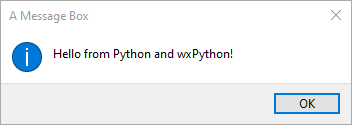
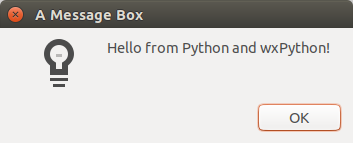

Constructor specifying the message box properties. |
|
Sets the extended message for the dialog: this message is usually an extension of the short message specified in the constructor or set with |
|
Sets the label for the Help button. |
|
Sets the message shown by the dialog. |
|
Overrides the default labels of the |
|
Overrides the default label of the |
|
Overrides the default labels of the Yes, No and Cancel buttons. |
|
Overrides the default labels of the Yes and No buttons. |
|
Shows the dialog, returning one of |
 Properties Summary

See |
|
See |
|
See |
|
See |
|
See |
|
See |
|
See |
|
See |
|
See |
 Class API

- class wx.MessageDialog(Dialog)
Possible constructors:
MessageDialog(parent, message, caption=MessageBoxCaptionStr,
              style=OK|CENTRE, pos=DefaultPosition) -> None
This class represents a dialog that shows a single or multi-line message, with a choice of
wx.OK, Yes, No and Cancel buttons.
Methods
- __init__(self, parent, message, caption=MessageBoxCaptionStr, style=OK | CENTRE, pos=DefaultPosition)
Constructor specifying the message box properties.
Use
ShowModalto show the dialog.style may be a bit list of the identifiers described above.
Notice that not all styles are compatible: only one of
OKandYES_NOmay be specified (and one of them must be specified) and at most one default button style can be used and it is only valid if the corresponding button is shown in the message box.
- GetCancelLabel(self)
- Return type:
str
- GetCaption(self)
- Return type:
str
- static GetClassDefaultAttributes(variant=WINDOW_VARIANT_NORMAL)
- Parameters:
variant (WindowVariant)
- Return type:
- GetEffectiveIcon(self)
- Return type:
int
- GetExtendedMessage(self)
- Return type:
str
- GetHelpLabel(self)
- Return type:
str
- GetMessage(self)
- Return type:
str
- GetMessageDialogStyle(self)
- Return type:
int
- GetNoLabel(self)
- Return type:
str
- GetOKLabel(self)
- Return type:
str
- GetYesLabel(self)
- Return type:
str
- HasCustomLabels(self)
- Return type:
bool
- SetExtendedMessage(self, extendedMessage)
Sets the extended message for the dialog: this message is usually an extension of the short message specified in the constructor or set with
SetMessage.If it is set, the main message appears highlighted – if supported – and this message appears beneath it in normal font. On the platforms which don’t support extended messages, it is simply appended to the normal message with an empty line separating them.
- Parameters:
extendedMessage (string)
- Return type:
None
Added in version 2.9.0.
- SetHelpLabel(self, help)
Sets the label for the Help button.
Please see the remarks in
SetYesNoLabelsdocumentation.Notice that changing the label of the help button resets its special status (if any, this depends on the platform) and it will be treated just like another button in this case.
- Parameters:
help (MessageDialogButtonLabel)
- Return type:
bool
Added in version 2.9.3.
- SetMessage(self, message)
Sets the message shown by the dialog.
- Parameters:
message (string)
- Return type:
None
Added in version 2.9.0.
- SetOKCancelLabels(self, ok, cancel)
Overrides the default labels of the
wx.OKand Cancel buttons.Please see the remarks in
SetYesNoLabelsdocumentation.- Parameters:
ok (MessageDialogButtonLabel)
cancel (MessageDialogButtonLabel)
- Return type:
bool
Added in version 2.9.0.
- SetOKLabel(self, ok)
Overrides the default label of the
wx.OKbutton.Please see the remarks in
SetYesNoLabelsdocumentation.- Parameters:
ok (MessageDialogButtonLabel)
- Return type:
bool
Added in version 2.9.0.
- SetYesNoCancelLabels(self, yes, no, cancel)
Overrides the default labels of the Yes, No and Cancel buttons.
Please see the remarks in
SetYesNoLabelsdocumentation.- Parameters:
yes (MessageDialogButtonLabel)
no (MessageDialogButtonLabel)
cancel (MessageDialogButtonLabel)
- Return type:
bool
Added in version 2.9.0.
- SetYesNoLabels(self, yes, no)
Overrides the default labels of the Yes and No buttons.
The arguments of this function can be either strings or one of the standard identifiers, such as
ID_APPLYorID_OPEN. Notice that even if the label is specified as an identifier, the return value of the dialogShowModalmethod still remains one ofID_OK,ID_CANCEL,ID_YESorID_NOvalues, i.e. this identifier changes only the label appearance but not the return code generated by the button. It is possible to mix stock identifiers and string labels in the same function call, for example:dlg = wx.MessageDialog(parent, message, caption) dlg.SetYesNoLabels(wx.ID_SAVE, "&Don't save")
Also notice that this function is not currently available on all platforms (although as of wxWidgets 2.9.0 it is implemented in all major ports), so it may return
Falseto indicate that the labels couldn’t be changed. If it returnsTrue, the labels were set successfully.Typically, if the function was used successfully, the main dialog message may need to be changed, e.g.:
dlg = wx.MessageDialog(parent, message, caption)
if dlg.SetYesNoLabels("&Quit", "&Don't quit"):
    dlg.SetMessage("What do you want to do?")
else: # buttons have standard "Yes"/"No" values, so rephrase the question
    dlg.SetMessage("Do you really want to quit?")
- Parameters:
yes (MessageDialogButtonLabel)
no (MessageDialogButtonLabel)
- Return type:
bool
Added in version 2.9.0.
- ShowModal(self)
Shows the dialog, returning one of
wx.ID_OK,wx.ID_CANCEL,wx.ID_YES,wx.ID_NOorwx.ID_HELP.Notice that this method returns the identifier of the button which was clicked unlike
wx.MessageBoxfunction.- Return type:
int
Properties
- CancelLabel
See
GetCancelLabel
- Caption
See
GetCaption
- EffectiveIcon
See
GetEffectiveIcon
- ExtendedMessage
See
GetExtendedMessageandSetExtendedMessage
- HelpLabel
See
GetHelpLabelandSetHelpLabel
- Message
See
GetMessageandSetMessage
- MessageDialogStyle
- NoLabel
See
GetNoLabel
- OKLabel
See
GetOKLabelandSetOKLabel
- YesLabel
See
GetYesLabel
Best viewed with Netscape Navigator 4.7 or Internet Explorer 6 at 800×600. No cookies required.