GeezerVisonThe World Wide Web, restored to 800 pixels of glory. | ||||||
| Home|About|Gaming cabinet|Archives|How it works|Starter sites | ||||||
GeezerVison is showing docs.wxpython.org — wx.MiniFrame — wxPython 4.3.2 Docs
|


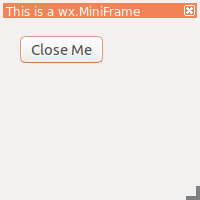



Default constructor. |
|
Used in two-step frame construction. |
|
 Class API

- class wx.MiniFrame(Frame)
Possible constructors:
MiniFrame() -> None

MiniFrame(parent, id=ID_ANY, title='', pos=DefaultPosition,
          size=DefaultSize, style=CAPTION|RESIZE_BORDER, name=FrameNameStr) ->
          None
A miniframe is a frame with a small title bar.
Methods
- __init__(self, *args, **kw)
 Overloaded Implementations:
__init__ (self)
Default constructor.
- Return type:
None
__init__ (self, parent, id=ID_ANY, title=’’, pos=DefaultPosition, size=DefaultSize, style=CAPTION|RESIZE_BORDER, name=FrameNameStr)
Constructor, creating the window.
- Parameters:
parent (wx.Window) – The window parent. This may be nullptr. If it is non-null, the frame will always be displayed on top of the parent window on Windows.
id (wx.WindowID) – The window identifier. It may take a value of -1 to indicate a default value.
title (string) – The caption to be displayed on the frame’s title bar.
pos (wx.Point) – The window position. The value DefaultPosition indicates a default position, chosen by either the windowing system or wxWidgets, depending on platform.
size (wx.Size) – The window size. The value DefaultSize indicates a default size, chosen by either the windowing system or wxWidgets, depending on platform.
style (long) – The window style. See wx.MiniFrame.
name (string) – The name of the window.
- Return type:
None
Note
The frame behaves like a normal frame on non-Windows platforms.
See also
- Create(self, parent, id=ID_ANY, title='', pos=DefaultPosition, size=DefaultSize, style=CAPTION | RESIZE_BORDER, name=FrameNameStr)
Used in two-step frame construction.
See wx.MiniFrame for further details.
- static GetClassDefaultAttributes(variant=WINDOW_VARIANT_NORMAL)
- Parameters:
variant (WindowVariant)
- Return type:

Best viewed with Netscape Navigator 4.7 or Internet Explorer 6 at 800×600. No cookies required.