GeezerVisonThe World Wide Web, restored to 800 pixels of glory. | ||||||||||||||||
| Home|About|Gaming cabinet|Archives|How it works|Starter sites | ||||||||||||||||
GeezerVison is showing docs.wxpython.org — wx.RearrangeDialog — wxPython 4.3.2 Docs
|



Default constructor. |
|
Customize the dialog by adding extra controls to it. |
|
Effectively creates the dialog for an object created using the default constructor. |
|
Return the list control used by the dialog. |
|
Return the array describing the order of items after it was modified by the user. |
 Properties Summary

See |
|
See |
 Class API

- class wx.RearrangeDialog(Dialog)
Possible constructors:
RearrangeDialog() -> None

RearrangeDialog(parent, message, title='', order=[], items=[],
                pos=DefaultPosition, name=RearrangeDialogNameStr) -> None
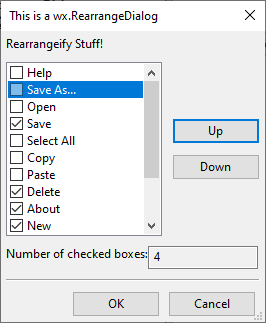
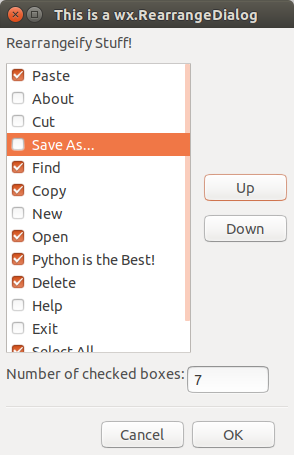
A dialog allowing the user to rearrange the specified items.
Methods
- __init__(self, *args, **kw)
 Overloaded Implementations:
__init__ (self)
Default constructor.
Createmust be called later to effectively create the control.- Return type:
None
__init__ (self, parent, message, title=’’, order=[], items=[], pos=DefaultPosition, name=RearrangeDialogNameStr)
Constructor creating the dialog.
Please see
Createfor the parameters description.- Parameters:
- Return type:
None
- AddExtraControls(self, win)
Customize the dialog by adding extra controls to it.
This function adds the given win to the dialog, putting it just below the part occupied by wx.RearrangeCtrl. It must be called after creating the dialog and you will typically need to process the events generated by the extra controls for them to do something useful.
For example:
class MyRearrangeDialog(wx.RearrangeDialog):

    def __init__(self, parent):

        wx.RearrangeDialog.__init__(self, parent)

        panel = wx.Panel(self)
        sizer = wx.BoxSizer(wx.HORIZONTAL)
        sizer.Add(wx.StaticText(panel, wx.ID_ANY,
                                "Column width in pixels:"))
        sizer.Add(wx.TextCtrl(panel, wx.ID_ANY, ""))
        panel.SetSizer(sizer)
        self.AddExtraControls(panel)


        # ... code to update the text control with the currently selected
        # item width and to react to its changes omitted ...
See also the complete example of a custom rearrange dialog in the dialogs sample.
- Parameters:
win (wx.Window) – The window containing the extra controls. It must have this dialog as its parent.
- Return type:
None
- Create(self, parent, message, title='', order=[], items=[], pos=DefaultPosition, name=RearrangeDialogNameStr)
Effectively creates the dialog for an object created using the default constructor.
- Parameters:
parent (wx.Window) – The dialog parent, possibly nullptr.
message (string) – The message shown inside the dialog itself, above the items list.
title (string) – The title of the dialog.
order (list of integers) – The initial order of the items in the convention used by wx.RearrangeList.
items (list of strings) – The items to show in the dialog.
pos (wx.Point) – Optional dialog position.
name (string) – Optional dialog name.
- Return type:
bool
- Returns:
Trueif the dialog was successfully created orFalseif creation failed.
- static GetClassDefaultAttributes(variant=WINDOW_VARIANT_NORMAL)
- Parameters:
variant (WindowVariant)
- Return type:
- GetList(self)
Return the list control used by the dialog.
- Return type:
See also
- GetOrder(self)
Return the array describing the order of items after it was modified by the user.
Please notice that the array will contain negative items if any items were unchecked. See wx.RearrangeList for more information about the convention used for this array.
- Return type:
List[int]
Properties

Best viewed with Netscape Navigator 4.7 or Internet Explorer 6 at 800×600. No cookies required.