GeezerVisonThe World Wide Web, restored to 800 pixels of glory. | ||||||||||||||||
| Home|About|Gaming cabinet|Archives|How it works|Starter sites | ||||||||||||||||
GeezerVison is showing docs.wxpython.org — wx.SingleChoiceDialog — wxPython 4.3.2 Docs
|


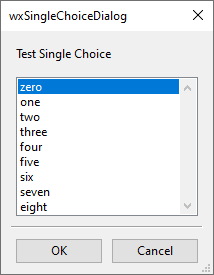
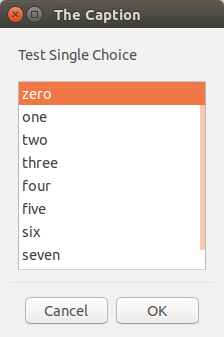


Constructor, taking an array of String choices and optional client data. |
|
Returns the index of selected item. |
|
Returns the selected string. |
|
Sets the index of the initially selected item. |
|
Shows the dialog, returning either |
 Properties Summary

See |
|
 Class API

- class wx.SingleChoiceDialog(Dialog)
PySingleChoiceDialog(parent, message, caption, choices, style=CHOICEDLG_STYLE, pos=DefaultPosition) . None
This class represents a dialog that shows a list of strings, and allows the user to select one.
Methods
- __init__(self, parent, message, caption, choices, style=CHOICEDLG_STYLE, pos=DefaultPosition)
Constructor, taking an array of String choices and optional client data.
- Parameters:
parent (wx.Window) – Parent window.
message (string) – Message to show on the dialog.
caption (string) – The dialog caption.
choices (list of strings) – An array of strings, or a string list, containing the choices.
style (long) – A dialog style (bitlist) containing flags chosen from standard dialog styles and the ones listed in the class documentation. The default value is equivalent to
wx.DEFAULT_DIALOG_STYLE|wx.RESIZE_BORDER|wx.OK|wx.CANCEL|wx.CENTRE.pos (wx.Point) – Dialog position.
- Return type:
None
- static GetClassDefaultAttributes(variant=WINDOW_VARIANT_NORMAL)
- Parameters:
variant (WindowVariant)
- Return type:
- GetSelection(self)
Returns the index of selected item.
- Return type:
int
- GetStringSelection(self)
Returns the selected string.
- Return type:
str
- SetSelection(self, selection)
Sets the index of the initially selected item.
- Parameters:
selection (int)
- Return type:
None
- ShowModal(self)
Shows the dialog, returning either
wx.ID_OKorwx.ID_CANCEL.- Return type:
int
Properties
- Selection
See
GetSelectionandSetSelection
- StringSelection
Best viewed with Netscape Navigator 4.7 or Internet Explorer 6 at 800×600. No cookies required.