GeezerVisonThe World Wide Web, restored to 800 pixels of glory. | ||||||||||||||||||||||||||||||||||||||||||||||||||||||||||||||||||||||||||||||||||
| Home|About|Gaming cabinet|Archives|How it works|Starter sites | ||||||||||||||||||||||||||||||||||||||||||||||||||||||||||||||||||||||||||||||||||
GeezerVison is showing docs.wxpython.org — wx.TextCtrl — wxPython 4.3.2 Docs
|


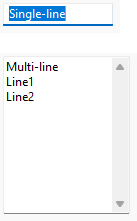
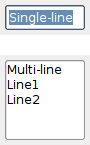
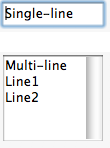

Default constructor. |
|
Creates the text control for two-step construction. |
|
Resets the internal modified flag as if the current changes had been saved. |
|
Delete the undo history. |
|
This function inserts into the control the character which would have been inserted if the given key event had occurred in the text control. |
|
Returns the style currently used for the new text. |
|
Gets the length of the specified line, not including any trailing newline character(s). |
|
Returns the contents of a given line in the text control, not including any trailing newline character(s). |
|
Returns the number of lines in the text control buffer. |
|
Returns the content of a multiline text control as |
|
Returns the style at this position in the text control. |
|
Turn off the widget’s native caret on Windows. |
|
Finds the position of the character at the specified point. |
|
Finds the row and column of the character at the specified point. |
|
Returns |
|
Returns |
|
Returns |
|
Returns |
|
Loads and displays the named file, if it exists. |
|
Mark text as modified (dirty). |
|
Disables all automatic character substitutions. |
|
Enables the automatic conversion of two |
|
Enables the automatic replacement of straight ( |
|
Enables the automatic replacement of new lines characters in a single-line text field with spaces under macOS. |
|
Converts given text position to client coordinates in pixels. |
|
Converts given position to a zero-based column, line number pair. |
|
Saves the contents of the control in a text file. |
|
Searches for a string in the control, using the provided search options. |
|
Changes the default style to use for the new text which is going to be added to the control. |
|
Marks the control as being modified by the user or not. |
|
Sets the content of a multiline text control from an |
|
Changes the style of the given range. |
|
Turn on the widget’s native caret on Windows. |
|
Makes the line containing the given position visible. |
|
Converts the given zero based column and line number to a position. |
|
|
|
Append text to the textctrl, for file-like compatibility. |
 Properties Summary

See |
|
See |
|
See |
 Class API

- class wx.TextCtrl(Control, TextEntry)
Possible constructors:
TextCtrl() -> None

TextCtrl(parent, id=ID_ANY, value='', pos=DefaultPosition,
         size=DefaultSize, style=0, validator=DefaultValidator,
         name=TextCtrlNameStr) -> None
A text control allows text to be displayed and edited.
Methods
- __init__(self, *args, **kw)
 Overloaded Implementations:
__init__ (self)
Default constructor.
- Return type:
None
__init__ (self, parent, id=ID_ANY, value=’’, pos=DefaultPosition, size=DefaultSize, style=0, validator=DefaultValidator, name=TextCtrlNameStr)
Constructor, creating and showing a text control.
- Parameters:
parent (wx.Window) – Parent window. Should not be nullptr.
id (wx.WindowID) – Control identifier. A value of -1 denotes a default value.
value (string) – Default text value.
pos (wx.Point) – Text control position.
size (wx.Size) – Text control size.
style (long) – Window style. See wx.TextCtrl.
validator (wx.Validator) – Window validator.
name (string) – Window name.
- Return type:
None
Note
The horizontal scrollbar (wx``wx.HSCROLL`` style flag) will only be created for multi-line text controls. Without a horizontal scrollbar, text lines that don’t fit in the control’s size will be wrapped (but no newline character is inserted). Single line controls don’t have a horizontal scrollbar, the text is automatically scrolled so that the insertion point is always visible.
See also
- Create(self, parent, id=ID_ANY, value='', pos=DefaultPosition, size=DefaultSize, style=0, validator=DefaultValidator, name=TextCtrlNameStr)
Creates the text control for two-step construction.
This method should be called if the default constructor was used for the control creation. Its parameters have the same meaning as for the non-default constructor.
- Parameters:
parent (wx.Window)
id (wx.WindowID)
value (string)
pos (wx.Point)
size (wx.Size)
style (long)
validator (wx.Validator)
name (string)
- Return type:
bool
- DiscardEdits(self)
Resets the internal modified flag as if the current changes had been saved.
- Return type:
None
- EmptyUndoBuffer(self)
Delete the undo history.
Currently only implemented in wxMSW (for controls using
wx.TE_RICH2style only), wxOSX and Qt (for multiline text controls only in both of these ports), does nothing in the other ports or for the controls not using the appropriate styles.- Return type:
None
Added in version 4.1/wxWidgets-3.1.6.
- EmulateKeyPress(self, event)
This function inserts into the control the character which would have been inserted if the given key event had occurred in the text control.
The event object should be the same as the one passed to
EVT_KEY_DOWNhandler previously by wxWidgets. Please note that this function doesn’t currently work correctly for all keys under any platform but MSW.- Parameters:
event (wx.KeyEvent)
- Return type:
bool
- Returns:
Trueif the event resulted in a change to the control,Falseotherwise.
- static GetClassDefaultAttributes(variant=WINDOW_VARIANT_NORMAL)
- Parameters:
variant (WindowVariant)
- Return type:
- GetDefaultStyle(self)
Returns the style currently used for the new text.
- Return type:
See also
- GetLineLength(self, lineNo)
Gets the length of the specified line, not including any trailing newline character(s).
- Parameters:
lineNo (long) – Line number (starting from zero).
- Return type:
int
- Returns:
The length of the line, or -1 if lineNo was invalid.
- GetLineText(self, lineNo)
Returns the contents of a given line in the text control, not including any trailing newline character(s).
- Parameters:
lineNo (long) – The line number, starting from zero.
- Return type:
str
- Returns:
The contents of the line.
- GetNumberOfLines(self)
Returns the number of lines in the text control buffer.
The returned number is the number of logical lines, i.e. just the count of the number of newline characters in the control + 1, for wxGTK and OSX/Cocoa ports while it is the number of physical lines, i.e. the count of lines actually shown in the control, in wxMSW. Because of this discrepancy, it is not recommended to use this function.
- Return type:
int
Note
Note that even empty text controls have one line (where the insertion point is), so
GetNumberOfLinesnever returns 0.
- GetRTFValue(self)
Returns the content of a multiline text control as
RTF(Rich Text Formatted) text.Don’t call this function unless
IsRTFSupportedreturnsTrue, as it asserts if called in this case (and returns an empty string).- Return type:
str
Added in version 4.3/wxWidgets-3.3.0.
See also
- GetStyle(self, position, style)
Returns the style at this position in the text control.
Not all platforms support this function.
- Parameters:
position (long)
style (wx.TextAttr)
- Return type:
bool
- Returns:
Trueon success,Falseif an error occurred (this may also mean that the styles are not supported under this platform).
See also
- HideNativeCaret(self)
Turn off the widget’s native caret on Windows. Ignored on other platforms.
- Return type:
bool
- HitTestPos(self, pt)
Finds the position of the character at the specified point.
If the return code is not
TE_HT_UNKNOWNthe position of the character closest to this position is returned, otherwise the output parameter is not modified.Please note that this function is currently only implemented in Univ, wxMSW and wxGTK ports and always returns
TE_HT_UNKNOWNin the other ports.
- HitTest(self, pt)
Finds the row and column of the character at the specified point.
If the return code is not
TE_HT_UNKNOWNthe row and column of the character closest to this position are returned, otherwise the output parameters are not modified.Please note that this function is currently only implemented in Univ, wxMSW and wxGTK ports and always returns
TE_HT_UNKNOWNin the other ports.
- IsModified(self)
Returns
Trueif the text has been modified by user.Note that calling
SetValuedoesn’t make the control modified.- Return type:
bool
See also
- IsMultiLine(self)
Returns
Trueif this is a multi line edit control andFalseotherwise.- Return type:
bool
See also
- IsRTFSupported(self)
Returns
trueif text controls support reading and writingRTF(Rich Text Format).This function only returns
Truein wxOSX (for multiline contrls) and wxMSW (for rich controls), which are the only ports implementingRTFsupport in wx.TextCtrl.- Return type:
bool
Added in version 4.3/wxWidgets-3.3.0.
See also
- IsSingleLine(self)
Returns
Trueif this is a single line edit control andFalseotherwise.- Return type:
bool
See also
- LoadFile(self, filename, fileType=TEXT_TYPE_ANY)
Loads and displays the named file, if it exists.
- Parameters:
filename (string) – The filename of the file to load.
fileType (int) – One of the values of TextCtrlFileType enum, specifying the type of file to load. Default value and plain text are supported on all platforms, while
TEXT_TYPE_RTFis only supported in wxOSX currently.
- Return type:
bool
- Returns:
Trueif successful,Falseotherwise.
- MarkDirty(self)
Mark text as modified (dirty).
- Return type:
None
See also
- OSXDisableAllSmartSubstitutions(self)
Disables all automatic character substitutions.
- Return type:
None
Added in version 4.1/wxWidgets-3.1.1.
Availability
Only available for OSX.
- OSXEnableAutomaticDashSubstitution(self, enable)
Enables the automatic conversion of two
ASCIIhyphens into an em dash.This feature is enabled by default.
- Parameters:
enable (bool)
- Return type:
None
Added in version 4.1/wxWidgets-3.1.1.
Availability
Only available for OSX.
- OSXEnableAutomaticQuoteSubstitution(self, enable)
Enables the automatic replacement of straight (
ASCII) quotation marks and apostrophes with smart (“curly”) quotes.This feature is enabled by default.
- Parameters:
enable (bool)
- Return type:
None
Added in version 4.1/wxWidgets-3.1.1.
Availability
Only available for OSX.
- OSXEnableNewLineReplacement(self, enable)
Enables the automatic replacement of new lines characters in a single-line text field with spaces under macOS.
This feature is enabled by default and will replace any new line (
\n) character entered into a single-line text field with the space character. Usually single-line text fields are not expected to hold multiple lines of text (that is whatwx.TE_MULTILINEis for, after all) and it is impossible to have multiple lines of text in them under non-Mac platforms. However, under macOS/Cocoa, a single-line text control can still show multiple lines and this function allows to lift the restriction preventing multiple lines from being entered unlesswx.TE_MULTILINEis specified.- Parameters:
enable (bool)
- Return type:
None
Added in version 4.1/wxWidgets-3.1.6.
Availability
Only available for OSX.
Note
Has no effect if the
wx.TE_MULTILINEflag is set on a text control.
- PositionToCoords(self, pos)
Converts given text position to client coordinates in pixels.
This function allows finding where is the character at the given position displayed in the text control.
- Parameters:
pos (long) – Text position in 0 to
GetLastPositionrange (inclusive).- Return type:
- Returns:
On success returns a wx.Point which contains client coordinates for the given position in pixels, otherwise returns
wx.DefaultPosition.
Added in version 2.9.3.
Availability
Only available for MSW, GTK . Additionally, wxGTK only implements this method for multiline controls and
wx.DefaultPositionis always returned for the single line ones.See also
- PositionToXY(self, pos)
Converts given position to a zero-based column, line number pair.
- Parameters:
pos (long) – Position.
- Return type:
Tuple[bool, int, int]
- SaveFile(self, filename='', fileType=TEXT_TYPE_ANY)
Saves the contents of the control in a text file.
- Parameters:
filename (string) – The name of the file in which to save the text.
fileType (int) – One of the values of TextCtrlFileType enum, specifying the type of file to save as. Default value and plain text are supported on all platforms, while
TEXT_TYPE_RTFis only supported in wxOSX currently.
- Return type:
bool
- Returns:
Trueif the operation was successful,Falseotherwise.
- SearchText(self, search)
Searches for a string in the control, using the provided search options.
The range of the match will be returned as a wx.TextSearchResult, which will contain -1 values if no match was found.
- Parameters:
search (wx.TextSearch)
- Return type:
Added in version 4.3/wxWidgets-3.3.0.
- SetDefaultStyle(self, style)
Changes the default style to use for the new text which is going to be added to the control.
This applies both to the text added programmatically using
WriteTextorAppendTextand to the text entered by the user interactively.If either of the font, foreground, or background colour is not set in style, the values of the previous default style are used for them. If the previous default style didn’t set them either, the global font or colours of the text control itself are used as fall back.
However if the style parameter is the default wx.TextAttr, then the default style is just reset (instead of being combined with the new style which wouldn’t change it at all).
- Parameters:
style (wx.TextAttr) – The style for the new text.
- Return type:
bool
- Returns:
Trueon success,Falseif an error occurred (this may also mean that the styles are not supported under this platform).
See also
- SetModified(self, modified)
Marks the control as being modified by the user or not.
- Parameters:
modified (bool)
- Return type:
None
See also
- SetRTFValue(self, val)
Sets the content of a multiline text control from an
RTF(Rich Text Formatted) buffer.This offers more granular control of content formatting, as well as a significant performance benefit with larger content. This also provides the ability to read an
RTFfile and move it directly into the control.Don’t call this function unless
IsRTFSupportedreturnsTrue, as it asserts if called in this case.- Parameters:
val (string)
- Return type:
None
Added in version 4.3/wxWidgets-3.3.0.
See also
Text Sample for a usage example.
See also
- SetStyle(self, start, end, style)
Changes the style of the given range.
If any attribute within style is not set, the corresponding attribute from
GetDefaultStyleis used.- Parameters:
start (long) – The start of the range to change.
end (long) – The end of the range to change.
style (wx.TextAttr) – The new style for the range.
- Return type:
bool
- Returns:
Trueon success,Falseif an error occurred (this may also mean that the styles are not supported under this platform).
See also
- ShowNativeCaret(self, show=True)
Turn on the widget’s native caret on Windows. Ignored on other platforms.
- Return type:
bool
- ShowPosition(self, pos)
Makes the line containing the given position visible.
- Parameters:
pos (long) – The position that should be visible.
- Return type:
None
- XYToPosition(self, x, y)
Converts the given zero based column and line number to a position.
- Parameters:
x (long) – The column number.
y (long) – The line number.
- Return type:
int
- Returns:
The position value, or -1 if x or y was invalid.
- flush(self)
NOP, for file-like compatibility.- Return type:
None
- write(self, text)
Append text to the textctrl, for file-like compatibility.
- Return type:
None
Properties
- DefaultStyle
See
GetDefaultStyleandSetDefaultStyle
- NumberOfLines
See
GetNumberOfLines
- RTFValue
See
GetRTFValueandSetRTFValue

Best viewed with Netscape Navigator 4.7 or Internet Explorer 6 at 800×600. No cookies required.