GeezerVisonThe World Wide Web, restored to 800 pixels of glory. | ||||||||||||||||||||
| Home|About|Gaming cabinet|Archives|How it works|Starter sites | ||||||||||||||||||||
GeezerVison is showing docs.wxpython.org — wx.TextEntryDialog — wxPython 4.3.2 Docs
|


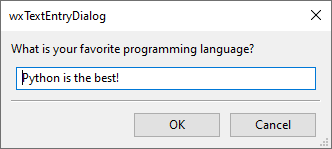
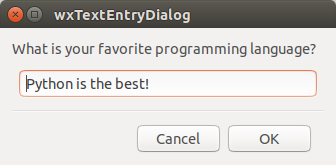



Default constructor. |
|
Convert all text entered into the text control used by the dialog to upper case. |
|
Returns the text that the user has entered if the user has pressed |
|
Sets the hint shown in the empty text control. |
|
This function sets the maximum number of characters the user can enter into this dialog. |
|
Sets the default text value. |
|
Shows the dialog, returning |
 Properties Summary

 Class API

- class wx.TextEntryDialog(Dialog)
Possible constructors:
TextEntryDialog() -> None

TextEntryDialog(parent, message, caption=GetTextFromUserPromptStr,
                value='', style=TextEntryDialogStyle, pos=DefaultPosition,
                sz=DefaultSize) -> None
This class represents a dialog that requests a one-line text string from the user.
Methods
- __init__(self, *args, **kw)
 Overloaded Implementations:
__init__ (self)
Default constructor.
Call
Createto really create the dialog later.- Return type:
None
Added in version 2.9.5.
__init__ (self, parent, message, caption=GetTextFromUserPromptStr, value=’’, style=TextEntryDialogStyle, pos=DefaultPosition, sz=DefaultSize)
Constructor.
Use
ShowModalto show the dialog.See
Createmethod for parameter description.- Parameters:
- Return type:
None
- Create(self, parent, message, caption=GetTextFromUserPromptStr, value='', style=TextEntryDialogStyle, pos=DefaultPosition, sz=DefaultSize)
- Parameters:
parent (wx.Window) – Parent window.
message (string) – Message to show on the dialog.
caption (string) – The caption of the dialog.
value (string) – The default value, which may be the empty string.
style (long) – A dialog style, specifying the buttons (wx``wx.OK``,
wx.CANCEL) and an optionalwx.CENTREstyle. Additionally, most wx.TextCtrl styles (such asTE_PASSWORDorTE_MULTILINE) may be specified here, butTE_READONLYmay not be used, as it doesn’t make sense for this dialog, used for text input.pos (wx.Point) – Dialog position.
sz (wx.Size) – The size of the dialog (this parameter is only available since wxWidgets 3.3.0).
- Return type:
bool
Added in version 2.9.5.
- ForceUpper(self)
Convert all text entered into the text control used by the dialog to upper case.
Call this method to ensure that all text entered into the text control used by the dialog is converted on the fly to upper case. If the text control is not empty, its existing contents is also converted to upper case.
- Return type:
None
Added in version 4.1/wxWidgets-3.1.0.
See also
- static GetClassDefaultAttributes(variant=WINDOW_VARIANT_NORMAL)
- Parameters:
variant (WindowVariant)
- Return type:
- GetValue(self)
Returns the text that the user has entered if the user has pressed
wx.OK, or the original value if the user has pressed Cancel.- Return type:
str
- SetHint(self, hint)
Sets the hint shown in the empty text control.
- Parameters:
hint (string)
- Return type:
None
Added in version 4.3/wxWidgets-3.3.2.
See also
- SetMaxLength(self, len)
This function sets the maximum number of characters the user can enter into this dialog.
- Parameters:
len (long)
- Return type:
None
Added in version 2.9.5.
See also
- SetValue(self, value)
Sets the default text value.
- Parameters:
value (string)
- Return type:
None
- ShowModal(self)
Shows the dialog, returning
wx.ID_OKif the user pressedwx.OK, andwx.ID_CANCELotherwise.Call
GetValueto retrieve the values of the string entered by the user after showing the dialog.- Return type:
int
Properties

Best viewed with Netscape Navigator 4.7 or Internet Explorer 6 at 800×600. No cookies required.