GeezerVisonThe World Wide Web, restored to 800 pixels of glory. | ||||||||||||||||||||||||||
| Home|About|Gaming cabinet|Archives|How it works|Starter sites | ||||||||||||||||||||||||||
GeezerVison is showing docs.wxpython.org — wx.adv.CommandLinkButton — wxPython 4.3.2 Docs
|





Default constructor. |
|
Button creation function for two-step creation. |
|
Returns the string label for the button. |
|
Returns the current main label. |
|
Returns the currently used note. |
|
Sets the string label and note for the button. |
|
Changes the main label. |
|
Sets a new main label and note for the button. |
|
Changes the note. |
 Properties Summary

See |
|
 Class API

- class wx.adv.CommandLinkButton(Button)
Possible constructors:
CommandLinkButton() -> None

CommandLinkButton(parent, id=ID_ANY, mainLabel='', note='',
                  pos=DefaultPosition, size=DefaultSize, style=0,
                  validator=DefaultValidator, name=ButtonNameStr) -> None
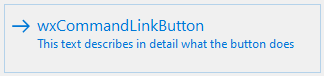
Objects of this class are similar in appearance to the normal Buttons but are similar to the links in a web page in functionality.
Methods
- __init__(self, *args, **kw)
 Overloaded Implementations:
__init__ (self)
Default constructor.
Use
Createto really create the control.- Return type:
None
__init__ (self, parent, id=ID_ANY, mainLabel=’’, note=’’, pos=DefaultPosition, size=DefaultSize, style=0, validator=DefaultValidator, name=ButtonNameStr)
Constructor really creating a command Link button.
The button will be decorated with stock icons under GTK+ 2.
- Parameters:
parent (wx.Window) – Parent window. Must not be nullptr.
id (wx.WindowID) – Button identifier. A value of
wx.ID_ANYindicates a default value.mainLabel (string) – First line of text on the button, typically the label of an action that will be made when the button is pressed.
note (string) – Second line of text describing the action performed when the button is pressed.
pos (wx.Point) – Button position.
size (wx.Size) – Button size. If the default size is specified then the button is sized appropriately for the text.
style (long) – Window style. See wx.Button class description.
validator (wx.Validator) – Window validator.
name (string) – Window name.
- Return type:
None
See also
- Create(self, parent, id=ID_ANY, mainLabel='', note='', pos=DefaultPosition, size=DefaultSize, style=0, validator=DefaultValidator, name=ButtonNameStr)
Button creation function for two-step creation.
For more details, see wx.adv.CommandLinkButton.
- Parameters:
parent (wx.Window)
id (wx.WindowID)
mainLabel (string)
note (string)
pos (wx.Point)
size (wx.Size)
style (long)
validator (wx.Validator)
name (string)
- Return type:
bool
- static GetClassDefaultAttributes(variant=WINDOW_VARIANT_NORMAL)
- Parameters:
variant (WindowVariant)
- Return type:
VisualAttributes
- GetLabel(self)
Returns the string label for the button.
- Return type:
str
- Returns:
A string with the main label and note concatenated together with a newline separating them.
See also
- GetMainLabel(self)
Returns the current main label.
- Return type:
str
- Returns:
Main label currently displayed.
- GetNote(self)
Returns the currently used note.
- Return type:
str
- Returns:
Note currently displayed.
- SetLabel(self, label)
Sets the string label and note for the button.
- Parameters:
label (string) – The label and note to set, with the two separated by the first newline or none to set a blank note.
- Return type:
None
- SetMainLabel(self, mainLabel)
Changes the main label.
- Parameters:
mainLabel (string) – New main label to use.
- Return type:
None
- SetMainLabelAndNote(self, mainLabel, note)
Sets a new main label and note for the button.
Neither of the arguments can be empty, if you need to change just the label or just the note, use
SetMainLabelorSetNoteinstead of this function.- Parameters:
mainLabel (string) – New main label to use.
note (string) – New note to use.
- Return type:
None
- SetNote(self, note)
Changes the note.
- Parameters:
note (string) – New note to use.
- Return type:
None
Properties
- MainLabel
See
GetMainLabelandSetMainLabel

Best viewed with Netscape Navigator 4.7 or Internet Explorer 6 at 800×600. No cookies required.