GV

GeezerVison

The World Wide Web, restored to 800 pixels of glory.

Home|About|Gaming cabinet|Archives|How it works|Starter sites

On this site

  • Table of Contents
  • wx.lib.agw.shapedbutton.SBitmapTextButton
  • Show Source
  • index
  • modules
  • next
  • previous
  • Home
  • Gallery
  • wx.lib
  • wx.lib.agw
  • wx.lib.agw.shapedbutton

This view

  • Original page
  • New address

GeezerVison is showing docs.wxpython.org — wx.lib.agw.shapedbutton.SBitmapTextButton — wxPython 4.3.2 Docs

phoenix_title wx.lib.agw.shapedbutton.SBitmapTextButton

Subclass of SButton which displays a bitmap and a label.


class_hierarchy Class Hierarchy

Inheritance diagram for class SBitmapTextButton:

Inheritance diagram of SBitmapTextButton


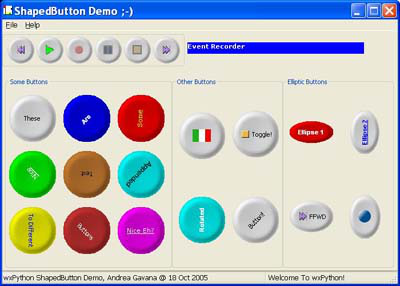
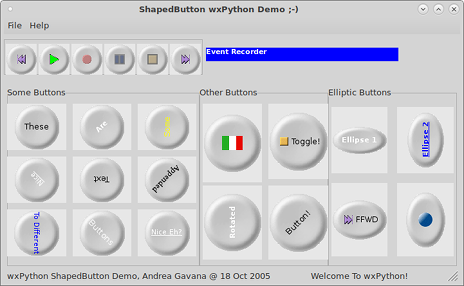
appearance Control Appearance


wxMSW

wxMSW

wxGTK

wxGTK

wxMAC

wxMAC


sub_classes Known Subclasses

wx.lib.agw.shapedbutton.SBitmapTextToggleButton


super_classes Known Superclasses

wx.lib.agw.shapedbutton.SBitmapButton


method_summary Methods Summary

__init__

Default class constructor.

DrawLabel

Draws the bitmap and the text label.


api Class API

class SBitmapTextButton(SBitmapButton)

Subclass of SButton which displays a bitmap and a label.


Methods

__init__(self, parent, id, bitmap, label, pos=wx.DefaultPosition, size=wx.DefaultSize)

Default class constructor.

Parameters:
  • parent – the SBitmapTextButton parent. Must not be None;

  • id – window identifier. A value of -1 indicates a default value;

  • bitmap – the button bitmap (if any);

  • label – the button text label;

  • pos – the control position. A value of (-1, -1) indicates a default position, chosen by either the windowing system or wxPython, depending on platform;

  • size – the control size. A value of (-1, -1) indicates a default size, chosen by either the windowing system or wxPython, depending on platform.


DrawLabel(self, dc, width, height, dw=0, dh=0)

Draws the bitmap and the text label.

Parameters:
  • dc – an instance of wx.DC;

  • width – the button width;

  • height – the button height;

  • dw – width differential, to show a 3D effect;

  • dh – height differential, to show a 3D effect.

© Copyright 2012-2026, The wxPython Team. Created using Sphinx 9.1.0 and the python-docs-theme.
You are visitor 01402503 — GeezerVison does not store the pages you look up.
Best viewed with Netscape Navigator 4.7 or Internet Explorer 6 at 800×600. No cookies required.