GeezerVisonThe World Wide Web, restored to 800 pixels of glory. | ||||||||||||||||||||||||||||||||||||||||||||||||||||||||||||||||||||||||||||||||||||||||||||||||||||||||||||||||||||||||||||||||||||||||||||||||||||||||||||||||||||||||||||
| Home|About|Gaming cabinet|Archives|How it works|Starter sites | ||||||||||||||||||||||||||||||||||||||||||||||||||||||||||||||||||||||||||||||||||||||||||||||||||||||||||||||||||||||||||||||||||||||||||||||||||||||||||||||||||||||||||||
GeezerVison is showing drafts.csswg.org — CSS Animations Module Level 1 1. IntroductionThis section is not normative CSS Transitions [CSS3-TRANSITIONS] provide a way to interpolate CSS property values when they change as a result of underlying property changes. This provides an easy way to do simple animation, but the start and end states of the animation are controlled by the existing property values, and transitions provide little control to the author on how the animation progresses. This proposal introduces defined animations, in which the author can specify the changes in CSS properties over time as a set of keyframes. Animations are similar to transitions in that they change the presentational value of CSS properties over time. The principal difference is that while transitions trigger implicitly when property values change, animations are explicitly executed when the animation properties are applied. Because of this, animations require explicit values for the properties being animated. These values are specified using animation keyframes, described below. Many aspects of the animation can be controlled, including how many times the animation iterates, whether or not it alternates between the begin and end values, and whether or not the animation should be running or paused. An animation can also delay its start time. 1.1. Value DefinitionsThis specification follows the CSS property definition conventions from [CSS2] using the value definition syntax from [CSS-VALUES-3]. Value types not defined in this specification are defined in CSS Values & Units [CSS-VALUES-3]. Combination with other CSS modules may expand the definitions of these value types. In addition to the property-specific values listed in their definitions, all properties defined in this specification also accept the CSS-wide keywords as their property value. For readability they have not been repeated explicitly. 2. CSS Animations ModelCSS Animations affect computed property values. This effect happens by adding a specified value to the CSS cascade ([CSS3CASCADE]) (at the level for CSS Animations) that will produce the correct computed value for the current state of the animation. As defined in [CSS3CASCADE], animations override all normal rules, but are overridden by !important rules. If at some point in time there are multiple animations specifying behavior for the same property, the animation which occurs last in the value of animation-name will override the other animations at that point. An animation does not affect the computed value before the application of the animation (that is, when the animation-name property is set on an element) or after it is removed. Furthermore, typically an animation does not affect the computed value before the animation delay has expired or after the end of the animation, but may do so depending on the animation-fill-mode property. While running, the animation computes the value of those properties it animates. Other values may take precedence over the animated value according to the CSS cascade ([CSS3CASCADE]). While an animation is applied but has not finished, or has finished but has an animation-fill-mode of forwards or both, the user agent must act as if the will-change property ([css-will-change-1]) on the element additionally includes all the properties animated by the animation. The start time of an animation is the time at which the style applying the animation and the corresponding @keyframes rule are both resolved. If an animation is specified for an element but the corresponding @keyframes rule does not yet exist, the animation cannot start; the animation will start from the beginning as soon as a matching @keyframes rule can be resolved. An animation specified by dynamically modifying the element’s style will start when this style is resolved; that may be immediately in the case of a pseudo style rule such as hover, or may be when the scripting engine returns control to the browser (in the case of style applied by script). Note that dynamically updating keyframe style rules does not start or re-start an animation. An animation applies to an element if its name appears as one of the
identifiers in the computed value of the animation-name property and the
animation uses a valid @keyframes rule. Once an
animation has started it continues until it ends or the animation-name is
removed. Changes to the values of animation properties while the animation
is running apply as if the animation had those values from when it
began. For example, shortening the animation-delay may cause the animation
to jump forwards or even finish immediately and dispatch an
The same @keyframes rule name may be repeated within an animation-name. Changes to the animation-name update existing animations by iterating over the new list of animations from last to first, and, for each animation, finding the last matching animation in the list of existing animations. If a match is found, the existing animation is updated using the animation properties corresponding to its position in the new list of animations, whilst maintaining its current playback time as described above. The matching animation is removed from the existing list of animations such that it will not match twice. If a match is not found, a new animation is created. As a result, updating animation-name from ‘a’ to ‘a, a’ will cause the existing animation for ‘a’ to become the second animation in the list and a new animation will be created for the first item in the list. div {
animation-name: diagonal-slide;
animation-duration: 5s;
animation-iteration-count: 10;
}
@keyframes diagonal-slide {
from {
left: 0;
top: 0;
}
to {
left: 100px;
top: 100px;
}
}
This will produce an animation that moves an element from (0, 0) to (100px, 100px) over five seconds and repeats itself nine times (for a total of ten iterations). Setting the display property to none will terminate any running animation applied to the element and its descendants. If an element has a display of none, updating display to a value other than none will start all animations applied to the element by the animation-name property, as well as all animations applied to descendants with display other than none. While authors can use animations to create dynamically changing content, dynamically changing content can lead to seizures in some users. For information on how to avoid content that can lead to seizures, see Guideline 2.3: Seizures: Do not design content in a way that is known to cause seizures ([WCAG20]). Implementations may ignore animations when the rendering medium is not interactive e.g. when printed. A future version of this specification may define how to render animations for these media. 3. Declaring KeyframesKeyframes are used to specify the values for the animating properties at various points during the animation. The keyframes specify the behavior of one cycle of the animation; the animation may iterate zero or more times. Keyframes are specified using the @keyframes at-rule, defined as follows: @keyframes = @keyframes <keyframes-name> { <qualified-rule-list> } <keyframes-name> = <custom-ident> | <string> <keyframe-block> = <keyframe-selector># { <declaration-list> } <keyframe-selector> = from | to | <percentage [0,100]> The <rule-list> inside of @keyframes can only contain <keyframe-block> rules. The <declaration-list> inside of <keyframe-block> accepts any CSS property except those defined in this specification, but does accept the animation-timing-function property and interprets it specially. None of the properties interact with the cascade (so using !important on them is invalid and will cause the property to be ignored). A @keyframes block has a name given by the <custom-ident> or <string> in its prelude. The two syntaxes are equivalent in functionality; the name is the value of the ident or string. As normal for <custom-ident>s and <string>s, the names are fully case-sensitive; two names are equal only if they are codepoint-by-codepoint equal. The <custom-ident> additionally excludes the none keyword. The <string> additionally excludes the empty string (but allows the string "none" and other excluded keywords). When serialized, the value is serialized as an <ident> unless it’s a disallowed keyword, in which case it’s serialized as a <string>.
For example, the following two @keyframes rules have the same name,
so the first will be ignored:
On the other hand, the following @keyframes rule’s name is different from the previous two rules:
The following @keyframes rules are invalid because they use disallowed <custom-ident> values:
However, those names can be specified with a <string>, so the following are both valid:
The <keyframe-selector> for a <keyframe-block> consists of a comma-separated list of percentage values or the keywords from or to. The selector is used to specify the percentage along the duration of the animation that the keyframe represents. The keyframe itself is specified by the block of property values declared on the selector. The keyword from is equivalent to the value 0%. The keyword to is equivalent to the value 100%. Values less than 0% or higher than 100% are invalid and cause their <keyframe-block> to be ignored. Note: Note that the percentage unit specifier must be used on percentage values. Therefore, 0 is an invalid keyframe selector. If a 0% or from keyframe is not specified, then the user agent constructs a 0% keyframe using the computed values of the properties being animated. If a 100% or to keyframe is not specified, then the user agent constructs a 100% keyframe using the computed values of the properties being animated. The <keyframe-block> contains properties and values. The properties defined by this specification are ignored in these rules, with the exception of animation-timing-function, the behavior of which is described below. In addition, properties qualified with !important are invalid and ignored. If multiple @keyframes rules are defined with the same name, the last one in document order wins, and all preceding ones are ignored. div {
animation-name: slide-right;
animation-duration: 2s;
}
@keyframes slide-right {
from {
margin-left: 0px;
}
50% {
margin-left: 110px;
opacity: 1;
}
50% {
opacity: 0.9;
}
to {
margin-left: 200px;
}
}
The two 50% rules from above can also be combined into an equivalent single rule as illustrated below: @keyframes slide-right {
from {
margin-left: 0px;
}
50% {
margin-left: 110px;
opacity: 0.9;
}
to {
margin-left: 200px;
}
}
To determine the set of keyframes, all of the values in the selectors are sorted in increasing order by time. The rules within the @keyframes rule then cascade; the properties of a keyframe may thus derive from more than one @keyframes rule with the same selector value. If a property is not specified for a keyframe, or is specified but invalid, the animation of that property proceeds as if that keyframe did not exist. Conceptually, it is as if a set of keyframes is constructed for each property that is present in any of the keyframes, and an animation is run independently for each property. @keyframes wobble {
0% {
left: 100px;
}
40% {
left: 150px;
}
60% {
left: 75px;
}
100% {
left: 100px;
}
}
Four keyframes are specified for the animation named "wobble". In the first keyframe, shown at the beginning of the animation cycle, the value of the left property being animated is 100px. By 40% of the animation duration, left has animated to 150px. At 60% of the animation duration, left has animated back to 75px. At the end of the animation cycle, the value of left has returned to 100px. The diagram below shows the state of the animation if it were given a duration of 10s. 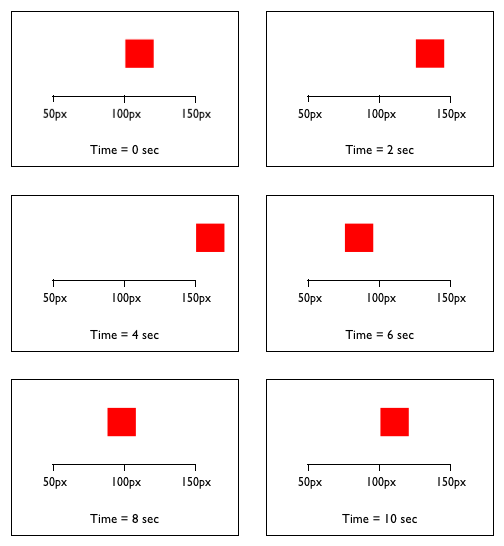
This specification needs to define how the value is determined from the keyframes, like the section on Application of transitions does for CSS Transitions. 3.1. Timing functions for keyframesA keyframe style rule may also declare the timing function that is to be used as the animation moves to the next keyframe. @keyframes bounce {
from {
top: 100px;
animation-timing-function: ease-out;
}
25% {
top: 50px;
animation-timing-function: ease-in;
}
50% {
top: 100px;
animation-timing-function: ease-out;
}
75% {
top: 75px;
animation-timing-function: ease-in;
}
to {
top: 100px;
}
}
Five keyframes are specified for the animation named "bounce". Between the first and second keyframe (i.e., between 0% and 25%) an ease-out timing function is used. Between the second and third keyframe (i.e., between 25% and 50%) an ease-in timing function is used. And so on. The effect will appear as an element that moves up the page 50px, slowing down as it reaches its highest point then speeding up as it falls back to 100px. The second half of the animation behaves in a similar manner, but only moves the element 25px up the page. A timing function specified on the to or 100% keyframe is ignored. See the animation-timing-function property for more information. 4. Declaring AnimationsCSS Animations are defined by binding keyframes to an element using the animation-* properties. These list-valued properties, which are all longhands of the animation shorthand, form a coordinating list property group with animation-name as the coordinating list base property and each item in the coordinated value list defining the properties of a single animation effect. Note: This is analogous to the behavior of the background-* properties, with background-image analogous to animation-name. See CSS Values 4 § A Coordinating List-Valued Properties for how the individual animation-* property values coordinate. 4.1. The animation-name propertyThe animation-name property defines a list of animations that apply. Each name is used to select
the keyframe at-rule that provides the property values for the animation. If the name does not match
any keyframe at-rule, there are no properties to be animated and the animation will not execute.
Furthermore, if the animation name is
The values of animation-name have the following meanings:
4.2. The animation-duration propertyThe animation-duration property defines duration of a single animation cycle.
4.3. The animation-timing-function propertyThe animation-timing-function property describes how the animation will progress between each pair of keyframes. Timing functions are defined in the separate CSS Easing Functions module [css-easing-1]. The input progress value used is the percentage of the time elapsed between the current keyframe and the next keyframe after incorporating the effect of the animation-direction property. During the animation-delay, the animation-timing-function is not applied. Note: This definition is necessary because otherwise a step easing function with a step position of start would produce a backwards fill equal to the top of the first step in the function. The output progress value is used as the p value when interpolating the property values between the current and next keyframe.
When specified in a keyframe, animation-timing-function defines the progression of the animation between the current keyframe and the next keyframe for the animating property in sorted keyframe selector order (which may be an implicit 100% keyframe). 4.4. The animation-iteration-count propertyThe animation-iteration-count property specifies the number of times an animation cycle is played. The initial value is 1, meaning the animation will play from beginning to end once. This property is often used in conjunction with an animation-direction value of alternate, which will cause the animation to play in reverse on alternate cycles. The time window during which the animation is active
(
<single-animation-iteration-count> = infinite | <number [0,∞]>
If the animation has a duration of 0s, it will occur instantaneously for any valid value of animation-iteration-count, including infinite. 4.5. The animation-direction propertyThe animation-direction property defines whether or not the animation should play in reverse on some or all cycles. When an animation is played in reverse the timing functions are also reversed. For example, when played in reverse an ease-in animation would appear to be an ease-out animation.
<single-animation-direction> = normal | reverse | alternate | alternate-reverse
Note: For the purpose of determining whether an iteration is even or odd, iterations start counting from 1. 4.6. The animation-play-state propertyThe animation-play-state property defines whether the animation is running or paused.
<single-animation-play-state> = running | paused
4.7. The animation-delay propertyThe animation-delay property defines when the animation will start. It allows an animation to begin execution some time after it is applied, or to appear to have begun execution some time before it is applied.
4.8. The animation-fill-mode propertyThe animation-fill-mode property defines what values are applied by the animation outside the time it is executing. By default, an animation will not affect property values between the time it is applied (the animation-name property is set on an element) and the time it begins execution (which is determined by the animation-delay property). Also, by default an animation does not affect property values after the animation ends (determined by the animation-duration and animation-iteration-count properties). The animation-fill-mode property can override this behavior. Dynamic updates to the property will be reflected by property values as needed, whether during the animation delay or after the animation ends.
<single-animation-fill-mode> = none | forwards | backwards | both
4.9. The animation shorthand propertyThe animation shorthand property is a comma-separated list of animation definitions. Each item in the list gives one item of the value for all of the subproperties of the shorthand, which are known as the animation properties. (See the definition of animation-name for what happens when these properties have lists of different lengths, a problem that cannot occur when they are defined using only the animation shorthand.)
<single-animation> = <time [0s,∞]> || <easing-function> || <time> || <single-animation-iteration-count> || <single-animation-direction> || <single-animation-fill-mode> || <single-animation-play-state> || [ none | <keyframes-name> ] Order is important within each animation definition: the first value in each <single-animation> that can be parsed as a <time> is assigned to the animation-duration, and the second value in each <single-animation> that can be parsed as a <time> is assigned to animation-delay. Order is also important within each animation definition for distinguishing <keyframes-name> values from other keywords. When parsing, keywords that are valid for properties other than animation-name whose values were not found earlier in the shorthand must be accepted for those properties rather than for animation-name. Furthermore, when serializing, default values of other properties must be output in at least the cases necessary to distinguish an animation-name that could be a value of another property, and may be output in additional cases.
For example, a value parsed from animation: 3s none backwards
(where animation-fill-mode is none
and animation-name is backwards)
must not be serialized as animation: 3s backwards
(where animation-fill-mode is backwards
and animation-name is none).
5. Animation EventsSeveral animation-related events are available through the DOM Event system. The start and end of an animation, and the end of each iteration of an animation, all generate DOM events. An element can have multiple properties being animated simultaneously. This can occur either with a single animation-name value with keyframes containing multiple properties, or with multiple animation-name values. For the purposes of events, each animation-name specifies a single animation. Therefore an event will be generated for each animation-name value and not necessarily for each property being animated. Any animation for which a valid keyframe rule is defined will run and generate events; this includes animations with empty keyframe rules. The time the animation has been running is sent with each event generated. This allows the event handler to determine the current iteration of a looping animation or the current position of an alternating animation. This time does not include any time the animation was in the paused play state. 5.1.
The
|
| Event handler | Event handler event type |
|---|---|
onanimationstart
| animationstart
|
onanimationiteration
| animationiteration
|
onanimationend
| animationend
|
onanimationcancel
| animationcancel
|
6. DOM Interfaces
CSS animations are exposed to the CSSOM through a pair of new interfaces describing the keyframes.
Note: the interfaces defined below reflect the interoperable API available as of this level of the specification. Future levels may deprecate parts of this API and extend others.
6.1.
The CSSRule Interface
The following two rule types are added to the CSSRule interface. They provide
identification for the new keyframe and keyframes rules.
6.1.1. IDL Definition
partial interface CSSRule {const unsigned short = 7;KEYFRAMES_RULE const unsigned short = 8; };KEYFRAME_RULE
6.2.
The CSSKeyframeRule Interface
The CSSKeyframeRule interface represents the style rule for a single key.
6.2.1. IDL Definition
[Exposed =Window ]interface :CSSKeyframeRule CSSRule {attribute CSSOMString keyText ; [SameObject ,PutForwards =cssText]readonly attribute CSSStyleProperties style ; };
6.2.2. Attributes
keyText, of type CSSOMString-
This attribute represents the keyframe selector as a comma-separated list
of percentage values. The from and to keywords map to 0% and 100%,
respectively.
If keyText is updated with an invalid keyframe selector, a SyntaxError exception must be thrown and the value of keyText must remain unchanged.
style, of type CSSStyleProperties, readonly-
Must return a
CSSStylePropertiesobject for the keyframe rule, with the following properties:- readonly flag
- Unset.
- declarations
- The declared declarations in the rule, in specified order.
- parent CSS rule
- The context object (i.e. this
CSSKeyframeRule). - owner node
- Null.
6.3.
The CSSKeyframesRule Interface
The CSSKeyframesRule interface represents a complete set of keyframes for
a single animation.
6.3.1. IDL Definition
[Exposed =Window ]interface :CSSKeyframesRule CSSRule {attribute CSSOMString name ;readonly attribute CSSRuleList cssRules ;readonly attribute unsigned long length ;getter CSSKeyframeRule (unsigned long index );undefined appendRule (CSSOMString rule );undefined deleteRule (CSSOMString select );CSSKeyframeRule ?findRule (CSSOMString select ); };
6.3.2. Attributes
name, of type CSSOMString- This attribute is the name of the keyframes, used by the animation-name property.
cssRules, of type CSSRuleList, readonly- This attribute gives access to the keyframes in the list.
length, of type unsigned long, readonly- This attribute is the number of keyframes in the list.
6.3.3. The indexed property getter
The indexed property
getter returns the CSSKeyframeRule from the list of keyframes
at the indicated position.
Parameters:
indexof typeunsigned long- The zero-based index of the rule to return.
Return Value:
CSSKeyframeRule-
The found rule or
undefinedif there is no rule at the specific index.
No Exceptions
6.3.4.
The appendRule method
The appendRule method appends the passed
CSSKeyframeRule at the end of the keyframes rule.
Parameters:
ruleof typeCSSOMString- The rule to be appended, expressed in the same syntax as one entry in the @keyframes rule. A valid rule is always appended e.g. even if its key(s) already exists.
No Return Value
No Exceptions
6.3.5.
The deleteRule method
The deleteRule method
deletes the last declared CSSKeyframeRule
matching the specified keyframe selector.
If no matching rule exists, the method does nothing.
Parameters:
selectof typeCSSOMString-
The keyframe selector of the rule to be deleted:
a comma-separated list of percentage values between 0% and 100%
or the keywords from or to which resolve to 0% and 100%,
respectively.
The number and order of the values in the specified keyframe selector must match those of the targeted keyframe rule(s). The match is not sensitive to white space around the values in the list.
No Return Value
No Exceptions
6.3.6.
The findRule method
The findRule
returns the last declared CSSKeyframeRule matching the specified keyframe selector.
If no matching rule exists, the method does nothing.
Parameters:
selectof typeCSSOMString-
The keyframe selector of the rule to be found:
a comma-separated list of percentage values between 0% and 100%
or the keywords from or to which resolve to 0% and 100%,
respectively.
The number and order of the values in the specified keyframe selector must match those of the targeted keyframe rule(s). The match is not sensitive to white space around the values in the list.
Return Value:
CSSKeyframeRule- The found rule.
No Exceptions
@keyframes colorful-diagonal-slide {

  from {
    left: 0;
    top: 0;
  }

  10% {
    background-color: blue;
  }

  10% {
    background-color: green;
  }

  25%, 75% {
    background-color: red;
  }

  100% {
    left: 100px;
    top: 100px;
  }

}
Assuming the variable anim holds a reference to a CSSKeyframesRule object for this animation, then:
anim.deleteRule('10%');
var tenPercent = anim.findRule('10%');
will start by deleting the last 10% rule i.e. the green background color rule; then find the remaining blue background rule and return it into tenPercent.
The following:
var red = anim.findRule('75%');
will set red to null. The full selector for the red background color rule must be used instead:
var red = anim.findRule('25%,75%');
Since from maps to 0% and to maps to 100%, we can find these rules using either value:
var from = anim.findRule('0%'); // Returns from { left: 0; top: 0; } rule
var to = anim.findRule('to');   // Returns 100% { left: 100px; top: 100px; } rule
6.4.
Extensions to the GlobalEventHandlers Interface Mixin
This specification extends the GlobalEventHandlers interface mixin from HTML
to add event handler IDL attributes for animation events
as defined in § 5.3 Event
handlers on elements, Document objects, and Window
objects.
6.4.1. IDL Definition
partial interface mixin GlobalEventHandlers {attribute EventHandler ;onanimationstart attribute EventHandler ;onanimationiteration attribute EventHandler ;onanimationend attribute EventHandler ; };onanimationcancel
7. Privacy Considerations
No privacy concerns have been reported on this specification.
8. Security Considerations
No security concerns have been reported on this specification.
9. Changes
9.1. Changes since the Working Draft of 11 October 2018
The following substantive changes were made:
- Defined indexed property getter for CSSKeyframesRule
- Added constructor type on AnimationEvent’s definition
- Added required unit for dimension in range notation
- Applied range definition notation to descriptor and rule’s prelude values
- Applied range definition notation to property values
- Associated event definitions with their EventHandler container
- Better markup for productions
- Corrected typo (rule to be found, not rule to be deleted)
- Made value definition reference consistent with other CSS specifications
- IDL aligned with Web IDL specification
- Added default dictionary value to constructor
- Rewrote confusing example (#4118)
- Clarified handling of zero-duration animations
- Use "not animatable" rather than "none"
- Timing functions now called easing functions
- Changed GlobalEventHandlers to be a mixin
10. Acknowledgements
Thanks especially to the feedback from Tab Atkins, Brian Birtles, Shane Stephens, Carine Bournez, Christian Budde, Anne van Kesteren, Øyvind Stenhaug, Estelle Weyl, and all the rest of the www-style community.
11. Other open issues
Need to specify how keyframes interact.
12. Working Group Resolutions that are pending editing
This section is informative and temporary.
The editors are currently behind on editing this spec. The following working group resolutions still need to be edited in:
-
2014-09-09 minutes (Antibes f2f)
- Issue(7335): Detail how/when keyframe values are computed; using G.beta in dbaron’s mail
-
Agreed that both transitions and animations animate all properties. css-transitions to define animation of non-interoperable/discrete values. They take their starting values below 50% timing function progress, and end values above -
Dynamic changes to animation properties/keyframes. Tab to propose resolution. (Bug 14713) -
Negative animation-delay values apply against the active duration of the animation i.e. (animation-duration*animation-iteration-count). The delay can thus swallow iterations for which no iteration event will be fired. The start/end events are still fired. Even when delay == (-1*active_duration) -
Fire animation start/end events when animation-duration is zero, with 0 elapsedTime -
If animation-iteration-count is infinite and duration is 0, treat the iteration-count as if it was finite and run a 0s second (option A in Brian’s mail) -
If an animation with a negative animation delay is initially paused, the start event still fires
-
2012-10-29 minutes
-
Change the animation properties to be dynamically changeable -
@keyframes can be dynamically changed -
When you encounter duplicate animations names, last one wins. -
Make *animations* transition *all* properties. Unless otherwise specified, discrete properties take their starting values below 50% timing function progress, and end values above 50% timing function progress.
-
-
2012-12-12 minutes and intermediate comments
and 2012-12-19 minutes-
Animations only run if they contain at least one valid keyframe rule (Bug) -
When an element changes from display:none to display: non-none, animations start immediately (Bug) -
An initially-paused animation is still started (fires start events etc.) (Bug) -
Animations can be paused during their delay phase, which freezes the remaining delay to be applied after it unpauses (Bug) -
animation-play-state has the same list behavior as the other animation properties, matching the length of animation-name (Bug)
-
-
2013-02-20 minutes
-
Øyvind’s clarification accepted -
keyframe rules cascade -
mark pseudoElement at-risk
-
-
2013-05-30 minutes
-
expectations on animations in non-interactive media
-
-
2014-01-27 minutes
-
remove text about waiting for document load
-
Best viewed with Netscape Navigator 4.7 or Internet Explorer 6 at 800×600. No cookies required.