GeezerVisonThe World Wide Web, restored to 800 pixels of glory. | ||||||||||||||||||||||||||||||||||||||||||||||||||||||||||||||||||||||||||||
| Home|About|Gaming cabinet|Archives|How it works|Starter sites | ||||||||||||||||||||||||||||||||||||||||||||||||||||||||||||||||||||||||||||
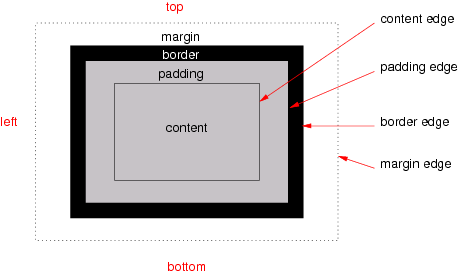
GeezerVison is showing drafts.csswg.org — CSS Box Model Module Level 3 1. IntroductionThis subsection is not normative. CSS describes how each element and each string of text in a source document is laid out by transforming the element tree into a set of boxes, whose size, position, and stacking level on the canvas depend on the values of their CSS properties. Note: CSS Cascading and Inheritance describes how properties are assigned to elements in the box tree, while CSS Display 3 § 1 Introduction describes how the element tree is transformed into the box tree. Each CSS box has a rectangular content area, a band of padding around the content, a border around the padding, and a margin outside the border. The sizing properties [css-sizing-3], together with various other properties that control layout, define the size of the content area. The box styling properties—padding and its longhands, border and its longhands, and margin and its longhands—define the sizes of these other areas. Margins and padding are defined in this module. Borders are similarly defined in [css-backgrounds-3]. Note: This module only defines the physical per-side longhand properties. Additional, flow-relative longhand properties are defined in [css-logical-1]. Note that both sets of longhand properties control the same margins/padding: they are just different ways of indexing each side. History of CSS Box module and the definition of Block LayoutThis module originally contained the CSS Level 3 specification prose relating to box generation (now defined in [css-display-3]), the box model (defined here), as well as block layout (now only defined in [CSS2] Chapters 9 and 10). Since its maintenance was put aside during the development of CSS2.1, its prose was severely outdated by the time CSS2 Revision 1 was finally completed. Therefore, the block layout portion of the prose has been retired, to be re-synched to CSS2 and updated as input to a new Block Layout module at some point in the future. It is being split apart from this module and from the CSS Display Module both because of the practical concern that it would be a huge amount of work and also in recognition that CSS now has multiple layout models (Flex Layout, Grid Layout, Positioned Layout, and Table Layout, in addition to Block Layout) which each deserve their own parallel module. 1.1. Value DefinitionsThis specification follows the CSS property definition conventions from [CSS2] using the value definition syntax from [CSS-VALUES-3]. Value types not defined in this specification are defined in CSS Values & Units [CSS-VALUES-3]. Combination with other CSS modules may expand the definitions of these value types. In addition to the property-specific values listed in their definitions, all properties defined in this specification also accept the CSS-wide keywords as their property value. For readability they have not been repeated explicitly. 1.2. Module InteractionsThis module replaces the definitions of the margin and padding properties defined in [CSS2] sections 8.1, 8.2, 8.3 (but not 8.3.1), and 8.4. All properties in this module apply to the ::first-line and ::first-letter pseudo-elements. 2. The CSS Box ModelEach box has a content area (which contains its content—text, descendant boxes, an image or other replaced element content, etc.) and optional surrounding padding, border, and margin areas; the size of each area is specified by corresponding properties, and can be zero (or in the case of margins, negative). The following diagram shows how these areas relate and the terminology used to refer to the various parts of the box:
The various areas and edges of a typical box. The background of the content, padding, and border areas of a box is specified by its background properties. The border area can additionally be painted with a border style using the border properties. Margins are always transparent. See [css-backgrounds-3]. The margin, border, and padding can be broken down into top, right, bottom, and left segments, each of which can be controlled independently by its corresponding property. 2.1. Boxes and EdgesThe perimeter of each of the four areas (content, padding, border, and margin) is called an edge, and each edge can be broken down into a top, right, bottom, and left side. Thus each box has four edges each composed of four sides:
2.2. FragmentationWhen a box fragments—is broken, as across lines or across pages, into separate box fragments—each of its boxes (content box, padding box, border box, margin box) also fragments. How the content/padding/border/margin areas react to fragmentation is specified in [css-break-3] and controlled by the box-decoration-break property. 2.3. Box-edge KeywordsThe following <box> CSS keywords are defined for use in properties (such as transform-box and background-clip) that need to refer to various box edges:
For convenience, the following value types are defined to represents commonly used subsets of <box>: <visual-box> = content-box | padding-box | border-box <layout-box> = <visual-box> | margin-box <paint-box> = <visual-box> | fill-box | stroke-box <coord-box> = <paint-box> | view-box 3. MarginsMargins surround the border edge of a box, providing spacing between boxes. The margin properties specify the thickness of the margin area of a box. The margin shorthand property sets the margin for all four sides while the margin longhand properties only set their respective side. This section defines the physical margin longhands. (Additional flow-relative margin longhands are defined in [css-logical-1].) Note: Adjoining margins in block layout can collapse. See CSS2§8.3.1 Collapsing Margins for details. Also, margins adjoining a fragmentation break are sometimes truncated. See CSS Fragmentation 3 § 5.2 Adjoining Margins at Breaks for details. 3.1. Page-relative (Physical) Margin Properties: the margin-top, margin-right, margin-bottom, and margin-left properties
These properties set the top, right, bottom, and left margin of a box, respectively. Negative values for margin properties are allowed, but there may be implementation-specific limits. Note: Application to internal ruby boxes [CSS-RUBY-1] is not defined in this specification. 3.2. Margin Shorthand: the margin property
The margin property is a shorthand property for setting margin-top, margin-right, margin-bottom, and margin-left in a single declaration. If there is only one component value, it applies to all sides. If there are two values, the top and bottom margins are set to the first value and the right and left margins are set to the second. If there are three values, the top is set to the first value, the left and right are set to the second, and the bottom is set to the third. If there are four values they apply to the top, right, bottom, and left, respectively.
The following code demonstrates some possible margin declarations.
body { margin: 2em }         /* all margins set to 2em */
body { margin: 1em 2em }     /* top & bottom = 1em, right & left = 2em */
body { margin: 1em 2em 3em } /* top=1em, right=2em, bottom=3em, left=2em */
The last rule of the example above is equivalent to the example below: body {
margin-top: 1em;
margin-right: 2em;
margin-bottom: 3em;
margin-left: 2em; /* copied from opposite side (right) */
}
4. PaddingPadding is inserted between the content edge and the padding edge of a box, providing spacing between the content and the border. The padding properties specify the thickness of the padding area of a box. The padding shorthand property sets the padding for all four sides while the padding longhand properties only set their respective side. This section defines the physical padding longhands. (Additional flow-relative padding longhands are defined in [css-logical-1].) Note: Backgrounds specified on the box are by default laid out and painted within the padding edges. (They are additionally painted underneath the border, in the border area.) This behavior can be adjusted using the background-origin and background-clip properties. 4.1. Page-relative (Physical) Padding Properties: the padding-top, padding-right, padding-bottom, and padding-left properties
These properties set the top, right, bottom, and left padding of a box, respectively. Negative values for padding properties are invalid. Note: Application to internal ruby boxes [CSS-RUBY-1] is not defined in this specification. 4.2. Padding Shorthand: the padding property
The padding property is a shorthand property for setting padding-top, padding-right, padding-bottom, and padding-left in a single declaration. If there is only one component value, it applies to all sides. If there are two values, the top and bottom padding are set to the first value and the right and left padding are set to the second. If there are three values, the top is set to the first value, the left and right are set to the second, and the bottom is set to the third.
The following code demonstrates some possible padding declarations.
body { padding: 2em }         /* all padding set to 2em */
body { padding: 1em 2em }     /* top & bottom = 1em, right & left = 2em */
body { padding: 1em 2em 3em } /* top=1em, right=2em, bottom=3em, left=2em */
The last rule of the example above is equivalent to the example below: body {
padding-top: 1em;
padding-right: 2em;
padding-bottom: 3em;
padding-left: 2em; /* copied from opposite side (right) */
}
5. BordersBorders fill the border area, to visually delineate the edges of the box, The border properties specify the thickness of the border area of a box, as well as its drawing style and color. See [css-backgrounds-3] for the definition of these properties, including their physical longhands. (Additional flow-relative border longhands are defined in [css-logical-1].) 6. Changes6.1. Recent ChangesThere have only been minor editorial adjustments since the 6 April 2023 Recommendation:
6.2. Changes Since CSS Level 2The following changes have been made to this module since CSS Level 2:
7. Privacy ConsiderationsNo privacy considerations have been reported on this module. 8. Security ConsiderationsNo security considerations have been reported on this module. | ||||||||||||||||||||||||||||||||||||||||||||||||||||||||||||||||||||||||||||
| You are visitor 01402503 — GeezerVison does not store the pages you look up. Best viewed with Netscape Navigator 4.7 or Internet Explorer 6 at 800×600. No cookies required. |